SAR Black Rock Industry: Difference between revisions
From TrainzOnline
Jump to navigationJump to search
added note about MIN bug |
mNo edit summary |
||
| (5 intermediate revisions by the same user not shown) | |||
| Line 8: | Line 8: | ||
</tr> | </tr> | ||
<tr valign="top"> | <tr valign="top"> | ||
<td align="center">[[image:Tab_HM_Grey.png|link=SAR_Black Rock]] [[image:Tab_IN_White.png|link=]] [[image:Tab_TM_Grey.png|link=SAR_Black Rock_TrackMarks]] [[image: | <td align="center">[[image:Tab_HM_Grey.png|link=SAR_Black Rock]] [[image:Tab_IN_White.png|link=]] [[image:Tab_TM_Grey.png|link=SAR_Black Rock_TrackMarks]] [[image:Tab_SW_Grey.png|link=SAR_Black Rock_Switches]] [[image:Tab_Blank_Grey.png|link=]]</td> | ||
</tr> | </tr> | ||
<tr valign="top"> | <tr valign="top"> | ||
| Line 20: | Line 20: | ||
<td width=220 align="right">[[Image:SAR_Peterborough-Quorn_Line.png|link=SAR Peterborough-Quorn|alt=Peterborough-Quorn|Show Peterborough-Quorn]]</td> | <td width=220 align="right">[[Image:SAR_Peterborough-Quorn_Line.png|link=SAR Peterborough-Quorn|alt=Peterborough-Quorn|Show Peterborough-Quorn]]</td> | ||
<td width=110 align="center">[[Image:Next Left.png|link=|alt=]]<br>[[Image:SAR_Minvalara_Name.png|link=SAR Minvalara|alt=Minvalara|Next Up Location]]</td> | <td width=110 align="center">[[Image:Next Left.png|link=|alt=]]<br>[[Image:SAR_Minvalara_Name.png|link=SAR Minvalara|alt=Minvalara|Next Up Location]]</td> | ||
<td width=90 align="center">[[Image:Location Index.png|link=SAR Index|alt=Location Index| | <td width=90 align="center">[[Image:Location Index.png|link=SAR Index|alt=Location Index|Location Index]]<br>[[image:Scenario Index.png|link=SAR Peterborough Base Session|alt=Scenarios|Scenario Index]]</td> | ||
<td width=110 align="center">[[Image:Next Right.png|link=|alt=]]<br>[[Image:SAR_Orroroo_Name.png|link=SAR Orroroo|alt=Orooro|Next Down Location]]</td> | <td width=110 align="center">[[Image:Next Right.png|link=|alt=]]<br>[[Image:SAR_Orroroo_Name.png|link=SAR Orroroo|alt=Orooro|Next Down Location]]</td> | ||
<td width=220 align="left">[[Image:SAR_Peterborough-Quorn_Line.png|link=SAR Peterborough-Quorn|alt=Peterborough-Quorn|Show Peterborough-Quorn]]</td> | <td width=220 align="left">[[Image:SAR_Peterborough-Quorn_Line.png|link=SAR Peterborough-Quorn|alt=Peterborough-Quorn|Show Peterborough-Quorn]]</td> | ||
| Line 46: | Line 46: | ||
</tr> | </tr> | ||
<tr valign="top"> | <tr valign="top"> | ||
<td width=70>[[Image: | <td width=70>[[Image:Passenger_Icon_off.png|link=]] </td> | ||
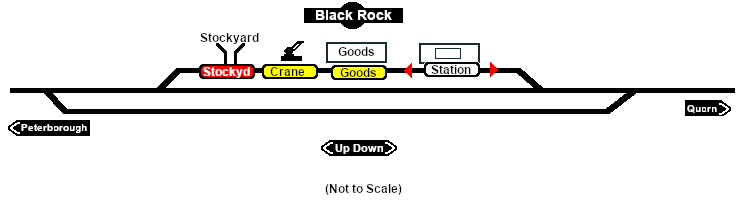
<td>[[image:Station_Label.png|link=]] [[image:Trackmark_Left.png|link=|alt=TM|10px]] <span style="font-weight: 700; color: blue;">Black Rock Station Up</span> [[image:Trackmark_Right.png|link=|alt=TM|10px]] <span style="font-weight: 700; color: blue;">Black Rock Station Dn</span></td> | <td>[[image:Station_Label.png|link=]] [[image:Trackmark_Left.png|link=|alt=TM|10px]] <span style="font-weight: 700; color: blue;">Black Rock Station Up</span> [[image:Trackmark_Right.png|link=|alt=TM|10px]] <span style="font-weight: 700; color: blue;">Black Rock Station Dn</span><br> | ||
<span style="font-size=12px; font-weight: 700;"> This station is NOT passenger enabled</span></td> | |||
</tr> | </tr> | ||
<tr valign="top"> | <tr valign="top"> | ||
| Line 54: | Line 55: | ||
<tr valign="middle"> | <tr valign="middle"> | ||
<td colspan=2 align="center"><span style="font-weight: 700;">For all other Industries use the "Drive To <span style="color: blue;">name of industry</span>" and <span style="color: blue;">"Load/Unload"</span> commands</span></td> | <td colspan=2 align="center"><span style="font-weight: 700;">For all other Industries use the "Drive To <span style="color: blue;">name of industry</span>" and <span style="color: blue;">"Load/Unload"</span> commands</span></td> | ||
</tr> | </tr> | ||
<tr valign="top"> | <tr valign="top"> | ||
| Line 88: | Line 70: | ||
<td width=70> </td> | <td width=70> </td> | ||
<td>[[image:Crane_Label.png|link=]] <span style="font-weight: 700; color: blue;">Black Rock Goods Crane</span> | <td>[[image:Crane_Label.png|link=]] <span style="font-weight: 700; color: blue;">Black Rock Goods Crane</span> | ||
* <span style="font-weight: 700;"> | * <span style="font-weight: 700;">Farm Equipment - <span style="color: blue;">Unload</span></span> | ||
* <span style="font-weight: 700;">I-Beams - <span style="color: blue;">Unload</span></span> | * <span style="font-weight: 700;">I-Beams - <span style="color: blue;">Unload</span></span> | ||
* <span style="font-weight: 700;">John Deere Tractor Product - <span style="color: blue;">Unload</span></span> | |||
* <span style="font-weight: 700;">Lumber - <span style="color: blue;">Unload</span></span> | * <span style="font-weight: 700;">Lumber - <span style="color: blue;">Unload</span></span> | ||
</tr> | </tr> | ||
<tr valign="top"> | <tr valign="top"> | ||
Latest revision as of 07:55, 18 April 2021
|
  |
||||||||||||||||||||||||||||||||||