SAR Scenario Quorn Shunter: Difference between revisions
From TrainzOnline
Jump to navigationJump to search
mNo edit summary |
mNo edit summary |
||
| (2 intermediate revisions by the same user not shown) | |||
| Line 1: | Line 1: | ||
<!-- V1.0 --> | |||
<table width=1000> | |||
<tr valign="top"> | <tr valign="top"> | ||
<td width=50 align="left">[[image:ArrowLeftBtn.png|link=SAR Scenario | <td width=50 align="left">[[image:ArrowLeftBtn.png|link=SAR Scenario Terowie Shunter|30px]]</td> | ||
<td width=900 align="center"><span style="font-size: 21px; font-weight: 700;"> <span style="background-color: black; color: white;"> | <td width=900 align="center"><span style="font-size: 21px; font-weight: 700;"> <span style="background-color: black; color: white;"> 15 </span> <span style="background-color: black; color: white;"> Quorn Shunter </span></span></td> | ||
<td width=50 align="right">[[image:ArrowRightBtn.png|link=SAR Scenario | <td width=50 align="right">[[image:ArrowRightBtn.png|link=SAR Scenario Depot Fuel Run|30px]]</td> | ||
</tr> | </tr> | ||
<tr valign="top"> | <tr valign="top"> | ||
<td align="center" colspan=3>A scenario in the '''[[SAR Peterborough Base Session | <td align="center" colspan=3>A scenario in the '''[[SAR Peterborough Base Session]]'''</td> | ||
</tr> | </tr> | ||
</table> | </table> | ||
<table width=1000> | <table width=1000> | ||
<tr valign="top"> | <tr valign="top"> | ||
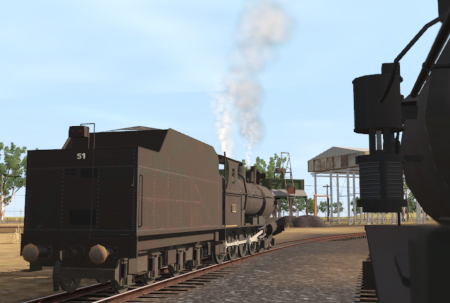
<td align="left"> | <td align="left">Shunting operations around '''Quorn''' yard. This scenario can be continued as the '''[[SAR Scenario Quorn-Peterborough Empty Fuel|Quorn-Peterborough Empty Fuel Freight]]''' scenario.</td> | ||
<td align="right">[[file:BackToBottom.png|link=#bottom|alt=Bottom|Bottom]]</td> | <td align="right">[[file:BackToBottom.png|link=#bottom|alt=Bottom|Bottom]]</td> | ||
</tr> | </tr> | ||
</table> | </table> | ||
----- | ----- | ||
<table width=1000> | <table width=1000> | ||
<tr valign="top"> | <tr valign="top"> | ||
<td width=450>[[image:SAR | <td width=450>[[image:SAR Quorn Shunter.png|link=|alt=Quorn Shunter]]</td> | ||
<td> | <td> | ||
<table width=550 bgcolor="black"> <!-- BEGIN Loco/consist sub table --> | <table width=550 bgcolor="black"> <!-- BEGIN Loco/consist sub table --> | ||
| Line 26: | Line 27: | ||
<tr valign="top"> | <tr valign="top"> | ||
<td width=75><span style="font-size: 15px; font-weight: 700; color: white; background-color: black;"> Era: </span></td> | <td width=75><span style="font-size: 15px; font-weight: 700; color: white; background-color: black;"> Era: </span></td> | ||
<td>''' | <td>'''1920s to 1950s'''</td> | ||
</tr> | </tr> | ||
<tr valign="top"> | <tr valign="top"> | ||
<td><span style="font-size: 15px; font-weight: 700; color: white; background-color: black;"> Duration: </span></td> | <td><span style="font-size: 15px; font-weight: 700; color: white; background-color: black;"> Duration: </span></td> | ||
<td>''' | <td>'''40 minutes'''</td> | ||
</tr> | </tr> | ||
<tr valign="top"> | <tr valign="top"> | ||
<td><span style="font-size: 15px; font-weight: 700; color: white; background-color: black;"> Loco: </span></td> | <td><span style="font-size: 15px; font-weight: 700; color: white; background-color: black;"> Loco: </span></td> | ||
<td>'''[[SAR | <td>'''The [[image:Loco_Roster_Label.png|link=SAR Peterborough Division Loco Roster]] has locos available at the <span style="color: white; background-color: black;"> Quorn Loco Depot </span>''' | ||
*'''[[SAR_Scenario_Rolling_Stock#SAR_T_Class|SAR T 51]]''' | |||
*'''[[SAR_Scenario_Rolling_Stock#SAR_T_Class|SAR T 255]]''' | |||
</td> | |||
</tr> | </tr> | ||
<tr valign="top"> | <tr valign="top"> | ||
<td><span style="font-size: 15px; font-weight: 700; color: white; background-color: black;"> Consist: </span></td> | <td><span style="font-size: 15px; font-weight: 700; color: white; background-color: black;"> Consist: </span></td> | ||
<td> | <td>To be shunted by the selected loco to/from various locations | ||
*'''[[SAR_Scenario_Rolling_Stock#Tank|Tank Fuel]]''' wagons | |||
*'''[[SAR_Scenario_Rolling_Stock#TGR_DB|Guard Van]]''' | |||
</td> | </td> | ||
</tr> | </tr> | ||
| Line 59: | Line 64: | ||
</tr> | </tr> | ||
</table> <!-- END Location Data table --> | </table> <!-- END Location Data table --> | ||
<table cellpadding="2" bgcolor="black" width=1000> | <table cellpadding="2" bgcolor="black" width=1000> | ||
<tr valign="top"> | <tr valign="top"> | ||
<td><span style="font-size: 15px; font-weight: 700; color: white">Getting Started:</span><br> | <td><span style="font-size: 15px; font-weight: 700; color: white">Getting Started:</span><br> | ||
<table bgcolor="lightyellow" | <table bgcolor="lightyellow"> | ||
<tr valign="top"> | <tr valign="top"> | ||
<td> | <td> | ||
# If you have already closed the opening message window then the first step is to pause the session by pressing the <span style="font-weight: 700; font-size: 15px; color: white; background-color: black;"> P </span> key. | # If you have already closed the opening message window then the first step is to pause the session by pressing the <span style="font-weight: 700; font-size: 15px; color: white; background-color: black;"> P </span> key. | ||
# Next locate your loco. '''Either''':- | # Next locate your loco. '''Either''':- | ||
# | #* Open the '''Finder Tool''' (press <span style="font-weight: 700; font-size: 15px; color: white; background-color: black;"> Ctrl </span> <span style="font-weight: 700; font-size: 15px; color: white; background-color: black;"> F </span>) and type, in the '''Name''' field, the name of your selected loco, for example '''SAR T 51''' (or just '''T 51''' which should be enough), then click the '''tick''' icon, '''OR''' | ||
#*Open the '''Driver List''' (bottom left of the screen) and then scroll through the list to find the '''loco name''' ('''SAR T 51''') then click the drivers '''Eye''' icon [[image:Driver_Eye.png|link=]] to take control of the loco | |||
# Take a few moments to get your bearings. Click [[image:Line_Index_Quorn.png|link=SAR_Quorn|Quorn Data]] (this link will open in this window) to show the location details and track plans for '''Quorn'''. In each location details page:- | |||
# | |||
# Take a few moments to get your bearings. Click [[image: | |||
#*the [[image:Tab_HM_White.png|link=|75px]] tab gives an overall summary of each location with a "potted" history (where available). | #*the [[image:Tab_HM_White.png|link=|75px]] tab gives an overall summary of each location with a "potted" history (where available). | ||
#*the [[image:Tab_TM_Grey.png|link=|75px]] tab reveals the invisible [[image:Trackmark_Right.png|link=|alt=TM|8px]] '''Track Marks''' for '''Drive To''' commands. | #*the [[image:Tab_TM_Grey.png|link=|75px]] tab reveals the invisible [[image:Trackmark_Right.png|link=|alt=TM|8px]] '''Track Marks''' for '''Drive To''' commands. | ||
| Line 84: | Line 84: | ||
</td> | </td> | ||
</tr> | </tr> | ||
</table> | </table> | ||
</td> | </td> | ||
</tr> | </tr> | ||
</table> | </table> | ||
<br> | <br> | ||
<table cellpadding="2" bgcolor="blue" width=1000> | <table cellpadding="2" bgcolor="blue" width=1000> | ||
<tr valign="top"> | <tr valign="top"> | ||
<td><span style="font-size: 15px; font-weight: 700; color: white">Tutorial:</span><br> | <td><span style="font-size: 15px; font-weight: 700; color: white">Tutorial:</span><br> | ||
<table bgcolor="lightcyan" width=996> | <table bgcolor="lightcyan" width=996> | ||
<tr valign="center"> | <tr valign="center"> | ||
<td width=70 align="right">[[image:SAR Tutorial.png|link=SAR Scenarios Tutorial|alt=Tutorial]]</td> | <td width=70 align="right">[[image:SAR Tutorial.png|link=SAR Scenarios Tutorial|alt=Tutorial]]</td> | ||
<td width=750>'''A tutorial on using these scenarios is provided in the link on the left. The link will open in this window'''</td> | <td width=750>'''A tutorial on using these scenarios is provided in the link on the left. The link will open in this window'''</td> | ||
</tr> | </tr> | ||
</table> | </table> | ||
</td> | </td> | ||
</tr> | </tr> | ||
</table> | </table> | ||
<br> | <br> | ||
<table width=1000> <!-- BEGIN Yard (if applicable), Orders, Strip Map and Driving Notes tables --> | <table width=1000> <!-- BEGIN Yard (if applicable), Orders, Strip Map and Driving Notes tables --> | ||
<tr valign="top"> | <tr valign="top"> | ||
<td> | <td> | ||
<table bgcolor=#000000 width=820 cellpadding=2> <!-- BEGIN Black Border for | <table bgcolor=#000000 width=820 cellpadding=2> <!-- BEGIN Black Border for Yard Table --> | ||
<tr valign="top"> | <tr valign="top"> | ||
<td | <td><span style="font-size: 15px; font-weight: 700; color: white">Yard Map:</span><br> | ||
<table bgcolor=#ffffff width=816> <!-- BEGIN Yard Table --> | |||
< | |||
<table bgcolor= | |||
<tr valign="top"> | <tr valign="top"> | ||
<td | <td align="center">[[image:SAR_Quorn.png|link=|alt=Yard map]]</td> | ||
</tr> | </tr> | ||
<tr valign="top"> | <tr valign="top"> | ||
<td> </td> | <td> </td> | ||
</tr> | </tr> | ||
</table> <!-- END Yard Table --> | |||
</td> | |||
< | |||
</tr> | </tr> | ||
</table> <!-- END Black Border for Yard Table --> | |||
<br> | |||
<table bgcolor=#000000 width=820 cellpadding=2> <!-- BEGIN Black Border for Orders Table --> | |||
<tr valign="top"> | <tr valign="top"> | ||
<td> | <td><span style="font-size: 15px; font-weight: 700; color: white">Orders:</span><br> | ||
<table bgcolor=#e8e8e8 width=816> <!-- BEGIN Orders and Logo Table --> | |||
< | |||
<tr valign="top"> | <tr valign="top"> | ||
<td | <td width=716> | ||
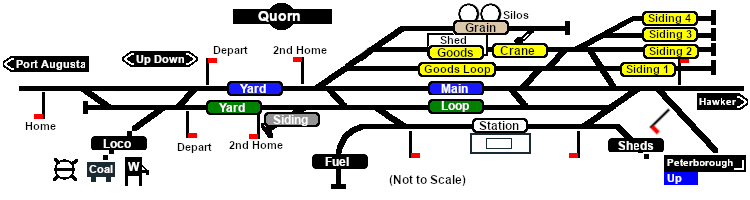
< | # Move the loco from the <span style="font-weight: 700;"><span style="color: white; background-color: black;"> Loco </span> Depot</span> to the <span style="font-weight: 700;"><span style="color: white; background-color: black;"> Fuel </span> Siding</span>. | ||
# Collect the 4 empty '''Tank''' wagons stored in the siding and move them to eastern ('''Peterborough''') end of the <span style="color: black; background-color: white; font-weight: 700;"> Station </span> road. | |||
# Collect the 8 '''Tank''' wagons and the '''Guard Van''' stored on a <span style="font-weight: 700; color: black; background-color: yellow;"> Goods Siding 3 </span>. | |||
# Attach the 8 wagons and van to the western ('''Port Augusta''') end of the 4 wagons on the <span style="color: black; background-color: white; font-weight: 700;"> Station </span> road so that the '''Guard Van''' is at the rear ('''Port Augusta''') end. | |||
< | # You can either:- | ||
## Terminate the scenario by moving the wagons to storage on <span style="font-weight: 700; color: black; background-color: yellow;"> Goods Siding 1 </span> and the loco back to the <span style="font-weight: 700;"><span style="color: white; background-color: black;"> Loco </span> Depot</span>, '''OR''' | |||
</ | ## Begin the '''[[SAR Scenario Quorn-Peterborough Empty Fuel|Quorn-Peterborough Empty Fuel Freight]]''' scenario starting at '''Step 5''' (you have already completed the first 4 steps of that scenario). | ||
</ | |||
< | |||
</ | |||
< | |||
</ | |||
</ | |||
</td> | </td> | ||
<td width=100>[[image:SAR Train Order Rotated.png|100px|link=|alt=Logo]]</td> | <td width=100>[[image:SAR Train Order Rotated.png|100px|link=|alt=Logo]]</td> | ||
| Line 194: | Line 141: | ||
</table> <!-- END Black Border for Orders Table --> | </table> <!-- END Black Border for Orders Table --> | ||
<br> | <br> | ||
<table cellpadding="2" bgcolor="black" width=820> | <table cellpadding="2" bgcolor="black" width=820> | ||
<tr valign="top"> | <tr valign="top"> | ||
<td><span style="font-size: 15px; font-weight: 700; color: white">Driving Notes:</span><br> | <td><span style="font-size: 15px; font-weight: 700; color: white">Driving Notes:</span><br> | ||
<table bgcolor="lightyellow" width=816> | <table bgcolor="lightyellow" width=816> | ||
<tr valign="top"> | <tr valign="top"> | ||
<td> | <td> | ||
*You have permission to pass semaphore signals at stop provided you are satisfied that the road ahead is clear. | |||
*When driving manually in yards, you are responsible for correctly setting any '''catch points'''. | |||
*You have | |||
* | |||
</td> | </td> | ||
</tr> | </tr> | ||
</table> | </table> | ||
</td> | </td> | ||
</tr> | </tr> | ||
</table> | </table> | ||
</td> | </td> | ||
<td> | <td> | ||
<table width=180> | <table width=180> | ||
<tr valign="top"> | <tr valign="top"> | ||
<td> | <td> | ||
<td align="center">[[image:SAR Scenario | <td align="center">[[image:SAR Scenario Quorn Strip Map.png|link=|alt=Strip Map]]<br>[[image:SAR Scenario Route.png|link=|alt=Route Key]]</td> | ||
</tr> | </tr> | ||
</table> | </table> | ||
</td> | </td> | ||
</tr> | </tr> | ||
</table> | </table> | ||
----- | ----- | ||
<table width=1000> | <table width=1000> | ||
<tr valign="top"> | <tr valign="top"> | ||
<td colspan=9>'''Links:''' All links will open in this window</td> | <td colspan=9>'''Links:''' All links will open in this window</td> | ||
</tr> | </tr> | ||
<tr valign="center"> | <tr valign="center"> | ||
<td width=63 align="left">[[image:ArrowLeftBtn.png|link=SAR Scenario | <td width=63 align="left">[[image:ArrowLeftBtn.png|link=SAR Scenario Terowie Shunter|30px]]</td> | ||
<td width=125 align="center">[[image:Session Scenario Index.png|link=SAR Peterborough Base Session|alt=Scenarios|Scenario Index]]<br>'''[[SAR Peterborough Base Session|Session Scenarios]]'''</td> | <td width=125 align="center">[[image:Session Scenario Index.png|link=SAR Peterborough Base Session|alt=Scenarios|Scenario Index]]<br>'''[[SAR Peterborough Base Session|Session Scenarios]]'''</td> | ||
<td width=125 align="center">[[Image:Location Index.png|link=SAR Index|alt=Location Index|Location Index]]<br>'''[[SAR Index|Location List]]'''</td> | <td width=125 align="center">[[Image:Location Index.png|link=SAR Index|alt=Location Index|Location Index]]<br>'''[[SAR Index|Location List]]'''</td> | ||
| Line 239: | Line 180: | ||
<td width=125 align="center">[[image:Industry Index.png|link=SAR Scenario Industries|alt=Industries]]<br>'''[[SAR Scenario Industries|Active Industries]]'''</td> | <td width=125 align="center">[[image:Industry Index.png|link=SAR Scenario Industries|alt=Industries]]<br>'''[[SAR Scenario Industries|Active Industries]]'''</td> | ||
<td width=125 align="center">[[image:BackToTop.png|link=#top|alt=Top|Top]]</td> | <td width=125 align="center">[[image:BackToTop.png|link=#top|alt=Top|Top]]</td> | ||
<td width= | <td width=50 align="right">[[image:ArrowRightBtn.png|link=SAR Scenario Depot Fuel Run|30px]]</td> | ||
</tr> | </tr> | ||
</table | </table> | ||
<span id="bottom"></span> | <span id="bottom"></span> | ||
---- | ---- | ||
This page was created by Trainz user '''<span class="plainlinks">[http://online.ts2009.com/mediaWiki/index.php/User:Pware pware]</span>''' in February 2021 and was last updated as shown below. | This page was created by Trainz user '''<span class="plainlinks">[http://online.ts2009.com/mediaWiki/index.php/User:Pware pware]</span>''' in February 2021 and was last updated as shown below. | ||
---- | ---- | ||
Latest revision as of 03:38, 27 November 2022
| Shunting operations around Quorn yard. This scenario can be continued as the Quorn-Peterborough Empty Fuel Freight scenario. |  |
 |
|

|
|
Each location in the layout has a detailed set of track diagrams that provide a variety of useful information The Getting Started guide below gives a summary of what is available.  graphic, or go to the bottom of the page for all the session links (all links will open in this window). |

Getting Started:
|


Tutorial:
|

|
|




This page was created by Trainz user pware in February 2021 and was last updated as shown below.


