SAR Black Rock Switches V1: Difference between revisions

From TrainzOnline
Jump to navigationJump to search
Pware (talk | contribs)
mNo edit summary
Pware (talk | contribs)
mNo edit summary
 
Line 92: Line 92:
<tr valign="top">
<tr valign="top">


<td width=150><span style="font-weight: 700;"><span style="background-color: black; color: white;">&#160;Peterborough&#160;-&#160;</span><span style="background-color: white; color: black;">&#160;Station&#160;</span> <span style="background-color: yellow; color: black;">&#160;Goods&#160;</span> <span style="background-color: red; color: white;">&#160;Stockyard&#160;</span></span></td>
<td width=300><span style="font-weight: 700;"><span style="background-color: black; color: white;">&#160;Peterborough&#160;-&#160;</span><span style="background-color: red; color: white;">&#160;Stockyard&#160;</span> <span style="background-color: yellow; color: black;">&#160;Goods&#160;</span><span style="background-color: white; color: black;">&#160;Station&#160;</span></span></td>


<td width=225><span style="font-weight: 700;"><span style="background-color: black; color: yellow;">&#160;1&#160;</span>-L <span style="background-color: black; color: yellow;">&#160;2&#160;</span>-L <span style="background-color: red; color: white;">&#160;A&#160;</span>-L </span></td>
<td width=95><span style="font-weight: 700;"><span style="background-color: black; color: yellow;">&#160;1&#160;</span>-L <span style="background-color: black; color: yellow;">&#160;2&#160;</span>-L <span style="background-color: red; color: white;">&#160;A&#160;</span>-L </span></td>


<td width=150><span style="font-weight: 700;"><span style="background-color: black; color: white;">&#160;Quorn&#160;-&#160;</span><span style="background-color: white; color: black;">&#160;Station&#160;</span> <span style="background-color: yellow; color: black;">&#160;Goods&#160;</span> <span style="background-color: red; color: white;">&#160;Stockyard&#160;</span></span></td>
<td width=250><span style="font-weight: 700;"><span style="background-color: black; color: white;">&#160;Quorn&#160;-&#160;</span><span style="background-color: white; color: black;">&#160;Station&#160;</span> <span style="background-color: yellow; color: black;">&#160;Goods&#160;</span> <span style="background-color: red; color: white;">&#160;Stockyard&#160;</span></span></td>


<td width=225><span style="font-weight: 700;"><span style="background-color: black; color: yellow;">&#160;4&#160;</span>-R <span style="background-color: black; color: yellow;">&#160;3&#160;</span>-R <span style="background-color: red; color: white;">&#160;B&#160;</span>-R </span></td>
<td width=105><span style="font-weight: 700;"><span style="background-color: black; color: yellow;">&#160;4&#160;</span>-R <span style="background-color: black; color: yellow;">&#160;3&#160;</span>-R <span style="background-color: red; color: white;">&#160;B&#160;</span>-R </span></td>


</tr>
</tr>
</table> <!-- END Switch Sets Station/Goods/Stockyard table -->
<table width=750> <!-- BEGIN Switch Sets Main table -->
<tr valign="top">
<tr valign="top">


<td width=150><span style="font-weight: 700;"><span style="background-color: black; color: white;">&#160;Peterborough&#160;-&#160;</span><span style="background-color: #1919fe; color: white;">&#160;Main&#160;</span></span></td>
<td><span style="font-weight: 700;"><span style="background-color: black; color: white;">&#160;Peterborough&#160;-&#160;</span><span style="background-color: #1919fe; color: white;">&#160;Main&#160;</span></span></td>


<td width=225><span style="font-weight: 700;"><span style="background-color: black; color: yellow;">&#160;1&#160;</span>-L <span style="background-color: black; color: yellow;">&#160;2&#160;</span>-R </span></td>
<td><span style="font-weight: 700;"><span style="background-color: black; color: yellow;">&#160;1&#160;</span>-L <span style="background-color: black; color: yellow;">&#160;2&#160;</span>-R </span></td>


<td width=150><span style="font-weight: 700;"><span style="background-color: black; color: white;">&#160;Quorn&#160;-&#160;</span><span style="background-color: #1919fe; color: white;">&#160;Main&#160;</span></span></td>
<td><span style="font-weight: 700;"><span style="background-color: black; color: white;">&#160;Quorn&#160;-&#160;</span><span style="background-color: #1919fe; color: white;">&#160;Main&#160;</span></span></td>


<td width=225><span style="font-weight: 700;"><span style="background-color: black; color: yellow;">&#160;4&#160;</span>-R <span style="background-color: black; color: yellow;">&#160;3&#160;</span>-L </span></td>
<td><span style="font-weight: 700;"><span style="background-color: black; color: yellow;">&#160;4&#160;</span>-R <span style="background-color: black; color: yellow;">&#160;3&#160;</span>-L </span></td>


</tr>
</tr>
</table> <!-- END Switch Sets Mainline table -->
<table width=750> <!-- BEGIN Switch Sets Loop table -->
<tr valign="top">
<tr valign="top">


<td width=150><span style="font-weight: 700;"><span style="background-color: black; color: white;">&#160;Peterborough&#160;-&#160;</span><span style="background-color: #008100; color: white;">&#160;Loop&#160;</span></span></td>
<td><span style="font-weight: 700;"><span style="background-color: black; color: white;">&#160;Peterborough&#160;-&#160;</span><span style="background-color: #008100; color: white;">&#160;Loop&#160;</span></span></td>


<td width=225><span style="font-weight: 700;"><span style="background-color: black; color: yellow;">&#160;1&#160;</span>-R </span></td>
<td><span style="font-weight: 700;"><span style="background-color: black; color: yellow;">&#160;1&#160;</span>-R </span></td>


<td width=150><span style="font-weight: 700;"><span style="background-color: black; color: white;">&#160;Quorn&#160;-&#160;</span><span style="background-color: #008100; color: white;">&#160;Loop&#160;</span></span></td>
<td><span style="font-weight: 700;"><span style="background-color: black; color: white;">&#160;Quorn&#160;-&#160;</span><span style="background-color: #008100; color: white;">&#160;Loop&#160;</span></span></td>


<td width=225><span style="font-weight: 700;"><span style="background-color: black; color: yellow;">&#160;4&#160;</span>-L </span></td>
<td><span style="font-weight: 700;"><span style="background-color: black; color: yellow;">&#160;4&#160;</span>-L </span></td>


</tr>
</tr>

Latest revision as of 00:36, 7 May 2024

    
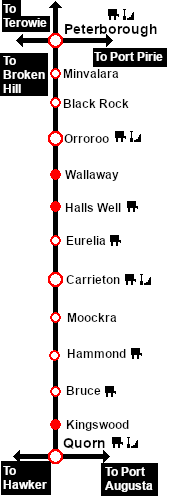
Peterborough-Quorn
Minvalara
Location Index
Scenarios

Orooro
Peterborough-Quorn
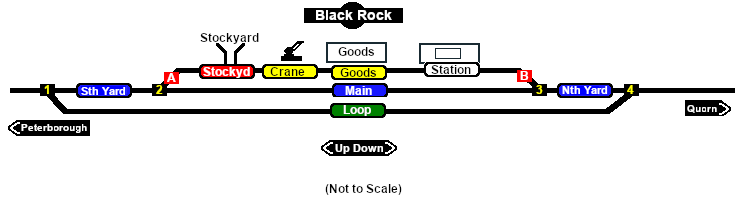
Black Rock Switches map
For SAR Peterborough Narrow Gauge Division v1.0. For the latest V2.0 click here
  Switches  
No. Name Facing and L/R Directions
(default direction first)
No. Name Facing and L/R Directions
(default direction first)
BK 1 Down (L) Main, (R) Loop BK 2 Down (R) Main, (L) Stockyard/Goods Shed/Station
 BKCP A  Up  (R) Catchpoint , (L) Peterborough  BKCP B  Down  (L) Catchpoint , (R) Quorn
BK 3 Up (L) Main, (R) Stockyard/Goods Shed/Station BK 4 Up (R) Main, (L) Loop
 Switch Sets 
 Peterborough -  Stockyard   Goods  Station   1 -L  2 -L  A -L  Quorn -  Station   Goods   Stockyard   4 -R  3 -R  B -R
 Peterborough -  Main   1 -L  2 -R  Quorn -  Main   4 -R  3 -L
 Peterborough -  Loop   1 -R  Quorn -  Loop   4 -L
Peterborough-Quorn
Peterborough-Quorn Strip Map