SAR Hammond Industry V2: Difference between revisions
From TrainzOnline
Jump to navigationJump to search
Created page with "<!-- V2.0 (separate V1.0 file) --> <table width=1000> <!-- BEGIN TOP TABLE --> <tr valign="top"> <td width=750> <table width=750> <!-- BEGIN TABBED link list with Industry ..." |
mNo edit summary |
||
| (6 intermediate revisions by the same user not shown) | |||
| Line 16: | Line 16: | ||
</table> <!-- END TABBED link list --> | </table> <!-- END TABBED link list --> | ||
<table bgcolor="lightgrey" bordercolor="lightgrey" width=750> <!-- BEGIN | <table bgcolor="lightgrey" bordercolor="lightgrey" width=750> <!-- BEGIN location link table with LINE and STATION NAMES --> | ||
<tr valign="middle"> | <tr valign="middle"> | ||
| Line 26: | Line 26: | ||
</tr> | </tr> | ||
</table> <!-- END | </table> <!-- END location link table with LINE and STATION NAMES --> | ||
<table width=750> | <table width=750> | ||
<tr valign="top"> | <tr valign="top"> | ||
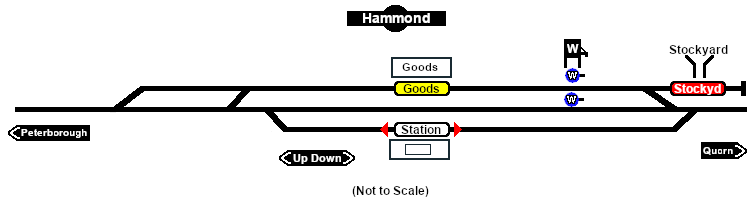
<td>[[image: | <td>[[image:SAR_Hammond_Industry_V2.png|link=|alt=Hammond Industry map]]</td> | ||
</tr> | </tr> | ||
<tr valign="top"> | <tr valign="top"> | ||
<td align="center"><span style="font-weight: 700;">For <span style="color: blue;">SAR Peterborough Narrow Gauge Division v2.0</span>. For the | <td align="center"><span style="font-weight: 700;">For <span style="color: blue;">SAR Peterborough Narrow Gauge Division v2.0</span>. For the original <span style="color: blue;">V1.0</span> click <span style="background-color: yellow;">[[SAR_Hammond_Industry_V1|here]]</span></span></td> | ||
</tr> | </tr> | ||
</table> | </table> | ||
| Line 43: | Line 43: | ||
</tr> | </tr> | ||
<!-- BEGIN | <!-- BEGIN industry passenger stations --> | ||
<tr valign="middle"> | <tr valign="middle"> | ||
| Line 49: | Line 49: | ||
</tr> | </tr> | ||
<tr valign="middle"> | <tr valign="middle"> | ||
<td colspan=2 align="center"><span style="font-weight: 700;">For | <td colspan=2 align="center"><span style="font-weight: 700;">For all Industries use the "Drive To <span style="color: blue;">name of industry</span>" and <span style="color: blue;">"Load/Unload"</span> commands</span></td> | ||
</tr> | </tr> | ||
<tr valign="top"> | <tr valign="top"> | ||
<td colspan=2 align="center">[[Image:line740.png|link=]]</td> | <td colspan=2 align="center">[[Image:line740.png|link=]]</td> | ||
</tr> | </tr> | ||
<tr valign="top"> | <tr valign="top"> | ||
<td width=70>[[Image: | <td width=70>[[Image:Passenger_Icon.png|link=]]</td> | ||
<td>[[image:Station_Label.png|link= | <td>[[image:Station_Label.png|link=]] <span style="font-weight: 700; color: blue;">Hammond</span><br> | ||
<span style=" | * <span style="font-weight: 700;">Passengers - <span style="color: blue;">Load/Unload</span></span></td> | ||
</tr> | </tr> | ||
<tr valign="top"> | <tr valign="top"> | ||
<td | <td width=70> </td> | ||
<td><span style="font-weight: 700; color: black;">Trackmarks [[image:Trackmark_Left.png|link=|alt=TM|10px]] <span style="color: blue;">Hammond Station Up</span> and [[image:Trackmark_Right.png|link=|alt=TM|10px]] <span style="color: blue;">Hammond Station Dn</span> are also available.</span></td> | |||
<td | |||
</tr> | </tr> | ||
<tr valign="top"> | <tr valign="top"> | ||
| Line 70: | Line 68: | ||
</tr> | </tr> | ||
<!-- END | <!-- END industry passenger stations --> | ||
<tr valign="top"> | <tr valign="top"> | ||
<td width=70>[[Image:Goods_Icon.png|link=]]</td> | <td width=70>[[Image:Goods_Icon.png|link=]]</td> | ||
<td>[[image:Goods_Label.png|link=]] <span style="font-weight: 700; color: blue;">Hammond Goods | <td>[[image:Goods_Label.png|link=]] <span style="font-weight: 700; color: blue;">Hammond Goods Dock</span> | ||
* <span style="font-weight: 700;">General Goods - <span style="color: blue;">Unload</span></span> | * <span style="font-weight: 700;">General Goods - <span style="color: blue;">Unload</span></span> | ||
* <span style="font-weight: 700;">Fertiliser Bagged - <span style="color: blue;">Unload</span></span> | * <span style="font-weight: 700;">Fertiliser Bagged - <span style="color: blue;">Unload</span></span> | ||
* <span style="font-weight: 700;">Wool Bale - <span style="color: blue;">Load</span></span></td> | * <span style="font-weight: 700;">Wool Bale - <span style="color: blue;">Load</span></span></td> | ||
</tr> | |||
<tr valign="top"> | |||
<td colspan=2 align="center">[[Image:line740.png|link=]]</td> | |||
</tr> | |||
<tr valign="top"> | |||
<td width=70>[[Image:Livestock_Icon.png|link=]]</td> | |||
<td>[[image:Stockyard_Label.png|link=]] <span style="font-weight: 700; color: blue;">Hammond Stockyard</span> | |||
* <span style="font-weight: 700;">Cattle - <span style="color: blue;">Load/Unload</span></span> | |||
* <span style="font-weight: 700;">Sheep - <span style="color: blue;">Load/Unload</span></span></td> | |||
</tr> | </tr> | ||
<tr valign="top"> | <tr valign="top"> | ||
| Line 85: | Line 93: | ||
<tr valign="top"> | <tr valign="top"> | ||
<td width=70>[[Image:Water_Icon.png|link=]]</td> | <td width=70>[[Image:Water_Icon.png|link=]]</td> | ||
<td>[[image:Goods_Label.png|link=]] [[image:WaterColumn.png|link=]] <span style="font-weight: 700; color: blue;">Hammond Water Column</span> | <td>[[image:Main_Label.png|link=]] [[image:WaterColumn.png|link=]] <span style="font-weight: 700; color: blue;">Hammond Water Column Main</span> | ||
* <span style="font-weight: 700;">Water - <span style="color: blue;">Load</span></span></td> | * <span style="font-weight: 700;">Water - <span style="color: blue;">Load</span></span> | ||
* '''Track Mark''' [[image:Trackmark_Right.png|link=|alt=TM|10px]] <span style="font-weight: 700; color: blue;">Hammond Water Column Main Dn Approach</span> located on the left of the water column</td> | |||
</tr> | |||
<tr valign="top"> | |||
<td width=70> </td> | |||
<td>[[image:Goods_Label.png|link=]] [[image:WaterColumn.png|link=]] <span style="font-weight: 700; color: blue;">Hammond Water Column Goods</span> | |||
* <span style="font-weight: 700;">Water - <span style="color: blue;">Load</span></span> | |||
* '''Track Mark''' [[image:Trackmark_Right.png|link=|alt=TM|10px]] <span style="font-weight: 700; color: blue;">Hammond Water Column Goods Dn Approach</span> located on the left of the water column</td> | |||
</tr> | |||
<tr valign="top"> | |||
<td width=70> </td> | |||
<td><span style="font-weight: 700;">Each water column has Trackmarks placed on both approaches as AI destinations for positioning the loco and then manually driving to move the tender alongside the column for loading</span></td> | |||
</tr> | </tr> | ||
| Line 96: | Line 115: | ||
</td> | </td> | ||
<td> | <td>[[Image:SAR_Peterborough-Quorn_Line.png|link=SAR_Peterborough-Quorn_V2|alt=Peterborough-Quorn|Show Peterborough-Quorn]]<br> | ||
[[Image:SAR_Peterborough-Quorn_Line.png|link=SAR_Peterborough-Quorn_V2|alt=Peterborough-Quorn|Show Peterborough-Quorn]]<br> | |||
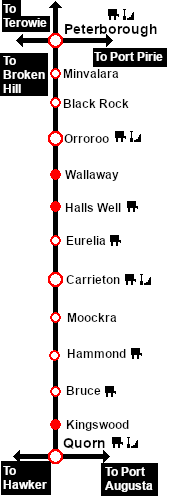
[[Image:SAR_Peterborough-Quorn Strip Map.png|link=|alt=Peterborough-Quorn Strip Map]]</td> | [[Image:SAR_Peterborough-Quorn Strip Map.png|link=|alt=Peterborough-Quorn Strip Map]]</td> | ||
</tr> | </tr> | ||
</table> <!-- END TOP TABLE --> | </table> <!-- END TOP TABLE --> | ||
Latest revision as of 05:13, 4 October 2025
|
  |
||||||||||||||||||||||||||||||||||||||||