SAR Scenario Laura Test Run V2: Difference between revisions
From TrainzOnline
Jump to navigationJump to search
mNo edit summary |
mNo edit summary |
||
| (One intermediate revision by the same user not shown) | |||
| Line 100: | Line 100: | ||
<tr valign="top"> | <tr valign="top"> | ||
<td> | <td> | ||
# If you have already closed the opening message window then | # Open the session '''SAR Northern Division Free Roam Session V2''' into '''Trainz Driver'''. To do this:<br> | ||
#* From the '''Driver/Surveyor''' loading screen select the route '''SAR Northern Division (Narrow Gauge) Route v2''' | |||
#* Then select <span style="font-weight: 700; color: white; background-color: grey;"> VIEW SESSIONS </span> | |||
#* Then select the session '''SAR Northern Division Free Roam Session V2''' | |||
#* Click <span style="font-weight: 700; color: white; background-color: grey;"> DRIVE SESSION </span> | |||
# If you have already closed the opening message window then pause the session by pressing the <span style="font-weight: 700; font-size: 15px; color: white; background-color: black;"> P </span> key. | |||
# If you decide to set the session clock to a different starting time then follow the instructions shown in the '''Orders''' section | # If you decide to set the session clock to a different starting time then follow the instructions shown in the '''Orders''' section | ||
# Next locate your loco. '''Either''':- | # Next locate your loco. '''Either''':- | ||
| Line 115: | Line 120: | ||
# Each location details page has direct links to the adjacent locations so you can explore along the route. | # Each location details page has direct links to the adjacent locations so you can explore along the route. | ||
# When you are ready to start, reload the '''Peterborough Base Session''' page (click the '''Scenarios''' button on your current location page) and select this '''Scenario''' again or just use the '''Back''' button on your browser - whichever is quicker. | # When you are ready to start, reload the '''Peterborough Base Session''' page (click the '''Scenarios''' button on your current location page) and select this '''Scenario''' again or just use the '''Back''' button on your browser - whichever is quicker. | ||
# Switch back to '''Driver Mode''' | # Switch back to '''Driver Mode''' | ||
# Close the opening message window if it is on the screen '''OR''' if '''Pause''' is shown on the screen instead, press the <span style="font-weight: 700; font-size: 15px; color: white; background-color: black;"> P </span> key. Both actions will start the session. | |||
</td> | </td> | ||
</tr> | </tr> | ||
| Line 196: | Line 202: | ||
<table width=180> <!-- BEGIN Strip Map Table --> | <table width=180> <!-- BEGIN Strip Map Table --> | ||
<tr valign="top"> | <tr valign="top"> | ||
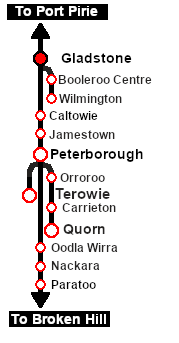
<td | <td>[[image:SAR Scenario Gladstone Strip Map.png|link=|alt=Strip Map]]<br>[[image:SAR Scenario Route.png|link=|alt=Route Key]]<br> | ||
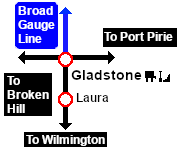
[[image:SAR Gladstone-Laura Strip Map_V2.png|link=|alt=Strip Map]] | |||
</td> | |||
</tr> | </tr> | ||
</table> <!-- END Strip Map Table --> | </table> <!-- END Strip Map Table --> | ||
Latest revision as of 07:17, 8 January 2026
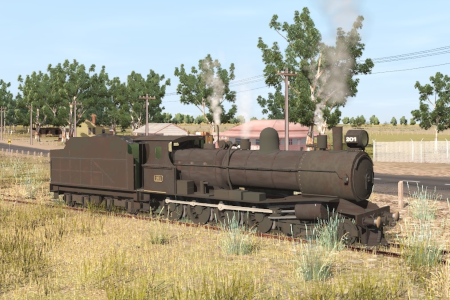
| A loco has just been serviced with some minor repairs to its running gear at the Gladstone Depot Shed. Before it can re-enter service it is required to make a trial run to Laura on the Wilmington Line and back. |  |
When, Where and With What
 |
|
||||||||||||||||

Similar/Related Scenarios
| 23 | Rail Car Inspection Run |
|
|
Each location in the layout has a detailed set of track diagrams that provide a variety of useful information The Getting Started guide below gives a summary of what is available.  graphic, or go to the bottom of the page for all the session links (all links will open in this window). |

Getting Started:
|


Tutorial:
|

|
|
||||||||||







This page was created by Trainz user pware in May 2022 and was last updated as shown below.


