SAR Scenario Terowie Shunter V2: Difference between revisions
From TrainzOnline
Jump to navigationJump to search
mNo edit summary |
mNo edit summary |
||
| (2 intermediate revisions by the same user not shown) | |||
| Line 30: | Line 30: | ||
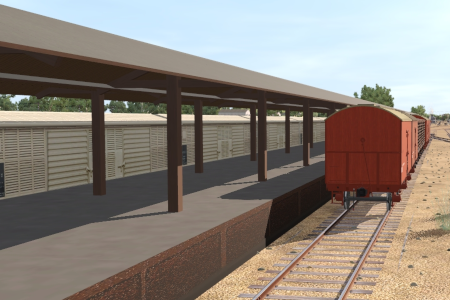
'''Terowie's''' only role was as a change of gauge location. Passengers and freight from '''Adelaide''' arrived from the south on the '''broad gauge (5ft 3in - 1600mm)''' line and were transferred to wagons on the '''narrow gauge (3ft 6in - 1067mm)''' line to continue north to '''Peterborough''' and onto destinations on the '''Broken Hill''', '''Trans Continental''' and '''Central Australia''' lines. The reverse arrangement applied to traffic travelling south to '''Adelaide'''.<br> | '''Terowie's''' only role was as a change of gauge location. Passengers and freight from '''Adelaide''' arrived from the south on the '''broad gauge (5ft 3in - 1600mm)''' line and were transferred to wagons on the '''narrow gauge (3ft 6in - 1067mm)''' line to continue north to '''Peterborough''' and onto destinations on the '''Broken Hill''', '''Trans Continental''' and '''Central Australia''' lines. The reverse arrangement applied to traffic travelling south to '''Adelaide'''.<br> | ||
Passengers simply | Passengers simply walked from a train on one side of the platform to a train on the other side at the station. Goods and livestock were manually moved from wagons of one gauge on one side of a transfer platform to wagons of the other gauge on the other side, or by gantry crane from one train to the other. Much later a bogie exchange system was introduced to help eliminate the manual handling of freight. By 1970 the line from '''Peterborough''' to '''Terowie''' became dual gauge with the addition of a standard gauge track. By 1988 the line from '''Adelaide''' to '''Peterborough''' via '''Terowie''' was closed.</td> | ||
</tr> | </tr> | ||
</table> | </table> | ||
| Line 123: | Line 123: | ||
<tr valign="top"> | <tr valign="top"> | ||
<td> | <td> | ||
# If you have already closed the opening message window then | # Open the session '''SAR Northern Division Free Roam Session V2''' into '''Trainz Driver'''. To do this:<br> | ||
#* From the '''Driver/Surveyor''' loading screen select the route '''SAR Northern Division (Narrow Gauge) Route v2''' | |||
#* Then select <span style="font-weight: 700; color: white; background-color: grey;"> VIEW SESSIONS </span> | |||
#* Then select the session '''SAR Northern Division Free Roam Session V2''' | |||
#* Click <span style="font-weight: 700; color: white; background-color: grey;"> DRIVE SESSION </span> | |||
# If you have already closed the opening message window then pause the session by pressing the <span style="font-weight: 700; font-size: 15px; color: white; background-color: black;"> P </span> key. | |||
# If you decide to set the session clock to a different starting time then follow the instructions shown in the '''Orders''' section below | # If you decide to set the session clock to a different starting time then follow the instructions shown in the '''Orders''' section below | ||
# Next locate your loco. '''Either''':- | # Next locate your loco. '''Either''':- | ||
| Line 136: | Line 141: | ||
# When you are ready to start, reload the '''Peterborough Base Session''' page (click the '''Scenarios''' button on your current location page) and select this '''Scenario''' again or just use the '''Back''' button on your browser - whichever is quicker. | # When you are ready to start, reload the '''Peterborough Base Session''' page (click the '''Scenarios''' button on your current location page) and select this '''Scenario''' again or just use the '''Back''' button on your browser - whichever is quicker. | ||
# Switch back to '''Trainz Driver Mode''' | # Switch back to '''Trainz Driver Mode''' | ||
# Close the opening message window | # Close the opening message window if it is on the screen '''OR''' if '''Pause''' is shown on the screen instead, press the <span style="font-weight: 700; font-size: 15px; color: white; background-color: black;"> P </span> key. Both actions will start the session. | ||
</td> | </td> | ||
</tr> | </tr> | ||
Latest revision as of 06:21, 24 February 2026
| Error creating thumbnail: /bin/bash: line 1: /usr/bin/convert: No such file or directory Error code: 127 13 |
14 Terowie Shunter A scenario in the SAR Peterborough Base Session v2.0 |
Error creating thumbnail: /bin/bash: line 1: /usr/bin/convert: No such file or directory Error code: 127 15 |
| Narrow gauge shunting operations in Terowie Yard. This scenario can be continued as one of the scenario 10 Transcontinental Express Freights operations starting from Terowie. |  |
|
The Historical Bit Terowie's only role was as a change of gauge location. Passengers and freight from Adelaide arrived from the south on the broad gauge (5ft 3in - 1600mm) line and were transferred to wagons on the narrow gauge (3ft 6in - 1067mm) line to continue north to Peterborough and onto destinations on the Broken Hill, Trans Continental and Central Australia lines. The reverse arrangement applied to traffic travelling south to Adelaide. |
When, Where and With What
 |
|
|||||||||||||||

Similar/Related Scenarios
| 10 | Transcontinental Express Freights | 12 | Peterborough Shunter | 14 | Gladstone Shunter |
| 15 | Quorn Shunter | 19 | Servicing the Broad Gauge Express | ||
|
|
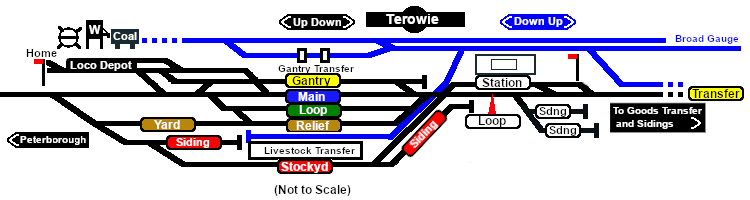
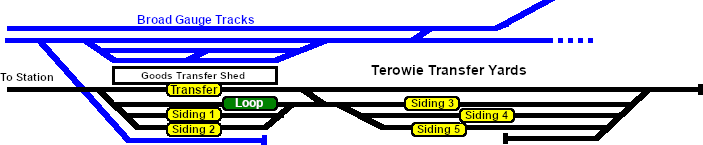
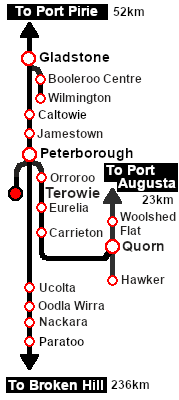
Each location in the layout has a detailed set of track diagrams that provide a variety of useful information The Getting Started guide below gives a summary of what is available.  graphic, or go to the bottom of the page for all the session links (all links will open in this window). |

Getting Started:
|


Tutorial:
|

|
|
|||||||||||




Driving Notes:
|


This page was created by Trainz user pware in February 2021 and was last updated as shown below.


