SAR Scenario Coffee Pot Special V2: Difference between revisions
mNo edit summary |
mNo edit summary |
||
| (3 intermediate revisions by the same user not shown) | |||
| Line 64: | Line 64: | ||
</table> <!-- END Scenario image and loco/consist table --> | </table> <!-- END Scenario image and loco/consist table --> | ||
<span style="font-weight: 700; font-size: 15px; color: white; background-color: black;"> Similar/Related Scenarios </span>< | <table width=1000> | ||
<tr valign="top"> | |||
<td><span style="font-weight: 700; font-size: 15px; color: white; background-color: black;"> DLS Session Based on This Scenario </span><br> | |||
<br> | |||
This is a fully directed session with '''Navigation Points''' and '''Message Popups'''. All junction switches will be set for you. | |||
<br> | |||
<span style="font-weight: 700;"><kuid:45176:109282> <span style="color: brown;">SAR Northern Division Coffee Pot Special Session</span></span> - Train '''1''' in the timetable below. | |||
<br></td> | |||
</tr> | |||
<tr valign="top"> | |||
<td><span style="font-weight: 700; font-size: 15px; color: white; background-color: black;"> Similar/Related Scenarios </span></td> | |||
</tr> | |||
</table> | |||
<table width=1000> | <table width=1000> | ||
| Line 102: | Line 114: | ||
<tr valign="top"> | <tr valign="top"> | ||
<td> | <td> | ||
# If you have already closed the opening message window then | # Open the session '''SAR Northern Division Free Roam Session V2''' into '''Trainz Driver'''. To do this:<br> | ||
#* From the '''Driver/Surveyor''' loading screen select the route '''SAR Northern Division (Narrow Gauge) Route v2''' | |||
#* Then select <span style="font-weight: 700; color: white; background-color: grey;"> VIEW SESSIONS </span> | |||
#* Then select the session '''SAR Northern Division Free Roam Session V2''' | |||
#* Click <span style="font-weight: 700; color: white; background-color: grey;"> DRIVE SESSION </span> | |||
# If you have already closed the opening message window then pause the session by pressing the <span style="font-weight: 700; font-size: 15px; color: white; background-color: black;"> P </span> key. | |||
# If you decide to set the session clock to a different starting time then follow the instructions shown in the '''Orders''' section | # If you decide to set the session clock to a different starting time then follow the instructions shown in the '''Orders''' section | ||
# Next locate your loco. '''Either''':- | # Next locate your loco. '''Either''':- | ||
| Line 108: | Line 125: | ||
#*Open the '''Driver List''' (bottom left of the screen) and then scroll through the list to find '''either''':- | #*Open the '''Driver List''' (bottom left of the screen) and then scroll through the list to find '''either''':- | ||
#:*the '''loco name''' ('''SAR SMC 1''') '''OR''' | #:*the '''loco name''' ('''SAR SMC 1''') '''OR''' | ||
#:*the '''driver''' icon (named '''Driver | #:*the '''driver''' icon (named '''Driver SMC''') - this is a non-animated icon | ||
#::then click the drivers '''Eye''' icon [[image:Driver_Eye.png|link=]] to take control of the loco. | #::then click the drivers '''Eye''' icon [[image:Driver_Eye.png|link=]] to take control of the loco. | ||
# Take a few moments to get your bearings. Click [[image:Line_Index_Quorn.png|link=SAR_Quorn_V2|Quorn Data]] (this link will open in this window) to show the location details and track plans for '''Quorn'''. In each location details page:- | # Take a few moments to get your bearings. Click [[image:Line_Index_Quorn.png|link=SAR_Quorn_V2|Quorn Data]] (this link will open in this window) to show the location details and track plans for '''Quorn'''. In each location details page:- | ||
| Line 118: | Line 135: | ||
# When you are ready to start, reload the '''Peterborough Base Session''' page (click the '''Scenarios''' button on your current location page) and select this '''Scenario''' again or just use the '''Back''' button on your browser - whichever is quicker. | # When you are ready to start, reload the '''Peterborough Base Session''' page (click the '''Scenarios''' button on your current location page) and select this '''Scenario''' again or just use the '''Back''' button on your browser - whichever is quicker. | ||
# Switch back to '''Trainz Driver Mode''' | # Switch back to '''Trainz Driver Mode''' | ||
# Close the opening message window | # Close the opening message window if it is on the screen '''OR''' if '''Pause''' is shown on the screen instead, press the <span style="font-weight: 700; font-size: 15px; color: white; background-color: black;"> P </span> key. Both actions will start the session. | ||
</td> | </td> | ||
</tr> | </tr> | ||
| Line 202: | Line 219: | ||
<td align="right" width=70>'''CEFJØWX'''</td> | <td align="right" width=70>'''CEFJØWX'''</td> | ||
<td align="right" width=30>'''dep'''</td> | <td align="right" width=30>'''dep'''</td> | ||
<td> '''11: | <td> '''11:58'''</td> | ||
<td width=70>'''Woolshed Flat'''</td> | <td width=70>'''Woolshed Flat'''</td> | ||
<td width=30 align="right">'''dep'''</td> | <td width=30 align="right">'''dep'''</td> | ||
| Line 222: | Line 239: | ||
<td>'''Summit'''</td> | <td>'''Summit'''</td> | ||
<td align="right" colspan=2>'''arr'''</td> | <td align="right" colspan=2>'''arr'''</td> | ||
<td> '''12: | <td> '''12:12<sup>1</sup>'''</td> | ||
<td>'''Summit'''</td> | <td>'''Summit'''</td> | ||
<td align="right">'''arr'''</td> | <td align="right">'''arr'''</td> | ||
| Line 231: | Line 248: | ||
<tr valign="top"> | <tr valign="top"> | ||
<td align="right" colspan=3>'''dep'''</td> | <td align="right" colspan=3>'''dep'''</td> | ||
<td> '''12: | <td> '''12:16'''</td> | ||
<td align="right" colspan=2>'''dep'''</td> | <td align="right" colspan=2>'''dep'''</td> | ||
<td>    '''..'''</td> | <td>    '''..'''</td> | ||
| Line 252: | Line 269: | ||
<td align="right">'''ΔWX'''</td> | <td align="right">'''ΔWX'''</td> | ||
<td align="right">'''arr'''</td> | <td align="right">'''arr'''</td> | ||
<td> '''12: | <td> '''12:32wT'''</td> | ||
<td align="right">'''Loco Depot'''</td> | <td align="right">'''Loco Depot'''</td> | ||
<td align="right"> </td> | <td align="right"> </td> | ||
Latest revision as of 07:57, 6 May 2026
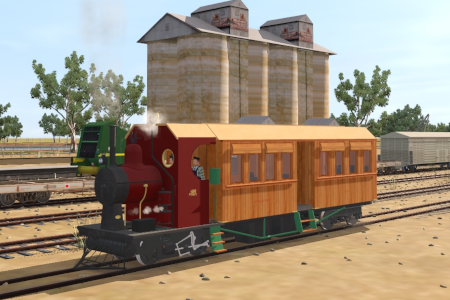
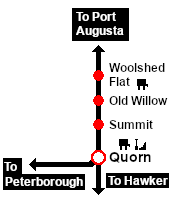
| A passenger excursion in the SAR SMC (Steam Motor Coach) on the Pichi Richi Railway from Quorn to Woolshed Flat, stopping at Summit. |  |
| The Historical Bit Affectionately known as the "Coffee Pot", SMC 1 consists of an engine unit and a passenger coach. The coach is attached to the loco by a pivot beneath the firebox and the loco cab floor is part of the coach frame. SMC 1 was one of only two units built. SMC 2 went to the SAR South Eastern Narrow Gauge Division. |
When, Where and With What
 |
|
| DLS Session Based on This Scenario
|
| Similar/Related Scenarios |
| 2 | Vintage East-West Express | 4 | Gladstone-Terowie Passenger Runs | 9 | Paratoo Mixed Passenger Freight |
| 16 | Gladstone-Wilmington Rail Motor | 17 | Peterborough-Quorn Passenger Runs | 28 | The Hawker Line Tour |
|
|
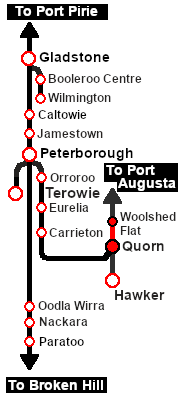
Each location in the layout has a detailed set of track diagrams that provide a variety of useful information The Getting Started guide below gives a summary of what is available.  graphic, or go to the bottom of the page for all the session links (all links will open in this window). |

Getting Started:
|


|
|
||||||||||||||||||||||||||||||||||||||||||||||||||||||||||||||||||||||||||||||||||||||||||||||||||||||||||||||||||||||||||||||








This page was created by Trainz user pware in May 2024 and was last updated as shown below.


