How to Control Junctions in Sessions: Difference between revisions
From TrainzOnline
Jump to navigationJump to search
mNo edit summary |
|||
| (57 intermediate revisions by the same user not shown) | |||
| Line 1: | Line 1: | ||
The | <table width=1000 bgcolor=#000000 cellpadding=2> | ||
<tr valign="top"> | |||
<td> | |||
<table width=996 bgcolor=#ffffff cellpadding=2> | |||
<tr valign="middle"> | |||
<td width=35>[[image:Information.png|35px|link=]]</td> | |||
<td><span style="font-size: 15px;">The information in this Wiki Page gives examples of how junctions can be controlled using '''Session Rules''' with '''TANE''', '''TRS19''', '''Trainz Plus''' and '''TRS22'''.</span></td> | |||
</tr> | |||
</table> | |||
</td> | |||
</tr> | |||
</table> | |||
<br> | |||
<table> | |||
<tr valign="top"> | |||
<td> | |||
__TOC__ | |||
</td> | |||
<td> | |||
<table bgcolor="lightcyan" cellpadding=2> | |||
<tr valign="top"> | |||
<td width=10>[[image:BlueDot10x10.png|link=]]</td> | |||
<td>Junctions can be controlled by Session Rules during the running of a Session</td> | |||
</tr> | |||
<tr valign="top"> | |||
<td>[[image:BlueDot10x10.png|link=]]</td> | |||
<td>The level of control includes:- | |||
<table> | |||
<tr valign="top"> | |||
<td with=10>[[image:BlackDot10x10.png|link=]]</td> | |||
<td>locking junctions (all or some) against user control</td> | |||
</tr> | |||
<tr valign="top"> | |||
<td>[[image:BlackDot10x10.png|link=]]</td> | |||
<td>setting junctions according to decisions made by users</td> | |||
</tr> | |||
<tr valign="top"> | |||
<td>[[image:BlackDot10x10.png|link=]]</td> | |||
<td>checking to see if users have set junctions correctly</td> | |||
</tr> | |||
</table> | |||
</td> | |||
</tr> | |||
</table> | |||
</td> | |||
</tr> | |||
</table> | |||
<br> | |||
The following applications give examples of using Session Rules to control junctions. | |||
<br> | |||
<table width=1000> <!-- BEGIN Nav Buttons Table NO SKIPS --> | |||
<tr valign="top"> | |||
<td width=629><span id="stepApp1"></span> | |||
='''Application 1: Presetting Junctions'''= | |||
</td> | |||
<td width=50> </td> <!-- Skip Down --> | |||
<td width=50> </td> <!-- Skip Up --> | |||
<td width=46>[[image:BackToTop.png|link=#top|alt=Top|Top]]</td> | |||
<td width=75> </td> | |||
<td width=75>[[file:NextDown.png|link=#stepApp2|alt=Next Down|Next Down]]</td> | |||
<td width=75>[[image:BackToBottom.png|link=#bottom|alt=Bottom|Bottom]]</td> | |||
</tr> | |||
</table> <!-- END Nav Buttons Table --> | |||
=== | <table width=1000 cellpadding=2 bgcolor=#ffffff> | ||
<tr valign="top"> | |||
<td width=60 rowspan=2>[[image:magnifier.png|link=]]</td> | |||
<td><span style="font-weight: 700; font-size: 17px;">The Scenario:</span></td> | |||
</tr> | |||
<tr valign="top"> | |||
<!-- <td> </td> --> | |||
<td>When a consist reaches a trigger, the junctions ahead are set and configured (e.g. locked/unlocked, AI control allowed/disallowed)</td> | |||
</tr> | |||
</table> | |||
<table width=1000 cellpadding=2 bgcolor=#ffffff> | |||
<tr valign="top"> | |||
<td width=60 rowspan=2>[[image:RulesWiki.PNG|link=]]</td> | |||
<td><span style="font-size: 17px;">'''Rules Used:'''</span></td> | |||
''' | </tr> | ||
<tr valign="top"> | |||
<!-- <td> </td> --> | |||
<td> | |||
<table> | <table> | ||
<tr> | <tr valign="top"> | ||
<td>[[ | <td width=25>[[image:DotPoint.JPG|10px|link=]]</td> | ||
<td>'''[[Session_Rule_List_with_Parameters#Trigger_Check_Rule|Trigger Check Rule]]''' to trigger the event</td> | |||
</tr> | |||
<tr valign="top"> | |||
<td>[[image:DotPoint.JPG|10px|link=]]</td> | |||
<td>'''[[Session_Rule_List_with_Parameters#Set_Junctions_Rule|Set Junctions Rule]]''' to set junctions</td> | |||
</tr> | |||
</table> | |||
</td> | |||
</tr> | </tr> | ||
</table> | </table> | ||
''' | <table width=1000 cellpadding=2 bgcolor=#ffffff> | ||
<tr valign="top"> | |||
<td width=60 rowspan=2>[[image:screenshot.PNG|link=]]</td> | |||
<td><span style="font-size: 17px;">'''Session Editor Screenshot:'''</span></td> | |||
</tr> | |||
<tr valign="top"> | |||
<!-- <td> </td> --> | |||
<td>[[file:SetJunctions.JPG|link=]]</td> | |||
</tr> | |||
</table> | |||
<table width=1000 cellpadding=2 bgcolor=#ffffff> | |||
<tr valign="top"> | |||
<td width=60 rowspan=2>[[image:explanation.PNG|link=]]</td> | |||
<td><span style="font-size: 17px;">'''Description:'''</span></td> | |||
</tr> | |||
<tr valign="top"> | |||
<!-- <td> </td> --> | |||
<td>'''Line''' <span style="font-weight: 700; font-size: 15px; color: white; background-color: black;"> 1 </span>''': Trigger Check''' The event is '''triggered''' when the consist reaches a trigger. This executes the following rule:- | |||
<table> | <table> | ||
<tr> | <tr valign="top"> | ||
<td>[[file:SetJunctionsList.JPG]]</td> | <td> | ||
:'''Line''' <span style="font-weight: 700; font-size: 15px; color: white; background-color: black;"> 2 </span>''': Set Junctions''' Sets selected junctions to set directions and specifies the level of control by the users and AI</td> | |||
</tr> | |||
</table> | |||
For example:-<br> | |||
[[file:SetJunctionsList.JPG|link=]]</td> | |||
</tr> | </tr> | ||
</table> | </table> | ||
<br> | |||
<table width=1000> <!-- BEGIN Nav Buttons Table NO SKIPS --> | |||
<tr valign="top"> | |||
<td width=629><span id="stepApp2"></span> | |||
='''Application 2: Asking the User to Set Junctions'''= | |||
</td> | |||
<td width=50> </td> <!-- Skip Down --> | |||
<td width=50> </td> <!-- Skip Up --> | |||
<td width=46>[[file:BackToTop.png|link=#top|alt=Top|Top]]</td> | |||
<td width=75>[[file:NextUp.png|link=#stepApp1|alt=Next Up|Top]]</td> | |||
<td width=75> </td> | |||
<td width=75>[[file:BackToBottom.png|link=#bottom|alt=Bottom|Bottom]]</td> | |||
</tr> | |||
</table> <!-- END Nav Buttons Table --> | |||
=== | <table width=1000 cellpadding=2 bgcolor=#ffffff> | ||
<tr valign="top"> | |||
<td width=60 rowspan=2>[[image:magnifier.png|link=]]</td> | |||
<td><span style="font-weight: 700; font-size: 17px;">The Scenario:</span></td> | |||
</tr> | |||
<tr valign="top"> | |||
<!-- <td> </td> --> | |||
<td>A consist has been halted at a trigger placed in front of a junction. The user will be asked to set that junction and the following junction before the consist can proceed</td> | |||
</tr> | |||
</table> | |||
''' | <table width=1000 cellpadding=2 bgcolor=#ffffff> | ||
<tr valign="top"> | |||
<td width=60 rowspan=2>[[image:conditions.PNG|link=]]</td> | |||
<td colspan=2><span style="font-size: 17px;">'''Preconditions:'''</span></td> | |||
</tr> | |||
<tr valign="top"> | |||
<!-- <td> </td> --> | |||
<td>[[image:DotPoint.JPG|10px|link=]]</td> | |||
<td>'''[[Session_Rule_List_with_Parameters#Navigation_Display_Rule|Navigation Display Rule]]''' to create a navigation point set</td> | |||
</tr> | |||
</table> | |||
<table width=1000 cellpadding=2 bgcolor=#ffffff> | |||
<tr valign="top"> | |||
<td width=60 rowspan=2>[[image:RulesWiki.PNG|link=]]</td> | |||
<td><span style="font-size: 17px;">'''Rules Used:'''</span></td> | |||
</tr> | |||
<tr valign="top"> | |||
<!-- <td> </td> --> | |||
<td> | |||
<table> | <table> | ||
<tr> | <tr valign="top"> | ||
<td>[[ | <td width=10>[[image:DotPoint.JPG|10px|link=]]</td> | ||
<td>'''[[Session_Rule_List_with_Parameters#Navigation_Display_Rule|Navigation Display Rule]]''' to create a navigation point set (in '''Preconditions''' above)</td> | |||
</tr> | |||
<tr valign="top"> | |||
<td>[[image:DotPoint.JPG|10px|link=]]</td> | |||
<td>'''[[Session_Rule_List_with_Parameters#Wait_on_Navigation_Point_Rule|Wait on Navigation Point Rule]]''' to trigger the event</td> | |||
</tr> | |||
<tr valign="top"> | |||
<td>[[image:DotPoint.JPG|10px|link=]]</td> | |||
<td>'''[[Session_Rule_List_with_Parameters#Message_Popup_Rule|Message Popup Rule]]''' to open a message window on the screen</td> | |||
</tr> | |||
<tr valign="top"> | |||
<td>[[image:DotPoint.JPG|10px|link=]]</td> | |||
<td>'''[[Session_Rule_List_with_Parameters#Multiple_Junction_Alignment_Check_Rule|Multiple Junction Alignment Check Rule]]''' to test if specified junctions are set correctly</td> | |||
</tr> | |||
</table> | |||
</td> | |||
</tr> | </tr> | ||
</table> | </table> | ||
''' | <table width=1000 cellpadding=2 bgcolor=#ffffff> | ||
<tr valign="top"> | |||
<td width=60 rowspan=2>[[image:screenshot.PNG|link=]]</td> | |||
<td><span style="font-size: 17px;">'''Session Editor Screenshot:'''</span></td> | |||
</tr> | |||
<tr valign="top"> | |||
<!-- <td> </td> --> | |||
<td>[[file:TestJunctions.JPG|link=]]</td> | |||
</tr> | |||
</table> | |||
<br> | |||
<table width=1000 cellpadding=2 bgcolor=#ffffff> | |||
<tr valign="top"> | |||
<td width=60 rowspan=2>[[image:explanation.PNG|link=]]</td> | |||
<td><span style="font-size: 17px;">'''Description:'''</span></td> | |||
</tr> | |||
<tr valign="top"> | |||
<!-- <td> </td> --> | |||
<td>'''Line''' <span style="font-weight: 700; font-size: 15px; color: white; background-color: black;"> 1 </span>''': Wait on Navigation Point''' The event is triggered when the consist halts at the navigation point assigned to the trigger. This executes the following rules simultaneously:- | |||
<table> | <table> | ||
<tr valign="top"> | |||
<td> | |||
:'''Line''' <span style="font-weight: 700; font-size: 15px; color: white; background-color: black;"> 2 </span>''': Message Popup''' Displays a message window asking that the next two junctions be manually set</td> | |||
</tr> | |||
<tr valign="top"> | |||
<td> | |||
:'''Line''' <span style="font-weight: 700; font-size: 15px; color: white; background-color: black;"> 3 </span>''': Multiple Junction Alignment Check''' tests the switch directions of the next two junctions and waits until they are aligned as specified<br> | |||
[[file:JunctionSettings.JPG|link=]]</td> | |||
</tr> | |||
<tr> | <tr> | ||
<td> | <td>The following line is executed only if the junctions are set correctly<br> | ||
::'''Line''' <span style="font-weight: 700; font-size: 15px; color: white; background-color: black;"> 4 </span>''': Message Popup''' Displays a message window stating that the junctions are now correctly set</td> | |||
</tr> | |||
</table> | |||
</td> | |||
</tr> | </tr> | ||
<tr> | </table> | ||
<td> | <br> | ||
<table> <!-- BEGIN Nav Buttons Table --> | |||
<tr valign="top"> | |||
<td width=729><span id="bottom"></span> </td> | |||
<td width=46>[[file:BackToTop.png|link=#top|alt=Top|Top]]</td> | |||
<td width=75>[[file:NextUp.png|link=#stepApp2|alt=Next Up|Top]]</td> | |||
<td width=75> </td> | |||
<td width=75> </td> | |||
</tr> | |||
</table> <!-- END Nav Buttons Table --> | |||
---- | |||
---- | |||
='''Trainz Wiki'''= | |||
<table width=1000> | |||
<tr valign="top"> | |||
<td> | |||
<table width=500 cellpadding=2 bgcolor=#ffffff> | |||
<tr valign="top"> | |||
<td width=80>[[image:TrainzWiki.png|link=]]</td> | |||
<td> | |||
<span style="font-size: 17px;">'''More Tutorials and Guides to Using Trainz'''</span><br> | |||
*'''<span class="plainlinks">[http://online.ts2009.com/mediaWiki/index.php/HowTo How to Guides]</span>''' | |||
*'''[[Driver Commands List]]''' | |||
*'''[[Session Rule List with Parameters|Session Rules List (Alphabetical) with Parameters]]''' | |||
*'''[[Session Rules By Categories With Properties|Session Rules List (Categories) With Parameters]]''' | |||
</td> | |||
</tr> | |||
</table> | |||
</td> | |||
<td> | |||
<table width=500 cellpadding=4 bgcolor="aquamarine"> | |||
<tr valign="top"> | |||
<td width=50>[[image:LinkWiki.PNG|link=]]</td> | |||
<td> | |||
<span style="font-size: 17px;">'''Related Links'''</span><br> | |||
*'''[[How to Control Signals in Sessions|How to Control Signals in Sessions]]''' | |||
</td> | |||
</tr> | |||
</table> | |||
</td> | |||
</tr> | </tr> | ||
</table> | </table> | ||
---- | |||
This page was created by Trainz user '''<span class="plainlinks">[http://online.ts2009.com/mediaWiki/index.php/User:Pware pware]</span>''' in May 2018 and was last updated as shown below. | |||
---- | |||
[[Category:How-to guides]] | |||
Latest revision as of 12:22, 5 July 2026
|
|


The following applications give examples of using Session Rules to control junctions.
Application 1: Presetting Junctions |
 |
 |
 |
 |
The Scenario: |
| When a consist reaches a trigger, the junctions ahead are set and configured (e.g. locked/unlocked, AI control allowed/disallowed) |
 |
Session Editor Screenshot: |
 |
 |
Description: |
Line 1 : Trigger Check The event is triggered when the consist reaches a trigger. This executes the following rule:-
For example:- 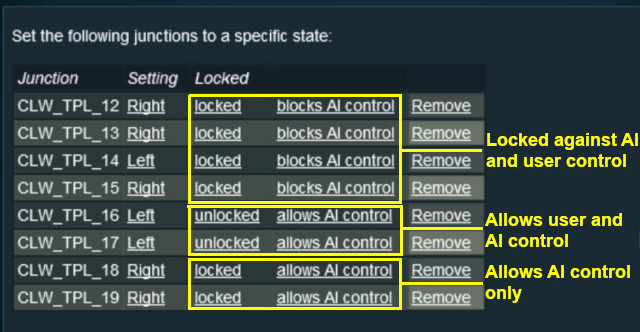 |
Application 2: Asking the User to Set Junctions |
|
 |
|
|
The Scenario: |
| A consist has been halted at a trigger placed in front of a junction. The user will be asked to set that junction and the following junction before the consist can proceed |
 |
Preconditions: | |
| Error creating thumbnail: /bin/bash: line 1: /usr/bin/convert: No such file or directory Error code: 127 | Navigation Display Rule to create a navigation point set | |
 |
Rules Used: | |||||||
|
|
Session Editor Screenshot: |
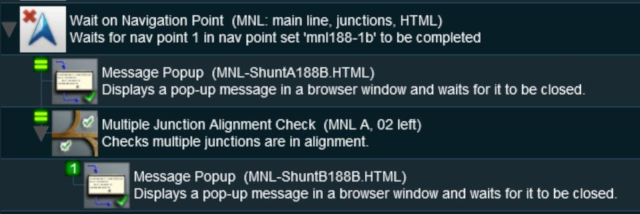 |
|
Description: | ||
Line 1 : Wait on Navigation Point The event is triggered when the consist halts at the navigation point assigned to the trigger. This executes the following rules simultaneously:-
|
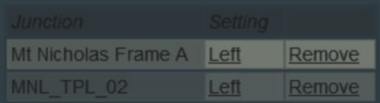
|
|
Trainz Wiki
|
|


This page was created by Trainz user pware in May 2018 and was last updated as shown below.


