How to Use Procedural Track: Difference between revisions
From TrainzOnline
Jump to navigationJump to search
mNo edit summary |
mNo edit summary |
||
| (12 intermediate revisions by the same user not shown) | |||
| Line 1: | Line 1: | ||
The information in this Wiki Page applies to '''TANE''', '''TRS19''', '''Trainz Plus''' and '''TRS22'''. This guide | <table width=1000 bgcolor=#000000 cellpadding=2> | ||
<tr valign="top"> | |||
<td> | |||
<table width=996 bgcolor=#ffffff cellpadding=2> | |||
<tr valign="middle"> | |||
<td width=35>[[image:Information.png|35px|link=]]</td> | |||
<td><span style="font-size: 15px;">The information in this Wiki Page covers the use of procedural track in '''Surveyor''' ('''Classic''' and '''Surveyor 2.0''') and applies to '''TANE''', '''TRS19''', '''Trainz Plus''' and '''TRS22'''. This guide does not show how to create procedural track assets. For information on creating procedural track assets see the '''Trainz Wiki Links''' at the bottom of this page.</span></td> | |||
</tr> | |||
</table> | |||
</td> | |||
</tr> | |||
</table> | |||
<br> | |||
<table> | |||
<tr valign="top"> | |||
<td> | |||
__TOC__ | __TOC__ | ||
</td> | |||
<td> | |||
<table width=700 bgcolor="lightcyan" cellpadding=2> | |||
<tr valign="top"> | |||
<td colspan=2><span style="font-size: 17px; font-weight: 700;">In Summary:</span></td> | |||
</tr> | |||
<tr valign="top"> | |||
<td width=10>[[image:BlueDot10x10.png|link=]]</td> | |||
<td>'''Procedural tracks are specific track splines that have been created for use with Trainz versions from T:ANE onwards'''</td> | |||
</tr> | |||
<tr valign="top"> | |||
<td width=10>[[image:BlueDot10x10.png|link=]]</td> | |||
<td>'''Procedural tracks provide animated switch points plus check rails and frogs at track junctions'''</td> | |||
</tr> | |||
</table> | |||
</td> | |||
</tr> | |||
</table> | |||
<br> | |||
<table> <!-- BEGIN Nav Buttons Table --> | <table> <!-- BEGIN Nav Buttons Table --> | ||
<tr valign="top"> | <tr valign="top"> | ||
| Line 13: | Line 46: | ||
='''What is Procedural Track?'''= | ='''What is Procedural Track?'''= | ||
<table | |||
<table width=1000> | |||
<tr valign="top"> | <tr valign="top"> | ||
<td> | <td> | ||
Procedural track works just like the standard (or "non-procedural") track that was the only type available before '''T:ANE'''. However, it provides additional cosmetic features (animated blades plus frogs and check rails) to junctions. These features are built into the track asset and do not have to be manually added when laying track.</td> | |||
</tr> | </tr> | ||
</table> | </table> | ||
<br> | <br> | ||
<table> | <table> | ||
<tr valign="top"> | <tr valign="top"> | ||
<td align="center" bgcolor="lightcyan"><span style="font-weight: 700; font-size: 17px;">Procedural Track</span><br> | <td align="center" bgcolor="lightcyan"> | ||
<span style="font-weight: 700; font-size: 17px;">Procedural Track</span><br> | |||
[[image:Procedural-LeftPath.png|link=]][[image:Procedural-RightPath.png|link=]] | [[image:Procedural-LeftPath.png|link=]][[image:Procedural-RightPath.png|link=]] | ||
</td> | </td> | ||
| Line 46: | Line 79: | ||
<td> </td> | <td> </td> | ||
<td>[[image:Procedural-CheckPauseOFF.png|link=]]</td> | <td>[[image:Procedural-CheckPauseOFF.png|link=]]</td> | ||
<td> | <td> | ||
<table bgcolor=#fcbcbc> | <table bgcolor=#fcbcbc> | ||
| Line 56: | Line 86: | ||
<tr valign="top"> | <tr valign="top"> | ||
<td>[[image:Stop.PNG|link=]]</td> | <td>[[image:Stop.PNG|link=]]</td> | ||
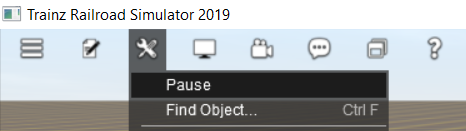
<td>If you turn pause '''OFF''' after using the '''UDS''' (available in '''TRS19 Platinum Edition''' and later versions) to switch from '''Driver''' to '''Surveyor''' then any consists that were moving in '''Driver''' will immediately start moving in '''Surveyor''' which can result in collisions and derailments | <td>If you turn pause '''OFF''' after using the '''UDS''' (available in '''TRS19 Platinum Edition''' and later '''Trainz''' versions) to switch from '''Driver''' to '''Surveyor''' then any consists that were moving in '''Driver''' will immediately start moving in '''Surveyor''' which can result in collisions and derailments | ||
</td> | </td> | ||
</tr> | </tr> | ||
| Line 91: | Line 118: | ||
='''Identifying Procedural Track'''= | ='''Identifying Procedural Track'''= | ||
There is no specific content category, such as "Track, procedural", that can be used to distinguish between procedural and non-procedural track assets. Like many assets it relies on the name given to the asset by the content creator. Most creators seem to have included the characters '''PRO''' in the track name - for example "Protrack", "Procedural" or just "Pro". This can be used to narrow down the search in '''CM'''. A typical '''CM''' custom filter that would | <table width=1000> | ||
<tr valign="top"> | |||
<td> | |||
There is no specific content category, such as "Track, procedural", that can be used to distinguish between procedural and non-procedural track assets. Like many assets it relies on the name given to the asset by the content creator. Most creators seem to have included the characters '''PRO''' in the track name - for example "Protrack", "Procedural" or just "Pro". This can be used to narrow down the search in '''CM'''. A typical '''CM''' custom filter that would have a good chance of identifying most procedural track assets is shown below.</td> | |||
</tr> | |||
</table> | |||
[[image:Procedural-CMFilter.png|link=]] | <table width=1000> | ||
<tr> | |||
<td>[[image:Procedural-CMFilter.png|link=]]</td> | |||
<td> | |||
<table bgcolor=#000000> | |||
<tr valign="top"> | |||
<td> | |||
<table bgcolor=#ffffe0> | |||
<tr valign="top"> | |||
<td>[[image:PencilTips.PNG|link=]]</td> | |||
<td>All procedural track assets have a '''minimum build version''' of '''4.2''' - but this <span style="font-weight: 700; font-size: 15px;">does not</span> mean that any track with this build number (or above) will be procedural.</td> | |||
</tr> | |||
</table> | |||
</td> | |||
</tr> | |||
</table> | |||
</td> | |||
</tr> | |||
</table> | |||
='''Laying Procedural Track'''= | ='''Laying Procedural Track'''= | ||
<table | <table width=1000 bgcolor="lightcyan" cellpadding=2> | ||
<tr valign="top"> | <tr valign="top"> | ||
<td>[[ | <td width=10>[[image:BlueDot10x10.png|link=]]</td> | ||
<td>'''The "fall-back" position for procedural track is to act and look like ordinary (non-procedural) track'''</td> | <td>'''The "fall-back" position for procedural track is to act and look like ordinary (non-procedural) track'''</td> | ||
</tr> | </tr> | ||
</table> | </table> | ||
<br> | |||
<table width=1000> | |||
<tr valign="top"> | |||
<td>Procedural tracks are laid down in '''Surveyor''' just like any other track. Track junctions are formed in the same way as they are when using non-procedural tracks. The difference is that the additional features (animated switch blades, frogs and check rails) are automatically added when a track junction is '''correctly''' formed using procedural tracks. | |||
<span style="background-color: #ffffb0; font-weight: 700;"> Faulty (incorrectly formed) procedural track junctions will work perfectly well as ''non-procedural'' junctions </span> - they can be switched left and right, and trains will pass over them correctly. But the special features that they have will not appear.</td> | |||
</tr> | |||
<span style="background-color: #ffffb0; font-weight: 700;"> Faulty (incorrectly formed) procedural track junctions will work perfectly well as ''non-procedural'' junctions </span> - they can be switched left and right, and trains will pass over them correctly. But the special features that they have will not appear. | </table> | ||
<table | <table width=1000 bgcolor="lightcyan" cellpadding=2> | ||
<tr valign="top"> | <tr valign="top"> | ||
<td>[[ | <td width=10>[[image:BlueDot10x10.png|link=]]</td> | ||
<td>A '''red track spline circle''' in '''Surveyor | <td>A '''red track spline circle''' or a '''red spline endpoint dot''' in '''Surveyor''' indicates that the procedural track junction is faulty</td> | ||
</tr> | </tr> | ||
</table> | </table> | ||
<br> | <br> | ||
<table width=1000> | |||
<tr valign="top"> | |||
<td colspan=2 align="center" bgcolor=#0000ff><span style="font-weight: 700; font-size: 15px; color: white;">Surveyor Classic</span></td> | |||
</tr> | |||
</table> | |||
<table width=1000 bgcolor=#000000 cellpadding=2> | |||
<tr valign="top"> | |||
<td> | |||
<table width=996 bgcolor=#ffffff cellpadding=2> | |||
<tr valign="top"> | |||
<td width=300>[[image:Procedural-ErrorRedSpline.png|link=]]</td> | |||
<td>Faulty procedural track junctions are indicted in '''Surveyor Classic''' (shown on the left) by:- | |||
<table> | <table> | ||
<tr valign="top"> | <tr valign="top"> | ||
<td>[[image: | <td width=10>[[image:DotPoint.JPG|10px|link=]]</td> | ||
<td> | <td>solid red track spline circles, or</td> | ||
</tr> | |||
<tr valign="top"> | |||
<td>[[image:DotPoint.JPG|10px|link=]]</td> | |||
<td>flashing red/white or red/yellow track spline circles</td> | |||
</tr> | |||
<tr valign="top"> | |||
<td colspan=2>Another indicator is the absence of the moveable switch blade and the check rails/frogs in the junction.</td> | |||
</tr> | |||
</table> | |||
</td> | |||
</tr> | |||
</table> | |||
</td> | </td> | ||
</tr> | </tr> | ||
</table> | </table> | ||
<br> | <br> | ||
<table | <table width=1000> | ||
<tr valign="top"> | <tr valign="top"> | ||
<td | <td colspan=4 align="center" bgcolor=#0000ff><span style="font-weight: 700; font-size: 15px; color: white;">Surveyor 2.0</span></td> | ||
< | |||
</tr> | </tr> | ||
<tr valign="top"> | <tr valign="top"> | ||
<td>[[ | <td> | ||
<table width=304 bgcolor=#000000 cellpadding=2> | |||
<tr valign="top"> | |||
<td> | |||
<table width=300 bgcolor=#ffffff cellpadding=2> | |||
<tr valign="top"> | |||
<td>[[image:Procedural-S20-Normal.png|link=]]<br> | |||
A normal procedural track junction in '''Surveyor 2.0''' is shown as a '''black''' track spline point</td> | |||
</tr> | |||
</table> | |||
</td> | |||
</tr> | </tr> | ||
</table> | </table> | ||
<br> | </td> | ||
<table width= | <td width=5> </td> | ||
<td> | |||
<table width=304 bgcolor=#000000 cellpadding=2> | |||
<tr valign="top"> | |||
<td> | |||
<table width=300 bgcolor=#ffffff cellpadding=2> | |||
<tr valign="top"> | |||
<td>[[image:Procedural-S20-NotNormal.png|link=]]<br> | |||
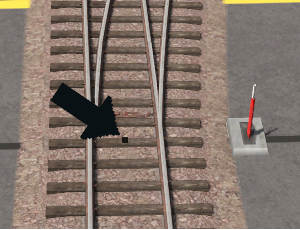
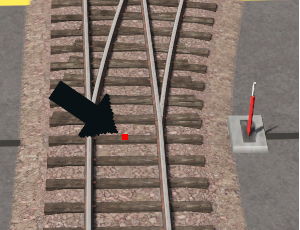
A faulty procedural track junction in '''Surveyor 2.0''' is shown as a <span style="color: red; font-weight: 700;">red</span> track spline point</td> | |||
</tr> | |||
</table> | |||
</td> | |||
</tr> | |||
</table> | |||
</td> | |||
<td> | |||
<table> | |||
<tr valign="top"> | |||
<td colspan=2>Faulty procedural track junctions are indicted in '''Surveyor 2.0''' (shown left and in '''Trainz Plus''' and '''TRS22 Platinum''' only) by:-</td> | |||
</tr> | |||
<tr valign="top"> | |||
<td width=10>[[image:DotPoint.JPG|10px|link=]]</td> | |||
<td>a red spline endpoint dot</td> | |||
</tr> | |||
<tr valign="top"> | <tr valign="top"> | ||
<td | <td colspan=2>Another indicator is the absence of the moveable switch blade and the check rails/frogs in the junction.</td> | ||
</tr> | |||
</table> | |||
</td> | |||
</tr> | </tr> | ||
</table> | </table> | ||
<br> | <br> | ||
<table> <!-- BEGIN Nav Buttons Table --> | <table> <!-- BEGIN Nav Buttons Table --> | ||
<tr valign="top"> | <tr valign="top"> | ||
| Line 160: | Line 265: | ||
='''Procedural Track Errors'''= | ='''Procedural Track Errors'''= | ||
Some of the most common causes of '''red track | <table width=1000> | ||
<tr valign="top"> | |||
<td> | |||
Some of the most common causes of '''red track spline circles''' (in Surveyor Classic) and '''red spline endpoint dots''' (in Surveyor 2.0) are listed below. <span style="background-color: #ffffb0; font-weight: 700;"> Remember, the presence of procedural track errors will not stop track junctions from working correctly as normal (''non procedural'') track junctions. </span></td> | |||
</tr> | |||
</table> | |||
<table width=800> | <table width=800> | ||
| Line 172: | Line 282: | ||
'''Solution:''' | '''Solution:''' | ||
<table> | |||
<tr valign="top"> | |||
<td width=10>[[image:DotPoint.JPG|10px|link=]]</td> | |||
<td>ignore, or</td> | |||
</tr> | |||
<tr valign="top"> | |||
<td>[[image:DotPoint.JPG|10px|link=]]</td> | |||
<td>if possible replace the non procedural track with a procedural track</td> | |||
</tr> | |||
</table> | |||
</td> | </td> | ||
</tr> | </tr> | ||
| Line 185: | Line 303: | ||
'''Solution:''' | '''Solution:''' | ||
<table> | |||
<tr valign="top"> | |||
<td width=10>[[image:DotPoint.JPG|10px|link=]]</td> | |||
<td>Increase the curve radius</td> | |||
</tr> | |||
</table> | |||
</td> | </td> | ||
</tr> | </tr> | ||
| Line 197: | Line 321: | ||
'''Solution:''' | '''Solution:''' | ||
<table> | |||
<tr valign="top"> | |||
<td width=10>[[image:DotPoint.JPG|10px|link=]]</td> | |||
<td>adjust the spline heights to create a level junction</td> | |||
</tr> | |||
</table> | |||
<br> | <br> | ||
<table bgcolor=#000000 width=450> | <table bgcolor=#000000 width=450> | ||
| Line 223: | Line 352: | ||
'''Solution:''' | '''Solution:''' | ||
<table> | |||
<tr valign="top"> | |||
<td width=10>[[image:DotPoint.JPG|10px|link=]]</td> | |||
<td>ignore, or</td> | |||
</tr> | |||
<tr valign="top"> | |||
<td>[[image:DotPoint.JPG|10px|link=]]</td> | |||
<td>adjust the placement of the second junction to allow the frogs/check rails to be added to the first junction</td> | |||
</tr> | |||
</table> | |||
<br> | <br> | ||
<table bgcolor=#000000 width=450> | <table bgcolor=#000000 width=450> | ||
| Line 260: | Line 397: | ||
<td> | <td> | ||
<span style="font-size: 17px; font-weight: 700;">More Tutorials and Guides to Using Trainz</span><br> | <span style="font-size: 17px; font-weight: 700;">More Tutorials and Guides to Using Trainz</span><br> | ||
*'''<span class=" | *'''<span class="plain;">[http://online.ts2009.com/mediaWiki/index.php/HowTo How to Guides]</span>''' | ||
*'''[[Driver Commands List]]''' | *'''[[Driver Commands List]]''' | ||
*'''[[Session Rule List with Parameters|Session Rules List (Alphabetical) with Parameters]]''' | *'''[[Session Rule List with Parameters|Session Rules List (Alphabetical) with Parameters]]''' | ||
| Line 276: | Line 413: | ||
</table> | </table> | ||
---- | ---- | ||
This page was created by Trainz user '''<span class=" | This page was created by Trainz user '''<span class="plain;">[http://online.ts2009.com/mediaWiki/index.php/User:Pware pware]</span>''' in June 2021 and was last updated as shown below. | ||
---- | ---- | ||
[[Category:How-to guides]] | [[Category:How-to guides]] | ||
Latest revision as of 00:08, 26 July 2026
|
|
|||||||
 |
 |
What is Procedural Track?
| Procedural track works just like the standard (or "non-procedural") track that was the only type available before T:ANE. However, it provides additional cosmetic features (animated blades plus frogs and check rails) to junctions. These features are built into the track asset and do not have to be manually added when laying track. |
|
Procedural Track |
Non Procedural Track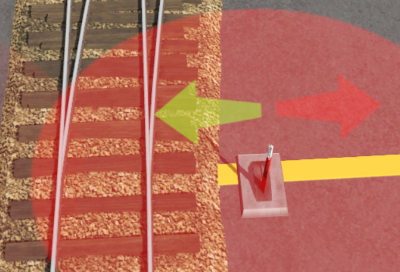 |
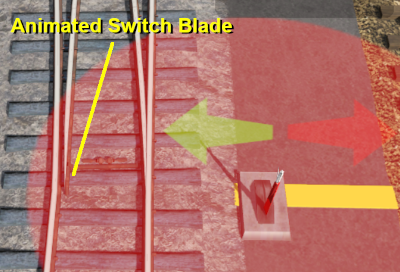
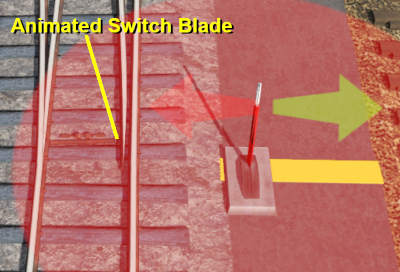
|
||||||||||


Procedural Track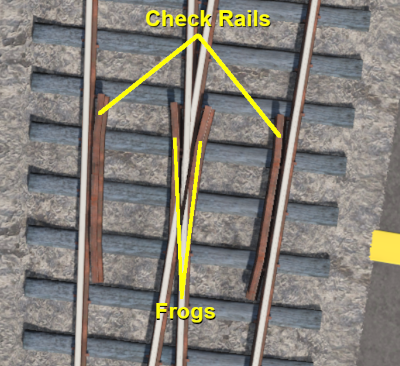 |
Non Procedural Track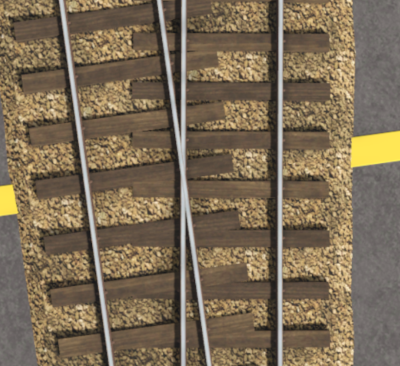 |
 |
 |
|
|
Identifying Procedural Track
| There is no specific content category, such as "Track, procedural", that can be used to distinguish between procedural and non-procedural track assets. Like many assets it relies on the name given to the asset by the content creator. Most creators seem to have included the characters PRO in the track name - for example "Protrack", "Procedural" or just "Pro". This can be used to narrow down the search in CM. A typical CM custom filter that would have a good chance of identifying most procedural track assets is shown below. |
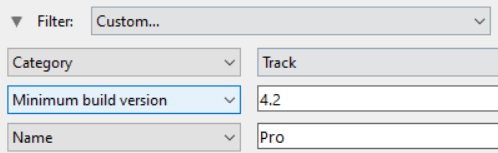 |
|

Laying Procedural Track
 |
The "fall-back" position for procedural track is to act and look like ordinary (non-procedural) track |
| Procedural tracks are laid down in Surveyor just like any other track. Track junctions are formed in the same way as they are when using non-procedural tracks. The difference is that the additional features (animated switch blades, frogs and check rails) are automatically added when a track junction is correctly formed using procedural tracks. Faulty (incorrectly formed) procedural track junctions will work perfectly well as non-procedural junctions - they can be switched left and right, and trains will pass over them correctly. But the special features that they have will not appear. |
|
A red track spline circle or a red spline endpoint dot in Surveyor indicates that the procedural track junction is faulty |
| Surveyor Classic |
|
||||||||
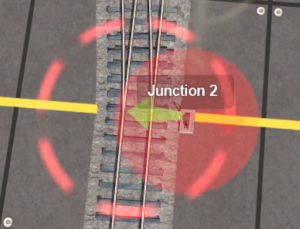
| Surveyor 2.0 | |||||||||||||
|
|
|
|||||||||||
|
|
|
|
Procedural Track Errors
| Some of the most common causes of red track spline circles (in Surveyor Classic) and red spline endpoint dots (in Surveyor 2.0) are listed below. Remember, the presence of procedural track errors will not stop track junctions from working correctly as normal (non procedural) track junctions. |
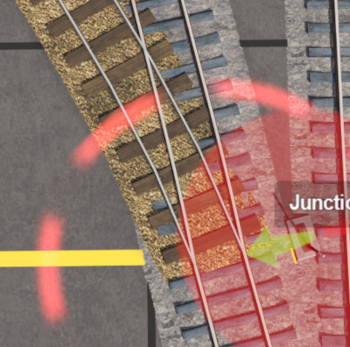
| Incompatible Tracks | ||||||||
 |
Fault:
One of the tracks used to form the junction is not a procedural track Solution:
|
|||||||
| Curve Too Tight | ||||||||
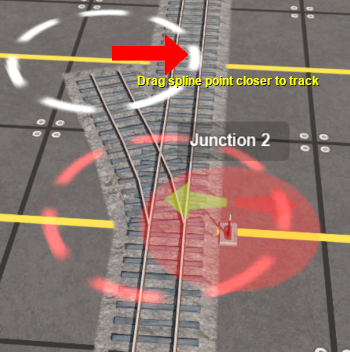 |
Fault:
One of the diverging tracks has a curve radius that is too tight Solution:
|
|||||||
| Track Splines Not Level | ||||||||
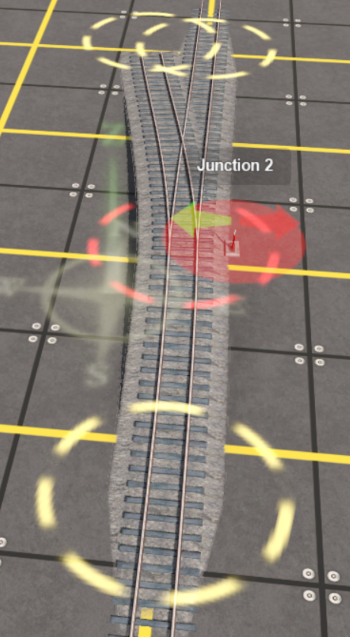 |
Fault:
The spline circles that define the junction are not at the same height Solution:
|
|||||||
| Junctions Too Close | ||||||||
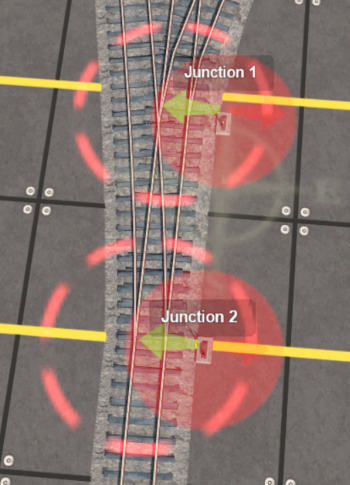 |
Fault:
A second junction has been added that is too close to the first and there is not enough room for the frogs/check rails to be added to the first junction Solution:
|
|||||||
|
|
Trainz Wiki
 |
More Tutorials and Guides to Using Trainz |
|
Related Content Creation Guides |
This page was created by Trainz user pware in June 2021 and was last updated as shown below.


