Using Content Manager to Update Assets: Difference between revisions
mNo edit summary |
mNo edit summary |
||
| Line 79: | Line 79: | ||
<table cellpadding=2> | <table cellpadding=2> | ||
<tr valign="top"> | <tr valign="top"> | ||
<td colspan=2><span style="font-weight: 700; font-size: 17px;">Steps:</span></td> | <td colspan=2><span style="font-weight: 700; font-size: 17px;">Steps: To Create an "Updates Available" Filter:-</span></td> | ||
</tr> | </tr> | ||
<tr valign="top"> | <tr valign="top"> | ||
| Line 252: | Line 252: | ||
<table width=996 bgcolor=#ffffff cellpadding=2> | <table width=996 bgcolor=#ffffff cellpadding=2> | ||
<tr valign="top"> | <tr valign="top"> | ||
<td colspan=2><span style="font-weight: 700; font-size: 17px;">Steps: | <td colspan=2><span style="font-weight: 700; font-size: 17px;">Steps: To Download and Install all the Updated Assets:-</span></td> | ||
</tr> | </tr> | ||
<tr valign="top"> | <tr valign="top"> | ||
| Line 345: | Line 345: | ||
<table width=1000 cellpadding=2> | <table width=1000 cellpadding=2> | ||
<tr valign="top"> | <tr valign="top"> | ||
<td colspan=2><span style="font-weight: 700; font-size: 17px;">Steps:</span></td> | <td colspan=2><span style="font-weight: 700; font-size: 17px;">Steps: Updating Non-DLS Assets:-</span></td> | ||
</tr> | </tr> | ||
<tr valign="top"> | <tr valign="top"> | ||
Latest revision as of 04:34, 2 September 2026
|
|
 |
 |
 |
Set Up An Update Filter
|

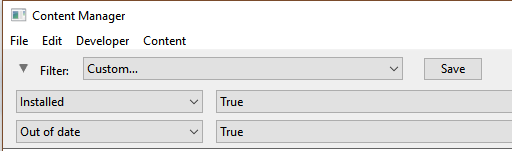
| Steps: To Create an "Updates Available" Filter:- | |||||||||
 |
Open a Content Manager Filter:
|
||||||||
 |
Configure:
|
||||||||
 |
... and Configure:
|
||||||||
 |
Save:
|
||||||||
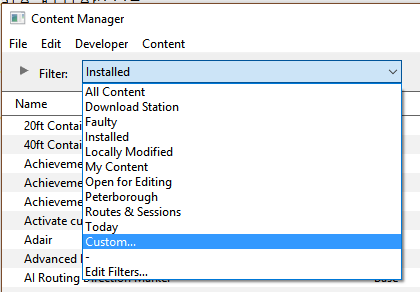


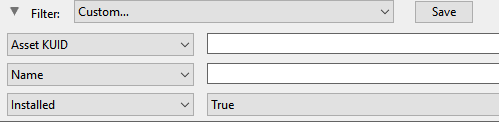
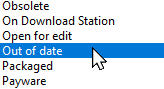
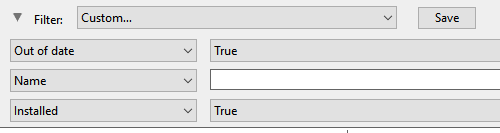


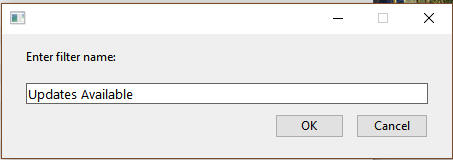
You can now select and run this filter whenever you want to check for and install any asset updates.
|
 |
|
|
Updating Assets "Installed From DLS"
| If you run your new filter and see one or more updated assets available for download that were "Installed from DLS", then the process is very simple. |
|

 |
|
|
||||||||
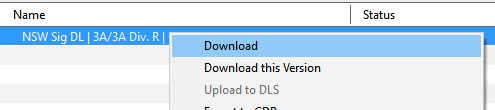
 |
More information on the Status labels used in Content Manager can be found on the Trainz Wiki Page at:- |
|
|
|
|
Updating Built in, Base, Packaged and Payware Assets
 |
Assets that are Built-in, Base, Packaged or Installed, Payware will require a few extra steps to be updated |
|
||||||||||
The method shown above ( Updating Assets "Installed from DLS") will not work for assets that are Built-in, Base, Packaged or Installed, Payware. If Content Manager lists updates for these types of assets as available for download then the process involves a few extra steps.
|
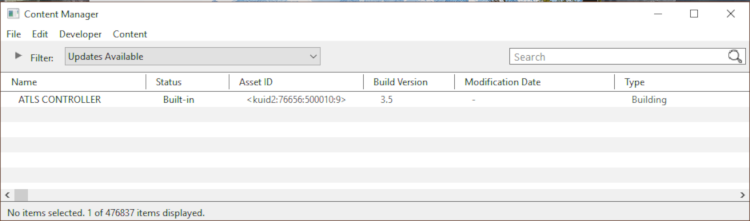
| Steps: Updating Non-DLS Assets:- | |||||||||||||||||
|
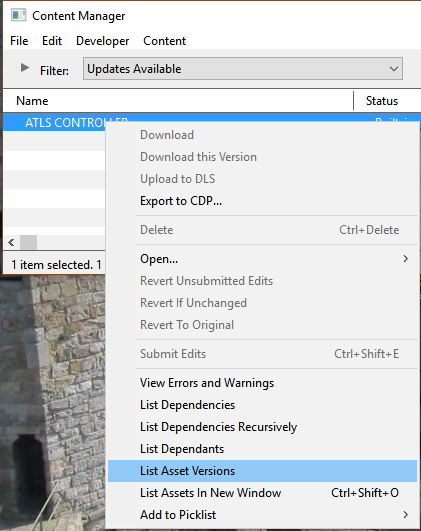
Select the Built-in, Base, Packaged and Payware Assets to Update:
|
||||||||||||||||
|
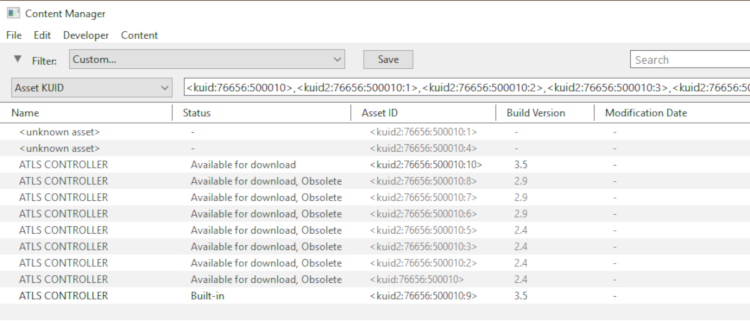
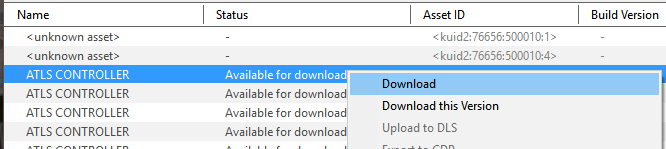
Select Assets to Update:
|
||||||||||||||||


|
|
|
Updating a Mixture of Assets
| If Content Manager shows a mixture of Installed from DLS, Built-in, Base and Installed, Payware assets to be updated, then use the method described above for updating all the assets. | ||||||
Steps:
|
||||||
|
|
Trainz Wiki
 |
More Tutorials and Guides to Using Trainz |
This page was created by Trainz user pware in Februrary 2019 and was last updated as shown below.


