How to Control Signals in Sessions: Difference between revisions
From TrainzOnline
Jump to navigationJump to search
mNo edit summary |
|||
| (One intermediate revision by the same user not shown) | |||
| Line 1: | Line 1: | ||
The information in this Wiki Page | <table width=1000 bgcolor=#000000 cellpadding=2> | ||
<tr valign="top"> | |||
<td> | |||
<table width=996 bgcolor=#ffffff cellpadding=2> | |||
<tr valign="middle"> | |||
<td width=35>[[image:Information.png|35px|link=]]</td> | |||
<td><span style="font-size: 15px;">The information in this Wiki Page gives examples of how signals can be controlled using '''Session Rules''' with '''TANE''', '''TRS19''', '''Trainz Plus''' and '''TRS22'''.</span></td> | |||
</tr> | |||
</table> | |||
</td> | |||
</tr> | |||
</table> | |||
<br> | |||
<table> | <table> | ||
<tr valign="top"> | <tr valign="top"> | ||
| Line 120: | Line 132: | ||
<table bgcolor=#ffffff cellpadding=2> | <table bgcolor=#ffffff cellpadding=2> | ||
<tr valign="top"> | <tr valign="top"> | ||
<td colspan=2><span style="font-weight: 700; font-size: 15px;">Steps:</span> | <td colspan=2><span style="font-weight: 700; font-size: 15px;">Steps: To Set a Signal State:-</span></td> | ||
</tr> | </tr> | ||
<tr valign="top"> | <tr valign="top"> | ||
| Line 159: | Line 171: | ||
<tr valign="top"> | <tr valign="top"> | ||
<td width=629><span id="step"></span> | <td width=629><span id="step"></span> | ||
='''Application 2: Halt Before Clear'''= | ='''Application 2: Halt Before Clear'''= | ||
</td> | </td> | ||
Latest revision as of 10:16, 4 September 2026
|
|


The following applications give examples of using Session Rules to control signals.
Application 1: Fixed Signals |
 |
 |
 |
 |
The Scenario: |
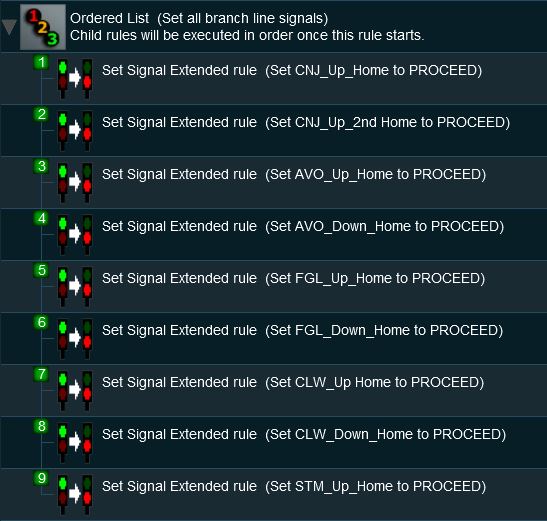
| It is after hours and all the signal staff on a single track branch line have clocked off for the night. All approach and depart signals on the line are locked at PROCEED and safe working is now the responsibility of the train crew. The signals will not reset to STOP when passed by a train. |
 |
Rules Used: | |||
|
 |
Session Editor Screenshot: |
 |
 |
Description: | |||||||||||||||||||
Line 1 : Ordered List Not absolutely necessary but it places all the Set Signal Extended rules in a single container which makes them easier to manage
|
||||||||||||||||||||


Application 2: Halt Before Clear |
|
 |
|
|
The Scenario: |
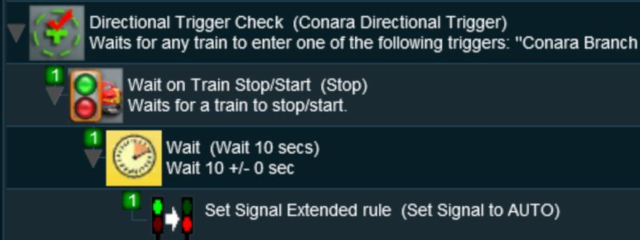
| A train approaching a signal must come to a complete stop before the signal is changed from STOP to PROCEED |
 |
Preconditions: | |
| Error creating thumbnail: /bin/bash: line 1: /usr/bin/convert: No such file or directory Error code: 127 | Use the Set Signal Extended Rule to initially set the signal to STOP | |
| Error creating thumbnail: /bin/bash: line 1: /usr/bin/convert: No such file or directory Error code: 127 | This scenario uses the Directional Trigger from the DLS (<kuid:76656:70010> shown below) to make sure that only trains approaching the facing signal will trigger the rule. Trains travelling in the opposite direction will not trigger the rule.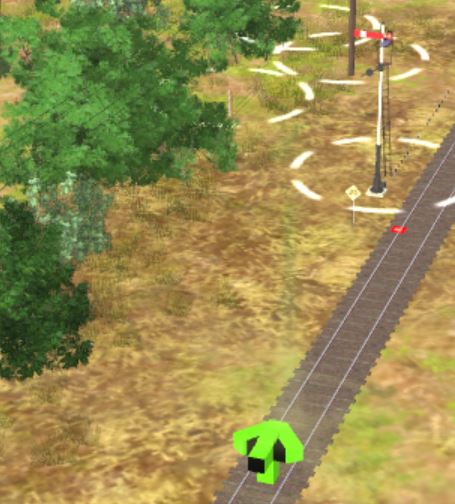 |
|
|
Rules Used: | |||||||
|
|
Session Editor Screenshot: |
 |
|
Description: | ||
Line 1 : Directional Trigger Check set to trigger when a train approaches the signal from the facing direction
 Signal Passed at Danger Rule can be used to deal with the situation. |
|
|
Trainz Wiki
|
|


This page was created by Trainz user pware in May 2018 and was last updated as shown below.


