How to Rename a Picklist: Difference between revisions
From TrainzOnline
Jump to navigationJump to search
mNo edit summary |
mNo edit summary |
||
| Line 40: | Line 40: | ||
<table width=1000> | <table width=1000> | ||
<tr valign="top"> | <tr valign="top"> | ||
<td colspan=2><span style="font-size: 15px; font-weight: 700;">Steps: | <td colspan=2><span style="font-size: 15px; font-weight: 700;">Steps: To Rename a Picklist:-</span><br> | ||
From the '''Trainz Launcher''':-</td> | From the '''Trainz Launcher''':-</td> | ||
</tr> | </tr> | ||
| Line 100: | Line 100: | ||
<tr valign="top"> | <tr valign="top"> | ||
<td>[[image:DotPoint.JPG|10px|link=]]</td> | <td>[[image:DotPoint.JPG|10px|link=]]</td> | ||
<td>The workaround method to rename | <td>The workaround method to rename a Picklist is to follow the steps '''To Rename a Picklist''' shown below. The basic sequence is:- | ||
<table> | <table> | ||
<tr valign="top"> | <tr valign="top"> | ||
<td width=10>[[image:DotPointBlueSquare.png|10px|link=]]</td> | |||
<td>Save a text copy of the '''Picklist''' to be renamed</td> | |||
<td width= | |||
<td>''' | |||
</tr> | </tr> | ||
<tr valign="top"> | <tr valign="top"> | ||
<td>[[image: | <td>[[image:DotPointBlueSquare.png|10px|link=]]</td> | ||
<td>''' | <td>Delete the '''Picklist''' from '''Content Manager'''</td> | ||
</tr> | </tr> | ||
<tr valign="top"> | <tr valign="top"> | ||
<td>[[image: | <td>[[image:DotPointBlueSquare.png|10px|link=]]</td> | ||
<td>''' | <td>Import the text copy back into '''Content Manager''' and give it a new name</td> | ||
</td> | |||
</tr> | </tr> | ||
</table> | </table> | ||
| Line 133: | Line 124: | ||
<table width=1000> | <table width=1000> | ||
<tr valign="top"> | <tr valign="top"> | ||
<td colspan=2><span style="font-size: 15px; font-weight: 700;">Steps: | <td colspan=2><span style="font-size: 15px; font-weight: 700;">Steps: To Rename a Picklist:-</span></td> | ||
</tr> | </tr> | ||
<tr valign="top"> | <tr valign="top"> | ||
| Line 144: | Line 135: | ||
<table> | <table> | ||
<tr valign="top"> | <tr valign="top"> | ||
<td colspan=2><span style="font-size: 15px; font-weight: 700;">Steps: | <td colspan=2><span style="font-size: 15px; font-weight: 700;">Steps: To Delete a PickList:-</span><br> | ||
From the '''Trainz''' Launcher</td> | From the '''Trainz''' Launcher</td> | ||
</tr> | </tr> | ||
| Line 219: | Line 210: | ||
<td> | <td> | ||
<span style="font-size: 17px;">'''More Tutorials and Guides to Using Trainz'''</span><br> | <span style="font-size: 17px;">'''More Tutorials and Guides to Using Trainz'''</span><br> | ||
*'''<span class=" | *'''<span class="plain;">[http://online.ts2009.com/mediaWiki/index.php/HowTo How to Guides]</span>''' | ||
*'''[[Driver Commands List]]''' | *'''[[Driver Commands List]]''' | ||
*'''[[Session Rule List with Parameters|Session Rules List (Alphabetical) with Parameters]]''' | *'''[[Session Rule List with Parameters|Session Rules List (Alphabetical) with Parameters]]''' | ||
| Line 227: | Line 218: | ||
</table> | </table> | ||
---- | ---- | ||
This page was created by Trainz user '''<span class=" | This page was created by Trainz user '''<span class="plain;">[http://online.ts2009.com/mediaWiki/index.php/User:Pware pware]</span>''' in January 2020 and was last updated as shown below. | ||
---- | ---- | ||
[[Category:How-to guides]] | [[Category:How-to guides]] | ||
Latest revision as of 05:50, 7 September 2026
|
 |
|
For TRS19 SP4 (and later), TRS22 and Trainz Plus |
 |
 |
| Steps: To Rename a Picklist:- From the Trainz Launcher:- |
|
 |
select Manage Content |
 |
in Content Manager open the Filter drop down box |
 |
select Edit Filters and Picklists |
| This will open the Picklists | |
 |
Right Click on the Picklist to be renamed and select Rename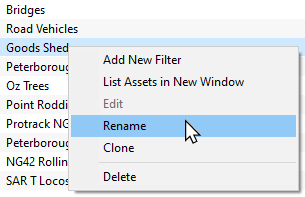 |
 |
enter the new name and Left Click on the OK or Save button |
For T:ANE and TRS19 SP3 and Earlier Versions |
 |
 |
|
|

| Steps: To Rename a Picklist:- | ||||||||||||||||
|
If you have not already created a backup copy of the original Picklist, then follow the steps listed in the Trainz Wiki Page  How to Backup a Picklist |
|||||||||||||||
|
Once you have created the backup copy, delete the Picklist from your Trainz Install
|
|||||||||||||||


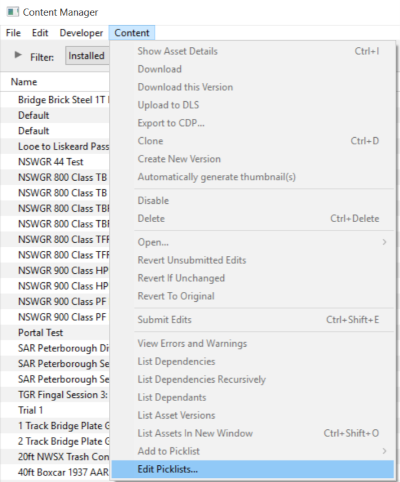


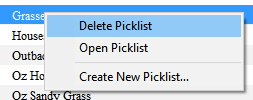
|
Follow the first 3 steps listed in the Trainz Wiki Page How to Restore a Picklist |
|
enter the new name for the Picklist |
|
Information and instructions on backing up and restoring Trainz assets can be found on the Trainz Wiki Page at:- |
|
|
Trainz Wiki
 |
More Tutorials and Guides to Using Trainz |
This page was created by Trainz user pware in January 2020 and was last updated as shown below.


