How to Deal with Missing Dependencies: Difference between revisions
No edit summary |
|||
| (28 intermediate revisions by the same user not shown) | |||
| Line 108: | Line 108: | ||
<td> </td> | <td> </td> | ||
<td>If an asset with '''Missing Dependencies''' has been installed using the <span style="font-weight: 700; font-size: 15px;">Import Content Files...</span> or <span style="font-weight: 700; font-size: 15px;">Import Content Folder...</span> options in the <span style="font-weight: 700; font-size: 15px;">File</span> menu of '''Content Manager''', then the missing dependencies may be on the '''DLS'''. When these two import methods are used '''Content Manager''' does not check the '''DLS''' for any missing dependencies.</td> | <td>If an asset with '''Missing Dependencies''' has been installed using the <span style="font-weight: 700; font-size: 15px;">Import Content Files...</span> or <span style="font-weight: 700; font-size: 15px;">Import Content Folder...</span> options in the <span style="font-weight: 700; font-size: 15px;">File</span> menu of '''Content Manager''', then the missing dependencies may be on the '''DLS'''. When these two import methods are used '''Content Manager''' does not check the '''DLS''' for any missing dependencies.</td> | ||
</tr> | |||
<tr valign="top"> | |||
<td> </td> | |||
<td><span style="font-weight: 700; font-size: 15px;">Possible Remedy:</span></td> | |||
</tr> | </tr> | ||
<tr valign="top"> | <tr valign="top"> | ||
| Line 134: | Line 138: | ||
<tr valign="top"> | <tr valign="top"> | ||
<td>[[image:DotPoint2.JPG|link=]]</td> | <td>[[image:DotPoint2.JPG|link=]]</td> | ||
<td><span style="font-weight: 700; font-size: 15px; background-color: lightcyan;"> Right Click </span> on any one of the highlighted assets and select the option <span style="font-weight: 700; font-size: 15px;">List Dependencies</span></td> | <td><span style="font-weight: 700; font-size: 15px; background-color: lightcyan;"> Right Click </span> on any one of the highlighted assets and select the option <span style="font-weight: 700; font-size: 15px; background-color: #d9d9d9;"> List Dependencies </span></td> | ||
<!-- <td></td> --> | <!-- <td></td> --> | ||
</tr> | </tr> | ||
| Line 156: | Line 161: | ||
<tr valign="top"> | <tr valign="top"> | ||
<td>[[image:DotPoint5.JPG|link=]]</td> | <td>[[image:DotPoint5.JPG|link=]]</td> | ||
<td colspan=2><span style="font-weight: 700; font-size: 15px; background-color: lightcyan;"> Right Click </span> on any one of the highlighted items and select the option <span style="font-weight: 700; font-size: 15px;">Download</span> | <td colspan=2><span style="font-weight: 700; font-size: 15px; background-color: lightcyan;"> Right Click </span> on any one of the highlighted items and select the option <span style="font-weight: 700; font-size: 15px; background-color: #d9d9d9;"> Download </span> | ||
</td> | </td> | ||
</tr> | </tr> | ||
| Line 175: | Line 180: | ||
<td> </td> | <td> </td> | ||
<td>If a dependency has been '''Disabled''' then it is still installed but it is blocked from being used. Removing the block will make it available for use.</td> | <td>If a dependency has been '''Disabled''' then it is still installed but it is blocked from being used. Removing the block will make it available for use.</td> | ||
</tr> | |||
<tr valign="top"> | |||
<td> </td> | |||
<td><span style="font-weight: 700; font-size: 15px;">Possible Remedy:</span></td> | |||
</tr> | </tr> | ||
<tr valign="top"> | <tr valign="top"> | ||
| Line 195: | Line 204: | ||
<tr valign="top"> | <tr valign="top"> | ||
<td>[[image:DotPoint2.JPG|link=]]</td> | <td>[[image:DotPoint2.JPG|link=]]</td> | ||
<td><span style="font-weight: 700; font-size: 15px; background-color: lightcyan;"> Right Click </span> on any one of the highlighted assets and select the option <span style="font-weight: 700; font-size: 15px;">List Dependencies</span></td> | <td><span style="font-weight: 700; font-size: 15px; background-color: lightcyan;"> Right Click </span> on any one of the highlighted assets and select the option <span style="font-weight: 700; font-size: 15px; background-color: #d9d9d9;"> List Dependencies </span></td> | ||
</tr> | </tr> | ||
<tr valign="top"> | <tr valign="top"> | ||
| Line 208: | Line 217: | ||
<tr valign="top"> | <tr valign="top"> | ||
<td>[[image:DotPoint5.JPG|link=]]</td> | <td>[[image:DotPoint5.JPG|link=]]</td> | ||
<td>Open the <span style="font-weight: 700; font-size: 15px;">Content</span> menu and select the <span style="font-weight: 700; font-size: 15px;">Enable</span> option.</td> | <td>Open the <span style="font-weight: 700; font-size: 15px;">Content</span> menu and select the <span style="font-weight: 700; font-size: 15px; background-color: #d9d9d9;"> Enable </span> option.</td> | ||
</tr> | </tr> | ||
</table> | </table> | ||
| Line 246: | Line 255: | ||
<td><br> | <td><br> | ||
If a dependency has been '''Deleted''' then it is no longer installed. It can be reinstalled if it is on the '''DLS'''.</td> | If a dependency has been '''Deleted''' then it is no longer installed. It can be reinstalled if it is on the '''DLS'''.</td> | ||
</tr> | |||
<tr valign="top"> | |||
<td> </td> | |||
<td><span style="font-weight: 700; font-size: 15px;">Possible Remedy:</span></td> | |||
</tr> | </tr> | ||
<tr valign="top"> | <tr valign="top"> | ||
| Line 273: | Line 286: | ||
<tr valign="top"> | <tr valign="top"> | ||
<td>[[image:DotPoint2.JPG|link=]]</td> | <td>[[image:DotPoint2.JPG|link=]]</td> | ||
<td><span style="font-weight: 700; font-size: 15px; background-color: lightcyan;"> Right Click </span> on any one of the highlighted assets and select the option <span style="font-weight: 700; font-size: 15px;">List Dependencies</span></td> | <td><span style="font-weight: 700; font-size: 15px; background-color: lightcyan;"> Right Click </span> on any one of the highlighted assets and select the option <span style="font-weight: 700; font-size: 15px; background-color: #d9d9d9;"> List Dependencies </span></td> | ||
</tr> | </tr> | ||
<tr valign="top"> | <tr valign="top"> | ||
| Line 293: | Line 306: | ||
<tr valign="top"> | <tr valign="top"> | ||
<td>[[image:DotPoint5.JPG|link=]]</td> | <td>[[image:DotPoint5.JPG|link=]]</td> | ||
<td><span style="font-weight: 700; font-size: 15px; background-color: lightcyan;"> Right Click </span> on any one of the selected dependencies and select the option <span style="font-weight: 700; font-size: 15px;">Download</span></td> | <td><span style="font-weight: 700; font-size: 15px; background-color: lightcyan;"> Right Click </span> on any one of the selected dependencies and select the option <span style="font-weight: 700; font-size: 15px; background-color: #d9d9d9;"> Download </span></td> | ||
</tr> | </tr> | ||
</table> | </table> | ||
| Line 309: | Line 322: | ||
<tr valign="top"> | <tr valign="top"> | ||
<td width=25>[[image:Cblue.png|link=]]</td> | <td width=25>[[image:Cblue.png|link=]]</td> | ||
<td>has been | <td>has been installed but contains dependencies that are not on the '''DLS''' or '''built-in'''.</td> | ||
</tr> | </tr> | ||
<tr valign="top"> | <tr valign="top"> | ||
<td> </td> | <td> </td> | ||
<td>Downloaded assets can sometimes contain dependencies that are not on the '''DLS''' or '''Built-in''' (ones that came installed with '''Trainz'''). This can lead to frustrations especially if the creator of the downloaded asset has not provided any information on where these missing dependencies can be found. Even when the location, such as a 3rd party web site, has been identified that site may no longer exist.</td> | <td>Downloaded assets can sometimes contain dependencies that are not on the '''DLS''' or '''Built-in''' (ones that came installed with '''Trainz'''). This can lead to frustrations especially if the creator of the downloaded asset has not provided any information on where these missing dependencies can be found. Even when the location, such as a 3rd party web site, has been identified as the source that site may no longer exist.</td> | ||
</tr> | </tr> | ||
<tr valign="top"> | <tr valign="top"> | ||
<td> </td> | <td> </td> | ||
<td>If the missing dependencies are not on the '''DLS''' then fixing this may not be easy. Possible | <td>If the missing dependencies are not on the '''DLS''' then fixing this may not be easy.<br> | ||
<span style="font-weight: 700; font-size: 15px;">Possible Remedies:</span></td> | |||
</tr> | </tr> | ||
<tr valign="top"> | <tr valign="top"> | ||
<td> </td> | <td> </td> | ||
<td> | <td> | ||
<table> | <table width=970 bgcolor=#000000 cellpadding=2> | ||
<tr valign="top"> | |||
<td> | |||
<table width=966 bgcolor=#ffffff cellpadding=2> | |||
<tr valign="top"> | <tr valign="top"> | ||
<td width=10>[[image:DotPoint.JPG|10px|link=]]</td> | <td width=10>[[image:DotPoint.JPG|10px|link=]]</td> | ||
<td>There is a very long thread in the '''Trainz Forum''' where you will find posts looking for missing dependencies. See [[file:WikiLink.PNG|link=]] '''[https://forums.auran.com/trainz/showthread.php?111942 Missing kuids? Post them here]'''</td> | <td>There is a very long thread in the '''Trainz Forum''' where you will find posts looking for missing dependencies. See [[file:WikiLink.PNG|link=]] '''[https://forums.auran.com/trainz/showthread.php?111942 Missing kuids? Post them here]'''. You may find your missing '''<kuids>''' there. A '''Google''' search using the '''<kuid>''' values may also help here.<br> | ||
<table bgcolor=#fcbcbc cellpadding=2> | |||
<tr valign="top"> | |||
<td>[[image:Stop.PNG|link=]]</td> | |||
<td><span style="font-size: 15px; font-weight: 700;">WARNING:</span><br> | |||
There are some well known pirate and malware sites on the Internet that have, or claim to have, some missing dependency assets. Use them at your own risk.</td> | |||
</tr> | |||
</table> | |||
</td> | |||
</tr> | </tr> | ||
<tr valign="top"> | <tr valign="top"> | ||
<td>[[image:DotPoint.JPG|10px|link=]]</td> | <td>[[image:DotPoint.JPG|10px|link=]]</td> | ||
<td>You can try contacting the asset creator via email (their address may be in the '''config.txt''' file) or by a '''Direct Message''' through the '''Trainz Forum'''</td> | <td>You can try contacting the asset creator via email (their address may be in the assets '''config.txt''' file) or by sending a '''Direct Message''' through the '''Trainz Forum'''</td> | ||
</tr> | </tr> | ||
<tr valign="top"> | <tr valign="top"> | ||
<td colspan=2>'''Neither is a guaranteed solution'''</td> | <td colspan=2>'''Neither method is a guaranteed solution'''</td> | ||
</tr> | |||
</table> | |||
</td> | |||
</tr> | </tr> | ||
</table> | </table> | ||
| Line 363: | Line 391: | ||
<tr valign="top"> | <tr valign="top"> | ||
<td>[[image:BlueDot10x10.png|link=]]</td> | <td>[[image:BlueDot10x10.png|link=]]</td> | ||
<td>'''Delete and Replace the Missing Dependency:''' If the missing dependency is part of a route or session then it might be possible to delete it and replace it with a similar asset | <td>'''Delete and Replace the Missing Dependency:''' If the missing dependency is part of a route or session then it might be possible to delete it and replace it with a similar asset. If the missing dependency is crucial to the operation of the route or its sessions then this could involve a lot of extra work.</td> | ||
</tr> | </tr> | ||
<tr valign="top"> | <tr valign="top"> | ||
| Line 378: | Line 406: | ||
='''Locating Missing Dependencies in a Layout'''= | ='''Locating Missing Dependencies in a Layout'''= | ||
</td> | </td> | ||
<td width=50> | <td width=50>[[image:SkipDown.png|link=#skipSplines|Skip Down]]</td> <!-- skip Down --> | ||
<td width=50> </td> | <td width=50> </td> | ||
<td width=46>[[image:BackToTop.png|link=#top|alt=Top|Top]]</td> | <td width=46>[[image:BackToTop.png|link=#top|alt=Top|Top]]</td> | ||
| Line 390: | Line 418: | ||
<tr valign="top"> | <tr valign="top"> | ||
<td width=10>[[image:BlueDot10x10.png|link=]]</td> | <td width=10>[[image:BlueDot10x10.png|link=]]</td> | ||
<td>Missing | <td>Missing spline and track dependencies in a layout will be marked by dotted lines in '''Surveyor'''</td> | ||
</tr> | </tr> | ||
<tr valign="top"> | <tr valign="top"> | ||
<td>[[image:BlueDot10x10.png|link=]]</td> | <td>[[image:BlueDot10x10.png|link=]]</td> | ||
<td>Missing | <td>Missing ground texture dependencies will be shown as a bright false colour in '''Surveyor'''</td> | ||
</tr> | </tr> | ||
<tr valign="top"> | <tr valign="top"> | ||
<td>[[image:BlueDot10x10.png|link=]]</td> | <td>[[image:BlueDot10x10.png|link=]]</td> | ||
<td>Missing scenery objects, including rolling stock track objects (e.g. signals, switches) will '''NOT''' be visible | <td>Missing scenery objects, including rolling stock and track objects (e.g. signals, switches), will '''NOT''' be visible in '''Surveyor''' unless a setting has been ticked '''ON'''</td> | ||
</tr> | </tr> | ||
</table> | </table> | ||
| Line 404: | Line 432: | ||
<table width=1000> | <table width=1000> | ||
<tr valign="top"> | <tr valign="top"> | ||
<td>Before deciding to delete any missing dependencies from | <td>Before deciding to delete any missing dependencies from a route or session, it is recommended that you identify, as far as possible, what those dependencies are and how they are used. This will provide clues to finding currently installed and suitable replacements.<br> | ||
<br> | <br> | ||
<table bgcolor=#000000 cellpadding=2> | <table bgcolor=#000000 cellpadding=2> | ||
| Line 414: | Line 442: | ||
<td width=975><span style="font-size: 17px; font-weight: 700;">Notes:'''</span><br> | <td width=975><span style="font-size: 17px; font-weight: 700;">Notes:'''</span><br> | ||
---- | ---- | ||
Replacing missing dependencies is not always simple. The '''Bulk Asset Update/Replace Tool''' in '''Surveyor Classic''' and the '''Bulk Replace Filtered Assets''' in '''Trainz Plus Surveyor 2.0''' will not allow missing dependencies to be selected and replaced. Instead you must find each missing | Replacing missing dependencies is not always simple. The '''Bulk Asset Update/Replace Tool''' in '''Surveyor Classic''' and the '''Bulk Replace Filtered Assets''' in '''Trainz Plus Surveyor 2.0''' will not allow missing dependencies to be selected and replaced. Instead you must find each missing dependency and manually replace it.</td> | ||
</tr> | </tr> | ||
</table> | </table> | ||
| Line 424: | Line 452: | ||
</table> | </table> | ||
<br> | <br> | ||
<table width=1000> <!-- BEGIN Nav Buttons Table SKIPS NO SECTIONS --> | |||
<tr valign="top"> | |||
<td width=629><span id="skipSplines"></span> | |||
==='''Missing Splines (including Track)'''=== | ==='''Missing Splines (including Track)'''=== | ||
</td> | |||
<td width=50>[[image:SkipDown.png|link=#skipGround|Skip Down]]</td> <!-- skip Down --> | |||
<td width=50>[[image:SkipUp.png|link=#stepLocating|Skip Up]]</td> <!-- skip Up --> | |||
<td width=46> </td> <!-- Top --> | |||
<td width=75> </td> <!-- Next Up --> | |||
<td width=75> </td> <!-- Next Down --> | |||
<td width=75> </td> <!-- Bottom --> | |||
</tr> | |||
</table> <!-- END Nav Buttons Table --> | |||
<table width=1000 bgcolor="lightcyan" cellpadding=2> | <table width=1000 bgcolor="lightcyan" cellpadding=2> | ||
<tr valign="top"> | <tr valign="top"> | ||
<td width=10>[[image:BlueDot10x10.png|link=]]</td> | <td width=10>[[image:BlueDot10x10.png|link=]]</td> | ||
<td>Missing Spline Dependencies will be shown as broken white parallel lines | <td>Missing Spline Dependencies will be shown in '''Surveyor''' as broken white parallel lines</td> | ||
</tr> | </tr> | ||
</table> | </table> | ||
| Line 441: | Line 481: | ||
<td bgcolor="lightcyan"> | <td bgcolor="lightcyan"> | ||
<br> | <br> | ||
The missing spline asset is most likely a road. If deleted the broken white lines will be removed leaving a "space" in the | The missing spline asset is most likely a road. If deleted the broken white lines will be removed leaving a "space" in the landscape. Deleting it will not affect the operation of the route or its sessions, just their appearance.<br> | ||
<br> | <br> | ||
It could be replaced by any suitable road spline.</td> | It could be replaced by any suitable road spline.</td> | ||
| Line 452: | Line 492: | ||
<td bgcolor="lightcyan"> | <td bgcolor="lightcyan"> | ||
<br> | <br> | ||
The missing spline asset is rail track - the presence of the track objects is a major clue. If deleted the broken white lines will be removed leaving a "space" in the | The missing spline asset is rail track - the presence of the track objects is a major clue. If deleted the broken white lines will be removed leaving a "space" in the landscape. Track objects on the track will also be deleted. Deleting it '''WILL''' affect the operation of the route and its sessions, as well as their appearance.<br> | ||
<br> | <br> | ||
It could be replaced by any suitable rail track spline '''BUT''' you will also have to add replacements for all the track objects that were also deleted and probably edit | It could be replaced by any suitable rail track spline '''BUT''' you will also have to add replacements for all the track objects that were also deleted and probably need to edit '''Session Rules''' and '''Driver Commands''' as well.</td> | ||
</tr> | </tr> | ||
</table> | </table> | ||
| Line 463: | Line 503: | ||
<td bgcolor="lightcyan"> | <td bgcolor="lightcyan"> | ||
<br> | <br> | ||
The missing spline asset is a tunnel with track. If deleted it will leave | The missing spline asset is a tunnel with track. If deleted it will leave gaps (and possibly digholes) in the route and it '''WILL''' affect the operation of the route and its sessions, as well as their appearance.<br> | ||
<br> | <br> | ||
It could be replaced by another suitable tunnel spline.</td> | It could be replaced by another suitable tunnel spline.</td> | ||
| Line 469: | Line 509: | ||
</table> | </table> | ||
<br> | <br> | ||
<table width=1000> <!-- BEGIN Nav Buttons Table SKIPS NO SECTIONS --> | |||
<tr valign="top"> | |||
<td width=629><span id="skipGround"></span> | |||
==='''Missing Ground Textures'''=== | ==='''Missing Ground Textures'''=== | ||
</td> | |||
<td width=50>[[image:SkipDown.png|link=#skipScenery|Skip Down]]</td> <!-- skip Down --> | |||
<td width=50>[[image:SkipUp.png|link=#skipSplines|Skip Up]]</td> <!-- skip Up --> | |||
<td width=46> </td> <!-- Top --> | |||
<td width=75> </td> <!-- Next Up --> | |||
<td width=75> </td> <!-- Next Down --> | |||
<td width=75> </td> <!-- Bottom --> | |||
</tr> | |||
</table> <!-- END Nav Buttons Table --> | |||
<table width=1000 bgcolor="lightcyan" cellpadding=2> | <table width=1000 bgcolor="lightcyan" cellpadding=2> | ||
| Line 487: | Line 539: | ||
<td bgcolor="lightcyan"> | <td bgcolor="lightcyan"> | ||
<br> | <br> | ||
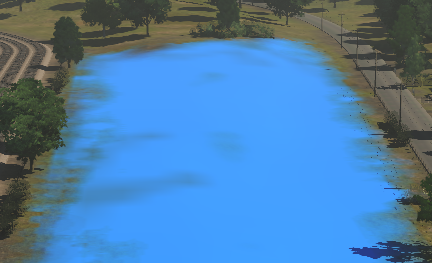
The false blue colour indicates that the missing asset is a ground texture. If deleted it will not affect the operation of the route, just | The false blue colour indicates that the missing asset is a ground texture. If deleted it will not affect the operation of the route and its sessions, just their appearance.<br> | ||
<br> | |||
It could be replaced by any suitable ground texture or, if there is another ground texture already in place ('''Trainz''' does not delete an underlying texture when you paint over it with another texture), you could ignore the missing texture and leave the pre-existing texture in place.<br> | |||
<br> | <br> | ||
<table bgcolor=#000000 cellpadding=2> | <table bgcolor=#000000 cellpadding=2> | ||
<tr valign="top"> | <tr valign="top"> | ||
| Line 508: | Line 560: | ||
</table> | </table> | ||
<br> | <br> | ||
<table width=1000> <!-- BEGIN Nav Buttons Table SKIPS NO SECTIONS --> | |||
<tr valign="top"> | |||
<td width=629><span id="skipScenery"></span> | |||
==='''Missing Scenery Objects (incl Rolling Stock and Track Objects)'''=== | ==='''Missing Scenery Objects (incl Rolling Stock and Track Objects)'''=== | ||
</td> | |||
<td width=50>[[image:SkipDown.png|link=#stepDeleting|Skip Down]]</td> <!-- skip Down --> | |||
<td width=50>[[image:SkipUp.png|link=#skipGround|Skip Up]]</td> <!-- skip Up --> | |||
<td width=46> </td> <!-- Top --> | |||
<td width=75> </td> <!-- Next Up --> | |||
<td width=75> </td> <!-- Next Down --> | |||
<td width=75> </td> <!-- Bottom --> | |||
</tr> | |||
</table> <!-- END Nav Buttons Table --> | |||
<table width=1000 bgcolor="lightcyan" cellpadding=2> | <table width=1000 bgcolor="lightcyan" cellpadding=2> | ||
<tr valign="top"> | <tr valign="top"> | ||
<td width=10>[[image:BlueDot10x10.png|link=]]</td> | <td width=10>[[image:BlueDot10x10.png|link=]]</td> | ||
<td>Missing Scenery Dependencies will be shown as orange 3D frames in the layout '''ONLY IF''' a control setting has been ticked. Otherwise there | <td>Missing Scenery Dependencies will be shown as orange 3D frames in the layout '''ONLY IF''' a control setting has been ticked. Otherwise there may be no indication that something is missing.</td> | ||
</tr> | </tr> | ||
</table> | </table> | ||
| Line 523: | Line 587: | ||
<tr valign="middle"> | <tr valign="middle"> | ||
<td width=35>[[image:Information.png|35px|link=]]</td> | <td width=35>[[image:Information.png|35px|link=]]</td> | ||
<td>Missing non-spline scenery objects (e.g. trees, houses), including track objects (e.g. signals, switches, speed signs), <span style="font-size: 15px; font-weight: 700;">will not appear in any form</span> (e.g. as dotted while lines) in '''Surveyor'''. To make their presence visible you must turn on a control setting in '''Surveyor'''.</td> | <td>Missing non-spline scenery objects (e.g. trees, houses, etc), including track objects (e.g. signals, switches, speed signs, etc), <span style="font-size: 15px; font-weight: 700;">will not appear in any form</span> (e.g. as dotted while lines) in '''Surveyor''' by default. To make their presence visible you must turn on a control setting in '''Surveyor'''.</td> | ||
</tr> | </tr> | ||
</table> | </table> | ||
| Line 564: | Line 628: | ||
<td width=300>[[image:MainMenuSelectGeneral_S20.png|link=]]</td> | <td width=300>[[image:MainMenuSelectGeneral_S20.png|link=]]</td> | ||
<td width=25>[[image:DotPoint3.JPG|link=]]</td> | <td width=25>[[image:DotPoint3.JPG|link=]]</td> | ||
<td><span style="font-weight: 700; font-size: 15px; background-color: lightcyan;"> Left Click </span> on the <span style=" | <td><span style="font-weight: 700; font-size: 15px; background-color: lightcyan;"> Left Click </span> on the <span style="font-weight: 700; font-size: 15px; color: black; background-color: #d9d9d9;"> General Settings </span> option.<br> | ||
<br> | <br> | ||
This will display the '''General Settings''' options as a set of check boxes in the right of the window.</td> | This will display the '''General Settings''' options as a set of check boxes in the right of the window.</td> | ||
| Line 608: | Line 672: | ||
<td bgcolor="lightcyan"> | <td bgcolor="lightcyan"> | ||
<br> | <br> | ||
From its size and shape, the missing asset is most probably a building. If deleted it will leave a "space" in the route but it will not affect the operation of sessions that use this route, just their appearance.<br> | From its size and shape, the missing asset is most probably a building. If deleted it will leave a "space" in the route but it will not affect the operation of the route or its sessions that use this route, just their appearance.<br> | ||
<br> | <br> | ||
It could be replaced by any suitable similar sized building asset.</td> | It could be replaced by any suitable similar sized building asset.</td> | ||
| Line 630: | Line 694: | ||
<td bgcolor="lightcyan"> | <td bgcolor="lightcyan"> | ||
<br> | <br> | ||
From its size, shape and location, the missing dependency (or dependencies - there may be several different ones) is most likely a tree. If deleted it will leave gaps in the forest but it will not affect the operation of sessions | From its size, shape and location, the missing dependency (or dependencies - there may be several different ones) is most likely a tree. If deleted it will leave gaps in the forest but it will not affect the operation of the route or its sessions, just their appearance.<br> | ||
<br> | <br> | ||
It could be replaced by any suitable similar sized tree asset.</td> | It could be replaced by any suitable similar sized tree asset.</td> | ||
| Line 641: | Line 705: | ||
<td bgcolor="lightcyan"> | <td bgcolor="lightcyan"> | ||
<br> | <br> | ||
The missing asset is clearly rolling stock. If deleted it '''WILL''' affect the operation of the | The missing asset is clearly rolling stock. If deleted it '''WILL''' affect the operation of any sessions that contain the missing dependency.<br> | ||
<br> | <br> | ||
It could be replaced by an alternative rolling stock asset but '''Session Rules''' and '''Driver Commands''' (coupling and decoupling) may have to be edited.</td> | It could be replaced by an alternative rolling stock asset but '''Session Rules''' and '''Driver Commands''' (coupling and decoupling) may have to be edited.</td> | ||
| Line 652: | Line 716: | ||
<td bgcolor="lightcyan"> | <td bgcolor="lightcyan"> | ||
<br> | <br> | ||
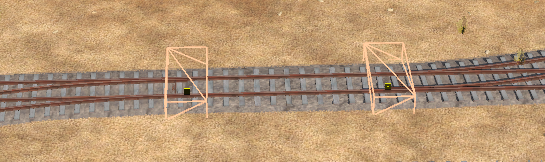
Because of its position on the track the missing asset is clearly a track object and almost certainly a track switch. | Because of its position on the track the missing asset is clearly a track object and, in this example, almost certainly a track switch. Deleted track objects '''COULD''' affect the operation of sessions using this route depending on the type of track object (track switches '''WILL''' have an effect while caution and whistle signs may not).<br> | ||
<br> | <br> | ||
It could be replaced by an alternative track object asset but existing '''Session Rules''' and '''Driver Commands''' may have to be edited.</td> | It could be replaced by an alternative track object asset but existing '''Session Rules''' and '''Driver Commands''' may have to be edited.</td> | ||
| Line 663: | Line 727: | ||
='''Deleting Missing Dependencies'''= | ='''Deleting Missing Dependencies'''= | ||
</td> | </td> | ||
<td width=50> | <td width=50>[[image:SkipDown.png|link=#skipDeleteAutomatically|Skip Down]]</td> <!-- skip Down --> | ||
<td width=50> </td> | <td width=50> </td> <!-- skip Up --> | ||
<td width=46>[[image:BackToTop.png|link=#top|alt=Top|Top]]</td> | <td width=46>[[image:BackToTop.png|link=#top|alt=Top|Top]]</td> | ||
<td width=75>[[image:NextUp.png|link=#stepLocating|alt=Next Up|Next Up]]</td> | <td width=75>[[image:NextUp.png|link=#stepLocating|alt=Next Up|Next Up]]</td> | ||
| Line 675: | Line 739: | ||
<tr valign="top"> | <tr valign="top"> | ||
<td width=10>[[image:BlueDot10x10.png|link=]]</td> | <td width=10>[[image:BlueDot10x10.png|link=]]</td> | ||
<td>Missing dependencies throughout a route can be deleted by | <td>Missing Dependencies can be deleted "en mass" automatically by tools in '''Surveyor'''</td> | ||
</tr> | |||
<tr valign="top"> | |||
<td>[[image:BlueDot10x10.png|link=]]</td> | |||
<td>Once they are made visible Missing Dependencies can be deleted manually and individually, like any other object in '''Surveyor'''</td> | |||
</tr> | |||
</table> | |||
<br> | |||
<table width=1000> <!-- BEGIN Nav Buttons Table SKIPS NO SECTIONS --> | |||
<tr valign="top"> | |||
<td width=629><span id="skipDeleteAutomatically"></span> | |||
=='''Delete Missing Dependencies Automatically'''== | |||
</td> | |||
<td width=50>[[image:SkipDown.png|link=#skipDeleteManually|Skip Down]]</td> <!-- skip Down --> | |||
<td width=50>[[image:SkipUp.png|link=#stepDeleting|Skip Up]]</td> <!-- skip Up --> | |||
<td width=46> </td> <!-- Top --> | |||
<td width=75> </td> <!-- Next Up --> | |||
<td width=75> </td> <!-- Next Down --> | |||
<td width=75> </td> <!-- Bottom --> | |||
</tr> | |||
</table> <!-- END Nav Buttons Table --> | |||
<table width=1000 bgcolor="lightcyan" cellpadding=2> | |||
<tr valign="top"> | |||
<td width=10>[[image:BlueDot10x10.png|link=]]</td> | |||
<td>Missing dependencies throughout a route or session can be deleted by commands found in the '''Tools''' menu of '''Surveyor'''</td> | |||
</tr> | </tr> | ||
</table> | </table> | ||
| Line 685: | Line 774: | ||
<tr valign="top"> | <tr valign="top"> | ||
<td width=35>[[image:Information.png|35px|link=]]</td> | <td width=35>[[image:Information.png|35px|link=]]</td> | ||
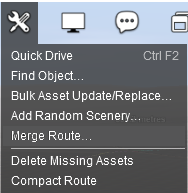
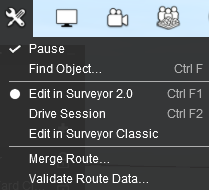
<td><span style="font-weight: 700; font-size: 15px;">The command used to delete missing assets is found in the Tools menu of Surveyor. This command will be different depending on | <td><span style="font-weight: 700; font-size: 15px;">The command used to delete missing assets is found in the Tools menu of Surveyor. This command will be different depending on the version and SP update of Trainz that you are using.</span></td> | ||
</tr> | |||
<tr valign="top"> | |||
<td colspan=2> | |||
<table bgcolor=#fcbcbc cellpadding=2> | |||
<tr valign="top"> | |||
<td>[[image:Stop.PNG|link=]]</td> | |||
<td><span style="font-size: 15px; font-weight: 700;">WARNING:</span><br> | |||
<span style="font-weight: 700; font-size: 15px;">Deleting Missing Dependencies cannot be undone. It is strongly recommended that you make a backup copy (e.g. a .cdp file) of the route and session before performing this action.</span></td> | |||
</tr> | |||
</table> | |||
</td> | |||
</tr> | </tr> | ||
</table> | </table> | ||
| Line 704: | Line 804: | ||
<tr valign="top"> | <tr valign="top"> | ||
<td align="center"><span style="font-weight: 700; font-size: 15px;">In '''TRS19'''</span><br> | <td align="center"><span style="font-weight: 700; font-size: 15px;">In '''TRS19'''</span><br> | ||
The command is | The command is <span style="color: white; background-color: black; font-weight: 700; font-size: 15px;"> Delete Missing Assets </span><br> | ||
This is also the command in <span style="font-weight: 700; font-size: 15px;">TRS22</span> and <span style="font-weight: 700; font-size: 15px;">Trainz Plus</span> versions '''SP6''' and earlier<br> | This is also the command in <span style="font-weight: 700; font-size: 15px;">TRS22</span> and <span style="font-weight: 700; font-size: 15px;">Trainz Plus</span> versions '''SP6''' and earlier.<br> | ||
[[image:ToolsMenu_TRS19.png|link=]]</td> | [[image:ToolsMenu_TRS19.png|link=]]</td> | ||
</tr> | </tr> | ||
| Line 721: | Line 821: | ||
<tr valign="top"> | <tr valign="top"> | ||
<td align="center"><span style="font-weight: 700; font-size: 15px;">In '''TRS22''' and '''Trainz Plus''' update '''SP7''' and later</span><br> | <td align="center"><span style="font-weight: 700; font-size: 15px;">In '''TRS22''' and '''Trainz Plus''' update '''SP7''' and later</span><br> | ||
The command is | The command is in the <span style="color: white; background-color: black; font-weight: 700; font-size: 15px;"> Validate Route Data... </span> option<br> | ||
[[image:ToolsMenu_S20SP7.png|link=]]</td> | [[image:ToolsMenu_S20SP7.png|link=]]</td> | ||
</tr> | </tr> | ||
| Line 736: | Line 836: | ||
<td><span style="font-weight: 700; font-size: 17px; color: white; background-color: black;"> Delete Missing Assets </span><br> | <td><span style="font-weight: 700; font-size: 17px; color: white; background-color: black;"> Delete Missing Assets </span><br> | ||
<br> | <br> | ||
If this option is shown in the '''Surveyor Tools''' menu then <span style="font-weight: 700; font-size: 15px; background-color: lightcyan;"> Left Click </span> on the option. '''ALL''' missing dependencies will be deleted from the route with no | If this option is shown in the '''Surveyor Tools''' menu then <span style="font-weight: 700; font-size: 15px; background-color: lightcyan;"> Left Click </span> on the option. '''ALL''' missing dependencies will be deleted from the route with no exceptions.<br> | ||
<br> | <br> | ||
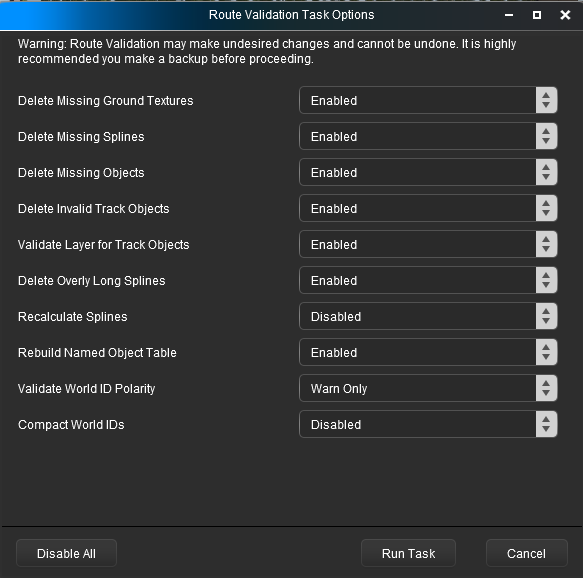
<span style="font-weight: 700; font-size: 17px; color: white; background-color: black;"> Validate Route Data... </span><br> | <span style="font-weight: 700; font-size: 17px; color: white; background-color: black;"> Validate Route Data... </span><br> | ||
| Line 747: | Line 847: | ||
<tr valign="top"> | <tr valign="top"> | ||
<td width=585>[[image:RouteValidationTaskOptions.png|link=]]</td> | <td width=585>[[image:RouteValidationTaskOptions.png|link=]]</td> | ||
<td>< | <td> | ||
<table bgcolor=#000000 cellpadding=2> | |||
<tr valign="top"> | |||
<td> | |||
<table bgcolor=#ffffb0 cellpadding=2> | |||
<tr valign="top"> | |||
<td width=25>[[image:NotePad.PNG|link=]]</td> | |||
<td>Note the warning at the top of the dialogue window. The changes made by this process cannot be undone.</td> | |||
</tr> | |||
</table> | |||
</td> | |||
</tr> | |||
</table> | |||
<br> | <br> | ||
You can set them all to '''Enable''' (so '''ALL''' | The first three options in the selection will delete the missing '''Ground Texture''', '''Spline''' (including '''Track Spline''') and (Scenery) '''Object''' dependencies. You can set them all to '''Enable''' (so '''ALL''' these missing dependencies will be deleted) or selectively enable/disable individual options (to delete some types but not others).<br> | ||
<br> | <br> | ||
<table bgcolor=#000000 cellpadding=2> | <table bgcolor=#000000 cellpadding=2> | ||
| Line 757: | Line 868: | ||
<table bgcolor=#ffffff cellpadding=2> | <table bgcolor=#ffffff cellpadding=2> | ||
<tr valign="top"> | <tr valign="top"> | ||
<td colspan=2><span style="font-weight: 700; font-size: 15px;">Steps: | <td colspan=2><span style="font-weight: 700; font-size: 15px;">Steps: To Delete Selected Missing Dependencies:-</span></td> | ||
</tr> | </tr> | ||
<tr valign="top"> | <tr valign="top"> | ||
| Line 778: | Line 889: | ||
</table> | </table> | ||
</td> | </td> | ||
</tr> | |||
</table> | |||
</td> | |||
</tr> | |||
</table> | |||
<br> | |||
<table width=1000> <!-- BEGIN Nav Buttons Table SKIPS NO SECTIONS --> | |||
<tr valign="top"> | |||
<td width=629><span id="skipDeleteManually"></span> | |||
=='''Delete Missing Dependencies Manually'''== | |||
</td> | |||
<td width=50> </td> <!-- skip Down --> | |||
<td width=50>[[image:SkipUp.png|link=#skipDeleteAutomatically|Skip Up]]</td> <!-- skip Up --> | |||
<td width=46> </td> <!-- Top --> | |||
<td width=75> </td> <!-- Next Up --> | |||
<td width=75> </td> <!-- Next Down --> | |||
<td width=75> </td> <!-- Bottom --> | |||
</tr> | |||
</table> <!-- END Nav Buttons Table --> | |||
<table width=1000 bgcolor="lightcyan" cellpadding=2> | |||
<tr valign="top"> | |||
<td width=10>[[image:BlueDot10x10.png|link=]]</td> | |||
<td>If you only have a few identified '''Missing Dependencies''' in one area then it may be easier to delete them manually</td> | |||
</tr> | |||
<tr valign="top"> | |||
<td width=10>[[image:BlueDot10x10.png|link=]]</td> | |||
<td>Deleting '''Missing Track Object Dependencies''' usually requires each one to be deleted manually</td> | |||
</tr> | |||
</table> | |||
<table width=1000> | |||
<tr valign="top"> | |||
<td>All '''Missing Dependencies''' can be deleted manually, one at a time. It will depend on how many you have and how widely distributed they are.</td> | |||
</tr> | |||
</table> | |||
<table width=1000 bgcolor=#000000 cellpadding=2> | |||
<tr valign="top"> | |||
<td> | |||
<table width=996 bgcolor=#ffffff cellpadding=2> | |||
<tr valign="top"> | |||
<td colspan=3><span style="font-weight: 700; font-size: 15px;">Steps: To Remove Individual Missing Dependencies Manually:-</span></td> | |||
</tr> | |||
<tr valign="top"> | |||
<td colspan=3>[[image:RedDot10x10.png|link=]] <span style="font-weight: 700; font-size: 15px; background-color: lightyellow;"> Using Surveyor 2.0  </span></td> | |||
</tr> | |||
<tr valign="top"> | |||
<td width=25>[[image:DotPoint1.JPG|link=]]</td> | |||
<td>With the [[image:S20_FreeMoveToolIcon.png|link=|20px]] '''Free Move Tool''' <span style="font-weight: 700; font-size: 15px; background-color: lightcyan;"> Left Click </span> on the orange box frame of a missing dependency.</td> | |||
<td rowspan=2> | |||
<table bgcolor=#ffffe0 cellpadding=2> | |||
<tr valign="top"> | |||
<td width=25>[[image:PencilTips.PNG|link=]]</td> | |||
<td>If a missing '''track object''' cannot be selected and deleted then try the following steps:- | |||
<table> | |||
<tr valign="top"> | |||
<td width=25>[[image:DotPoint1RedC.png|link=]]</td> | |||
<td>'''Select''' the '''track segment''' containing the track object</td> | |||
</tr> | |||
<tr valign="top"> | |||
<td>[[image:DotPoint2RedC.png|link=]]</td> | |||
<td>'''Delete''' and then '''Replace''' the track segment</td> | |||
</tr> | |||
</table> | |||
</td> | |||
</tr> | |||
</table> | |||
</td> | |||
</tr> | |||
<tr valign="top"> | |||
<td>[[image:DotPoint2.JPG|link=]]</td> | |||
<td>Press the <span style="font-weight: 700; font-size: 15px; color: white; background-color: black;"> Delete </span> key <span style="font-weight: 700; font-size: 15px;">OR</span> <span style="font-weight: 700; font-size: 15px; background-color: lightcyan;"> Left Click </span> on the object's '''Context Icon''' and select the <span style="font-weight: 700; font-size: 15px; color: white; background-color: black;"> Delete </span> option</td> | |||
<!-- <td></td> --> | |||
</tr> | |||
<tr valign="top"> | |||
<td colspan=3>[[image:RedDot10x10.png|link=]] <span style="font-weight: 700; font-size: 15px; background-color: lightyellow;"> Using Surveyor Classic  </span></td> | |||
</tr> | |||
<tr valign="top"> | |||
<td width=25>[[image:DotPoint1.JPG|link=]]</td> | |||
<td colspan=2>Open the appropriate flyout (for '''Tracks''' including Track Objects press the <span style="font-weight: 700; font-size: 15px; color: white; background-color: black;"> F4 </span> key, for scenery and spline '''Objects''' press the <span style="font-weight: 700; font-size: 15px; color: white; background-color: black;"> F3 </span> key)</td> | |||
</tr> | |||
<tr valign="top"> | |||
<td>[[image:DotPoint2.JPG|link=]]</td> | |||
<td colspan=2><span style="font-weight: 700; font-size: 15px; background-color: lightcyan;"> Left Click </span> on the [[image:DeleteIcon.png|link=]] '''Delete Icon''' and then <span style="font-weight: 700; font-size: 15px; background-color: lightcyan;"> Left Click </span> on the orange box frame of the missing object</td> | |||
</tr> | </tr> | ||
</table> | </table> | ||
| Line 788: | Line 985: | ||
<td width=729><span id="bottom"></span> </td> | <td width=729><span id="bottom"></span> </td> | ||
<td width=46>[[image:BackToTop.png|link=#top|alt=Top|Top]]</td> | <td width=46>[[image:BackToTop.png|link=#top|alt=Top|Top]]</td> | ||
<td width=75>[[file:NextUp.png|link=# | <td width=75>[[file:NextUp.png|link=#stepDeleting|alt=Next Up|Next Up]]</td> | ||
<td width=75> </td> | <td width=75> </td> | ||
<td width=75> </td> | <td width=75> </td> | ||
| Line 795: | Line 992: | ||
---- | ---- | ||
---- | ---- | ||
='''Trainz Wiki'''= | ='''Trainz Wiki'''= | ||
<table width=1000> | <table width=1000> | ||
<tr valign="top"> | <tr valign="top"> | ||
<td> | <td> | ||
<table width= | <table width=550 cellpadding=2 bgcolor=#ffffff> | ||
<tr valign="top"> | <tr valign="top"> | ||
<td width=80>[[image:TrainzWiki.png|link=]]</td> | <td width=80>[[image:TrainzWiki.png|link=]]</td> | ||
| Line 813: | Line 1,011: | ||
</td> | </td> | ||
<td> | <td> | ||
<table width= | <table width=450 cellpadding=4 bgcolor="aquamarine"> | ||
<tr valign="top"> | <tr valign="top"> | ||
<td width=50>[[image:LinkWiki.PNG|link=]]</td> | <td width=50>[[image:LinkWiki.PNG|link=]]</td> | ||
Latest revision as of 06:30, 21 October 2026
|
 |
 |
|
|||||||||
What Causes Missing Dependencies? |
 |
|
|
|
| Missing Dependencies can occur when an asset:- |
 |
has been installed from a .cdp file (e.g. from a 3rd party web site) or from a content folder (e.g. on your HD) without also installing other assets it requires. | |||||||||||||||||||||
| If an asset with Missing Dependencies has been installed using the Import Content Files... or Import Content Folder... options in the File menu of Content Manager, then the missing dependencies may be on the DLS. When these two import methods are used Content Manager does not check the DLS for any missing dependencies. | ||||||||||||||||||||||
| Possible Remedy: | ||||||||||||||||||||||
|
||||||||||||||||||||||





 |
has been Disabled or Deleted in Content Manager. | |||||||||||||||||||||||||
| If a dependency has been Disabled then it is still installed but it is blocked from being used. Removing the block will make it available for use. | ||||||||||||||||||||||||||
| Possible Remedy: | ||||||||||||||||||||||||||
|
||||||||||||||||||||||||||
If a dependency has been Deleted then it is no longer installed. It can be reinstalled if it is on the DLS. |
||||||||||||||||||||||||||
| Possible Remedy: | ||||||||||||||||||||||||||
|
||||||||||||||||||||||||||

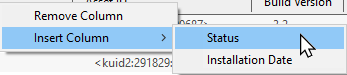
 |
has been installed but contains dependencies that are not on the DLS or built-in. | |||||||||
| Downloaded assets can sometimes contain dependencies that are not on the DLS or Built-in (ones that came installed with Trainz). This can lead to frustrations especially if the creator of the downloaded asset has not provided any information on where these missing dependencies can be found. Even when the location, such as a 3rd party web site, has been identified as the source that site may no longer exist. | ||||||||||
| If the missing dependencies are not on the DLS then fixing this may not be easy. Possible Remedies: |
||||||||||
|
||||||||||


|
||||||||||||
Locating Missing Dependencies in a Layout |
 |
|
 |
|
|
 |
Missing spline and track dependencies in a layout will be marked by dotted lines in Surveyor |
|
Missing ground texture dependencies will be shown as a bright false colour in Surveyor |
|
Missing scenery objects, including rolling stock and track objects (e.g. signals, switches), will NOT be visible in Surveyor unless a setting has been ticked ON |
| Before deciding to delete any missing dependencies from a route or session, it is recommended that you identify, as far as possible, what those dependencies are and how they are used. This will provide clues to finding currently installed and suitable replacements.
|
Missing Splines (including Track) |
|
 |
|
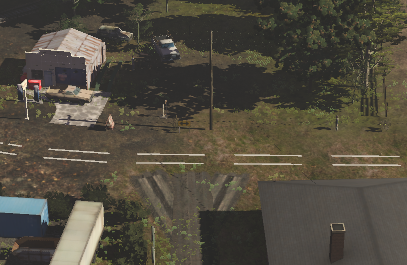
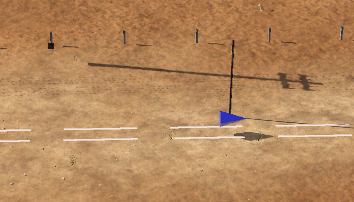
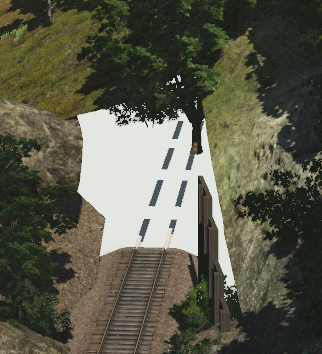
Missing Spline Dependencies will be shown in Surveyor as broken white parallel lines |
| In the following examples... | |
 |
|
 |
|
 |
|
Missing Ground Textures |
|
|
|
Missing Ground Texture Dependencies will be shown as a false colour covering their location in the layout |
|
Zooming out will reveal any underlying ground texture |
 |
|
Missing Scenery Objects (incl Rolling Stock and Track Objects) |
|
|
|
Missing Scenery Dependencies will be shown as orange 3D frames in the layout ONLY IF a control setting has been ticked. Otherwise there may be no indication that something is missing. |
|
| Locating these objects in a layout can give you useful clues as to what the missing dependencies are (e.g. trees/bushes, cars, buildings, signals, wagons, etc). |
|
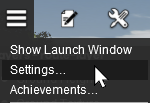
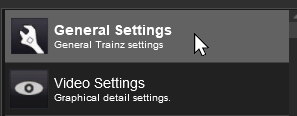
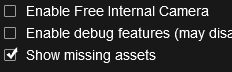


| With the Show missing assets check box set on, each scenery object that is missing will be shown as an Orange Wire Frame Box in Surveyor but will still be invisible in Driver. |
| In the following examples... | |
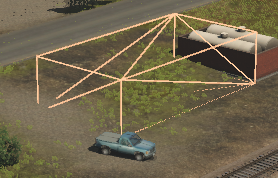 |
|
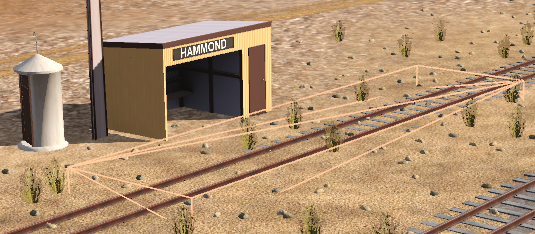 |
|
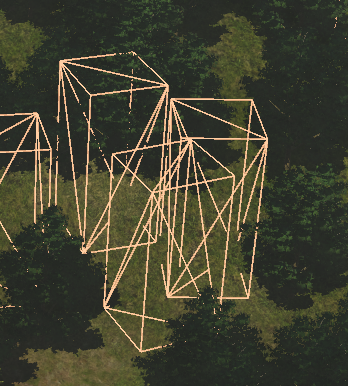 |
|
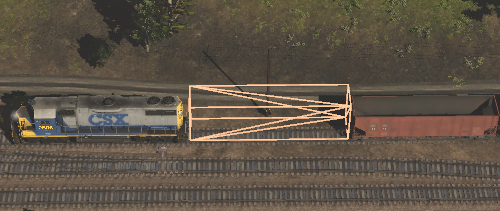 |
|
 |
|
Deleting Missing Dependencies |
|
|
|
|
|
Missing Dependencies can be deleted "en mass" automatically by tools in Surveyor |
|
Once they are made visible Missing Dependencies can be deleted manually and individually, like any other object in Surveyor |
Delete Missing Dependencies Automatically |
|
|
|
Missing dependencies throughout a route or session can be deleted by commands found in the Tools menu of Surveyor |
|
||||||
|
|
|||||
| Delete Missing Assets
|
 |
|
||||||||||||||


Delete Missing Dependencies Manually |
|
|
If you only have a few identified Missing Dependencies in one area then it may be easier to delete them manually |
|
Deleting Missing Track Object Dependencies usually requires each one to be deleted manually |
| All Missing Dependencies can be deleted manually, one at a time. It will depend on how many you have and how widely distributed they are. |
|
||||||||||||||||||||||||||


|
|
Trainz Wiki
|
|


This page was created by Trainz user pware in October 2026 and was last updated as shown below.


