SAR Yandiah Industry: Difference between revisions
From TrainzOnline
Jump to navigationJump to search
mNo edit summary |
mNo edit summary |
||
| (4 intermediate revisions by the same user not shown) | |||
| Line 1: | Line 1: | ||
<!-- V1.0 --> | |||
<table> | |||
<tr valign="top"> | <tr valign="top"> | ||
<td width=750> | <td width=750> | ||
<table width=750 | <table width=750> | ||
<tr valign="top"> | <tr valign="top"> | ||
<td align="center">[[Image:line740.png|link=]]</td> | <td align="center">[[Image:line740.png|link=]]</td> | ||
</tr> | </tr> | ||
<tr valign="top"> | <tr valign="top"> | ||
<td align="center">[[image:Tab_HM_Grey.png|link=SAR_Yandiah]] [[image:Tab_IN_White.png|link=]] [[image:Tab_TM_Grey.png|link=SAR_Yandiah_TrackMarks]] [[image: | <td align="center">[[image:Tab_HM_Grey.png|link=SAR_Yandiah]] [[image:Tab_IN_White.png|link=]] [[image:Tab_TM_Grey.png|link=SAR_Yandiah_TrackMarks]] [[image:Tab_SW_Grey.png|link=SAR_Yandiah_Switches]] [[image:Tab_Blank_Grey.png|link=]]</td> | ||
</tr> | </tr> | ||
<tr valign="top"> | <tr valign="top"> | ||
<td align="center">[[Image:line740.png|link=]]</td> | <td align="center">[[Image:line740.png|link=]]</td> | ||
</tr> | </tr> | ||
</table | </table> | ||
<table bgcolor="lightgrey" bordercolor="lightgrey" width=750 | <table bgcolor="lightgrey" bordercolor="lightgrey" width=750> | ||
<tr valign="middle"> | <tr valign="middle"> | ||
| Line 25: | Line 26: | ||
</tr> | </tr> | ||
</table | </table> | ||
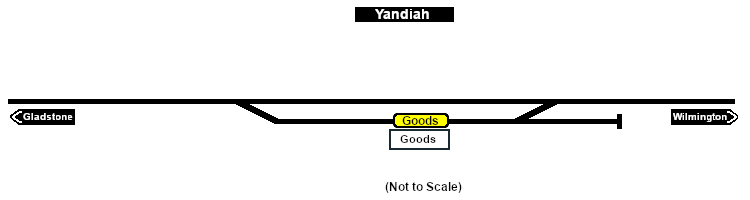
[[image:SAR_Yandiah_Industry.png|link=|alt=Yandiah Industry map]] | [[image:SAR_Yandiah_Industry.png|link=|alt=Yandiah Industry map]] | ||
<table bgcolor="lightcyan" width=750 | <table bgcolor="lightcyan" width=750> | ||
<tr valign="top"> | <tr valign="top"> | ||
| Line 41: | Line 42: | ||
<td colspan=2 align="center"><span style="font-weight: 700;">For all Industries use the "Drive To <span style="color: blue;">name of industry</span>" and <span style="color: blue;">"Load/Unload"</span> commands</span></td> | <td colspan=2 align="center"><span style="font-weight: 700;">For all Industries use the "Drive To <span style="color: blue;">name of industry</span>" and <span style="color: blue;">"Load/Unload"</span> commands</span></td> | ||
</tr> | </tr> | ||
<tr valign="top"> | <tr valign="top"> | ||
<td colspan=2 align="center">[[Image:line740.png|link=]]</td> | <td colspan=2 align="center">[[Image:line740.png|link=]]</td> | ||
| Line 57: | Line 57: | ||
</tr> | </tr> | ||
</table | </table> | ||
</td> | </td> | ||
| Line 65: | Line 65: | ||
</td> | </td> | ||
</tr> | </tr> | ||
</table | </table> | ||
Latest revision as of 05:38, 16 November 2022
|
|
||||||||||||||||||||