How to Use Navigation Point Rules: Difference between revisions
From TrainzOnline
Jump to navigationJump to search
mNo edit summary |
|||
| (12 intermediate revisions by the same user not shown) | |||
| Line 1: | Line 1: | ||
<table width=1000 bgcolor=#000000 cellpadding=2> | |||
<table | |||
<tr valign="top"> | <tr valign="top"> | ||
<td> | <td> | ||
<table width=996 bgcolor=#ffffff cellpadding=2> | |||
<tr valign="middle"> | |||
<td width=35>[[image:Information.png|35px|link=]]</td> | |||
<td><span style="font-size: 15px;">The information in this Wiki Page explains how to use the different '''Navigation Point Rules''' in '''Sessions''' created with '''T:ANE''', '''TRS19''', '''TRS22''' and '''Trainz Plus'''.</span></td> | |||
</tr> | |||
</table> | |||
</td> | </td> | ||
</tr> | </tr> | ||
</table> | </table> | ||
<br> | <br> | ||
<table width=1000> | |||
<tr valign="top"> | |||
<td width=250> | |||
__TOC__ | __TOC__ | ||
< | </td> | ||
<table | <td> | ||
<table bgcolor="lightcyan" cellpadding=2> | |||
<tr valign="top"> | <tr valign="top"> | ||
<td width=10>[[image:BlueDot10x10.png|link=]]</td> | <td width=10>[[image:BlueDot10x10.png|link=]]</td> | ||
<td>'''Navigation Points''' are icons that appear at set track locations or on set rail vehicles that indicate destinations for user driven trains and tasks to be performed</td> | <td>'''Navigation Points''' are icons that appear at set track locations or on set rail vehicles that indicate destinations for user driven trains and tasks to be performed</td> | ||
</tr> | |||
<tr valign="top"> | |||
<td>[[image:BlueDot10x10.png|link=]]</td> | |||
<td>The navigation points are created and controlled by the set of Session rules that are described in this document</td> | |||
</tr> | </tr> | ||
</table> | </table> | ||
<br> | <br> | ||
<table cellpadding=4 bgcolor="Aquamarine"> | |||
< | <tr valign="top"> | ||
<td>[[image:LinkWiki.PNG|link=]]</td> | |||
<td>For examples of how to use these rules in '''Trainz''' Sessions, see the '''Trainz Wiki Page''' at:-<br> | |||
* '''[[How to Use Navigation Point Rules (Applications)]]''' | |||
</td> | |||
</tr> | |||
</table> | |||
</td> | |||
</tr> | |||
</table> | |||
<table> <!-- BEGIN Nav Buttons Table --> | <table> <!-- BEGIN Nav Buttons Table --> | ||
<tr valign="top"> | <tr valign="top"> | ||
<td width=729><span id="stepDisplay"></span>& | <td width=729><span id="stepDisplay"></span> </td> | ||
<td width=46>[[ | <td width=46>[[image:BackToTop.png|link=#top|alt=Top|Top]]</td> | ||
<td width=75>& | <td width=75> </td> | ||
<td width=75>[[ | <td width=75>[[image:NextDown.png|link=#stepHide|alt=Next Down|Next Down]]</td> | ||
<td width=75>[[ | <td width=75>[[image:BackToBottom.png|link=#bottom|alt=Bottom|Bottom]]</td> | ||
</tr> | </tr> | ||
</table> <!-- END Nav Buttons Table --> | </table> <!-- END Nav Buttons Table --> | ||
| Line 37: | Line 55: | ||
<tr valign="top"> | <tr valign="top"> | ||
<td width=10>[[image:BlueDot10x10.png|link=]]</td> | <td width=10>[[image:BlueDot10x10.png|link=]]</td> | ||
<td>The '''Navigation Set Hide/Show Rule''' is added to a Session and configured using the [[ | <td>The '''Navigation Set Hide/Show Rule''' is added to a Session and configured using the [[image:WikiLink.PNG|link=]] '''[[How to Use Session Editor|Session Editor]]''' in Surveyor</td> | ||
</tr> | </tr> | ||
<tr valign="top"> | <tr valign="top"> | ||
<td width=10>[[image:BlueDot10x10.png|link=]]</td> | <td width=10>[[image:BlueDot10x10.png|link=]]</td> | ||
<td>The [[ | <td>The [[image:WikiLink.PNG|link=]] '''[[Session_Rule_List_with_Parameters#Navigation Display Rule|Navigation Display Rule]]''' creates and displays a '''set of Navigation Points'''</td> | ||
</tr> | </tr> | ||
</table> | </table> | ||
| Line 74: | Line 92: | ||
<table width=1000> | <table width=1000> | ||
<tr valign="top"> | <tr valign="top"> | ||
<td width=640>[[ | <td width=640>[[image:NavDisplaySetDialogUpper.JPG|link=]]</td> | ||
<td> | <td> | ||
<table width=360 bgcolor=#000000 cellpadding=2> | <table width=360 bgcolor=#000000 cellpadding=2> | ||
| Line 100: | Line 118: | ||
</tr> | </tr> | ||
<tr valign="top"> | <tr valign="top"> | ||
<td>[[ | <td>[[image:Gears.PNG|link=]]</td> | ||
<td><span style="font-size: 17px;">'''Settings:'''</span> | <td><span style="font-size: 17px;">'''Settings:'''</span> | ||
<table> | <table> | ||
| Line 108: | Line 126: | ||
<tr valign="top"> | <tr valign="top"> | ||
<td width=10>[[image:BlackDot10x10.png|link=]]</td> | <td width=10>[[image:BlackDot10x10.png|link=]]</td> | ||
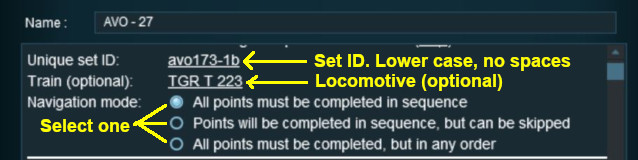
<td>'''Set ID:''' Each Navigation Point Set must have a '''unique ID code'''. This consists of any text characters <span style="background-color: red; color: white; font-weight: 700; font-size: 15px">& | <td>'''Set ID:''' Each Navigation Point Set must have a '''unique ID code'''. This consists of any text characters <span style="background-color: red; color: white; font-weight: 700; font-size: 15px"> EXCEPT </span> the '''SPACE''' character and '''UPPER CASE''' characters</td> | ||
</tr> | </tr> | ||
<tr valign="top"> | <tr valign="top"> | ||
| Line 119: | Line 137: | ||
<table> | <table> | ||
<tr valign="top"> | <tr valign="top"> | ||
<td>[[ | <td>[[image:PortalOptionButtonEmpty.PNG|link=]] '''All points must be completed in sequence''' - the order of the points listed below is the order in which they must be executed. No exceptions</td> | ||
</tr> | </tr> | ||
<tr valign="top"> | <tr valign="top"> | ||
<td>[[ | <td>[[image:PortalOptionButtonEmpty.PNG|link=]] '''Points will be completed in sequence, but can be skipped''' - the order of the points below is the order in which they must be executed but points can be skipped. You cannot go back to complete a missed point</td> | ||
</tr> | </tr> | ||
<tr valign="top"> | <tr valign="top"> | ||
<td>[[ | <td>[[image:PortalOptionButtonEmpty.PNG|link=]] '''All points must be completed but in any order''' - the order is not important but no points can be missed. All the Navigation Points in the set will be displayed when this option is selected</td> | ||
</tr> | </tr> | ||
</table> | </table> | ||
| Line 141: | Line 159: | ||
<table width=1000> | <table width=1000> | ||
<tr valign="top"> | <tr valign="top"> | ||
<td width=640>[[ | <td width=640>[[image:NavDisplaySetDialogLower.JPG|link=]]</td> | ||
<td> | <td> | ||
<table width=360 bgcolor=#000000 cellpadding=2> | <table width=360 bgcolor=#000000 cellpadding=2> | ||
| Line 170: | Line 188: | ||
</tr> | </tr> | ||
<tr valign="top"> | <tr valign="top"> | ||
<td>[[ | <td>[[image:Gears.PNG|link=]]</td> | ||
<td><span style="font-size: 17px;">'''Settings:'''</span> | <td><span style="font-size: 17px;">'''Settings:'''</span> | ||
<table> | <table> | ||
| Line 212: | Line 230: | ||
<tr valign="top"> | <tr valign="top"> | ||
<td width=10>[[image:BlackDot10x10.png|link=]]</td> | <td width=10>[[image:BlackDot10x10.png|link=]]</td> | ||
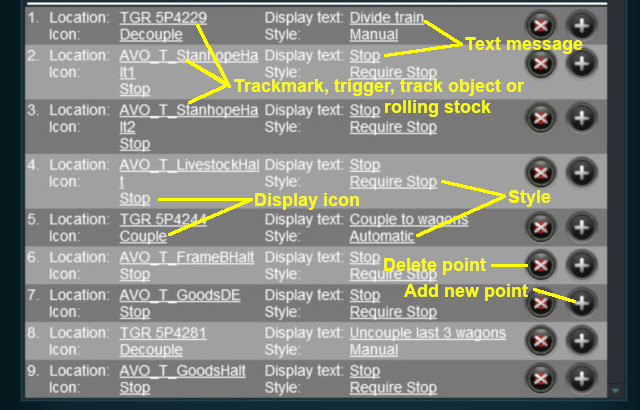
<td>'''Add Navigation Point''' - new points are added by a <span style="font-weight: 700; font-size: 15px; background-color: lightcyan;">Left Click</span> on the | <td>'''Add Navigation Point''' - new points are added by a <span style="font-weight: 700; font-size: 15px; background-color: lightcyan;">Left Click</span> on the [[image:AddIcon.png|link=]] icon. The new point will be inserted in the line below</td> | ||
</tr> | </tr> | ||
<tr valign="top"> | <tr valign="top"> | ||
<td>[[image:BlackDot10x10.png|link=]]</td> | <td>[[image:BlackDot10x10.png|link=]]</td> | ||
<td>'''Delete Navigation Point''' - existing points can be deleted by <span style="font-weight: 700; font-size: 15px; background-color: lightcyan;">Left Click</span> on the | <td>'''Delete Navigation Point''' - existing points can be deleted by a <span style="font-weight: 700; font-size: 15px; background-color: lightcyan;">Left Click</span> on the [[image:DeleteIcon.png|link=]] icon</td> | ||
</tr> | </tr> | ||
</table> | </table> | ||
| Line 235: | Line 253: | ||
<table> <!-- BEGIN Nav Buttons Table --> | <table> <!-- BEGIN Nav Buttons Table --> | ||
<tr valign="top"> | <tr valign="top"> | ||
<td width=729><span id="stepHide"></span>& | <td width=729><span id="stepHide"></span> </td> | ||
<td width=46>[[ | <td width=46>[[image:BackToTop.png|link=#top|alt=Top|Top]]</td> | ||
<td width=75>[[ | <td width=75>[[image:NextUp.png|link=#stepDisplay|alt=Next Up|Top]]</td> | ||
<td width=75>[[ | <td width=75>[[image:NextDown.png|link=#stepClear|alt=Next Down|Next Down]]</td> | ||
<td width=75>[[ | <td width=75>[[image:BackToBottom.png|link=#bottom|alt=Bottom|Bottom]]</td> | ||
</tr> | </tr> | ||
</table> <!-- END Nav Buttons Table --> | </table> <!-- END Nav Buttons Table --> | ||
| Line 248: | Line 266: | ||
<tr valign="top"> | <tr valign="top"> | ||
<td width=10>[[image:BlueDot10x10.png|link=]]</td> | <td width=10>[[image:BlueDot10x10.png|link=]]</td> | ||
<td>The '''Navigation Set Hide/Show Rule''' is added to a Session and configured using the [[ | <td>The '''Navigation Set Hide/Show Rule''' is added to a Session and configured using the [[image:WikiLink.PNG|link=]] '''[[How to Use Session Editor|Session Editor]]''' in Surveyor</td> | ||
</tr> | </tr> | ||
<tr valign="top"> | <tr valign="top"> | ||
<td width=10>[[image:BlueDot10x10.png|link=]]</td> | <td width=10>[[image:BlueDot10x10.png|link=]]</td> | ||
<td>The [[ | <td>The [[image:WikiLink.PNG|link=]] '''[[Session_Rule_List_with_Parameters#Navigation Set Hide/Show Rule|Navigation Set Hide/Show Rule]]''' hides and displays the navigation sets created by the '''Navigation Display Rule'''</td> | ||
</tr> | </tr> | ||
</table> | </table> | ||
| Line 258: | Line 276: | ||
<table width=1000> | <table width=1000> | ||
<tr valign="top"> | <tr valign="top"> | ||
<td width=500>[[ | <td width=500>[[image:NavPointHideDialog.JPG|500px|link=]]</td> | ||
<td> | <td> | ||
<table width=500 bgcolor=#000000 cellpadding=2> | <table width=500 bgcolor=#000000 cellpadding=2> | ||
| Line 284: | Line 302: | ||
</tr> | </tr> | ||
<tr valign="top"> | <tr valign="top"> | ||
<td>[[ | <td>[[image:Gears.PNG|link=]]</td> | ||
<td><span style="font-size: 17px;">'''Settings:'''</span> | <td><span style="font-size: 17px;">'''Settings:'''</span> | ||
<table> | <table> | ||
| Line 304: | Line 322: | ||
<tr valign="top"> | <tr valign="top"> | ||
<td>[[image:BlackDot10x10.png|link=]]</td> | <td>[[image:BlackDot10x10.png|link=]]</td> | ||
<td>'''Set ID:''' The unique Navigation Point '''Set ID''' code for the set to be hidden or shown. This must be the same ID as entered in the '''Navigation Display Rule''' and consists of any text characters <span style="background-color: red; color: white; font-weight: 700; font-size: 15px">& | <td>'''Set ID:''' The unique Navigation Point '''Set ID''' code for the set to be hidden or shown. This must be the same ID as entered in the [[image:PageLink.PNG|link=]] '''[[#stepDisplay|Navigation Display Rule]]''' and consists of any text characters <span style="background-color: red; color: white; font-weight: 700; font-size: 15px"> EXCEPT </span> the '''SPACE''' character and '''UPPER CASE''' characters</td> | ||
</tr> | </tr> | ||
</table> | </table> | ||
| Line 317: | Line 335: | ||
<table> <!-- BEGIN Nav Buttons Table --> | <table> <!-- BEGIN Nav Buttons Table --> | ||
<tr valign="top"> | <tr valign="top"> | ||
<td width=729><span id="stepClear"></span>& | <td width=729><span id="stepClear"></span> </td> | ||
<td width=46>[[ | <td width=46>[[image:BackToTop.png|link=#top|alt=Top|Top]]</td> | ||
<td width=75>[[ | <td width=75>[[image:NextUp.png|link=#stepHide|alt=Next Up|Top]]</td> | ||
<td width=75>[[ | <td width=75>[[image:NextDown.png|link=#stepComplete|alt=Next Down|Next Down]]</td> | ||
<td width=75>[[ | <td width=75>[[image:BackToBottom.png|link=#bottom|alt=Bottom|Bottom]]</td> | ||
</tr> | </tr> | ||
</table> <!-- END Nav Buttons Table --> | </table> <!-- END Nav Buttons Table --> | ||
| Line 327: | Line 345: | ||
='''Navigation Set Clear Rule'''= | ='''Navigation Set Clear Rule'''= | ||
The [[ | <table width=1000 bgcolor="lightcyan" cellpadding=2> | ||
<tr valign="top"> | |||
<td width=10>[[image:BlueDot10x10.png|link=]]</td> | |||
<td>The '''Navigation Set Clear Rule''' is added to a Session and configured using the [[image:WikiLink.PNG|link=]] '''[[How to Use Session Editor|Session Editor]]''' in Surveyor</td> | |||
</tr> | |||
<tr> | |||
<td width=10>[[image:BlueDot10x10.png|link=]]</td> | |||
<td>The [[image:WikiLink.PNG|link=]] '''[[Session_Rule_List_with_Parameters#Navigation Set Clear Rule|Navigation Set Clear Rule]]''' clears or completes any uncompleted Navigation Points in a set created by the '''Navigation Display Rule'''</td> | |||
</tr> | |||
</table> | |||
<br> | <br> | ||
<table width=1000> | |||
< | <tr valign="top"> | ||
<td width=500>[[image:NavSetClearDialog.JPG|500px|link=]]</td> | |||
<table> | <td> | ||
<table width=500 bgcolor=#000000 cellpadding=2> | |||
<tr valign="top"> | <tr valign="top"> | ||
<td> | <td> | ||
<table cellpadding=4 bgcolor=#eeeeee> | <table width=496 bgcolor=#ffffb0 cellpadding=2> | ||
<tr valign="top"> | |||
<td width=25>[[image:NotePad.PNG|link=]]</td> | |||
<td><span style="font-size: 17px; font-weight: 700;">Notes:'''</span><br> | |||
---- | |||
Visible '''Navigation Sets''' will be cleared automatically when they have been completed. However, you can clear an unfinished set at any time using this rule.</td> | |||
</tr> | |||
</table> | |||
</td> | |||
</tr> | |||
</table> | |||
</td> | |||
</tr> | |||
</table> | |||
<table width=1000 cellpadding=4 bgcolor=#eeeeee> | |||
<tr> | <tr> | ||
<td colspan="2"> | <td colspan="2"> | ||
| Line 342: | Line 384: | ||
</tr> | </tr> | ||
<tr valign="top"> | <tr valign="top"> | ||
<td>[[ | <td>[[image:Gears.PNG|link=]]</td> | ||
<td><span style="font-size: 17px;">'''Settings:'''</span>< | <td><span style="font-size: 17px;">'''Settings:'''</span> | ||
<table> | |||
<tr valign="top"> | |||
<td width=10>[[image:BlackDot10x10.png|link=]]</td> | |||
<td>'''Set ID:''' The unique Navigation Point '''Set ID''' code for the set to be cleared. This must be the same ID as entered in the [[image:PageLink.PNG|link=]] '''[[#stepDisplay|Navigation Display Rule]]''' and consists of any text characters <span style="background-color: red; color: white; font-weight: 700; font-size: 15px"> EXCEPT </span> the '''SPACE''' character and '''UPPER CASE''' characters</td> | |||
</tr> | |||
</table> | |||
</td> | |||
</tr> | </tr> | ||
<tr> | <tr> | ||
<td colspan="2"> | <td colspan="2"> | ||
----</td> | ----</td> | ||
</tr> | </tr> | ||
</table> | </table> | ||
| Line 356: | Line 402: | ||
<table> <!-- BEGIN Nav Buttons Table --> | <table> <!-- BEGIN Nav Buttons Table --> | ||
<tr valign="top"> | <tr valign="top"> | ||
<td width=729><span id="stepComplete"></span>& | <td width=729><span id="stepComplete"></span> </td> | ||
<td width=46>[[ | <td width=46>[[image:BackToTop.png|link=#top|alt=Top|Top]]</td> | ||
<td width=75>[[ | <td width=75>[[image:NextUp.png|link=#stepClear|alt=Next Up|Top]]</td> | ||
<td width=75>[[ | <td width=75>[[image:NextDown.png|link=#stepCheck|alt=Next Down|Next Down]]</td> | ||
<td width=75>[[ | <td width=75>[[image:BackToBottom.png|link=#bottom|alt=Bottom|Bottom]]</td> | ||
</tr> | </tr> | ||
</table> <!-- END Nav Buttons Table --> | </table> <!-- END Nav Buttons Table --> | ||
| Line 366: | Line 412: | ||
='''Navigation Point Complete Rule'''= | ='''Navigation Point Complete Rule'''= | ||
The [[ | <table width=1000 bgcolor="lightcyan" cellpadding=2> | ||
<tr valign="top"> | |||
<td width=10>[[image:BlueDot10x10.png|link=]]</td> | |||
<td>The '''Navigation Point Complete Rule''' is added to a Session and configured using the [[image:WikiLink.PNG|link=]] '''[[How to Use Session Editor|Session Editor]]''' in Surveyor</td> | |||
</tr> | |||
<tr valign="top"> | |||
<td>[[image:BlueDot10x10.png|link=]]</td> | |||
<td>The [[image:WikiLink.PNG|link=]] '''[[Session_Rule_List_with_Parameters#Navigation Point Complete Rule|Navigation Point Complete Rule]]''' clears or completes the selected '''Navigation Point''' in a set created by the [[image:PageLink.PNG|link=]] '''[[#stepDisplay|Navigation Display Rule]]'''. This rule is used to complete Navigation Points with their ''Style'' property set to '''manual'''</td> | |||
</tr> | |||
</table> | |||
<br> | <br> | ||
<table width=1000> | |||
< | <tr valign="top"> | ||
<td width=500>[[image:NavPointCompleteDialog.JPG|500px|link=]]</td> | |||
<table> | <td> | ||
<table width=500 bgcolor=#000000 cellpadding=2> | |||
<tr valign="top"> | <tr valign="top"> | ||
<td> | <td> | ||
<table cellpadding=4 bgcolor=#eeeeee> | <table width=496 bgcolor=#ffffb0 cellpadding=2> | ||
<tr valign="top"> | |||
<td width=25>[[image:NotePad.PNG|link=]]</td> | |||
<td><span style="font-size: 17px; font-weight: 700;">Notes:'''</span><br> | |||
---- | |||
'''Navigation Points''' with their '''Style:''' set to '''Automatic''' or '''Require Stop''' will be cleared automatically when they have been completed. Those set to '''Manual''' must be cleared by using this rule.</td> | |||
</tr> | |||
</table> | |||
</td> | |||
</tr> | |||
</table> | |||
</td> | |||
</tr> | |||
</table> | |||
<table width=1000 cellpadding=4 bgcolor=#eeeeee> | |||
<tr> | <tr> | ||
<td colspan="2"> | <td colspan="2"> | ||
| Line 381: | Line 450: | ||
</tr> | </tr> | ||
<tr valign="top"> | <tr valign="top"> | ||
<td>[[ | <td>[[image:Gears.PNG|link=]]</td> | ||
<td><span style="font-size: 17px;">'''Settings:'''</span>< | <td><span style="font-size: 17px;">'''Settings:'''</span> | ||
<table> | |||
<tr valign="top"> | |||
<td width=10>[[image:BlackDot10x10.png|link=]]</td> | |||
<td>'''Navigation Point Number''' A valid number identifying the particular Navigation Point to be completed. If the number entered does not exist then the rule will be ignored</td> | |||
</tr> | |||
<tr valign="top"> | |||
<td>[[image:BlackDot10x10.png|link=]]</td> | |||
<td>'''Set ID:''' The unique Navigation Point '''Set ID''' code for the set. This must be the same ID as entered in the [[image:PageLink.PNG|link=]] '''[[#stepDisplay|Navigation Display Rule]]''' and consists of any text characters <span style="background-color: red; color: white; font-weight: 700; font-size: 15px"> EXCEPT </span> the '''SPACE''' character and '''UPPER CASE''' characters</td> | |||
</tr> | |||
</table> | |||
</td> | |||
</tr> | </tr> | ||
<tr> | <tr> | ||
<td colspan="2"> | <td colspan="2"> | ||
----</td> | ----</td> | ||
</tr> | </tr> | ||
</table> | </table> | ||
| Line 396: | Line 472: | ||
<table> <!-- BEGIN Nav Buttons Table --> | <table> <!-- BEGIN Nav Buttons Table --> | ||
<tr valign="top"> | <tr valign="top"> | ||
<td width=729><span id="stepCheck"></span>& | <td width=729><span id="stepCheck"></span> </td> | ||
<td width=46>[[ | <td width=46>[[image:BackToTop.png|link=#top|alt=Top|Top]]</td> | ||
<td width=75>[[ | <td width=75>[[image:NextUp.png|link=#stepComplete|alt=Next Up|Top]]</td> | ||
<td width=75>[[ | <td width=75>[[image:NextDown.png|link=#stepWait|alt=Next Down|Next Down]]</td> | ||
<td width=75>[[ | <td width=75>[[image:BackToBottom.png|link=#bottom|alt=Bottom|Bottom]]</td> | ||
</tr> | </tr> | ||
</table> <!-- END Nav Buttons Table --> | </table> <!-- END Nav Buttons Table --> | ||
| Line 406: | Line 482: | ||
='''Navigation Set Check Rule'''= | ='''Navigation Set Check Rule'''= | ||
The [[ | <table width=1000 bgcolor="lightcyan" cellpadding=2> | ||
<tr valign="top"> | |||
<td width=10>[[image:BlueDot10x10.png|link=]]</td> | |||
<td>The '''Navigation Set Check Rule''' is added to a Session and configured using the [[image:WikiLink.PNG|link=]] '''[[How to Use Session Editor|Session Editor]]''' in Surveyor. It is a [[image:WikiLink.PNG|link=]] '''[[How_to_Use_Parent_and_Child_Rules|Parent Rule]]'''</td> | |||
</tr> | |||
<tr valign="top"> | |||
<td>[[image:BlueDot10x10.png|link=]]</td> | |||
<td>The [[image:WikiLink.PNG|link=]] '''[[Session_Rule_List_with_Parameters#Navigation Set Check Rule|Navigation Set Check Rule]]''' checks if the specified '''Navigation Set''' has been completed, or not completed, then executes any following child rules</td> | |||
</tr> | |||
</table> | |||
<br> | <br> | ||
<table width=1000> | |||
< | <tr valign="top"> | ||
<td width=500>[[image:NavSetCheckDialog.JPG|500px|link=]]</td> | |||
<table> | <td> | ||
<table bgcolor=#000000 cellpadding=2> | |||
<tr valign="top"> | <tr valign="top"> | ||
<td> | <td> | ||
<table cellpadding=4 bgcolor=#eeeeee> | <table bgcolor=#ffffb0 cellpadding=2> | ||
<tr valign="top"> | |||
<td width=25>[[image:NotePad.PNG|link=]]</td> | |||
<td><span style="font-size: 17px; font-weight: 700;">Notes:'''</span><br> | |||
---- | |||
This rule allows you to check if all the '''Navigation Points''' in an identified '''Navigation Point Set''' have been completed or not. It is a '''Parent Rule''' so it can be used to perform other actions (execute '''Child Rules''') based on the result of the check</td> | |||
</tr> | |||
</table> | |||
</td> | |||
</tr> | |||
</table> | |||
</td> | |||
</tr> | |||
</table> | |||
<table width=1000 cellpadding=4 bgcolor=#eeeeee> | |||
<tr> | <tr> | ||
<td colspan="2"> | <td colspan="2"> | ||
| Line 421: | Line 521: | ||
</tr> | </tr> | ||
<tr valign="top"> | <tr valign="top"> | ||
<td>[[ | <td>[[image:Gears.PNG|link=]]</td> | ||
<td><span style="font-size: 17px;">'''Settings:'''</span>< | <td><span style="font-size: 17px;">'''Settings:'''</span> | ||
<table> | |||
<tr valign="top"> | |||
<td width=10>[[image:BlackDot10x10.png|link=]]</td> | |||
<td>'''Set ID:''' The unique Navigation Point '''Set ID''' code for the set to be checked. This must be the same ID as entered in the [[image:PageLink.PNG|link=]] '''[[#stepDisplay|Navigation Display Rule]]''' and consists of any text characters <span style="background-color: red; color: white; font-weight: 700; font-size: 15px"> EXCEPT </span> the '''SPACE''' character and '''UPPER CASE''' characters</td> | |||
</tr> | |||
<tr valign="top"> | |||
<td>[[image:BlackDot10x10.png|link=]]</td> | |||
<td>'''Complete/Incomplete:''' <span style="font-weight: 700; font-size: 15px; background-color: lightcyan;">Left Click</span> to select one of these two options. The selected Navigation Point Set will be tested to see if it has been '''Completed''' (all of its Navigation Points have been cleared/completed) or if it is '''Incomplete''' (not all of its Navigation Points have been cleared/completed)</td> | |||
</tr> | |||
</table> | |||
</td> | |||
</tr> | </tr> | ||
<tr> | <tr> | ||
<td colspan="2"> | <td colspan="2"> | ||
----</td> | ----</td> | ||
</tr> | </tr> | ||
</table> | </table> | ||
| Line 436: | Line 543: | ||
<table> <!-- BEGIN Nav Buttons Table --> | <table> <!-- BEGIN Nav Buttons Table --> | ||
<tr valign="top"> | <tr valign="top"> | ||
<td width=729><span id="stepWait"></span>& | <td width=729><span id="stepWait"></span> </td> | ||
<td width=46>[[ | <td width=46>[[image:BackToTop.png|link=#top|alt=Top|Top]]</td> | ||
<td width=75>[[ | <td width=75>[[image:NextUp.png|link=#stepCheck|alt=Next Up|Top]]</td> | ||
<td width=75> | <td width=75> </td> | ||
<td width=75>[[ | <td width=75>[[image:BackToBottom.png|link=#bottom|alt=Bottom|Bottom]]</td> | ||
</tr> | </tr> | ||
</table> <!-- END Nav Buttons Table --> | </table> <!-- END Nav Buttons Table --> | ||
| Line 446: | Line 553: | ||
='''Wait on Navigation Point Rule'''= | ='''Wait on Navigation Point Rule'''= | ||
The [[ | <table width=1000 bgcolor="lightcyan" cellpadding=2> | ||
<tr valign="top"> | |||
<td width=10>[[image:BlueDot10x10.png|link=]]</td> | |||
<td>The '''Wait on Navigation Point Rule''' is added to a Session and configured using the [[image:WikiLink.PNG|link=]] '''[[How to Use Session Editor|Session Editor]]''' in Surveyor. It is a [[image:WikiLink.PNG|link=]] '''[[How_to_Use_Parent_and_Child_Rules|Parent Rule]]'''</td> | |||
</tr> | |||
<tr valign="top"> | |||
<td width=10>[[image:BlueDot10x10.png|link=]]</td> | |||
<td>The [[image:WikiLink.PNG|link=]] '''[[Session_Rule_List_with_Parameters#Wait on Navigation Point Rule|Wait on Navigation Point Rule]]''' waits until the specified Navigation Point in the specified set has been completed then executes any following child rules</td> | |||
</tr> | |||
</table> | |||
<br> | <br> | ||
<table width=1000> | |||
< | <tr valign="top"> | ||
<td width=500>[[image:NavPointWaitDialog.JPG|500px|link=]]</td> | |||
<table> | <td> | ||
<table bgcolor=#000000 cellpadding=2> | |||
<tr valign="top"> | <tr valign="top"> | ||
<td> | <td> | ||
<table cellpadding=4 bgcolor=#eeeeee> | <table bgcolor=#ffffb0 cellpadding=2> | ||
<tr valign="top"> | |||
<td width=25>[[image:NotePad.PNG|link=]]</td> | |||
<td><span style="font-size: 17px; font-weight: 700;">Notes:'''</span><br> | |||
---- | |||
This rule allows you to set a '''Wait''' condition until a particular '''Navigation Point''' in a specific '''Navigation Point Set''' has been completed. It is a '''Parent Rule''' so it can be used to perform other actions (execute '''Child Rules''') when the specific '''Navigation Point''' has been completed</td> | |||
</tr> | |||
</table> | |||
</td> | |||
</tr> | |||
</table> | |||
</td> | |||
</tr> | |||
</table> | |||
<table width=1000 cellpadding=4 bgcolor=#eeeeee> | |||
<tr> | <tr> | ||
<td colspan="2"> | <td colspan="2"> | ||
| Line 461: | Line 592: | ||
</tr> | </tr> | ||
<tr valign="top"> | <tr valign="top"> | ||
<td>[[ | <td>[[image:Gears.PNG|link=]]</td> | ||
<td><span style="font-size: 17px;">'''Settings:'''</span>< | <td><span style="font-size: 17px;">'''Settings:'''</span> | ||
<table> | |||
<tr valign="top"> | |||
<td width=10>[[image:BlackDot10x10.png|link=]]</td> | |||
<td>'''Navigation Point Number''' A valid number identifying the particular Navigation Point to be completed. If the number entered does not exist then the rule will be ignored</td> | |||
</tr> | |||
<tr valign="top"> | |||
<td>[[image:BlackDot10x10.png|link=]]</td> | |||
<td>'''Set ID:''' The unique Navigation Point '''Set ID''' code for the set. This must be the same ID as entered in the '''Navigation Display Rule''' and consists of any text characters <span style="background-color: red; color: white; font-weight: 700; font-size: 15px"> EXCEPT </span> the ''SPACE'' character and ''UPPER CASE'' characters</td> | |||
</tr> | |||
</table> | |||
</td> | |||
</tr> | </tr> | ||
<tr> | <tr> | ||
<td colspan="2"> | <td colspan="2"> | ||
----</td> | ----</td> | ||
</tr> | </tr> | ||
</table> | </table> | ||
| Line 476: | Line 614: | ||
<table> <!-- BEGIN Nav Buttons Table --> | <table> <!-- BEGIN Nav Buttons Table --> | ||
<tr valign="top"> | <tr valign="top"> | ||
<td width=729><span id="bottom"></span>& | <td width=729><span id="bottom"></span> </td> | ||
<td width=46>[[ | <td width=46>[[image:BackToTop.png|link=#top|alt=Top|Top]]</td> | ||
<td width=75>[[ | <td width=75>[[image:NextUp.png|link=#stepWait|alt=Next Up|Top]]</td> | ||
<td width=75>& | <td width=75> </td> | ||
<td width=75>& | <td width=75> </td> | ||
</tr> | </tr> | ||
</table> <!-- END Nav Buttons Table --> | </table> <!-- END Nav Buttons Table --> | ||
---- | ---- | ||
---- | ---- | ||
='''Trainz Wiki'''= | ='''Trainz Wiki'''= | ||
<table cellpadding= | <table width=1000> | ||
<tr valign="top"> | |||
<td> | |||
<table width=500 cellpadding=2 bgcolor=#ffffff> | |||
<tr valign="top"> | <tr valign="top"> | ||
<td>[[ | <td width=80>[[image:TrainzWiki.png|link=]]</td> | ||
<td> | <td> | ||
<span style="font-size: 17px;">'''More Tutorials and Guides to Using Trainz'''</span><br> | <span style="font-size: 17px;">'''More Tutorials and Guides to Using Trainz'''</span><br> | ||
*'''<span class=" | *'''<span class="plain;">[http://online.ts2009.com/mediaWiki/index.php/HowTo How to Guides]</span>''' | ||
*'''[[Driver Commands List]]''' | *'''[[Driver Commands List]]''' | ||
*'''[[Session Rule List with Parameters|Session Rules List (Alphabetical) with Parameters]]''' | *'''[[Session Rule List with Parameters|Session Rules List (Alphabetical) with Parameters]]''' | ||
*'''[[Session Rules By Categories With Properties|Session Rules List (Categories) With Parameters]]''' | *'''[[Session Rules By Categories With Properties|Session Rules List (Categories) With Parameters]]''' | ||
</td> | |||
</tr> | |||
</table> | |||
</td> | |||
<td> | |||
<table width=500 cellpadding=4 bgcolor="Aquamarine"> | |||
<tr valign="top"> | |||
<td width=50>[[image:LinkWiki.PNG|link=]]</td> | |||
<td> | |||
<span style="font-size: 17px;">'''Related Links'''</span><br> | |||
* '''[[How to Use Session Editor|How to Use the Session Editor]]''' | |||
</td> | |||
</tr> | |||
</table> | |||
</td> | </td> | ||
</tr> | </tr> | ||
</table> | </table> | ||
---- | ---- | ||
This page was created by Trainz user '''<span class=" | This page was created by Trainz user '''<span class="plain;">[http://online.ts2009.com/mediaWiki/index.php/User:Pware pware]</span>''' in May 2018 and was last updated as shown below. | ||
---- | ---- | ||
[[Category:How-to guides]][[Category:Rules]] | [[Category:How-to guides]][[Category:Rules]] | ||
Latest revision as of 00:02, 26 July 2026
|
|

 |
 |
 |
Navigation Display Rule
 |
The Navigation Set Hide/Show Rule is added to a Session and configured using the  Session Editor in Surveyor |
|
The Navigation Display Rule creates and displays a set of Navigation Points |
|

 |
|
|
|
||||||||||||
 |
Settings:
|
|||||||||||
|
|
||||||||||||


 |
|
|
||||||||||||||||||||||||||||


|
 |
|
|
Navigation Set Hide/Show Rule
|
The Navigation Set Hide/Show Rule is added to a Session and configured using the Session Editor in Surveyor |
|
The Navigation Set Hide/Show Rule hides and displays the navigation sets created by the Navigation Display Rule |
| Error creating thumbnail: /bin/bash: line 1: /usr/bin/convert: No such file or directory Error code: 127 |
|
|
|
|||||||||
|
Settings:
|
||||||||
|
|
|||||||||
|
|
|
|
Navigation Set Clear Rule
|
The Navigation Set Clear Rule is added to a Session and configured using the Session Editor in Surveyor |
|
The Navigation Set Clear Rule clears or completes any uncompleted Navigation Points in a set created by the Navigation Display Rule |
| Error creating thumbnail: /bin/bash: line 1: /usr/bin/convert: No such file or directory Error code: 127 |
|
|
|
|||
|
Settings:
|
||
|
|
|||
|
|
|
|
Navigation Point Complete Rule
|
The Navigation Point Complete Rule is added to a Session and configured using the Session Editor in Surveyor |
|
The Navigation Point Complete Rule clears or completes the selected Navigation Point in a set created by the  Navigation Display Rule. This rule is used to complete Navigation Points with their Style property set to manual |
| Error creating thumbnail: /bin/bash: line 1: /usr/bin/convert: No such file or directory Error code: 127 |
|
|
|
|||||
|
Settings:
|
||||
|
|
|||||
|
|
|
|
Navigation Set Check Rule
|
The Navigation Set Check Rule is added to a Session and configured using the Session Editor in Surveyor. It is a Parent Rule |
|
The Navigation Set Check Rule checks if the specified Navigation Set has been completed, or not completed, then executes any following child rules |
| Error creating thumbnail: /bin/bash: line 1: /usr/bin/convert: No such file or directory Error code: 127 |
|
|
|
|||||
|
Settings:
|
||||
|
|
|||||
|
|
|
Wait on Navigation Point Rule
|
The Wait on Navigation Point Rule is added to a Session and configured using the Session Editor in Surveyor. It is a Parent Rule |
|
The Wait on Navigation Point Rule waits until the specified Navigation Point in the specified set has been completed then executes any following child rules |
| Error creating thumbnail: /bin/bash: line 1: /usr/bin/convert: No such file or directory Error code: 127 |
|
|
|
|||||
|
Settings:
|
||||
|
|
|||||
|
|
Trainz Wiki
|
|

This page was created by Trainz user pware in May 2018 and was last updated as shown below.


