How to Use Navigation Point Rules: Difference between revisions
From TrainzOnline
Jump to navigationJump to search
mNo edit summary |
|||
| (10 intermediate revisions by the same user not shown) | |||
| Line 1: | Line 1: | ||
<table width=1000 bgcolor=#000000 cellpadding=2> | |||
<table | |||
<tr valign="top"> | <tr valign="top"> | ||
<td> | <td> | ||
<table width=996 bgcolor=#ffffff cellpadding=2> | |||
<tr valign="middle"> | |||
<td width=35>[[image:Information.png|35px|link=]]</td> | |||
<td><span style="font-size: 15px;">The information in this Wiki Page explains how to use the different '''Navigation Point Rules''' in '''Sessions''' created with '''T:ANE''', '''TRS19''', '''TRS22''' and '''Trainz Plus'''.</span></td> | |||
</tr> | |||
</table> | |||
</td> | </td> | ||
</tr> | </tr> | ||
</table> | </table> | ||
<br> | <br> | ||
<table width=1000> | |||
<tr valign="top"> | |||
<td width=250> | |||
__TOC__ | __TOC__ | ||
< | </td> | ||
<table | <td> | ||
<table bgcolor="lightcyan" cellpadding=2> | |||
<tr valign="top"> | <tr valign="top"> | ||
<td width=10>[[image:BlueDot10x10.png|link=]]</td> | <td width=10>[[image:BlueDot10x10.png|link=]]</td> | ||
<td>'''Navigation Points''' are icons that appear at set track locations or on set rail vehicles that indicate destinations for user driven trains and tasks to be performed</td> | <td>'''Navigation Points''' are icons that appear at set track locations or on set rail vehicles that indicate destinations for user driven trains and tasks to be performed</td> | ||
</tr> | |||
<tr valign="top"> | |||
<td>[[image:BlueDot10x10.png|link=]]</td> | |||
<td>The navigation points are created and controlled by the set of Session rules that are described in this document</td> | |||
</tr> | </tr> | ||
</table> | </table> | ||
<br> | <br> | ||
<table cellpadding=4 bgcolor="Aquamarine"> | |||
< | <tr valign="top"> | ||
<td>[[image:LinkWiki.PNG|link=]]</td> | |||
<td>For examples of how to use these rules in '''Trainz''' Sessions, see the '''Trainz Wiki Page''' at:-<br> | |||
* '''[[How to Use Navigation Point Rules (Applications)]]''' | |||
</td> | |||
</tr> | |||
</table> | |||
</td> | |||
</tr> | |||
</table> | |||
<table> <!-- BEGIN Nav Buttons Table --> | <table> <!-- BEGIN Nav Buttons Table --> | ||
<tr valign="top"> | <tr valign="top"> | ||
<td width=729><span id="stepDisplay"></span>& | <td width=729><span id="stepDisplay"></span> </td> | ||
<td width=46>[[ | <td width=46>[[image:BackToTop.png|link=#top|alt=Top|Top]]</td> | ||
<td width=75>& | <td width=75> </td> | ||
<td width=75>[[ | <td width=75>[[image:NextDown.png|link=#stepHide|alt=Next Down|Next Down]]</td> | ||
<td width=75>[[ | <td width=75>[[image:BackToBottom.png|link=#bottom|alt=Bottom|Bottom]]</td> | ||
</tr> | </tr> | ||
</table> <!-- END Nav Buttons Table --> | </table> <!-- END Nav Buttons Table --> | ||
| Line 37: | Line 55: | ||
<tr valign="top"> | <tr valign="top"> | ||
<td width=10>[[image:BlueDot10x10.png|link=]]</td> | <td width=10>[[image:BlueDot10x10.png|link=]]</td> | ||
<td>The '''Navigation Set Hide/Show Rule''' is added to a Session and configured using the [[ | <td>The '''Navigation Set Hide/Show Rule''' is added to a Session and configured using the [[image:WikiLink.PNG|link=]] '''[[How to Use Session Editor|Session Editor]]''' in Surveyor</td> | ||
</tr> | </tr> | ||
<tr valign="top"> | <tr valign="top"> | ||
<td width=10>[[image:BlueDot10x10.png|link=]]</td> | <td width=10>[[image:BlueDot10x10.png|link=]]</td> | ||
<td>The [[ | <td>The [[image:WikiLink.PNG|link=]] '''[[Session_Rule_List_with_Parameters#Navigation Display Rule|Navigation Display Rule]]''' creates and displays a '''set of Navigation Points'''</td> | ||
</tr> | </tr> | ||
</table> | </table> | ||
| Line 74: | Line 92: | ||
<table width=1000> | <table width=1000> | ||
<tr valign="top"> | <tr valign="top"> | ||
<td width=640>[[ | <td width=640>[[image:NavDisplaySetDialogUpper.JPG|link=]]</td> | ||
<td> | <td> | ||
<table width=360 bgcolor=#000000 cellpadding=2> | <table width=360 bgcolor=#000000 cellpadding=2> | ||
| Line 100: | Line 118: | ||
</tr> | </tr> | ||
<tr valign="top"> | <tr valign="top"> | ||
<td>[[ | <td>[[image:Gears.PNG|link=]]</td> | ||
<td><span style="font-size: 17px;">'''Settings:'''</span> | <td><span style="font-size: 17px;">'''Settings:'''</span> | ||
<table> | <table> | ||
| Line 108: | Line 126: | ||
<tr valign="top"> | <tr valign="top"> | ||
<td width=10>[[image:BlackDot10x10.png|link=]]</td> | <td width=10>[[image:BlackDot10x10.png|link=]]</td> | ||
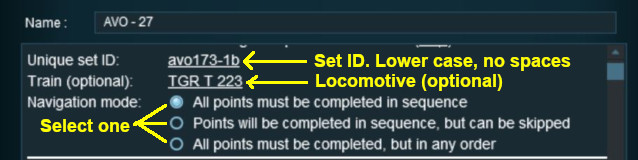
<td>'''Set ID:''' Each Navigation Point Set must have a '''unique ID code'''. This consists of any text characters <span style="background-color: red; color: white; font-weight: 700; font-size: 15px">& | <td>'''Set ID:''' Each Navigation Point Set must have a '''unique ID code'''. This consists of any text characters <span style="background-color: red; color: white; font-weight: 700; font-size: 15px"> EXCEPT </span> the '''SPACE''' character and '''UPPER CASE''' characters</td> | ||
</tr> | </tr> | ||
<tr valign="top"> | <tr valign="top"> | ||
| Line 119: | Line 137: | ||
<table> | <table> | ||
<tr valign="top"> | <tr valign="top"> | ||
<td>[[ | <td>[[image:PortalOptionButtonEmpty.PNG|link=]] '''All points must be completed in sequence''' - the order of the points listed below is the order in which they must be executed. No exceptions</td> | ||
</tr> | </tr> | ||
<tr valign="top"> | <tr valign="top"> | ||
<td>[[ | <td>[[image:PortalOptionButtonEmpty.PNG|link=]] '''Points will be completed in sequence, but can be skipped''' - the order of the points below is the order in which they must be executed but points can be skipped. You cannot go back to complete a missed point</td> | ||
</tr> | </tr> | ||
<tr valign="top"> | <tr valign="top"> | ||
<td>[[ | <td>[[image:PortalOptionButtonEmpty.PNG|link=]] '''All points must be completed but in any order''' - the order is not important but no points can be missed. All the Navigation Points in the set will be displayed when this option is selected</td> | ||
</tr> | </tr> | ||
</table> | </table> | ||
| Line 141: | Line 159: | ||
<table width=1000> | <table width=1000> | ||
<tr valign="top"> | <tr valign="top"> | ||
<td width=640>[[ | <td width=640>[[image:NavDisplaySetDialogLower.JPG|link=]]</td> | ||
<td> | <td> | ||
<table width=360 bgcolor=#000000 cellpadding=2> | <table width=360 bgcolor=#000000 cellpadding=2> | ||
| Line 170: | Line 188: | ||
</tr> | </tr> | ||
<tr valign="top"> | <tr valign="top"> | ||
<td>[[ | <td>[[image:Gears.PNG|link=]]</td> | ||
<td><span style="font-size: 17px;">'''Settings:'''</span> | <td><span style="font-size: 17px;">'''Settings:'''</span> | ||
<table> | <table> | ||
| Line 212: | Line 230: | ||
<tr valign="top"> | <tr valign="top"> | ||
<td width=10>[[image:BlackDot10x10.png|link=]]</td> | <td width=10>[[image:BlackDot10x10.png|link=]]</td> | ||
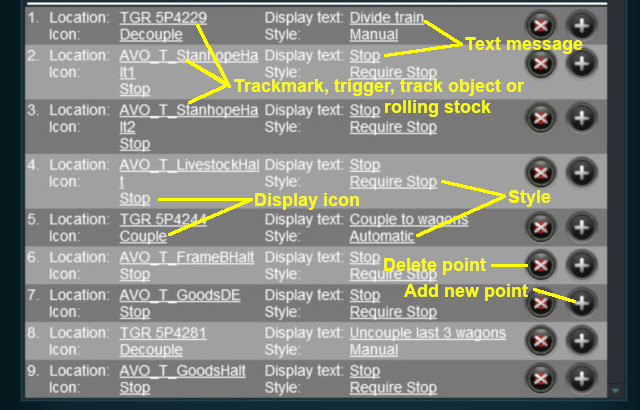
<td>'''Add Navigation Point''' - new points are added by a <span style="font-weight: 700; font-size: 15px; background-color: lightcyan;">Left Click</span> on the | <td>'''Add Navigation Point''' - new points are added by a <span style="font-weight: 700; font-size: 15px; background-color: lightcyan;">Left Click</span> on the [[image:AddIcon.png|link=]] icon. The new point will be inserted in the line below</td> | ||
</tr> | </tr> | ||
<tr valign="top"> | <tr valign="top"> | ||
<td>[[image:BlackDot10x10.png|link=]]</td> | <td>[[image:BlackDot10x10.png|link=]]</td> | ||
<td>'''Delete Navigation Point''' - existing points can be deleted by <span style="font-weight: 700; font-size: 15px; background-color: lightcyan;">Left Click</span> on the | <td>'''Delete Navigation Point''' - existing points can be deleted by a <span style="font-weight: 700; font-size: 15px; background-color: lightcyan;">Left Click</span> on the [[image:DeleteIcon.png|link=]] icon</td> | ||
</tr> | </tr> | ||
</table> | </table> | ||
| Line 235: | Line 253: | ||
<table> <!-- BEGIN Nav Buttons Table --> | <table> <!-- BEGIN Nav Buttons Table --> | ||
<tr valign="top"> | <tr valign="top"> | ||
<td width=729><span id="stepHide"></span>& | <td width=729><span id="stepHide"></span> </td> | ||
<td width=46>[[ | <td width=46>[[image:BackToTop.png|link=#top|alt=Top|Top]]</td> | ||
<td width=75>[[ | <td width=75>[[image:NextUp.png|link=#stepDisplay|alt=Next Up|Top]]</td> | ||
<td width=75>[[ | <td width=75>[[image:NextDown.png|link=#stepClear|alt=Next Down|Next Down]]</td> | ||
<td width=75>[[ | <td width=75>[[image:BackToBottom.png|link=#bottom|alt=Bottom|Bottom]]</td> | ||
</tr> | </tr> | ||
</table> <!-- END Nav Buttons Table --> | </table> <!-- END Nav Buttons Table --> | ||
| Line 248: | Line 266: | ||
<tr valign="top"> | <tr valign="top"> | ||
<td width=10>[[image:BlueDot10x10.png|link=]]</td> | <td width=10>[[image:BlueDot10x10.png|link=]]</td> | ||
<td>The '''Navigation Set Hide/Show Rule''' is added to a Session and configured using the [[ | <td>The '''Navigation Set Hide/Show Rule''' is added to a Session and configured using the [[image:WikiLink.PNG|link=]] '''[[How to Use Session Editor|Session Editor]]''' in Surveyor</td> | ||
</tr> | </tr> | ||
<tr valign="top"> | <tr valign="top"> | ||
<td width=10>[[image:BlueDot10x10.png|link=]]</td> | <td width=10>[[image:BlueDot10x10.png|link=]]</td> | ||
<td>The [[ | <td>The [[image:WikiLink.PNG|link=]] '''[[Session_Rule_List_with_Parameters#Navigation Set Hide/Show Rule|Navigation Set Hide/Show Rule]]''' hides and displays the navigation sets created by the '''Navigation Display Rule'''</td> | ||
</tr> | </tr> | ||
</table> | </table> | ||
| Line 258: | Line 276: | ||
<table width=1000> | <table width=1000> | ||
<tr valign="top"> | <tr valign="top"> | ||
<td width=500>[[ | <td width=500>[[image:NavPointHideDialog.JPG|500px|link=]]</td> | ||
<td> | <td> | ||
<table width=500 bgcolor=#000000 cellpadding=2> | <table width=500 bgcolor=#000000 cellpadding=2> | ||
| Line 284: | Line 302: | ||
</tr> | </tr> | ||
<tr valign="top"> | <tr valign="top"> | ||
<td>[[ | <td>[[image:Gears.PNG|link=]]</td> | ||
<td><span style="font-size: 17px;">'''Settings:'''</span> | <td><span style="font-size: 17px;">'''Settings:'''</span> | ||
<table> | <table> | ||
| Line 304: | Line 322: | ||
<tr valign="top"> | <tr valign="top"> | ||
<td>[[image:BlackDot10x10.png|link=]]</td> | <td>[[image:BlackDot10x10.png|link=]]</td> | ||
<td>'''Set ID:''' The unique Navigation Point '''Set ID''' code for the set to be hidden or shown. This must be the same ID as entered in the [[image:PageLink.PNG|link=]] '''[[#stepDisplay|Navigation Display Rule]]''' and consists of any text characters <span style="background-color: red; color: white; font-weight: 700; font-size: 15px">& | <td>'''Set ID:''' The unique Navigation Point '''Set ID''' code for the set to be hidden or shown. This must be the same ID as entered in the [[image:PageLink.PNG|link=]] '''[[#stepDisplay|Navigation Display Rule]]''' and consists of any text characters <span style="background-color: red; color: white; font-weight: 700; font-size: 15px"> EXCEPT </span> the '''SPACE''' character and '''UPPER CASE''' characters</td> | ||
</tr> | </tr> | ||
</table> | </table> | ||
| Line 317: | Line 335: | ||
<table> <!-- BEGIN Nav Buttons Table --> | <table> <!-- BEGIN Nav Buttons Table --> | ||
<tr valign="top"> | <tr valign="top"> | ||
<td width=729><span id="stepClear"></span>& | <td width=729><span id="stepClear"></span> </td> | ||
<td width=46>[[ | <td width=46>[[image:BackToTop.png|link=#top|alt=Top|Top]]</td> | ||
<td width=75>[[ | <td width=75>[[image:NextUp.png|link=#stepHide|alt=Next Up|Top]]</td> | ||
<td width=75>[[ | <td width=75>[[image:NextDown.png|link=#stepComplete|alt=Next Down|Next Down]]</td> | ||
<td width=75>[[ | <td width=75>[[image:BackToBottom.png|link=#bottom|alt=Bottom|Bottom]]</td> | ||
</tr> | </tr> | ||
</table> <!-- END Nav Buttons Table --> | </table> <!-- END Nav Buttons Table --> | ||
| Line 330: | Line 348: | ||
<tr valign="top"> | <tr valign="top"> | ||
<td width=10>[[image:BlueDot10x10.png|link=]]</td> | <td width=10>[[image:BlueDot10x10.png|link=]]</td> | ||
<td>The '''Navigation Set Clear Rule''' is added to a Session and configured using the [[ | <td>The '''Navigation Set Clear Rule''' is added to a Session and configured using the [[image:WikiLink.PNG|link=]] '''[[How to Use Session Editor|Session Editor]]''' in Surveyor</td> | ||
</tr> | </tr> | ||
<tr> | <tr> | ||
<td width=10>[[image:BlueDot10x10.png|link=]]</td> | <td width=10>[[image:BlueDot10x10.png|link=]]</td> | ||
<td>The [[ | <td>The [[image:WikiLink.PNG|link=]] '''[[Session_Rule_List_with_Parameters#Navigation Set Clear Rule|Navigation Set Clear Rule]]''' clears or completes any uncompleted Navigation Points in a set created by the '''Navigation Display Rule'''</td> | ||
</tr> | </tr> | ||
</table> | </table> | ||
| Line 340: | Line 358: | ||
<table width=1000> | <table width=1000> | ||
<tr valign="top"> | <tr valign="top"> | ||
<td width=500>[[ | <td width=500>[[image:NavSetClearDialog.JPG|500px|link=]]</td> | ||
<td> | <td> | ||
<table width=500 bgcolor=#000000 cellpadding=2> | <table width=500 bgcolor=#000000 cellpadding=2> | ||
| Line 366: | Line 384: | ||
</tr> | </tr> | ||
<tr valign="top"> | <tr valign="top"> | ||
<td>[[ | <td>[[image:Gears.PNG|link=]]</td> | ||
<td><span style="font-size: 17px;">'''Settings:'''</span> | <td><span style="font-size: 17px;">'''Settings:'''</span> | ||
<table> | <table> | ||
<tr valign="top"> | <tr valign="top"> | ||
<td width=10>[[image:BlackDot10x10.png|link=]]</td> | <td width=10>[[image:BlackDot10x10.png|link=]]</td> | ||
<td>'''Set ID:''' The unique Navigation Point '''Set ID''' code for the set to be cleared. This must be the same ID as entered in the [[image:PageLink.PNG|link=]] '''[[#stepDisplay|Navigation Display Rule]]''' and consists of any text characters <span style="background-color: red; color: white; font-weight: 700; font-size: 15px">& | <td>'''Set ID:''' The unique Navigation Point '''Set ID''' code for the set to be cleared. This must be the same ID as entered in the [[image:PageLink.PNG|link=]] '''[[#stepDisplay|Navigation Display Rule]]''' and consists of any text characters <span style="background-color: red; color: white; font-weight: 700; font-size: 15px"> EXCEPT </span> the '''SPACE''' character and '''UPPER CASE''' characters</td> | ||
</tr> | </tr> | ||
</table> | </table> | ||
| Line 384: | Line 402: | ||
<table> <!-- BEGIN Nav Buttons Table --> | <table> <!-- BEGIN Nav Buttons Table --> | ||
<tr valign="top"> | <tr valign="top"> | ||
<td width=729><span id="stepComplete"></span>& | <td width=729><span id="stepComplete"></span> </td> | ||
<td width=46>[[ | <td width=46>[[image:BackToTop.png|link=#top|alt=Top|Top]]</td> | ||
<td width=75>[[ | <td width=75>[[image:NextUp.png|link=#stepClear|alt=Next Up|Top]]</td> | ||
<td width=75>[[ | <td width=75>[[image:NextDown.png|link=#stepCheck|alt=Next Down|Next Down]]</td> | ||
<td width=75>[[ | <td width=75>[[image:BackToBottom.png|link=#bottom|alt=Bottom|Bottom]]</td> | ||
</tr> | </tr> | ||
</table> <!-- END Nav Buttons Table --> | </table> <!-- END Nav Buttons Table --> | ||
| Line 441: | Line 459: | ||
<tr valign="top"> | <tr valign="top"> | ||
<td>[[image:BlackDot10x10.png|link=]]</td> | <td>[[image:BlackDot10x10.png|link=]]</td> | ||
<td>'''Set ID:''' The unique Navigation Point '''Set ID''' code for the set. This must be the same ID as entered in the [[image:PageLink.PNG|link=]] '''[[#stepDisplay|Navigation Display Rule]]''' and consists of any text characters <span style="background-color: red; color: white; font-weight: 700; font-size: 15px">& | <td>'''Set ID:''' The unique Navigation Point '''Set ID''' code for the set. This must be the same ID as entered in the [[image:PageLink.PNG|link=]] '''[[#stepDisplay|Navigation Display Rule]]''' and consists of any text characters <span style="background-color: red; color: white; font-weight: 700; font-size: 15px"> EXCEPT </span> the '''SPACE''' character and '''UPPER CASE''' characters</td> | ||
</tr> | </tr> | ||
</table> | </table> | ||
| Line 454: | Line 472: | ||
<table> <!-- BEGIN Nav Buttons Table --> | <table> <!-- BEGIN Nav Buttons Table --> | ||
<tr valign="top"> | <tr valign="top"> | ||
<td width=729><span id="stepCheck"></span>& | <td width=729><span id="stepCheck"></span> </td> | ||
<td width=46>[[image:BackToTop.png|link=#top|alt=Top|Top]]</td> | <td width=46>[[image:BackToTop.png|link=#top|alt=Top|Top]]</td> | ||
<td width=75>[[image:NextUp.png|link=#stepComplete|alt=Next Up|Top]]</td> | <td width=75>[[image:NextUp.png|link=#stepComplete|alt=Next Up|Top]]</td> | ||
| Line 464: | Line 482: | ||
='''Navigation Set Check Rule'''= | ='''Navigation Set Check Rule'''= | ||
The [[ | <table width=1000 bgcolor="lightcyan" cellpadding=2> | ||
<tr valign="top"> | |||
<td width=10>[[image:BlueDot10x10.png|link=]]</td> | |||
<td>The '''Navigation Set Check Rule''' is added to a Session and configured using the [[image:WikiLink.PNG|link=]] '''[[How to Use Session Editor|Session Editor]]''' in Surveyor. It is a [[image:WikiLink.PNG|link=]] '''[[How_to_Use_Parent_and_Child_Rules|Parent Rule]]'''</td> | |||
</tr> | |||
<tr valign="top"> | |||
<td>[[image:BlueDot10x10.png|link=]]</td> | |||
<td>The [[image:WikiLink.PNG|link=]] '''[[Session_Rule_List_with_Parameters#Navigation Set Check Rule|Navigation Set Check Rule]]''' checks if the specified '''Navigation Set''' has been completed, or not completed, then executes any following child rules</td> | |||
</tr> | |||
</table> | |||
<br> | <br> | ||
<table width=1000> | |||
< | <tr valign="top"> | ||
<td width=500>[[image:NavSetCheckDialog.JPG|500px|link=]]</td> | |||
<table> | <td> | ||
<table bgcolor=#000000 cellpadding=2> | |||
<tr valign="top"> | <tr valign="top"> | ||
<td> | <td> | ||
<table cellpadding=4 bgcolor=#eeeeee> | <table bgcolor=#ffffb0 cellpadding=2> | ||
<tr valign="top"> | |||
<td width=25>[[image:NotePad.PNG|link=]]</td> | |||
<td><span style="font-size: 17px; font-weight: 700;">Notes:'''</span><br> | |||
---- | |||
This rule allows you to check if all the '''Navigation Points''' in an identified '''Navigation Point Set''' have been completed or not. It is a '''Parent Rule''' so it can be used to perform other actions (execute '''Child Rules''') based on the result of the check</td> | |||
</tr> | |||
</table> | |||
</td> | |||
</tr> | |||
</table> | |||
</td> | |||
</tr> | |||
</table> | |||
<table width=1000 cellpadding=4 bgcolor=#eeeeee> | |||
<tr> | <tr> | ||
<td colspan="2"> | <td colspan="2"> | ||
| Line 479: | Line 521: | ||
</tr> | </tr> | ||
<tr valign="top"> | <tr valign="top"> | ||
<td>[[ | <td>[[image:Gears.PNG|link=]]</td> | ||
<td><span style="font-size: 17px;">'''Settings:'''</span>< | <td><span style="font-size: 17px;">'''Settings:'''</span> | ||
<table> | |||
<tr valign="top"> | |||
<td width=10>[[image:BlackDot10x10.png|link=]]</td> | |||
<td>'''Set ID:''' The unique Navigation Point '''Set ID''' code for the set to be checked. This must be the same ID as entered in the [[image:PageLink.PNG|link=]] '''[[#stepDisplay|Navigation Display Rule]]''' and consists of any text characters <span style="background-color: red; color: white; font-weight: 700; font-size: 15px"> EXCEPT </span> the '''SPACE''' character and '''UPPER CASE''' characters</td> | |||
</tr> | |||
<tr valign="top"> | |||
<td>[[image:BlackDot10x10.png|link=]]</td> | |||
<td>'''Complete/Incomplete:''' <span style="font-weight: 700; font-size: 15px; background-color: lightcyan;">Left Click</span> to select one of these two options. The selected Navigation Point Set will be tested to see if it has been '''Completed''' (all of its Navigation Points have been cleared/completed) or if it is '''Incomplete''' (not all of its Navigation Points have been cleared/completed)</td> | |||
</tr> | |||
</table> | |||
</td> | |||
</tr> | </tr> | ||
<tr> | <tr> | ||
<td colspan="2"> | <td colspan="2"> | ||
----</td> | ----</td> | ||
</tr> | </tr> | ||
</table> | </table> | ||
| Line 494: | Line 543: | ||
<table> <!-- BEGIN Nav Buttons Table --> | <table> <!-- BEGIN Nav Buttons Table --> | ||
<tr valign="top"> | <tr valign="top"> | ||
<td width=729><span id="stepWait"></span>& | <td width=729><span id="stepWait"></span> </td> | ||
<td width=46>[[ | <td width=46>[[image:BackToTop.png|link=#top|alt=Top|Top]]</td> | ||
<td width=75>[[ | <td width=75>[[image:NextUp.png|link=#stepCheck|alt=Next Up|Top]]</td> | ||
<td width=75> | <td width=75> </td> | ||
<td width=75>[[ | <td width=75>[[image:BackToBottom.png|link=#bottom|alt=Bottom|Bottom]]</td> | ||
</tr> | </tr> | ||
</table> <!-- END Nav Buttons Table --> | </table> <!-- END Nav Buttons Table --> | ||
| Line 504: | Line 553: | ||
='''Wait on Navigation Point Rule'''= | ='''Wait on Navigation Point Rule'''= | ||
The [[ | <table width=1000 bgcolor="lightcyan" cellpadding=2> | ||
<tr valign="top"> | |||
<td width=10>[[image:BlueDot10x10.png|link=]]</td> | |||
<td>The '''Wait on Navigation Point Rule''' is added to a Session and configured using the [[image:WikiLink.PNG|link=]] '''[[How to Use Session Editor|Session Editor]]''' in Surveyor. It is a [[image:WikiLink.PNG|link=]] '''[[How_to_Use_Parent_and_Child_Rules|Parent Rule]]'''</td> | |||
</tr> | |||
<tr valign="top"> | |||
<td width=10>[[image:BlueDot10x10.png|link=]]</td> | |||
<td>The [[image:WikiLink.PNG|link=]] '''[[Session_Rule_List_with_Parameters#Wait on Navigation Point Rule|Wait on Navigation Point Rule]]''' waits until the specified Navigation Point in the specified set has been completed then executes any following child rules</td> | |||
</tr> | |||
</table> | |||
<br> | <br> | ||
<table width=1000> | |||
< | <tr valign="top"> | ||
<td width=500>[[image:NavPointWaitDialog.JPG|500px|link=]]</td> | |||
<table> | <td> | ||
<table bgcolor=#000000 cellpadding=2> | |||
<tr valign="top"> | <tr valign="top"> | ||
<td> | <td> | ||
<table cellpadding=4 bgcolor=#eeeeee> | <table bgcolor=#ffffb0 cellpadding=2> | ||
<tr valign="top"> | |||
<td width=25>[[image:NotePad.PNG|link=]]</td> | |||
<td><span style="font-size: 17px; font-weight: 700;">Notes:'''</span><br> | |||
---- | |||
This rule allows you to set a '''Wait''' condition until a particular '''Navigation Point''' in a specific '''Navigation Point Set''' has been completed. It is a '''Parent Rule''' so it can be used to perform other actions (execute '''Child Rules''') when the specific '''Navigation Point''' has been completed</td> | |||
</tr> | |||
</table> | |||
</td> | |||
</tr> | |||
</table> | |||
</td> | |||
</tr> | |||
</table> | |||
<table width=1000 cellpadding=4 bgcolor=#eeeeee> | |||
<tr> | <tr> | ||
<td colspan="2"> | <td colspan="2"> | ||
| Line 519: | Line 592: | ||
</tr> | </tr> | ||
<tr valign="top"> | <tr valign="top"> | ||
<td>[[ | <td>[[image:Gears.PNG|link=]]</td> | ||
<td><span style="font-size: 17px;">'''Settings:'''</span>< | <td><span style="font-size: 17px;">'''Settings:'''</span> | ||
<table> | |||
<tr valign="top"> | |||
<td width=10>[[image:BlackDot10x10.png|link=]]</td> | |||
<td>'''Navigation Point Number''' A valid number identifying the particular Navigation Point to be completed. If the number entered does not exist then the rule will be ignored</td> | |||
</tr> | |||
<tr valign="top"> | |||
<td>[[image:BlackDot10x10.png|link=]]</td> | |||
<td>'''Set ID:''' The unique Navigation Point '''Set ID''' code for the set. This must be the same ID as entered in the '''Navigation Display Rule''' and consists of any text characters <span style="background-color: red; color: white; font-weight: 700; font-size: 15px"> EXCEPT </span> the ''SPACE'' character and ''UPPER CASE'' characters</td> | |||
</tr> | |||
</table> | |||
</td> | |||
</tr> | </tr> | ||
<tr> | <tr> | ||
<td colspan="2"> | <td colspan="2"> | ||
----</td> | ----</td> | ||
</tr> | </tr> | ||
</table> | </table> | ||
| Line 534: | Line 614: | ||
<table> <!-- BEGIN Nav Buttons Table --> | <table> <!-- BEGIN Nav Buttons Table --> | ||
<tr valign="top"> | <tr valign="top"> | ||
<td width=729><span id="bottom"></span>& | <td width=729><span id="bottom"></span> </td> | ||
<td width=46>[[ | <td width=46>[[image:BackToTop.png|link=#top|alt=Top|Top]]</td> | ||
<td width=75>[[ | <td width=75>[[image:NextUp.png|link=#stepWait|alt=Next Up|Top]]</td> | ||
<td width=75>& | <td width=75> </td> | ||
<td width=75>& | <td width=75> </td> | ||
</tr> | </tr> | ||
</table> <!-- END Nav Buttons Table --> | </table> <!-- END Nav Buttons Table --> | ||
---- | ---- | ||
---- | ---- | ||
='''Trainz Wiki'''= | ='''Trainz Wiki'''= | ||
<table | <table width=1000> | ||
<tr valign="top"> | <tr valign="top"> | ||
<td>[[ | <td> | ||
<table width=500 cellpadding=2 bgcolor=#ffffff> | |||
<tr valign="top"> | |||
<td width=80>[[image:TrainzWiki.png|link=]]</td> | |||
<td> | <td> | ||
<span style="font-size: 17px;">'''More Tutorials and Guides to Using Trainz'''</span><br> | <span style="font-size: 17px;">'''More Tutorials and Guides to Using Trainz'''</span><br> | ||
*'''<span class=" | *'''<span class="plain;">[http://online.ts2009.com/mediaWiki/index.php/HowTo How to Guides]</span>''' | ||
*'''[[Driver Commands List]]''' | *'''[[Driver Commands List]]''' | ||
*'''[[Session Rule List with Parameters|Session Rules List (Alphabetical) with Parameters]]''' | *'''[[Session Rule List with Parameters|Session Rules List (Alphabetical) with Parameters]]''' | ||
*'''[[Session Rules By Categories With Properties|Session Rules List (Categories) With Parameters]]''' | *'''[[Session Rules By Categories With Properties|Session Rules List (Categories) With Parameters]]''' | ||
</td> | |||
</tr> | |||
</table> | |||
</td> | |||
<td> | |||
<table width=500 cellpadding=4 bgcolor="Aquamarine"> | |||
<tr valign="top"> | |||
<td width=50>[[image:LinkWiki.PNG|link=]]</td> | |||
<td> | |||
<span style="font-size: 17px;">'''Related Links'''</span><br> | |||
* '''[[How to Use Session Editor|How to Use the Session Editor]]''' | |||
</td> | |||
</tr> | |||
</table> | |||
</td> | </td> | ||
</tr> | </tr> | ||
</table> | </table> | ||
---- | ---- | ||
This page was created by Trainz user '''<span class=" | This page was created by Trainz user '''<span class="plain;">[http://online.ts2009.com/mediaWiki/index.php/User:Pware pware]</span>''' in May 2018 and was last updated as shown below. | ||
---- | ---- | ||
[[Category:How-to guides]][[Category:Rules]] | [[Category:How-to guides]][[Category:Rules]] | ||
Latest revision as of 00:02, 26 July 2026
|
|

 |
 |
 |
Navigation Display Rule
 |
The Navigation Set Hide/Show Rule is added to a Session and configured using the  Session Editor in Surveyor |
|
The Navigation Display Rule creates and displays a set of Navigation Points |
|

 |
|
|
|
||||||||||||
 |
Settings:
|
|||||||||||
|
|
||||||||||||


 |
|
|
||||||||||||||||||||||||||||


|
 |
|
|
Navigation Set Hide/Show Rule
|
The Navigation Set Hide/Show Rule is added to a Session and configured using the Session Editor in Surveyor |
|
The Navigation Set Hide/Show Rule hides and displays the navigation sets created by the Navigation Display Rule |
| Error creating thumbnail: /bin/bash: line 1: /usr/bin/convert: No such file or directory Error code: 127 |
|
|
|
|||||||||
|
Settings:
|
||||||||
|
|
|||||||||
|
|
|
|
Navigation Set Clear Rule
|
The Navigation Set Clear Rule is added to a Session and configured using the Session Editor in Surveyor |
|
The Navigation Set Clear Rule clears or completes any uncompleted Navigation Points in a set created by the Navigation Display Rule |
| Error creating thumbnail: /bin/bash: line 1: /usr/bin/convert: No such file or directory Error code: 127 |
|
|
|
|||
|
Settings:
|
||
|
|
|||
|
|
|
|
Navigation Point Complete Rule
|
The Navigation Point Complete Rule is added to a Session and configured using the Session Editor in Surveyor |
|
The Navigation Point Complete Rule clears or completes the selected Navigation Point in a set created by the  Navigation Display Rule. This rule is used to complete Navigation Points with their Style property set to manual |
| Error creating thumbnail: /bin/bash: line 1: /usr/bin/convert: No such file or directory Error code: 127 |
|
|
|
|||||
|
Settings:
|
||||
|
|
|||||
|
|
|
|
Navigation Set Check Rule
|
The Navigation Set Check Rule is added to a Session and configured using the Session Editor in Surveyor. It is a Parent Rule |
|
The Navigation Set Check Rule checks if the specified Navigation Set has been completed, or not completed, then executes any following child rules |
| Error creating thumbnail: /bin/bash: line 1: /usr/bin/convert: No such file or directory Error code: 127 |
|
|
|
|||||
|
Settings:
|
||||
|
|
|||||
|
|
|
Wait on Navigation Point Rule
|
The Wait on Navigation Point Rule is added to a Session and configured using the Session Editor in Surveyor. It is a Parent Rule |
|
The Wait on Navigation Point Rule waits until the specified Navigation Point in the specified set has been completed then executes any following child rules |
| Error creating thumbnail: /bin/bash: line 1: /usr/bin/convert: No such file or directory Error code: 127 |
|
|
|
|||||
|
Settings:
|
||||
|
|
|||||
|
|
Trainz Wiki
|
|

This page was created by Trainz user pware in May 2018 and was last updated as shown below.


