How to Use Message Popup Rule: Difference between revisions
mNo edit summary |
|||
| (3 intermediate revisions by the same user not shown) | |||
| Line 1: | Line 1: | ||
<table width=1000 bgcolor=#000000 cellpadding=2> | |||
<table cellpadding=2 | |||
<tr valign="top"> | <tr valign="top"> | ||
<td> | <td> | ||
<table width=996 bgcolor=#ffffff cellpadding=2> | |||
<tr valign="middle"> | |||
<td width=35>[[image:Information.png|35px|link=]]</td> | |||
<td><span style="font-size: 15px;">The information in this Wiki Page applies to using the '''Message Popup Rule''' to display '''Session''' information and user instructions in '''T:ANE''', '''TRS19''', '''TRS22''' and '''Trainz Plus'''.</span></td> | |||
</tr> | |||
</table> | |||
</td> | </td> | ||
</tr> | </tr> | ||
</table> | </table> | ||
<br> | <br> | ||
<table> | <table width=1000> | ||
<tr valign="top"> | <tr valign="top"> | ||
<td> | <td width=300> | ||
__TOC__ | __TOC__ | ||
</td> | </td> | ||
<td align="center"><span style="font-weight: 700; font-size: 17px; color: white; background-color: black;"> Workflow Diagram </span><br> | <td align="center"><span style="font-weight: 700; font-size: 17px; color: white; background-color: black;"> Workflow Diagram </span><br> | ||
[[image:MessagePopupWorkflow.png|link=|alt=Workflow diagram]]</td> | [[image:MessagePopupWorkflow.png|link=|alt=Workflow diagram]]</td> | ||
<td> | |||
<table cellpadding=2 bgcolor="Aquamarine"> | |||
<tr valign="top"> | |||
<td>[[image:LinkWiki.PNG|link=]]</td> | |||
<td> | |||
For more information on creating a '''HTML Asset''' see the '''Trainz Wiki Page''' at:-<br> | |||
* '''[[How to Create a HTML Asset]]'''</td> | |||
</tr> | |||
</table> | |||
</td> | |||
</tr> | </tr> | ||
</table> | </table> | ||
| Line 394: | Line 405: | ||
</tr> | </tr> | ||
<tr valign="top"> | <tr valign="top"> | ||
<td>'''Message location:''' '''<span style="text-decoration: underline;">Top left</span>''' of the screen has been chosen as the location for the message window. Other positions are '''Top right''', '''Bottom left''' and '''Bottom right'''</td> | <td>[[image:BlackDot10x10.png|link=]] '''Message location:''' '''<span style="text-decoration: underline;">Top left</span>''' of the screen has been chosen as the location for the message window. Other positions are '''Top right''', '''Bottom left''' and '''Bottom right'''</td> | ||
</tr> | </tr> | ||
<tr valign="top"> | <tr valign="top"> | ||
<td>'''HTML Asset:''' '''<span style="text-decoration: underline;">General Purpose Session HTML</span>''' one of the HTML assets installed with '''Trainz'''</td> | <td>[[image:BlackDot10x10.png|link=]] '''HTML Asset:''' '''<span style="text-decoration: underline;">General Purpose Session HTML</span>''' one of the HTML assets installed with '''Trainz'''</td> | ||
</tr> | </tr> | ||
<tr valign="top"> | <tr valign="top"> | ||
<td>'''String Table Token:''' '''<span style="text-decoration: underline;">html_warning_late</span>''' the string table '''token''' in the config.txt file of the '''<span style="text-decoration: underline;">General Purpose Session HTML</span>''' asset contains the message to be displayed</td> | <td>[[image:BlackDot10x10.png|link=]] '''String Table Token:''' '''<span style="text-decoration: underline;">html_warning_late</span>''' the string table '''token''' in the config.txt file of the '''<span style="text-decoration: underline;">General Purpose Session HTML</span>''' asset contains the message to be displayed</td> | ||
</tr> | </tr> | ||
<tr valign="top"> | <tr valign="top"> | ||
<td>'''HTML Wave:''' '''<span style="text-decoration: underline;">General Purpose Session HTML</span>''' HTML asset contains the ''optional'' sound file to be played</td> | <td>[[image:BlackDot10x10.png|link=]] '''HTML Wave:''' '''<span style="text-decoration: underline;">General Purpose Session HTML</span>''' HTML asset contains the ''optional'' sound file to be played</td> | ||
</tr> | </tr> | ||
<tr valign="top"> | <tr valign="top"> | ||
<td>'''Wav Name:''' '''<span style="text-decoration: underline;">all-aboard.wav</span>''' is the ''optional'' sound file to be played</td> | <td>[[image:BlackDot10x10.png|link=]] '''Wav Name:''' '''<span style="text-decoration: underline;">all-aboard.wav</span>''' is the ''optional'' sound file to be played</td> | ||
</tr> | </tr> | ||
<tr valign="top"> | <tr valign="top"> | ||
| Line 426: | Line 437: | ||
...which will produce the message "'''You are running late!'''" from the '''Message Popup Rule''' settings shown above. | ...which will produce the message "'''You are running late!'''" from the '''Message Popup Rule''' settings shown above. | ||
<br> | <br> | ||
<table> <!-- BEGIN Nav Buttons Table --> | <table> <!-- BEGIN Nav Buttons Table --> | ||
<tr valign="top"> | <tr valign="top"> | ||
| Line 446: | Line 448: | ||
='''Alternatives to the Message Popup Rule'''= | ='''Alternatives to the Message Popup Rule'''= | ||
<table cellpadding=2 bgcolor=#ffffff> | <table width=1000 cellpadding=2 bgcolor=#ffffff> | ||
<tr valign="top"> | <tr valign="top"> | ||
<td width= | <td width=60>[[image:RulesWiki.PNG|link=]]</td> | ||
<td | <td>There are other HTML message window rules that are alternatives to the '''Message Popup''' rule. A few possibilities are:- | ||
There are other HTML message window rules that are alternatives to the '''Message Popup''' rule. A few possibilities are:-</td> | *'''[[Session_Rule_List_with_Parameters#Display_HTML_Pages_Rule|Display HTML Pages Rule]]''' | ||
*'''[[Session_Rule_List_with_Parameters#Timed_Limited_Display_HTML_Rule_(SP2_and_later)|Timed Limited Display HTML Rule (SP2 and later)]]'''</td> | |||
</tr> | </tr> | ||
</table> | </table> | ||
<br> | <br> | ||
<table> <!-- BEGIN Nav Buttons Table --> | <table> <!-- BEGIN Nav Buttons Table --> | ||
<tr valign="top"> | <tr valign="top"> | ||
| Line 480: | Line 468: | ||
---- | ---- | ||
---- | ---- | ||
='''Trainz Wiki'''= | ='''Trainz Wiki'''= | ||
<table cellpadding=2 bgcolor=#ffffff> | <table width=1000> | ||
<tr valign="top"> | |||
<td> | |||
<table width=500 cellpadding=2 bgcolor=#ffffff> | |||
<tr valign="top"> | <tr valign="top"> | ||
<td>[[image:TrainzWiki.png|link=]]</td> | <td width=80>[[image:TrainzWiki.png|link=]]</td> | ||
<td> | <td> | ||
<span style="font-size: 17px;">'''More Tutorials and Guides to Using Trainz'''</span><br> | <span style="font-size: 17px;">'''More Tutorials and Guides to Using Trainz'''</span><br> | ||
| Line 491: | Line 481: | ||
*'''[[Session Rule List with Parameters|Session Rules List (Alphabetical) with Parameters]]''' | *'''[[Session Rule List with Parameters|Session Rules List (Alphabetical) with Parameters]]''' | ||
*'''[[Session Rules By Categories With Properties|Session Rules List (Categories) With Parameters]]''' | *'''[[Session Rules By Categories With Properties|Session Rules List (Categories) With Parameters]]''' | ||
</td> | |||
</tr> | |||
</table> | |||
</td> | |||
<td> | |||
<table width=500 cellpadding=4 bgcolor="aquamarine"> | |||
<tr valign="top"> | |||
<td width=50>[[image:LinkWiki.PNG|link=]]</td> | |||
<td> | |||
<span style="font-size: 17px;">'''Related Links'''</span><br> | |||
* '''[[How to Use Message Popup Rule (Applications)]]''' | |||
* '''[[How to Use Session Editor|Session Editor]]''' | |||
* '''[[How to Create a HTML Asset]]''' | |||
* '''[[How to Create a Message Popup Icon]]'''</td> | |||
</tr> | |||
</table> | |||
</td> | </td> | ||
</tr> | </tr> | ||
Latest revision as of 05:34, 4 July 2026
|
Workflow Diagram 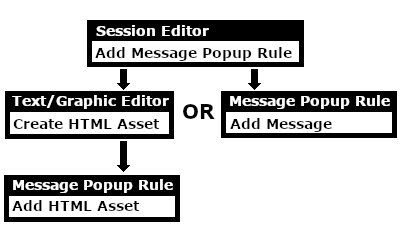 |
|
 |
 |
 |
Add a Message Popup Rule
 |
The Message Popup Rule is a Trainz Session Rule that creates onscreen messages for users in Driver Mode. |
The Message Popup Rule is added to a Session and configured using the  Session Editor in Surveyor. The rule will open a browser window on the screen in Driver Mode that will remain on the screen until it is closed by the user or by another rule. |
|
||||||||


|
 |
|
|
Using a Custom Message
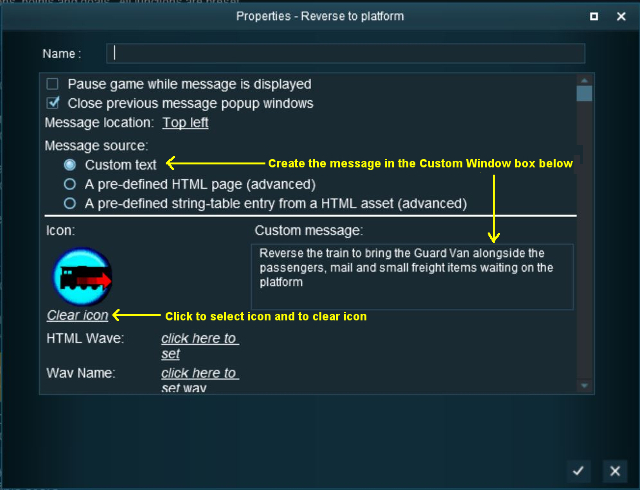
The settings shown in this example will direct Trainz to load the message from text entered in the Custom Message box.
 |
|
|||||||||||||||

|
|
|||||||
 |
Settings: Shown in the example above:-
|
||||||
|
|
|||||||


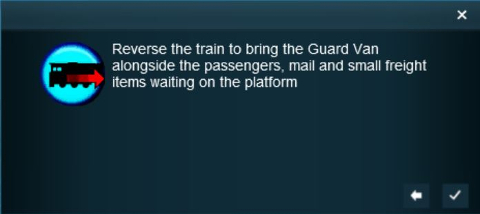 |
The custom message popup created by the example shown above |
|
||||||||||

 |
For information on how to create your own Message Popup Icons, see the Trainz Wiki Page at:- |
|
|
|
|
Using a HTML Page
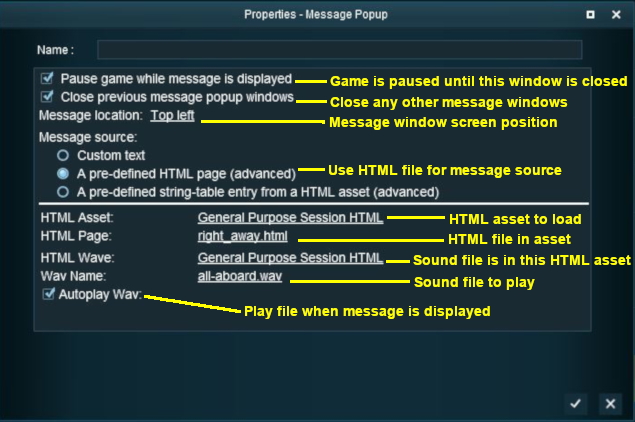
The settings shown in this example will direct Trainz to load the message from a HTML file in a HTML asset.
 |
|
|
|
||||||||||
|
Settings: Shown in the example above:-
|
|||||||||
|
|
||||||||||
|
|
|
|
Using a String-Table Message
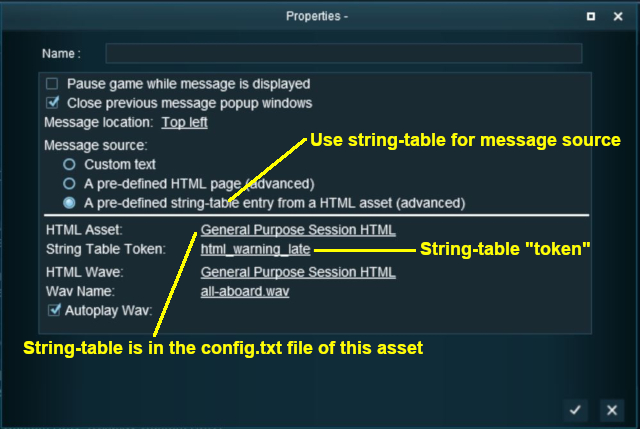
The settings shown in this example will direct Trainz to load the message from text stored in the config.txt string table of a specified HTML asset.
 |
|
|
|
||||||||||
|
Settings: Shown in the example above:-
|
|||||||||
|
|
||||||||||
For example, the config.txt file of the asset General Purpose Session HTML contains the following:-
string-table
    {
        html_warning_late       "You are running late!"
    }
...which will produce the message "You are running late!" from the Message Popup Rule settings shown above.
|
|
|
Alternatives to the Message Popup Rule
 |
There are other HTML message window rules that are alternatives to the Message Popup rule. A few possibilities are:- |
|
|
Trainz Wiki
|
|

This page was created by Trainz user pware in April 2018 and was last updated as shown below.


