How to Use Message Popup Rule (Applications): Difference between revisions
From TrainzOnline
Jump to navigationJump to search
mNo edit summary |
mNo edit summary |
||
| (One intermediate revision by the same user not shown) | |||
| Line 1: | Line 1: | ||
<table width=1000 bgcolor=#000000 cellpadding=2> | |||
<tr valign="top"> | |||
<td> | |||
<table width=996 bgcolor=#ffffff cellpadding=2> | |||
<tr valign="middle"> | |||
<td width=35>[[image:Information.png|35px|link=]]</td> | |||
<td><span style="font-size: 15px;">The information in this Wiki Page gives practical examples of how to use the '''Message Popup Rule''' in Sessions to create messages that will appear after specific events in '''T:ANE''', '''TRS19''', '''TRS22''' and '''Trainz Plus'''.</span></td> | |||
</tr> | |||
</table> | |||
</td> | |||
</tr> | |||
</table> | |||
<br> | |||
<table width=1000> <!-- BEGIN Nav Buttons Table NO SKIPS --> | <table width=1000> <!-- BEGIN Nav Buttons Table NO SKIPS --> | ||
<tr valign="top"> | <tr valign="top"> | ||
| Line 10: | Line 23: | ||
</tr> | </tr> | ||
</table> <!-- END Nav Buttons Table --> | </table> <!-- END Nav Buttons Table --> | ||
<table width=1000> | <table width=1000> | ||
| Line 96: | Line 103: | ||
<tr valign="top"> | <tr valign="top"> | ||
<td width=10>[[image:DotPoint.JPG|10px|link=]]</td> | <td width=10>[[image:DotPoint.JPG|10px|link=]]</td> | ||
<td> | <td>'''[[Session_Rule_List_with_Parameters#Trigger_Check_Rule|Trigger Check Rule]]''' to trigger the message event</td> | ||
</tr> | </tr> | ||
<tr valign="top"> | <tr valign="top"> | ||
| Line 181: | Line 188: | ||
<tr valign="top"> | <tr valign="top"> | ||
<td width=10>[[image:DotPoint.JPG|10px|link=]]</td> | <td width=10>[[image:DotPoint.JPG|10px|link=]]</td> | ||
<td>''' | <td>'''[[Session_Rule_List_with_Parameters#Navigation_Display_Rule|Navigation Display Rule]]''' to create the navigation point set</td> | ||
</tr> | </tr> | ||
</table> | </table> | ||
| Line 199: | Line 206: | ||
<tr valign="top"> | <tr valign="top"> | ||
<td width=10>[[image:DotPoint.JPG|10px|link=]]</td> | <td width=10>[[image:DotPoint.JPG|10px|link=]]</td> | ||
<td>'''[[Session_Rule_List_with_Parameters#Navigation_Display_Rule|Navigation Display Rule]]''' to create the navigation point set (in '''Preconditions''' above)</td> | |||
</tr> | |||
<tr valign="top"> | |||
<td>[[image:DotPoint.JPG|10px|link=]]</td> | |||
<td>'''[[Session_Rule_List_with_Parameters#Wait_on_Navigation_Point_Rule|Wait on Navigation Point Rule]]''' to trigger the message event</td> | <td>'''[[Session_Rule_List_with_Parameters#Wait_on_Navigation_Point_Rule|Wait on Navigation Point Rule]]''' to trigger the message event</td> | ||
</tr> | </tr> | ||
Latest revision as of 05:38, 4 July 2026
|
 |
 |
|
|


Application 1: Timed Message |
 |
|
|
 |
The Scenario: |
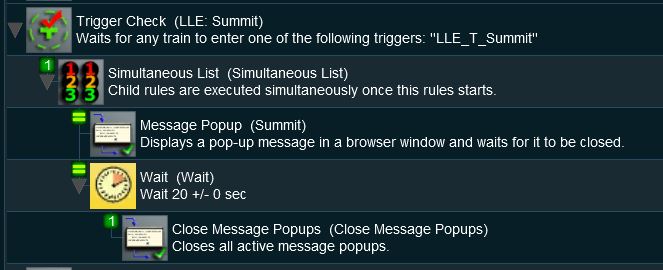
| A Message Popup is activated by a track trigger event and is automatically closed by a timed event |
 |
Rules Used: | |||||||||
|
 |
Session Editor Screenshot: |
 |
 |
Description: |
Line 1 : Trigger Check The event is triggered when a consist passes over a track trigger but any event could be used, such as a Navigation Point, a TimeCheck, a Wait On ... or Wait For ..., etc. As long as the following rules are child rules of the trigger event. This executes the following lines:-
|
Application 2: Navigation Point/Train Stopped Event |
|
 |
|
|
|
The Scenario: |
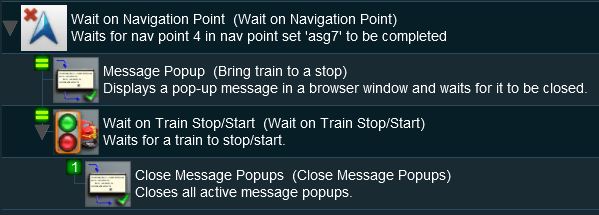
| A Message Popup is activated by a navigation event and is automatically closed by a train stopped event |
 |
Preconditions: | |
|
||
|
Rules Used: | |||||||||
|
|
Session Editor Screenshot: |
 |
|
Description: |
Line 1 : Wait on Navigation Point The event is triggered when a consist reaches a preset navigation point. This rule executes all its child rules simultaneously so no Simultaneous List Rule is required in this example. This executes the following lines:-
|
|
| In this example, the Close Message Popups Rule could be replaced by lines 2, 3, 4 and 5 from the Timed Message example shown above to produce a new message when the train stops moving and that message would be closed after a set time interval. |
 |
Information of setting and using Navigation Points can be found on the Trainz Wiki Page at:- |
|
|
Trainz Wiki
 |
More Tutorials and Guides to Using Trainz |
This page was created by Trainz user pware in April 2018 and was last updated as shown below.


