How to Move a Picklist: Difference between revisions
From TrainzOnline
Jump to navigationJump to search
mNo edit summary |
mNo edit summary |
||
| (4 intermediate revisions by the same user not shown) | |||
| Line 1: | Line 1: | ||
<table width=1000> | <table width=1000 bgcolor=#000000 cellpadding=2> | ||
<tr valign="top"> | <tr valign="top"> | ||
<td>The information in this Wiki Page applies to ''' | <td> | ||
<table width=996 bgcolor=#ffffff cellpadding=2> | |||
<tr valign="middle"> | |||
<td width=35>[[image:Information.png|35px|link=]]</td> | |||
<td><span style="font-size: 15px;">The information in this Wiki Page applies to '''Content Manager''' in '''T:ANE''', '''TRS19''', '''TRS22''' and '''Trainz Plus'''. This guide will show you how to move a Picklist from one copy of '''Trainz''' to another, on the same or different computers.</span></td> | |||
</tr> | |||
</table> | |||
</td> | |||
</tr> | </tr> | ||
</table> | </table> | ||
| Line 11: | Line 18: | ||
* For instructions on how to '''backup''' a Picklist, see the Trainz Wiki page [[image:WikiLink.PNG|link=]] '''[[How_to_Backup_a_Picklist|How to Backup a Picklist]]''' | * For instructions on how to '''backup''' a Picklist, see the Trainz Wiki page [[image:WikiLink.PNG|link=]] '''[[How_to_Backup_a_Picklist|How to Backup a Picklist]]''' | ||
* For instructions on how to '''manage''' a Picklist, see the Trainz Wiki page [[image:WikiLink.PNG|link=]] '''[[How_to_Manage_Filters_and_Picklists|How to Manage Filters and Picklists]]''' | * For instructions on how to '''manage''' a Picklist, see the Trainz Wiki page [[image:WikiLink.PNG|link=]] '''[[How_to_Manage_Filters_and_Picklists|How to Manage Filters and Picklists]]''' | ||
* For instructions on how to '''rename''' a Picklist, see the Trainz Wiki page [[image:WikiLink.PNG|link=]] '''[[How_to_Rename_a_Picklist|How to Rename a Picklist]]'''</td> | |||
* For instructions on how to '''rename''' a Picklist, see the Trainz Wiki page [[image:WikiLink.PNG|link=]] '''[[How_to_Rename_a_Picklist|How to Rename a Picklist]]''' | |||
</td> | |||
</tr> | </tr> | ||
</table> | </table> | ||
| Line 23: | Line 28: | ||
<tr valign="top"> | <tr valign="top"> | ||
<td>[[image:PencilTips.PNG|link=]]</td> | <td>[[image:PencilTips.PNG|link=]]</td> | ||
<td>If you have made '''backup copies''' of your Picklists then you have already completed half the work. Use the steps described in the Wiki Page [[image:WikiLink.PNG|link=]] '''[[How to Backup a Picklist#How to Restore a Picklist|How to | <td>If you have made '''backup copies''' of your Picklists then you have already completed half the work. Use the steps described in the Wiki Page [[image:WikiLink.PNG|link=]] '''[[How to Backup a Picklist#How to Restore a Picklist|How to Backup a Picklist]] (Restore Operation)''' to complete the move.</td> | ||
</tr> | </tr> | ||
</table> | </table> | ||
| Line 46: | Line 51: | ||
<table width=1000 cellpadding=4 bgcolor=#ffffff> <!-- BEGIN Step table --> | <table width=1000 cellpadding=4 bgcolor=#ffffff> <!-- BEGIN Step table --> | ||
<tr valign="top"> | <tr valign="top"> | ||
<td colspan=2><span style="font-weight: 700; font-size: 15px;">Steps:</span></td> | <td colspan=2><span style="font-weight: 700; font-size: 15px;">Steps: To Locate and Copy a Picklist:-</span></td> | ||
</tr> | </tr> | ||
<tr valign="top"> | <tr valign="top"> | ||
| Line 266: | Line 271: | ||
<table bgcolor=#ffffff> | <table bgcolor=#ffffff> | ||
<tr valign="top"> | <tr valign="top"> | ||
<td colspan=2><span style="font-weight: 700; font-size: 15px;">Steps: | <td colspan=2><span style="font-weight: 700; font-size: 15px;">Steps: To Copy a Picklist Between Different Computers:-</span></td> | ||
</tr> | </tr> | ||
<tr valign="top"> | <tr valign="top"> | ||
| Line 304: | Line 309: | ||
<table width=1000 cellpadding=4 bgcolor=#ffffff> <!-- BEGIN Step table --> | <table width=1000 cellpadding=4 bgcolor=#ffffff> <!-- BEGIN Step table --> | ||
<tr valign="top"> | <tr valign="top"> | ||
<td colspan=2><span style="font-weight: 700; font-size: 15px;">Steps:</span></td> | <td colspan=2><span style="font-weight: 700; font-size: 15px;">Steps: To Move the Picklist:-</span></td> | ||
</tr> | </tr> | ||
<tr valign="top"> | <tr valign="top"> | ||
| Line 416: | Line 421: | ||
---- | ---- | ||
='''Trainz Wiki'''= | ='''Trainz Wiki'''= | ||
<table | <table width=1000> | ||
<tr valign="top"> | <tr valign="top"> | ||
<td>[[image:TrainzWiki.png|link=]]</td> | <td> | ||
<table width=500 cellpadding=2 bgcolor=#ffffff> | |||
<tr valign="top"> | |||
<td width=80>[[image:TrainzWiki.png|link=]]</td> | |||
<td> | <td> | ||
<span style="font-size: 17px;">'''More Tutorials and Guides to Using Trainz'''</span><br> | <span style="font-size: 17px;">'''More Tutorials and Guides to Using Trainz'''</span><br> | ||
*'''<span class=" | *'''<span class="plain;">[http://online.ts2009.com/mediaWiki/index.php/HowTo How to Guides]</span>''' | ||
*'''[[Driver Commands List]]''' | *'''[[Driver Commands List]]''' | ||
*'''[[Session Rule List with Parameters|Session Rules List (Alphabetical) with Parameters]]''' | *'''[[Session Rule List with Parameters|Session Rules List (Alphabetical) with Parameters]]''' | ||
*'''[[Session Rules By Categories With Properties|Session Rules List (Categories) With Parameters]]''' | *'''[[Session Rules By Categories With Properties|Session Rules List (Categories) With Parameters]]''' | ||
</td> | |||
</tr> | |||
</table> | |||
</td> | |||
<td> | |||
<table width=500 cellpadding=4 bgcolor="aquamarine"> | |||
<tr valign="top"> | |||
<td width=50>[[image:LinkWiki.PNG|link=]]</td> | |||
<td> | |||
<span style="font-size: 17px;">'''Related Links'''</span><br> | |||
* '''[[How_to_Backup_a_Picklist|How to Backup a Picklist]]''' | |||
* '''[[How_to_Manage_Filters_and_Picklists|How to Manage Filters and Picklists]]''' | |||
* '''[[How_to_Rename_a_Picklist|How to Rename a Picklist]]''' (for '''TRS19 SP3''' and earlier) | |||
</td> | |||
</tr> | |||
</table> | |||
</td> | </td> | ||
</tr> | </tr> | ||
</table> | </table> | ||
---- | ---- | ||
This page was created by Trainz user '''<span class=" | This page was created by Trainz user '''<span class="plain;">[http://online.ts2009.com/mediaWiki/index.php/User:Pware pware]</span>''' in October 2018 and was last updated as shown below. | ||
---- | ---- | ||
[[Category:How-to guides]] | [[Category:How-to guides]] | ||
Latest revision as of 23:58, 8 September 2026
|
 |
|

|

Access Your Current Picklists |
 |
 |
 |
| Steps: To Locate and Copy a Picklist:- | ||||||||||||||||||||||||||||||||
 |
Open Content Manager and Your Picklists
|
|||||||||||||||||||||||||||||||

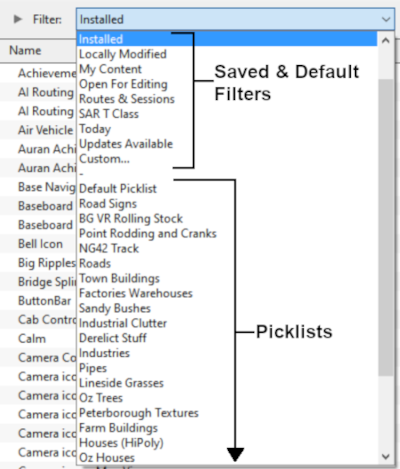


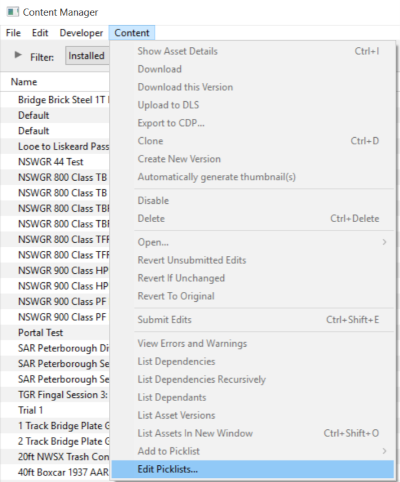


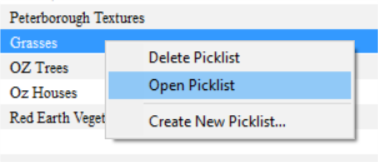
 |
Select the Picklist Contents:
|
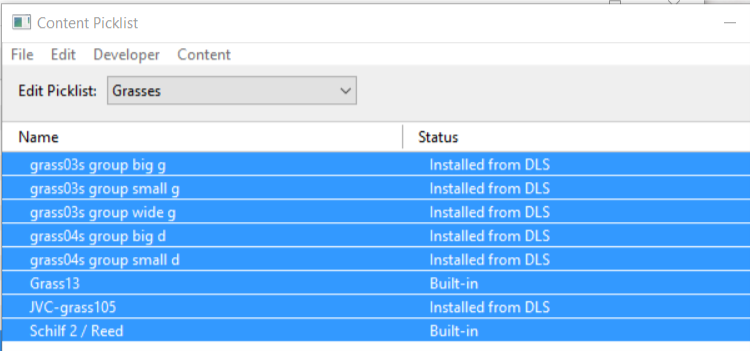
 |
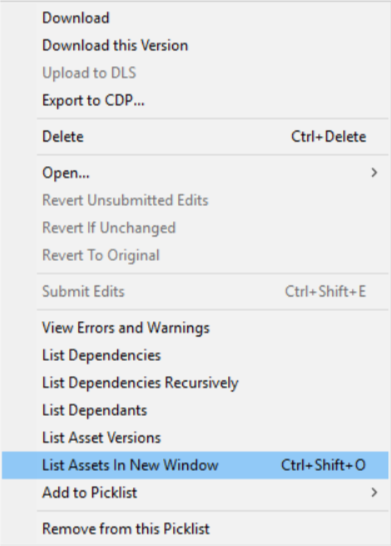
Copy the List to a New Window:
|
 |
Copy Assets in Picklist:
|
|||||||

Transfer the List to Another Copy of Trainz |
|
 |
|
|
||||||||||||||||||

| Steps: To Move the Picklist:- | |||||||||||||||||
 |
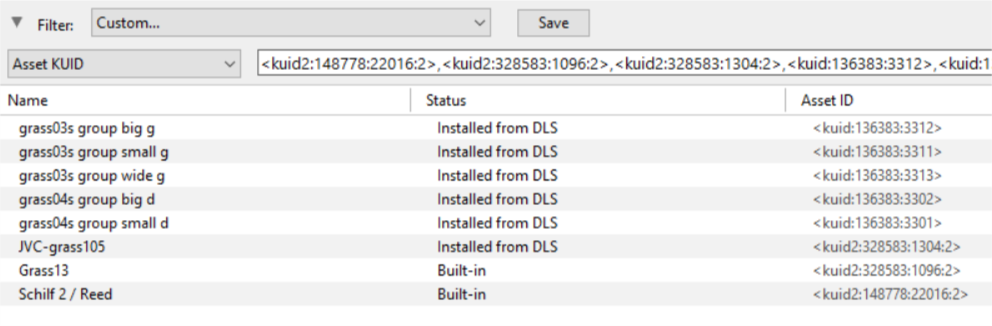
Open CM in the Destination Trainz and Create a New Filter:
|
||||||||||||||||

 |
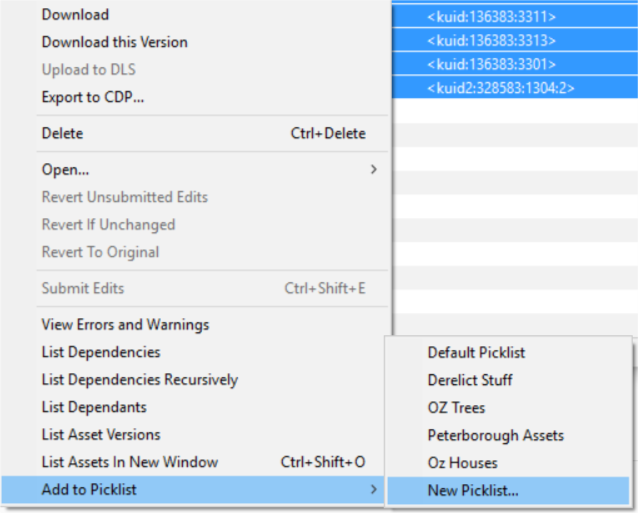
Create a New Picklist:
|
||||||||||
 |
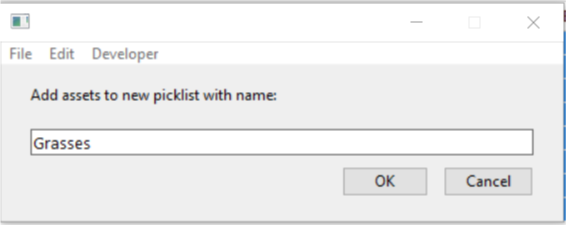
Name the Picklist:
|
|
|
Trainz Wiki
|
|

This page was created by Trainz user pware in October 2018 and was last updated as shown below.

