SAR Carrieton Industry V2: Difference between revisions
From TrainzOnline
Jump to navigationJump to search
Created page with "<!-- V2.0 --> <!-- seperate V1.0 file --> <!-- additional water columns added --> <table width=1000> <!-- BEGIN TOP TABLE --> <tr valign="top"> <td width=750> <table width=7..." |
mNo edit summary |
||
| (2 intermediate revisions by the same user not shown) | |||
| Line 18: | Line 18: | ||
</table> <!-- END TABBED link list --> | </table> <!-- END TABBED link list --> | ||
<table bgcolor="lightgrey" bordercolor="lightgrey" width=750> <!-- BEGIN | <table bgcolor="lightgrey" bordercolor="lightgrey" width=750> <!-- BEGIN location link table with LINE and STATION NAMES --> | ||
<tr valign="middle"> | <tr valign="middle"> | ||
| Line 28: | Line 28: | ||
</tr> | </tr> | ||
</table> <!-- END | </table> <!-- END location link table with LINE and STATION NAMES --> | ||
<table width=750> | <table width=750> | ||
| Line 49: | Line 49: | ||
</tr> | </tr> | ||
<tr valign="middle"> | <tr valign="middle"> | ||
<td colspan=2 align="center"><span style="font-weight: 700;">For | <td colspan=2 align="center"><span style="font-weight: 700;">For all Industries use the "Drive To <span style="color: blue;">name of industry</span>" and <span style="color: blue;">"Load/Unload"</span> commands</span></td> | ||
</tr> | </tr> | ||
<tr valign="top"> | <tr valign="top"> | ||
| Line 56: | Line 56: | ||
<tr valign="top"> | <tr valign="top"> | ||
<td width=70>[[Image: | <td width=70>[[Image:Passenger_Icon.png|link=]]</td> | ||
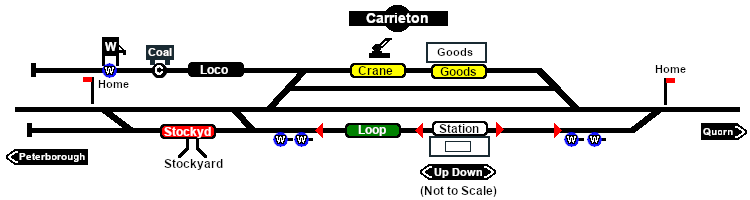
<td>[[image:Station_Label.png|link= | <td>[[image:Station_Label.png|link=]] <span style="font-weight: 700; color: blue;">Carrieton</span><br> | ||
<span style=" | * <span style="font-weight: 700;">Passengers - <span style="color: blue;">Load/Unload</span></span></td> | ||
</tr> | </tr> | ||
<tr valign="top"> | <tr valign="top"> | ||
<td | <td width=70> </td> | ||
<td><span style="font-weight: 700; color: black;">Trackmarks [[image:Trackmark_Left.png|link=|alt=TM|10px]] <span style="color: blue;">Carrieton Station Up</span> and [[image:Trackmark_Right.png|link=|alt=TM|10px]] <span style="color: blue;">Carrieton Station Dn</span> are also available.</span></td> | |||
<td | |||
</tr> | </tr> | ||
<tr valign="top"> | <tr valign="top"> | ||
| Line 82: | Line 80: | ||
<td>[[image:Crane_Label.png|link=]] <span style="font-weight: 700; color: blue;">Carrieton Goods Crane</span> | <td>[[image:Crane_Label.png|link=]] <span style="font-weight: 700; color: blue;">Carrieton Goods Crane</span> | ||
* <span style="font-weight: 700;">Farm Equipment - <span style="color: blue;">Load/Unload</span></span> | * <span style="font-weight: 700;">Farm Equipment - <span style="color: blue;">Load/Unload</span></span> | ||
* <span style="font-weight: 700;">John Deere Tractor Product - <span style="color: blue;">Load/Unload</span></span> | * <span style="font-weight: 700;">John Deere Tractor Product - <span style="color: blue;">Load/Unload</span></span> | ||
* <span style="font-weight: 700;">Lumber - <span style="color: blue;">Load/Unload</span></span></td> | * <span style="font-weight: 700;">Lumber - <span style="color: blue;">Load/Unload</span></span></td> | ||
| Line 125: | Line 122: | ||
* '''Track Mark''' [[image:Trackmark_Right.png|link=|alt=TM|10px]] <span style="font-weight: 700; color: blue;">Carrieton Water Columns Station Dn Approach</span> located on the left of the water columns</td> | * '''Track Mark''' [[image:Trackmark_Right.png|link=|alt=TM|10px]] <span style="font-weight: 700; color: blue;">Carrieton Water Columns Station Dn Approach</span> located on the left of the water columns</td> | ||
</tr> | </tr> | ||
<tr valign="top"> | <tr valign="top"> | ||
<td width=70> </td> | <td width=70> </td> | ||
<td> | <td><span style="font-weight: 700;">Each water column pair has a Trackmark placed on the long approach side as an AI destination for positioning the loco and then manually driving to move the tender alongside the column for loading. Water columns in pairs are spaced to allow both tenders in a consist double-headed by SAR T class locos to load water at the same time</span></td> | ||
</tr> | </tr> | ||
Latest revision as of 20:49, 5 October 2025
|
 |
||||||||||||||||||||||||||||||||||||||||||||||