SAR Scenario Gladstone Shunter V2: Difference between revisions
From TrainzOnline
Jump to navigationJump to search
Created page with "<!-- V2.0 (seperate V1.0 file) --> <!-- SAR Scenario 13 --> <table width=1000> <!-- BEGIN Title table --> <tr valign="top"> <td width=50 align="left">[[image:ArrowLeftBt..." |
mNo edit summary |
||
| (5 intermediate revisions by the same user not shown) | |||
| Line 3: | Line 3: | ||
<table width=1000> <!-- BEGIN Title table --> | <table width=1000> <!-- BEGIN Title table --> | ||
<tr valign="top"> | <tr valign="top"> | ||
<td width= | <td width=30 align="center">[[image:ArrowLeftBtn.png|link=SAR Scenario Peterborough Shunter_V2|30px]]<br> | ||
<td width= | <span style="font-weight: 700; font-size: 15px; color: white; background-color: black;"> 12 </span></td> | ||
<td width=940 align="center"><span style="font-size: 21px; font-weight: 700;"> <span style="background-color: black; color: white;"> 13 </span> <span style="background-color: black; color: white;"> Gladstone Shunter </span></span><br> | |||
A scenario in the '''[[SAR Peterborough Base Session_V2|SAR Peterborough Base Session v2.0]]'''<br> | |||
<span style="font-weight: 700;">This scenario has been updated in V2.0. For the original <span style="color: blue;">V1.0</span> scenario, click <span style="background-color: yellow;">[[SAR Scenario Gladstone Shunter_V1|here]]</span></span></td> | <span style="font-weight: 700;">This scenario has been updated in V2.0. For the original <span style="color: blue;">V1.0</span> scenario, click <span style="background-color: yellow;">[[SAR Scenario Gladstone Shunter_V1|here]]</span></span></td> | ||
<td width=30 align="center">[[image:ArrowRightBtn.png|link=SAR Scenario Terowie Shunter_V2|30px]]<br> | |||
<span style="font-weight: 700; font-size: 15px; color: white; background-color: black;"> 14 </span></td> | |||
</tr> | </tr> | ||
</table> <!-- END Title table --> | </table> <!-- END Title table --> | ||
| Line 15: | Line 15: | ||
<table width=1000> <!-- BEGIN Summary table --> | <table width=1000> <!-- BEGIN Summary table --> | ||
<tr valign="top"> | <tr valign="top"> | ||
<td align="left">Shunting operations in '''Gladstone | <td align="left">Shunting operations in '''Gladstone''' yard and sidings.</td> | ||
<td align="right">[[file:BackToBottom.png|link=#bottom|alt=Bottom|Bottom]]</td> | <td align="right">[[file:BackToBottom.png|link=#bottom|alt=Bottom|Bottom]]</td> | ||
</tr> | |||
<tr valign="top"> | |||
<td colspan=2 bgcolor="black"></td> | |||
</tr> | </tr> | ||
</table> <!-- END Title and summary tables --> | </table> <!-- END Title and summary tables --> | ||
--- | |||
<span style="font-weight: 700; font-size: 15px; color: white; background-color: black;"> When, Where and With What </span><br> | |||
<table width=1000> <!-- BEGIN Scenario image and loco/consist table --> | <table width=1000> <!-- BEGIN Scenario image and loco/consist table --> | ||
<tr valign="top"> | <tr valign="top"> | ||
| Line 72: | Line 77: | ||
</tr> | </tr> | ||
</table> <!-- END Scenario image and loco/consist table --> | </table> <!-- END Scenario image and loco/consist table --> | ||
<span style="font-weight: 700; font-size: 15px; color: white; background-color: black;"> Similar/Related Scenarios </span><br> | |||
<table width=1000> | |||
<tr valign="top"> | |||
<td width=20><span style="font-weight: 700; background-color: black; color: white;"> 12 </span> </td> | |||
<td width=310>'''[[SAR Scenario Peterborough Shunter_V2|Peterborough Shunter]]'''</td> | |||
<td width=20><span style="font-weight: 700; background-color: black; color: white;"> 14 </span> </td> | |||
<td width=310>'''[[SAR Scenario Terowie Shunter_V2|Terowie Shunter]]'''</td> | |||
<td width=20><span style="font-weight: 700; background-color: black; color: white;"> 15 </span> </td> | |||
<td width=310>'''[[SAR Scenario Quorn Shunter_V2|Quorn Shunter]]'''</td> | |||
</tr> | |||
<tr valign="top"> | |||
<td><span style="font-weight: 700; background-color: black; color: yellow;"> 19 </span> </td> | |||
<td>'''[[SAR Scenario Broad Gauge Express_V2|Servicing the Broad Gauge Express]]'''</td> | |||
<td colspan=4> </td> | |||
</tr> | |||
</table> | |||
<br> | |||
<table bgcolor="lightcyan" width=1000> <!-- BEGIN Location Data table --> | <table bgcolor="lightcyan" width=1000> <!-- BEGIN Location Data table --> | ||
<tr> | <tr> | ||
| Line 88: | Line 112: | ||
<tr valign="top"> | <tr valign="top"> | ||
<td> | <td> | ||
# If you have already closed the opening message window then | # Open the session '''SAR Northern Division Free Roam Session V2''' into '''Trainz Driver'''. To do this:<br> | ||
#* From the '''Driver/Surveyor''' loading screen select the route '''SAR Northern Division (Narrow Gauge) Route v2''' | |||
#* Then select <span style="font-weight: 700; color: white; background-color: grey;"> VIEW SESSIONS </span> | |||
#* Then select the session '''SAR Northern Division Free Roam Session V2''' | |||
#* Click <span style="font-weight: 700; color: white; background-color: grey;"> DRIVE SESSION </span> | |||
# If you have already closed the opening message window then pause the session by pressing the <span style="font-weight: 700; font-size: 15px; color: white; background-color: black;"> P </span> key. | |||
# If you decide to set the session clock to a different starting time then follow the instructions shown in the '''Orders''' section | # If you decide to set the session clock to a different starting time then follow the instructions shown in the '''Orders''' section | ||
# Next locate your loco. '''Either''':- | # Next locate your loco. '''Either''':- | ||
#*Open the '''Finder Tool''' (press <span style="font-weight: 700; font-size: 15px; color: white; background-color: black;"> Ctrl </span> <span style="font-weight: 700; font-size: 15px; color: white; background-color: black;"> F </span>) and type, in the '''Name''' field, the name of your selected loco. For example '''SAR T | #*Open the '''Finder Tool''' (press <span style="font-weight: 700; font-size: 15px; color: white; background-color: black;"> Ctrl </span> <span style="font-weight: 700; font-size: 15px; color: white; background-color: black;"> F </span>) and type, in the '''Name''' field, the name of your selected loco. For example '''SAR T 210''' (or just '''T 210''' should be enough). Click the '''tick''' icon, '''OR''' | ||
#*Open the '''Driver List''' (bottom left of the screen) and then scroll through the list to find '''either''':- | #*Open the '''Driver List''' (bottom left of the screen) and then scroll through the list to find '''either''':- | ||
#:*the '''loco name''' ('''SAR T | #:*the '''loco name''' ('''SAR T 210''') '''OR''' | ||
#:*the '''driver''' icon (named '''Driver | #:*the '''driver''' icon (named '''Driver 210''') - this is a non-animated icon | ||
#::then click the drivers '''Eye''' icon [[image:Driver_Eye.png|link=]] to take control of the loco | #::then click the drivers '''Eye''' icon [[image:Driver_Eye.png|link=]] to take control of the loco | ||
# Take a few moments to get your bearings. Click [[image:Line_Index_Gladstone.png|link=SAR_Gladstone_V2|Gladstone Data]] (this link will open in this window) to show the location details and track plans for '''Gladstone'''. In each location details page:- | # Take a few moments to get your bearings. Click [[image:Line_Index_Gladstone.png|link=SAR_Gladstone_V2|Gladstone Data]] (this link will open in this window) to show the location details and track plans for '''Gladstone'''. In each location details page:- | ||
| Line 104: | Line 133: | ||
# When you are ready to start, reload the '''Peterborough Base Session''' page (click the '''Scenarios''' button on your current location page) and select this '''Scenario''' again or just use the '''Back''' button on your browser - whichever is quicker. | # When you are ready to start, reload the '''Peterborough Base Session''' page (click the '''Scenarios''' button on your current location page) and select this '''Scenario''' again or just use the '''Back''' button on your browser - whichever is quicker. | ||
# Switch back to '''Trainz Driver Mode''' | # Switch back to '''Trainz Driver Mode''' | ||
# Close the opening message window | # Close the opening message window if it is on the screen '''OR''' if '''Pause''' is shown on the screen instead, press the <span style="font-weight: 700; font-size: 15px; color: white; background-color: black;"> P </span> key. Both actions will start the session. | ||
</td> | </td> | ||
</tr> | </tr> | ||
| Line 182: | Line 211: | ||
<table width=180> <!-- BEGIN Strip Map Table --> | <table width=180> <!-- BEGIN Strip Map Table --> | ||
<tr valign="top"> | <tr valign="top"> | ||
<td align="center">[[image:SAR Scenario Gladstone Strip | <td align="center">[[image:SAR Scenario Gladstone Shunter Strip Map_V2.png|link=|alt=Strip Map]]<br>[[image:SAR Scenario Route.png|link=|alt=Route Key]]</td> | ||
</tr> | </tr> | ||
</table> <!-- END Strip Map Table --> | </table> <!-- END Strip Map Table --> | ||
| Line 197: | Line 226: | ||
*You have been issued with the orders and an authority ticket for the '''Wilmington Line''' which is valid to the '''Army Siding'''. | *You have been issued with the orders and an authority ticket for the '''Wilmington Line''' which is valid to the '''Army Siding'''. | ||
*The '''Wilmington Line''' is '''not signalled''' beyond '''Gladstone Yard'''. Train order working is in operation on the line. | *The '''Wilmington Line''' is '''not signalled''' beyond '''Gladstone Yard'''. Train order working is in operation on the line. | ||
*You have permission to pass | *You have permission to pass signals at stop provided you are satisfied that the road ahead is clear. | ||
*When driving manually in yards, you are responsible for correctly setting any '''catch points'''. | *When driving manually in yards, you are responsible for correctly setting any '''catch points'''. | ||
</td> | </td> | ||
| Line 205: | Line 234: | ||
</tr> | </tr> | ||
</table> <!-- END Black border for Driving Notes sub table --> | </table> <!-- END Black border for Driving Notes sub table --> | ||
<table width=1000> <!-- BEGIN End Links Table --> | <table width=1000> <!-- BEGIN End Links Table --> | ||
<tr valign="top"> | <tr valign="top"> | ||
| Line 211: | Line 240: | ||
</tr> | </tr> | ||
<tr valign="center"> | <tr valign="center"> | ||
<td width= | <td width=30 align="center">[[image:ArrowLeftBtn.png|link=SAR Scenario Peterborough Shunter_V2|30px]]<br> | ||
<td width= | <span style="font-weight: 700; font-size: 15px; color: white; background-color: black;"> 12 </span></td> | ||
<td width= | <td width=135 align="center">[[image:Session Scenario Index.png|link=SAR Peterborough Base Session_V2|alt=Scenarios|Scenario Index]]<br>'''[[SAR Peterborough Base Session_V2|Scenario Index]]'''</td> | ||
<td width= | <td width=134 align="center">[[Image:Location Index.png|link=SAR Index_V2|alt=Location Index|Location Index]]<br>'''[[SAR Index_V2|Location Index]]'''</td> | ||
<td width= | <td width=134 align="center">[[image:SAR Tutorial.png|link=SAR Scenarios Tutorial_V2|alt=Tutorial|Drive Tutorial]]<br>'''[[SAR Scenarios Tutorial_V2|Drive Tutorial]]'''</td> | ||
<td width= | <td width=134 align="center">[[image:Rolling Stock Index.png|link=SAR Scenario Rolling Stock_V2|alt=Rolling Stock|Rolling Stock List]]<br>'''[[SAR Scenario Rolling Stock_V2|Rolling Stock List]]'''</td> | ||
<td width= | <td width=134 align="center">[[image:Loco Index.png|link=SAR Peterborough Division Loco Roster_V2|alt=Loco Roster|Loco Roster]]<br>'''[[SAR Peterborough Division Loco Roster_V2|Loco Roster]]'''</td> | ||
<td width= | <td width=134 align="center">[[image:Industry Index.png|link=SAR Scenario Industries_V2|alt=Industries|Active Industries]]<br>'''[[SAR Scenario Industries_V2|Active Industries]]'''</td> | ||
<td width= | <td width=135 align="center">[[image:BackToTop.png|link=#top|alt=Top|Top]]</td> | ||
<td width=30 align="center">[[image:ArrowRightBtn.png|link=SAR Scenario Terowie Shunter_V2|30px]]<br> | |||
<span style="font-weight: 700; font-size: 15px; color: white; background-color: black;"> 14 </span></td> | |||
</tr> | |||
<tr valign="top"> | |||
<td colspan=9 bgcolor="black"></td> | |||
</tr> | </tr> | ||
</table> <!-- END End Links Table --> | </table> <!-- END End Links Table --> | ||
<span id="bottom"></span> | <span id="bottom"></span> | ||
This page was created by Trainz user '''<span class="plainlinks">[http://online.ts2009.com/mediaWiki/index.php/User:Pware pware]</span>''' in February 2021 and was last updated as shown below. | This page was created by Trainz user '''<span class="plainlinks">[http://online.ts2009.com/mediaWiki/index.php/User:Pware pware]</span>''' in February 2021 and was last updated as shown below. | ||
---- | ---- | ||
Latest revision as of 07:10, 13 May 2026
| Error creating thumbnail: /bin/bash: line 1: /usr/bin/convert: No such file or directory Error code: 127 12 |
13 Gladstone Shunter A scenario in the SAR Peterborough Base Session v2.0 |
Error creating thumbnail: /bin/bash: line 1: /usr/bin/convert: No such file or directory Error code: 127 14 |
| Shunting operations in Gladstone yard and sidings. |  |
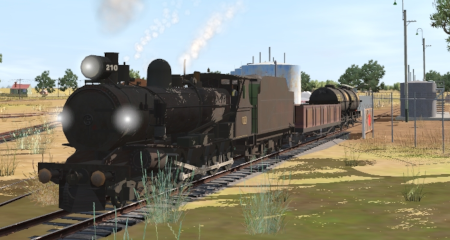
When, Where and With What
 |
|
|||||||||||||||

Similar/Related Scenarios
| 12 | Peterborough Shunter | 14 | Terowie Shunter | 15 | Quorn Shunter |
| 19 | Servicing the Broad Gauge Express | ||||
|
|
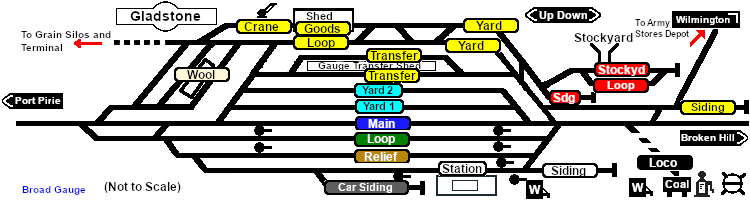
Each location in the layout has a detailed set of track diagrams that provide a variety of useful information The Getting Started guide below gives a summary of what is available.  graphic, or go to the bottom of the page for all the session links (all links will open in this window). |

Getting Started:
|


Tutorial:
|

|
|
|||||||||||




Driving Notes:
|


This page was created by Trainz user pware in February 2021 and was last updated as shown below.


