SAR Scenario Transcontinental Express Freight V2: Difference between revisions
mNo edit summary |
mNo edit summary |
||
| (14 intermediate revisions by the same user not shown) | |||
| Line 127: | Line 127: | ||
</table> | </table> | ||
<span style="font-weight: 700; font-size: 15px; color: white; background-color: black;"> Similar/Related Scenarios </span>< | <table width=1000> | ||
<tr valign="top"> | |||
<td><span style="font-weight: 700; font-size: 15px; color: white; background-color: black;"> DLS Sessions Based on This Scenario </span><br> | |||
<br> | |||
These are fully directed sessions with '''Navigation Points''' and '''Message Popups'''. All junction switches will be set for you.<br> | |||
<br> | |||
<span style="font-weight: 700;"><kuid2:45176:109500:1> <span style="color: brown;">SAR Northern Division Gladstone Express Freight</span></span> - Train '''122''' in the timetable below.<br> | |||
<span style="font-weight: 700;"><kuid2:45176:109470:1> <span style="color: brown;">SAR Northern Division Peterborough Express Freight</span></span> - Train '''820''' in the timetable below.<br> | |||
<span style="font-weight: 700;"><kuid:45176:109524> <span style="color: brown;">SAR Northern Division Quorn Express Freight</span></span> - Train '''124''' in the timetable below.<br> | |||
<span style="font-weight: 700;"><kuid:45176:109499> <span style="color: brown;">SAR Northern Division Terowie Express Freight</span></span> - Train '''123''' in the timetable below. | |||
<br></td> | |||
</tr> | |||
<tr valign="top"> | |||
<td><span style="font-weight: 700; font-size: 15px; color: white; background-color: black;"> Similar/Related Scenarios </span></td> | |||
</tr> | |||
</table> | |||
<table width=1000> | <table width=1000> | ||
| Line 145: | Line 160: | ||
</table> | </table> | ||
<br> | <br> | ||
<table | <table width=1000> <!-- BEGIN Location/Getting Started/Tutorial/Orders table --> | ||
<tr> | <tr> | ||
<td> | <td> | ||
[[Image:Location Index.png|link=SAR Index_V2|alt=Location Index|Location Index]] | <table bgcolor="lightcyan" width=820> | ||
</td> | <tr valign="top"> | ||
<td>[[Image:Location Index.png|link=SAR Index_V2|alt=Location Index|Location Index]]</td> | |||
<td>'''Each location in the layout has a detailed set of track diagrams that provide a variety of useful information'''<br> | <td>'''Each location in the layout has a detailed set of track diagrams that provide a variety of useful information'''<br> | ||
The <span style="font-weight: 700; color: white; background-color: black;"> Getting Started </span> guide below gives a summary of what is available.<br> | The <span style="font-weight: 700; color: white; background-color: black;"> Getting Started </span> guide below gives a summary of what is available.<br> | ||
| Line 155: | Line 171: | ||
</tr> | </tr> | ||
</table> <!-- END Location Data table --> | </table> <!-- END Location Data table --> | ||
<table cellpadding="2" bgcolor="black" width= | <table cellpadding="2" bgcolor="black" width=820> <!-- BEGIN Black border for Getting Started table --> | ||
<tr valign="top"> | <tr valign="top"> | ||
<td><span style="font-size: 15px; font-weight: 700; color: white">Getting Started:</span><br> | <td><span style="font-size: 15px; font-weight: 700; color: white">Getting Started:</span><br> | ||
| Line 161: | Line 177: | ||
<tr valign="top"> | <tr valign="top"> | ||
<td> | <td> | ||
# If you have already closed the opening message window then | # Open the session '''SAR Northern Division Free Roam Session V2''' into '''Trainz Driver'''. To do this:<br> | ||
#* From the '''Driver/Surveyor''' loading screen select the route '''SAR Northern Division (Narrow Gauge) Route v2''' | |||
#* Then select <span style="font-weight: 700; color: white; background-color: grey;"> VIEW SESSIONS </span> | |||
#* Then select the session '''SAR Northern Division Free Roam Session V2''' | |||
#* Click <span style="font-weight: 700; color: white; background-color: grey;"> DRIVE SESSION </span> | |||
# If you have already closed the opening message window then pause the session by pressing the <span style="font-weight: 700; font-size: 15px; color: white; background-color: black;"> P </span> key. | |||
# If you decide to set the session clock to a different starting time then follow the instructions shown in the '''Orders''' section below | # If you decide to set the session clock to a different starting time then follow the instructions shown in the '''Orders''' section below | ||
# Select a specific freight service starting at any of '''Paratoo''', '''Terowie''', '''Gladstone''' or '''Quorn''' from the timetable shown in the '''Orders''' section below. | # Select a specific freight service starting at any of '''Paratoo''', '''Terowie''', '''Gladstone''' or '''Quorn''' from the timetable shown in the '''Orders''' section below. | ||
| Line 178: | Line 199: | ||
# When you are ready to start, reload the '''Peterborough Base Session''' page (click the '''Scenarios''' button on your current location page) and select this '''Scenario''' again or just use the '''Back''' button on your browser - whichever is quicker. | # When you are ready to start, reload the '''Peterborough Base Session''' page (click the '''Scenarios''' button on your current location page) and select this '''Scenario''' again or just use the '''Back''' button on your browser - whichever is quicker. | ||
# Switch back to '''Trainz Driver Mode''' | # Switch back to '''Trainz Driver Mode''' | ||
# Close the opening message window | # Close the opening message window if it is on the screen '''OR''' if '''Pause''' is shown on the screen instead, press the <span style="font-weight: 700; font-size: 15px; color: white; background-color: black;"> P </span> key. Both actions will start the session. | ||
</td> | </td> | ||
</tr> | </tr> | ||
| Line 186: | Line 207: | ||
</table> <!-- END Black border for Getting Started table --> | </table> <!-- END Black border for Getting Started table --> | ||
<br> | <br> | ||
<table cellpadding="2" bgcolor="blue" width= | <table cellpadding="2" bgcolor="blue" width=820> <!-- BEGIN Blue border for Tutorial table --> | ||
<tr valign="top"> | <tr valign="top"> | ||
<td><span style="font-size: 15px; font-weight: 700; color: white">Tutorial:</span><br> | <td><span style="font-size: 15px; font-weight: 700; color: white">Tutorial:</span><br> | ||
<table bgcolor="lightcyan" width= | <table bgcolor="lightcyan" width=816> <!-- BEGIN Tutorial link table --> | ||
<tr valign="center"> | <tr valign="center"> | ||
<td width=70 align="right">[[image:SAR Tutorial.png|link=SAR Scenarios Tutorial_V2|alt=Tutorial]]</td> | <td width=70 align="right">[[image:SAR Tutorial.png|link=SAR Scenarios Tutorial_V2|alt=Tutorial]]</td> | ||
| Line 199: | Line 220: | ||
</table> <!-- END Blue Border for Tutorial table --> | </table> <!-- END Blue Border for Tutorial table --> | ||
<br> | <br> | ||
<table bgcolor=#000000 width=820 cellpadding=2> <!-- BEGIN Black Border for Orders Table --> | <table bgcolor=#000000 width=820 cellpadding=2> <!-- BEGIN Black Border for Orders Table --> | ||
<tr valign="top"> | <tr valign="top"> | ||
| Line 213: | Line 231: | ||
#* At '''Terowie''' move the loco from the <span style="background-color: #000000; color: white; font-weight: 700;"> Depot </span> | #* At '''Terowie''' move the loco from the <span style="background-color: #000000; color: white; font-weight: 700;"> Depot </span> | ||
#** If scenario <span style="font-weight: 700;"><span style="font-size: 15px; color: white; background-color: black;"> 14 </span> [[SAR Scenario Terowie Shunter_V2|Terowie Shunter]]</span> has been not been completed then run that scenario first. It will take approximately 50 minutes | #** If scenario <span style="font-weight: 700;"><span style="font-size: 15px; color: white; background-color: black;"> 14 </span> [[SAR Scenario Terowie Shunter_V2|Terowie Shunter]]</span> has been not been completed then run that scenario first. It will take approximately 50 minutes | ||
#** If | #** If scenario <span style="font-weight: 700;"><span style="font-size: 15px; color: white; background-color: black;"> 14 </span> [[SAR Scenario Terowie Shunter_V2|Terowie Shunter]]</span> has been completed then collect the loaded wagons waiting on the <span style="font-weight: 700;"><span style="color: white; background-color: #b8860b;"> Relief </span> road</span> in the main '''Terowie Yard''' | ||
#* At '''Quorn''' move the loco from the <span style="background-color: #000000; color: white; font-weight: 700;"> Depot </span> and couple to the wagons waiting in the '''Quorn''' <span style="font-weight: 700; background-color: yellow;"> Goods Loop </span> | #* At '''Quorn''' move the loco from the <span style="background-color: #000000; color: white; font-weight: 700;"> Depot </span> and couple to the wagons waiting in the '''Quorn''' <span style="font-weight: 700; background-color: yellow;"> Goods Loop </span> | ||
# Proceed as per the '''working timetable''' shown below to a suitable vacant road in <span style="font-weight: 700;">Peterborough <span style="color: black; background-color: cyan;"> Yard </span></span> | # Proceed as per the '''working timetable''' shown below to a suitable vacant road in <span style="font-weight: 700;">Peterborough <span style="color: black; background-color: cyan;"> Yard </span></span> | ||
# Coal and water the loco at <span style="font-weight: 700;">Peterborough Main <span style="color: white; background-color: black;"> Loco Coal & Water </span> Stage</span> as needed | # Coal and water the loco at <span style="font-weight: 700;">Peterborough Main <span style="color: white; background-color: black;"> Loco Coal & Water </span> Stage</span> as needed. You have the option of swapping your loco for another selected from the depot | ||
# Some of the trains have to be divided at '''Peterborough''' and may have to be combined with other wagons waiting there | # Some of the trains have to be divided at '''Peterborough''' and may have to be combined with other wagons waiting there | ||
<span style="font-weight: 700; font-size: 15px;">At Peterborough</span><br> | <span style="font-weight: 700; font-size: 15px;">At Peterborough</span><br> | ||
| Line 239: | Line 257: | ||
* Those wagons with '''Peterborough''' in their names are to be shunted to a vacant yard road or siding | * Those wagons with '''Peterborough''' in their names are to be shunted to a vacant yard road or siding | ||
* On '''Tuesdays''' and '''Thursdays''' the '''Port Augusta''' wagons stored <span style="font-weight: 700;">Peterborough <span style="color: black; background-color: yellow;"> Goods Sidings 1 </span></span> are to be combined with those in '''Train 320''' | * On '''Tuesdays''' and '''Thursdays''' the '''Port Augusta''' wagons stored <span style="font-weight: 700;">Peterborough <span style="color: black; background-color: yellow;"> Goods Sidings 1 </span></span> are to be combined with those in '''Train 320''' | ||
* After shunting has been completed | |||
*# reattach the loco (or an alternative loco) to the front (western or '''Gladstone''' end) of the train | |||
*# proceed with the train to a vacant <span style="font-weight: 700;">Quorn <span style="background-color: cyan;"> Yard </span></span> | |||
*# detach the wagons and move the loco to the '''Quorn''' loco <span style="background-color: #000000; color: white; font-weight: 700;"> Depot </span> for servicing | |||
:<span style="font-weight: 700; font-size: 15px; color: white; background-color: black;"> Train 330 from Terowie </span> | |||
* Those wagons with '''Peterborough''', '''Port Augusta''' or '''Port Pirie''' in their names are to be shunted to a vacant yard road or siding | |||
* Attach any waiting wagons with '''Broken Hill''' or '''Paratoo''' in their names | |||
* After shunting has been completed | * After shunting has been completed | ||
*# reattach the loco (or an alternative loco) to the front (western or '''Gladstone''' end) of the train | *# reattach the loco (or an alternative loco) to the front (western or '''Gladstone''' end) of the train | ||
| Line 259: | Line 284: | ||
<table width=180> <!-- BEGIN Strip Map Table --> | <table width=180> <!-- BEGIN Strip Map Table --> | ||
<tr valign="top"> | <tr valign="top"> | ||
<td | <td>[[image:SAR Scenario Gladstone-Paratoo-Terowie-Quorn Strip Map.png|link=|alt=Strip Map]]<br>[[image:SAR Scenario Route.png|link=|alt=Route Key]]<br><br> | ||
[[image:SAR Gladstone-Paratoo Strip Map_V2.png|link=|alt=Strip Map 2]]<br><br> | |||
[[image:SAR Peterborough-Quorn Strip Map.png|link=|alt=Strip Map 3]]<br><br> | |||
[[image:SAR Peterborough-Terowie Strip Map.png|link=|alt=Strip Map 4]] | |||
</td> | |||
</tr> | </tr> | ||
</table> <!-- END Strip Map Table --> | </table> <!-- END Strip Map Table --> | ||
| Line 433: | Line 462: | ||
<td> </td> | <td> </td> | ||
<td> 19:10<sup>4</sup></td> | <td> 19:10<sup>4</sup></td> | ||
<td> </td> | |||
<td> </td> | <td> </td> | ||
<td> </td> | <td> </td> | ||
| Line 446: | Line 476: | ||
<td align="right">'''CEFJØWX'''</td> | <td align="right">'''CEFJØWX'''</td> | ||
<td align="right">'''arr'''</td> | <td align="right">'''arr'''</td> | ||
<td> '''05:00cw'''</td> | <td> '''05:00cw<sup> </sup>'''</td> | ||
<td> '''09:06cw<sup>1</sup>'''</td> | <td> '''09:06cw<sup>1</sup>'''</td> | ||
<td colspan=2 align="center">[[image:Connect_Arrow_3c.png|link=]]</td> | <td colspan=2 align="center">[[image:Connect_Arrow_3c.png|link=]]</td> | ||
<td> '''19:25'''</td> | <td> '''19:25<sup> </sup>'''</td> | ||
<td align="right">'''dep'''</td> | <td align="right">'''dep'''</td> | ||
<td colspan=2 align="center">[[image:Connect_Arrow_4c.png|link=]]</td> | <td colspan=2 align="center">[[image:Connect_Arrow_4c.png|link=]]</td> | ||
| Line 771: | Line 801: | ||
</table> <!-- END Working Timetable black border Table --> | </table> <!-- END Working Timetable black border Table --> | ||
<table width=820> <!-- BEGIN Symbol Table --> | <table width=820> <!-- BEGIN Train Symbol Table --> | ||
<tr valign="top"> | <tr valign="top"> | ||
<td colspan=2>'''bold time''' = arrive/depart time</td> | <td colspan=2>'''bold time''' = arrive/depart time</td> | ||
| Line 777: | Line 807: | ||
</tr> | </tr> | ||
<tr valign="top"> | <tr valign="top"> | ||
<td colspan= | <td colspan=5><span style="font-weight: 700; font-size: 15px;">Service Symbols:</span></td> | ||
</tr> | </tr> | ||
<tr valign="top"> | <tr valign="top"> | ||
<td width= | <td width=164>'''A''' Attach wagons</td> | ||
<td width= | <td width=164>'''D''' Detach wagons</td> | ||
<td width= | <td width=164>'''L''' Load</td> | ||
<td width= | <td width=164>'''S''' Stable loco</td> | ||
<td width=164>'''T''' Turn loco</td> | |||
</tr> | </tr> | ||
<tr valign="top"> | <tr valign="top"> | ||
<td>''' | <td>'''U''' Unload</td> | ||
<td>'''a''' on request stop</td> | <td>'''a''' on request stop</td> | ||
<td>'''c''' coal (if required)</td> | <td>'''c''' coal (if required)</td> | ||
<td>'''w''' water (if required)</td> | <td>'''w''' water (if required)</td> | ||
<td> </td> | |||
</tr> | </tr> | ||
</table> <!-- END Train Symbol Table --> | |||
<table width=820> <!-- BEGIN Train Crossing Table --> | |||
<tr valign="top"> | <tr valign="top"> | ||
<td>'''<sup>1</sup>''' Cross '''trains [[SAR Scenario Paratoo Mixed Passenger Freight_V2|101/121]]/[[SAR Scenario Terowie-Paratoo Livestock_V2|160]]/[[SAR Scenario East-West Express_V2|300]]'''</td> | <td width=205>'''<sup>1</sup>''' Cross '''trains [[SAR Scenario Paratoo Mixed Passenger Freight_V2|101/121]]/[[SAR Scenario Terowie-Paratoo Livestock_V2|160]]/[[SAR Scenario East-West Express_V2|300]]'''</td> | ||
<td>'''<sup>2</sup>''' Cross '''train 921'''</td> | <td width=205>'''<sup>2</sup>''' Cross '''train 921'''</td> | ||
<td>'''<sup>3</sup>''' Cross '''train 320'''</td> | <td width=205>'''<sup>3</sup>''' Cross '''train 320'''</td> | ||
<td>'''<sup>4</sup>''' Cross '''train [[SAR Scenario Gladstone-Terowie Passenger_V2|207]]'''</td> | <td width=205>'''<sup>4</sup>''' Cross '''train [[SAR Scenario Gladstone-Terowie Passenger_V2|207]]'''</td> | ||
</tr> | </tr> | ||
<tr valign="top"> | <tr valign="top"> | ||
<td>'''<sup>5</sup>''' Cross '''train [[SAR Scenario Peterborough-Quorn Grain_V2|441]]'''</td> | <td>'''<sup>5</sup>''' Cross '''train [[SAR Scenario Peterborough-Quorn Grain_V2|441]]'''</td> | ||
<td colspan= | <td colspan=2>'''†''' continues as train '''127''' to '''Broken Hill'''</td> | ||
<td>'''‡''' from train '''921'''</td> | |||
</tr> | </tr> | ||
</table> <!-- END Train Crossing Table --> | |||
<table width=820> <!-- BEGIN Location Symbol Table --> | |||
<tr valign="top"> | <tr valign="top"> | ||
<td colspan=4><span style="font-weight: 700; font-size: 15px;">Location Symbols:</span></td> | <td colspan=4><span style="font-weight: 700; font-size: 15px;">Location Symbols:</span></td> | ||
</tr> | </tr> | ||
<tr valign="top"> | <tr valign="top"> | ||
<td>'''Δ = Turning Triangle'''</td> | <td width=205>'''Δ = Turning Triangle'''</td> | ||
<td>'''C = Loco Coal Loader'''</td> | <td width=205>'''C = Loco Coal Loader'''</td> | ||
<td>'''E = Engine Depot'''</td> | <td width=205>'''E = Engine Depot'''</td> | ||
<td>'''F = Fixed Signals'''</td> | <td width=205>'''F = Fixed Signals'''</td> | ||
</tr> | </tr> | ||
<tr valign="top"> | <tr valign="top"> | ||
| Line 816: | Line 853: | ||
<td>'''X = Crossing Loop'''</td> | <td>'''X = Crossing Loop'''</td> | ||
</tr> | </tr> | ||
</table> | <tr valign="top"> | ||
<td colspan=4 bgcolor="black"></td> | |||
</tr> | |||
</table> <!-- END Location Symbol Table --> | |||
<table cellpadding="2" bgcolor="black" width=820> <!-- BEGIN Black border for Driving Notes sub table --> | <table cellpadding="2" bgcolor="black" width=820> <!-- BEGIN Black border for Driving Notes sub table --> | ||
Latest revision as of 02:40, 7 May 2026
| Error creating thumbnail: /bin/bash: line 1: /usr/bin/convert: No such file or directory Error code: 127 9 |
10 Transcontinental Express Freights A scenario in the SAR Peterborough Base Session v2.0 |
Error creating thumbnail: /bin/bash: line 1: /usr/bin/convert: No such file or directory Error code: 127 11 |
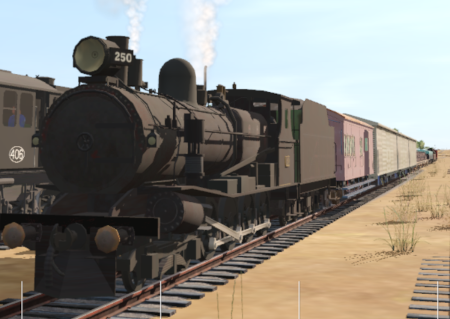
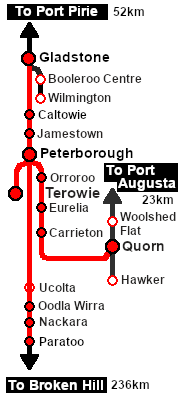
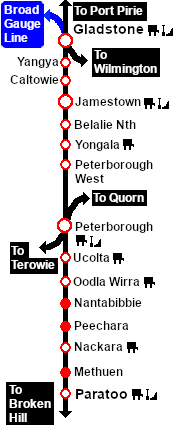
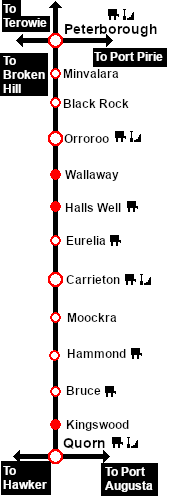
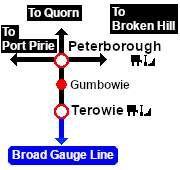
| Express transcontinental freight services running between Broken Hill (Paratoo), Port Augusta (Quorn), Terowie and Port Pirie (Gladstone). At Peterborough some services are divided for different destinations and/or combined with additional rolling stock. |  |
When, Where and With What
 |
|
|||||||||||||||||||||||||||||||||||||||||||
| DLS Sessions Based on This Scenario
|
| Similar/Related Scenarios |
| 5 | Paratoo-Gladstone Bulk Ore | 6 | Gladstone-Paratoo Empty Ore | 8 | Quorn-Peterborough Empty Fuel |
| 14 | Terowie Shunter | ||||
|
|




|
|||


| Transcontinental Express Freight Timetable | |||||||||||||||||||||||||||||||||||||||||||||||||||||||||||||||||||||||||||||||||||||||||||||||||||||||||||||||||||||||||||||||||||||||||||||||||||||||||||||||||||||||||||||||||||||||||||||||||||||||||||||||||||||||||||||||||||||||||||||||||||||||||||||||||||||||||||||||||||||||||||||||||||||||||||||||||||||||||||||||||||||||||||||||||||||||||||||||||||||||||||||||||||||||||||||||||||||||||||||||||||||||||||||||||||||||||||||||||||||||||||||||||||||||||||||||||||||||||||||||||||||||||||||||||||||||||||||||||||||||||||||||||||||||||||||||||||||||||||||||||||||||||||||||||||||
|
|||||||||||||||||||||||||||||||||||||||||||||||||||||||||||||||||||||||||||||||||||||||||||||||||||||||||||||||||||||||||||||||||||||||||||||||||||||||||||||||||||||||||||||||||||||||||||||||||||||||||||||||||||||||||||||||||||||||||||||||||||||||||||||||||||||||||||||||||||||||||||||||||||||||||||||||||||||||||||||||||||||||||||||||||||||||||||||||||||||||||||||||||||||||||||||||||||||||||||||||||||||||||||||||||||||||||||||||||||||||||||||||||||||||||||||||||||||||||||||||||||||||||||||||||||||||||||||||||||||||||||||||||||||||||||||||||||||||||||||||||||||||||||||||||||||

| bold time = arrive/depart time | plain time = timing point | |||
| Service Symbols: | ||||
| A Attach wagons | D Detach wagons | L Load | S Stable loco | T Turn loco |
| U Unload | a on request stop | c coal (if required) | w water (if required) | |
| 1 Cross trains 101/121/160/300 | 2 Cross train 921 | 3 Cross train 320 | 4 Cross train 207 |
| 5 Cross train 441 | † continues as train 127 to Broken Hill | ‡ from train 921 | |
| Location Symbols: | |||
| Δ = Turning Triangle | C = Loco Coal Loader | E = Engine Depot | F = Fixed Signals |
| J = Junction | Ø = Loco Turntable | W = Loco Water Tank | X = Crossing Loop |
Driving Notes:
|





This page was created by Trainz user pware in February 2021 and was last updated as shown below.


