SAR Scenario Hawker Freight V2: Difference between revisions
mNo edit summary |
mNo edit summary |
||
| (9 intermediate revisions by the same user not shown) | |||
| Line 5: | Line 5: | ||
<td width=30 align="center">[[image:ArrowLeftBtn.png|link=SAR Scenario Coffee Pot Special_V2|30px]]<br> | <td width=30 align="center">[[image:ArrowLeftBtn.png|link=SAR Scenario Coffee Pot Special_V2|30px]]<br> | ||
<span style="font-weight: 700; font-size: 15px; color: yellow; background-color: black;"> 25 </span></td> | <span style="font-weight: 700; font-size: 15px; color: yellow; background-color: black;"> 25 </span></td> | ||
<td width=940 align="center"><span style="font-size: 21px; font-weight: 700;"> <span style="background-color: black; color: yellow;">  | <td width=940 align="center"><span style="font-size: 21px; font-weight: 700;"> <span style="background-color: black; color: yellow;"> 26 </span> <span style="background-color: black; color: white;"> Quorn - Hawker Weekly Freight </span></span><br> | ||
A scenario in the '''[[SAR Peterborough Base Session_V2|SAR Peterborough Base Session v2.0]]'''</td> | A scenario in the '''[[SAR Peterborough Base Session_V2|SAR Peterborough Base Session v2.0]]'''</td> | ||
<td width=30 align="center">[[image:ArrowRightBtn.png|link=SAR Scenario Gladstone-Peterborough Freight_V2|30px]]<br> | <td width=30 align="center">[[image:ArrowRightBtn.png|link=SAR Scenario Gladstone-Peterborough Freight_V2|30px]]<br> | ||
| Line 114: | Line 114: | ||
</table> <!-- END Scenario image and loco/consist table --> | </table> <!-- END Scenario image and loco/consist table --> | ||
<span style="font-weight: 700; font-size: 15px; color: white; background-color: black;"> Similar/Related Scenarios </span>< | <table width=1000> | ||
<tr valign="top"> | |||
<td><span style="font-weight: 700; font-size: 15px; color: white; background-color: black;"> DLS Session Based on This Scenario </span><br> | |||
<br> | |||
This is a fully directed session with '''Navigation Points''' and '''Message Popups'''. All junction switches will be set for you. | |||
<br> | |||
<span style="font-weight: 700;"><kuid:109640:109640> <span style="color: brown;">SAR Northern Division Hawker Freight Session</span></span> - Train '''425''' in the timetable below. | |||
<br></td> | |||
</tr> | |||
<tr valign="top"> | |||
<td><span style="font-weight: 700; font-size: 15px; color: white; background-color: black;"> Similar/Related Scenarios </span></td> | |||
</tr> | |||
</table> | |||
<table width=1000> | <table width=1000> | ||
| Line 160: | Line 172: | ||
<tr valign="top"> | <tr valign="top"> | ||
<td> | <td> | ||
# If you have already closed the opening message window then | # Open the session '''SAR Northern Division Free Roam Session V2''' into '''Trainz Driver'''. To do this:<br> | ||
#* From the '''Driver/Surveyor''' loading screen select the route '''SAR Northern Division (Narrow Gauge) Route v2''' | |||
#* Then select <span style="font-weight: 700; color: white; background-color: grey;"> VIEW SESSIONS </span> | |||
#* Then select the session '''SAR Northern Division Free Roam Session V2''' | |||
#* Click <span style="font-weight: 700; color: white; background-color: grey;"> DRIVE SESSION </span> | |||
# If you have already closed the opening message window then pause the session by pressing the <span style="font-weight: 700; font-size: 15px; color: white; background-color: black;"> P </span> key. | |||
# If you decide to set the session clock to a different starting time then follow the instructions shown in the '''Orders''' section | # If you decide to set the session clock to a different starting time then follow the instructions shown in the '''Orders''' section | ||
# Next locate your loco. '''Either''':- | # Next locate your loco. '''Either''':- | ||
| Line 176: | Line 193: | ||
# When you are ready to start, reload the '''Peterborough Base Session''' page (click the '''Scenarios''' button on your current location page) and select this '''Scenario''' again or just use the '''Back''' button on your browser - whichever is quicker. | # When you are ready to start, reload the '''Peterborough Base Session''' page (click the '''Scenarios''' button on your current location page) and select this '''Scenario''' again or just use the '''Back''' button on your browser - whichever is quicker. | ||
# Switch back to '''Trainz Driver Mode''' | # Switch back to '''Trainz Driver Mode''' | ||
# Close the opening message window | # Close the opening message window if it is on the screen '''OR''' if '''Pause''' is shown on the screen instead, press the <span style="font-weight: 700; font-size: 15px; color: white; background-color: black;"> P </span> key. Both actions will start the session. | ||
</td> | </td> | ||
</tr> | </tr> | ||
| Line 219: | Line 236: | ||
# '''Option:''' Return to '''Quorn''' picking up any wagons on the way. | # '''Option:''' Return to '''Quorn''' picking up any wagons on the way. | ||
#* At '''Quorn''' stable any goods wagons on a goods siding and livestock wagons at the stockyard | #* At '''Quorn''' stable any goods wagons on a goods siding and livestock wagons at the stockyard | ||
#* Deliver loaded '''CCC''' gondola wagons to the <span style="font-weight: 700; background-color: #a1810b; color: white;"> Barytes Unloader | #* Deliver loaded '''CCC''' gondola wagons to the <span style="font-weight: 700; background-color: #a1810b; color: white;"> Barytes Unloader </span> | ||
#* Service and stable the loco at the depot after turning on the turntable | #* Service and stable the loco at the depot after turning on the turntable | ||
</td> | </td> | ||
| Line 326: | Line 343: | ||
<td>'''Wilson'''</td> | <td>'''Wilson'''</td> | ||
<td align="right"> </td> | <td align="right"> </td> | ||
<td>  | <td> (15:00) '''p'''</td> | ||
<td> </td> | <td> </td> | ||
</tr> | </tr> | ||
| Line 334: | Line 351: | ||
<td align="right">'''X'''</td> | <td align="right">'''X'''</td> | ||
<td align="right"> </td> | <td align="right"> </td> | ||
<td>  | <td> (09:05) '''d'''</td> | ||
<td>'''Gordon'''</td> | <td>'''Gordon'''</td> | ||
<td align="right"> </td> | <td align="right"> </td> | ||
<td>  | <td> (15:30) '''p'''</td> | ||
<td> </td> | <td> </td> | ||
</tr> | </tr> | ||
| Line 345: | Line 362: | ||
<td align="right">'''X'''</td> | <td align="right">'''X'''</td> | ||
<td align="right"> </td> | <td align="right"> </td> | ||
<td>  | <td> (09:36) '''d'''</td> | ||
<td>'''Willocra'''</td> | <td>'''Willocra'''</td> | ||
<td align="right"> </td> | <td align="right"> </td> | ||
<td>  | <td> (16:00) '''p'''</td> | ||
<td> </td> | <td> </td> | ||
</tr> | </tr> | ||
| Line 360: | Line 377: | ||
<td align="right">'''ΔCWX'''</td> | <td align="right">'''ΔCWX'''</td> | ||
<td align="right">'''arr'''</td> | <td align="right">'''arr'''</td> | ||
<td> '''10: | <td> '''10:05'''</td> | ||
<td>'''Quorn Yard'''</td> | <td>'''Quorn Yard'''</td> | ||
<td align="right">'''arr'''</td> | <td align="right">'''arr'''</td> | ||
<td> '''16: | <td> '''16:35D'''</td> | ||
<td> </td> | <td> </td> | ||
</tr> | </tr> | ||
| Line 400: | Line 417: | ||
<td align="right">'''Depot'''</td> | <td align="right">'''Depot'''</td> | ||
<td align="right" colspan=2> </td> | <td align="right" colspan=2> </td> | ||
<td>  ''' | <td>  '''cwT'''</td> | ||
<td align="right">'''Depot'''</td> | <td align="right">'''Depot'''</td> | ||
<td> </td> | <td> </td> | ||
| Line 417: | Line 434: | ||
</tr> | </tr> | ||
</table> <!-- END Black Border for Orders Table --> | </table> <!-- END Black Border for Orders Table --> | ||
<table width=820> <!-- BEGIN Symbol Table --> | <table width=820> <!-- BEGIN Train Symbol Table --> | ||
<tr valign="top"> | <tr valign="top"> | ||
<td colspan=2>'''bold time''' = arrive/depart time</td> | <td colspan=2>'''bold time''' = arrive/depart time</td> | ||
<td colspan=2> | <td colspan=2>plain time = timing point</td> | ||
</tr> | </tr> | ||
<tr valign="top"> | <tr valign="top"> | ||
<td colspan= | <td colspan=5><span style="font-weight: 700; font-size: 15px;">Service Symbols:</span></td> | ||
</tr> | </tr> | ||
<tr valign="top"> | <tr valign="top"> | ||
<td width= | <td width=164>'''A''' Attach wagons</td> | ||
<td width= | <td width=164>'''D''' Detach wagons</td> | ||
<td width= | <td width=164>'''L''' Load</td> | ||
<td width= | <td width=164>'''S''' Stable loco</td> | ||
<td width=164>'''T''' Turn loco</td> | |||
</tr> | </tr> | ||
<tr valign="top"> | <tr valign="top"> | ||
<td | <td>'''U''' Unload</td> | ||
<td colspan=2>''' | <td>'''a''' on request stop</td> | ||
<td>'''c''' coal (if required)</td> | |||
<td colspan=2>'''d''' detach wagons if required</td> | |||
</tr> | </tr> | ||
<tr valign="top"> | <tr valign="top"> | ||
<td>''' | <td colspan=2>'''p''' attach wagons if required</td> | ||
<td>'''w''' water (if required)</td> | <td>'''w''' water (if required)</td> | ||
<td> | <td> </td> | ||
<td> </td> | <td> </td> | ||
</tr> | </tr> | ||
</table> <!-- END Train Symbol Table --> | |||
<table width=820> | |||
<tr valign="top"> | <tr valign="top"> | ||
<td colspan=4><span style="font-weight: 700; font-size: 15px;">Location Symbols:</span></td> | <td colspan=4><span style="font-weight: 700; font-size: 15px;">Location Symbols:</span></td> | ||
</tr> | </tr> | ||
<tr valign="top"> | <tr valign="top"> | ||
<td>'''Δ = Turning Triangle'''</td> | <td width=205>'''Δ = Turning Triangle'''</td> | ||
<td>'''C = Loco Coal Loader'''</td> | <td width=205>'''C = Loco Coal Loader'''</td> | ||
<td>'''E = Engine Depot'''</td> | <td width=205>'''E = Engine Depot'''</td> | ||
<td>'''F = Fixed Signals'''</td> | <td width=205>'''F = Fixed Signals'''</td> | ||
</tr> | </tr> | ||
<tr valign="top"> | <tr valign="top"> | ||
| Line 468: | Line 490: | ||
</tr> | </tr> | ||
</table> <!-- END Yard, Orders, Strip Map tables --> | </table> <!-- END Yard, Orders, Strip Map tables --> | ||
<table cellpadding="2" bgcolor="black" width=1000> <!-- BEGIN Black border for Driving Notes sub table --> | <table cellpadding="2" bgcolor="black" width=1000> <!-- BEGIN Black border for Driving Notes sub table --> | ||
<tr valign="top"> | <tr valign="top"> | ||
| Line 478: | Line 501: | ||
*You have been issued with orders and the authorisation for the '''Hawker Line'''. | *You have been issued with orders and the authorisation for the '''Hawker Line'''. | ||
*As this is usually the only service operating on the line each week, and there is no certainty about which stops will be made, there is no need to maintain a strict timetable | *As this is usually the only service operating on the line each week, and there is no certainty about which stops will be made, there is no need to maintain a strict timetable | ||
*As the track is in poor condition there is a 20mph speed restriction in effect on the entire line | |||
*The water tank wagon is to be coupled directly behind the tender to replemish the loco as there are often no guaranteed water supplies on the line. | *The water tank wagon is to be coupled directly behind the tender to replemish the loco as there are often no guaranteed water supplies on the line. | ||
*The approaches to all locations are protected by invisible signals to prevent the '''AI Half Speed Slowdown Problem''' when approaching a signal at stop. | *The approaches to all locations are protected by invisible signals to prevent the '''AI Half Speed Slowdown Problem''' when approaching a signal at stop. | ||
| Line 513: | Line 537: | ||
<span id="bottom"></span> | <span id="bottom"></span> | ||
This page was created by Trainz user '''<span class="plainlinks">[http://online.ts2009.com/mediaWiki/index.php/User:Pware pware]</span>''' in May 2023 and was last updated as shown below. | This page was created by Trainz user '''<span class="plainlinks">[http://online.ts2009.com/mediaWiki/index.php/User:Pware pware]</span>''' in May 2023 and was last updated as shown below. | ||
---- | ---- | ||
Latest revision as of 07:19, 6 May 2026
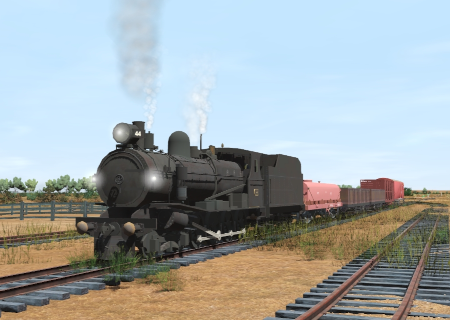
| The weekly Commonwealth Railways freight service from Quorn to Hawker. |  |
The Historical Bit
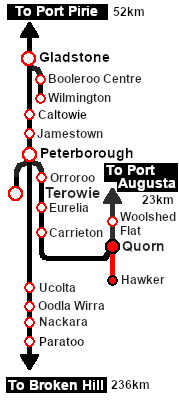
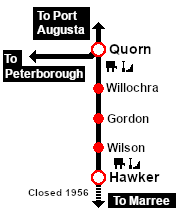
| Up until 1956 the narrow gauge (3ft6in, 1067mm) Central Australia Railway from Port Augusta to Marree and on to Alice Springs ran through the Flinders Ranges via Quorn and Hawker. In 1956 a new standard gauge (4ft8½inch, 1435mm) line from Port Augusta to Marree was opened following a more direct and easier route that avoided the difficult Flinders Ranges. The new line bypassed Quorn, Hawker and most of the original narrow gauge line to Marree. The old line was immediately closed except for the section between Quorn and Hawker. The closure reduced the services on the line from 10 train movements each day down to one movement each week. The Quorn-Hawker section survived because a mine near Hawker needed to send its ore to Quorn but the local dirt roads were unsuited for the task. The Commonwealth Railways (CR), the operator of the Central Australia Railway, ran a weekly freight service between Quorn and Hawker using SAR locos and a mixture of CR and SAR rolling stock. It was the only scheduled service running on the line although a second "when required" freight service was provided in the timetable. SAR T 44, which was based at Quorn, was a regular sight on this run. The few existing photographs of the service usually show a very short consist, only a few wagons, mostly for carrying minerals and general goods. |
When, Where and With What
 |
|
|||||||||||||||||||||||||||||

| DLS Session Based on This Scenario
|
| Similar/Related Scenarios |
|
|
Each location in the layout has a detailed set of track diagrams that provide a variety of useful information The Getting Started guide below gives a summary of what is available.  graphic, or go to the bottom of the page for all the session links (all links will open in this window). |

Getting Started:
|


Tutorial:
|

|
|
||||||||||||||||||||||||||||||||||||||||||||||||||||||||||||||||||||||||||||||||||||||||||||||||||||||||||||||||||||||||||||||||||||||||||||||||||||||||||||||||||||||||||||||||||||||||||||||||||||||||||||||||||||||




Driving Notes:
|



This page was created by Trainz user pware in May 2023 and was last updated as shown below.


