How to Get and Activate an FCT: Difference between revisions
From TrainzOnline
Jump to navigationJump to search
| (12 intermediate revisions by the same user not shown) | |||
| Line 19: | Line 19: | ||
<td width=46> </td> | <td width=46> </td> | ||
<td width=75> </td> | <td width=75> </td> | ||
<td width=75>[[file:NextDown.png|link=#|alt=Next Down|Next Down]]</td> | <td width=75>[[file:NextDown.png|link=#stepWhatIsAnFCT|alt=Next Down|Next Down]]</td> | ||
<td width=75>[[file:BackToBottom.png|link=#bottom|alt=Bottom|Bottom]]</td> | <td width=75>[[file:BackToBottom.png|link=#bottom|alt=Bottom|Bottom]]</td> | ||
</tr> | </tr> | ||
| Line 56: | Line 56: | ||
='''What is a First Class Ticket (FCT)'''= | ='''What is a First Class Ticket (FCT)'''= | ||
</td> | </td> | ||
<td width=50> | <td width=50> </td> <!-- skip Down --> | ||
<td width=50> | <td width=50> </td> <!-- skip Up --> | ||
<td width=46> </td> <!-- for Top and Minor Up/Down --> | <td width=46> </td> <!-- for Top and Minor Up/Down --> | ||
<td width=75> | <td width=75>[[image:NextUp.png|link=#top|alt=Next Up|Next Up]]</td> | ||
<td width=75> | <td width=75>[[image:NextDown.png|link=#stepBuyFCT|alt=Next Down|Next Down]]</td> | ||
<td width=75> </td> | <td width=75> </td> | ||
</tr> | </tr> | ||
| Line 114: | Line 114: | ||
<td>[[image:BlackDot10x10.png|link=]]</td> | <td>[[image:BlackDot10x10.png|link=]]</td> | ||
<td>Your '''ISP''' is blocking the download. One particular '''ISP''' in the '''USA''' has been named in several '''Trainz Forum Posts''' as the cause of this problem.<br> | <td>Your '''ISP''' is blocking the download. One particular '''ISP''' in the '''USA''' has been named in several '''Trainz Forum Posts''' as the cause of this problem.<br> | ||
<span style="font-weight: 700; font-size: 15px;">Solution:</span> unfortunately, you will have to change your '''ISP'''. | <span style="font-weight: 700; font-size: 15px;">Solution:</span> unfortunately, you will have to change your '''ISP''' <span style="font-weight: 700; font-size: 15px;">OR</span>, if you are using a laptop, download the '''DLS''' assets from a free wifi location.</td> | ||
</td> | |||
</tr> | </tr> | ||
</table> | </table> | ||
| Line 141: | Line 140: | ||
<tr valign="top"> | <tr valign="top"> | ||
<td>[[image:DotPoint.JPG|10px|link=]]</td> | <td>[[image:DotPoint.JPG|10px|link=]]</td> | ||
<td>Once purchased an '''FCT''' <span style="font-weight: 700; font-size: 15px;">has to be manually activated before it can be used</span>. You can purchase an '''FCT''' when it is on sale, for example, and leave it inactive until you are ready to use it.</td> | <td>Once purchased an '''FCT''' <span style="font-weight: 700; font-size: 15px;">has to be manually activated before it can be used</span>. You can purchase an '''FCT''' when it is on sale for a reduced rate, for example, and leave it inactive until you are ready to use it.</td> | ||
</tr> | </tr> | ||
<tr valign="top"> | <tr valign="top"> | ||
| Line 168: | Line 167: | ||
<td width=50> </td> <!-- skip Up --> | <td width=50> </td> <!-- skip Up --> | ||
<td width=46> </td> <!-- for Top and Minor Up/Down --> | <td width=46> </td> <!-- for Top and Minor Up/Down --> | ||
<td width=75> | <td width=75>[[image:NextUp.png|link=#stepWhatIsAnFCT|alt=Next Up|Next Up]]</td> | ||
<td width=75> | <td width=75>[[image:NextDown.png|link=#stepActivateFCT|alt=Next Down|Next Down]]</td> | ||
<td width=75> </td> | <td width=75> </td> | ||
</tr> | </tr> | ||
| Line 217: | Line 216: | ||
<tr valign="top"> | <tr valign="top"> | ||
<td>[[image:DotPoint3.JPG|link=]]</td> | <td>[[image:DotPoint3.JPG|link=]]</td> | ||
<td>From the menu at the top of the '''Store''' page select <span style="font-weight: 700; font-size: 15px;"> | <td>From the menu at the top of the '''Store''' page select the <span style="font-weight: 700; font-size: 15px;">BUY FIRST CLASS TICKET</span> link.<br> | ||
[[image:WebStore-BuyFCT.png|link=]]<br> | [[image:WebStore-BuyFCT.png|link=]]<br> | ||
On the | <span style="font-weight: 700; font-size: 15px;">On the BUY FIRST CLASS TICKET page.</span></td> | ||
</tr> | </tr> | ||
<tr valign="top"> | <tr valign="top"> | ||
| Line 268: | Line 267: | ||
<tr valign="top"> | <tr valign="top"> | ||
<td width=25>[[image:DotPoint1.JPG|link=]]</td> | <td width=25>[[image:DotPoint1.JPG|link=]]</td> | ||
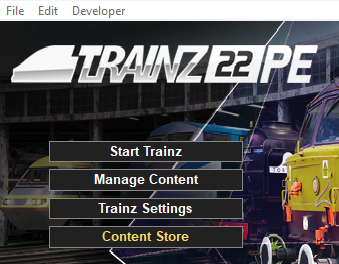
<td>Start your copy of '''Trainz''' which will load to show the '''Launcher Window''' (shown below).< | <td>Start your copy of '''Trainz''' which will load to show the '''Launcher Window''' (shown below). | ||
[[image:TRS22Launcher.png|link=]]</td> | <table> | ||
<tr valign="top"> | |||
<td width=340>[[image:TRS22Launcher.png|link=]]</td> | |||
<td> | |||
<table> | |||
<tr valign="top"> | |||
<td colspan=2> </td> | |||
</tr> | |||
<tr valign="top"> | |||
<td width=25>[[image:DotPoint2.JPG|link=]]</td> | |||
<td><span style="font-weight: 700; font-size: 15px; background-color: lightcyan;"> Left Click </span> on the <span style="font-weight: 700; font-size: 15px;">Trainz Settings</span> option to load the '''Trainz Settings''' dialogue window.</td> | |||
</tr> | |||
<tr valign="top"> | |||
<td colspan=2> </td> | |||
</tr> | </tr> | ||
<tr valign="top"> | <tr valign="top"> | ||
<td>[[image: | <td>[[image:DotPoint3.JPG|link=]]</td> | ||
<td><span style="font-weight: 700; font-size: 15px; background-color: lightcyan;"> Left Click </span> on the <span style="font-weight: 700; font-size: 15px;">MyTrainz Tab</span> (in older versions of '''Trainz''' this was labelled the '''Internet''' tab).<br> | <td>In the '''Trainz Settings''' dialogue window <span style="font-weight: 700; font-size: 15px; background-color: lightcyan;"> Left Click </span> on the <span style="font-weight: 700; font-size: 15px;">MyTrainz Tab</span> (in older versions of '''Trainz''' this was labelled the '''Internet''' tab).<br> | ||
[[image:TrainzSettingsTabs.png|link=]]</td> | [[image:TrainzSettingsTabs.png|link=]]</td> | ||
</tr> | </tr> | ||
<tr valign="top"> | <tr valign="top"> | ||
<td | <td colspan=2> </td> | ||
</tr> | |||
< | |||
<tr valign="top"> | <tr valign="top"> | ||
<td | <td>[[image:DotPoint4.JPG|link=]]</td> | ||
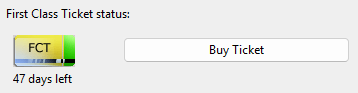
< | <td>In the '''First Class Ticket Status''' section of the <span style="font-weight: 700; font-size: 15px;">MyTrainz Tab</span> <span style="font-weight: 700; font-size: 15px; background-color: lightcyan;"> Left Click </span> on the [[image:MyTrainz-FCTBuy.png|link=]] button.<br> | ||
[[image:MyTrainz-FCT.png|link=]]<br> | |||
This will take you direct to the '''BUY FIRST CLASS TICKET''' page on the '''Forum Web Site'''.</td> | |||
</tr> | |||
</table> | |||
</td> | |||
</tr> | </tr> | ||
</table> | </table> | ||
| Line 289: | Line 305: | ||
<tr valign="top"> | <tr valign="top"> | ||
<td> </td> | <td> </td> | ||
<td><span style="font-weight: 700; font-size: 15px;">On the Trainz Web Site</span></td> | <td><span style="font-weight: 700; font-size: 15px;">On the Trainz Web Site BUY FIRST CLASS TICKET page</span></td> | ||
</tr> | </tr> | ||
<tr valign="top"> | <tr valign="top"> | ||
| Line 296: | Line 312: | ||
<tr valign="top"> | <tr valign="top"> | ||
<td width=250 rowspan=3>[[image:WebStore-Cart.png|link=]]</td> | <td width=250 rowspan=3>[[image:WebStore-Cart.png|link=]]</td> | ||
<td width=25>[[image: | <td width=25>[[image:DotPoint5.JPG|link=]]</td> | ||
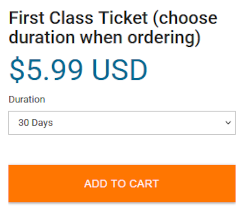
<td><span style="font-weight: 700; font-size: 15px; background-color: lightcyan;"> Left Click </span> on the '''Duration''' drop down box to select the number of days your '''FCT''' will be active.<br> | <td><span style="font-weight: 700; font-size: 15px; background-color: lightcyan;"> Left Click </span> on the '''Duration''' drop down box to select the number of days your '''FCT''' will be active.<br> | ||
The options will be '''7''', '''30''', '''90''', '''180''' and '''365 days'''.</td> | The options will be '''7''', '''30''', '''90''', '''180''' and '''365 days'''.</td> | ||
| Line 306: | Line 322: | ||
<tr valign="top"> | <tr valign="top"> | ||
<!-- <td></td> --> | <!-- <td></td> --> | ||
<td>[[image: | <td>[[image:DotPoint6.JPG|link=]]</td> | ||
<td><span style="font-weight: 700; font-size: 15px; background-color: lightcyan;"> Left Click </span> on the <span style="font-weight: 700; font-size: 15px;">ADD TO CART</span> button and follow the instructions for completing the purchase.</td> | <td><span style="font-weight: 700; font-size: 15px; background-color: lightcyan;"> Left Click </span> on the <span style="font-weight: 700; font-size: 15px;">ADD TO CART</span> button and follow the instructions for completing the purchase.</td> | ||
</tr> | </tr> | ||
| Line 329: | Line 345: | ||
<td width=50> </td> <!-- skip Up --> | <td width=50> </td> <!-- skip Up --> | ||
<td width=46> </td> <!-- for Top and Minor Up/Down --> | <td width=46> </td> <!-- for Top and Minor Up/Down --> | ||
<td width=75> | <td width=75>[[image:NextUp.png|link=#stepWhatIsAnFCT|alt=Next Up|Next Up]]</td> | ||
<td width=75> | <td width=75>[[image:NextDown.png|link=#bottom|alt=Next Down|Next Down]]</td> | ||
<td width=75> </td> | <td width=75> </td> | ||
</tr> | </tr> | ||
| Line 363: | Line 379: | ||
<td width=75>[[image:MyTrainz-FCTDaysLeft.png|link=]]</td> | <td width=75>[[image:MyTrainz-FCTDaysLeft.png|link=]]</td> | ||
<td>The '''FCT Status''' shown in the '''Install Tab''' indicates how many days are left on your current '''FCT'''.<br> | <td>The '''FCT Status''' shown in the '''Install Tab''' indicates how many days are left on your current '''FCT'''.<br> | ||
If you have an '''FCT''' with days | If you have an '''FCT''' with days in credit (e.g. '''47 days left''') then it will be active as soon as you use '''Content Manager''' to download from the '''DLS'''.</td> | ||
</tr> | </tr> | ||
</table> | </table> | ||
| Line 405: | Line 421: | ||
<td width=740>[[image:WebMyTrainz-FCTList.png|link=]]</td> | <td width=740>[[image:WebMyTrainz-FCTList.png|link=]]</td> | ||
<td><br> | <td><br> | ||
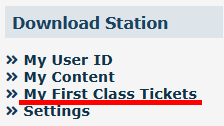
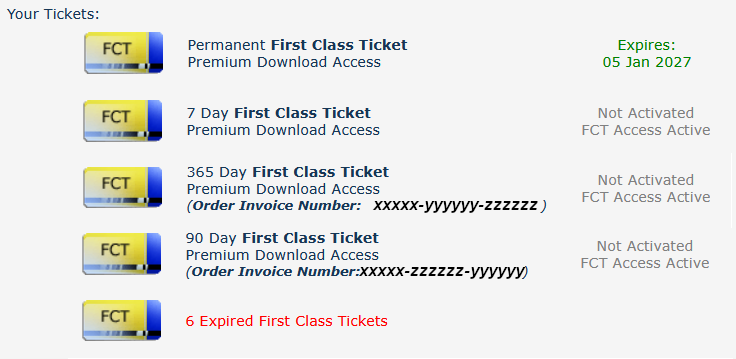
Any ticket with the label '''Permanent''' is part of a '''Trainz Plus Subscription'''. Its expiry date is the same as the expiry date of the subscription.<br> | <span style="background-color: yellow;">Any ticket with the label '''Permanent''' is part of a '''Trainz Plus Subscription'''.</span> Its expiry date is the same as the expiry date of the subscription.<br> | ||
<br> | <br> | ||
Any ticket that can be activated will be shown with its '''Invoice Details'''. | <span style="background-color: yellow;">Any ticket that can be activated will be shown with its '''Invoice Details'''.</span> | ||
</td> | </td> | ||
</tr> | </tr> | ||
| Line 444: | Line 460: | ||
<td width=50> </td> | <td width=50> </td> | ||
<td width=46>[[image:BackToTop.png|link=#top|alt=Top|Top]]</td> | <td width=46>[[image:BackToTop.png|link=#top|alt=Top|Top]]</td> | ||
<td width=75>[[image:NextUp.png|link=#stepActivateFCT|alt=Next Up|Next Up]]</td> | |||
<td width=75> </td> | <td width=75> </td> | ||
<td width=75> </td> | <td width=75> </td> | ||
</tr> | </tr> | ||
| Line 451: | Line 467: | ||
---- | ---- | ||
---- | ---- | ||
='''Trainz Wiki'''= | ='''Trainz Wiki'''= | ||
<table cellpadding=2 bgcolor=#ffffff> | <table cellpadding=2 bgcolor=#ffffff> | ||
Latest revision as of 10:33, 18 August 2026
|
 |
 |
|
|||||||||
What is a First Class Ticket (FCT) |
 |
|
| With an FCT:- | |
| Error creating thumbnail: /bin/bash: line 1: /usr/bin/convert: No such file or directory Error code: 127 | there is no limit to how much or how often you can download from the DLS. |
| Error creating thumbnail: /bin/bash: line 1: /usr/bin/convert: No such file or directory Error code: 127 | you get priority Download Station access. |
| Error creating thumbnail: /bin/bash: line 1: /usr/bin/convert: No such file or directory Error code: 127 | only 1 FCT is needed per account, not 1 per Trainz product. So if you own both TRS19 and TRS22 then the same FCT will be used for both without any penalty. |
| Error creating thumbnail: /bin/bash: line 1: /usr/bin/convert: No such file or directory Error code: 127 | you will get increased download speeds. The exact speed will depend on external factors such as the speed of your internet connection, the paths taken by the data to reach your system, the access speed of the servers used by N3V and any restrictions imposed by your Internet Service Provider. |
| As soon as you access the DLS using Content Manager your FCT status is checked using your Trainz Login. If you have an active FCT then you will be given priority access at the maximum available download speed. |
|


|

How to Purchase an FCT |
|
|
 |
You can purchase an FCT from within the Trainz Program itself or from the Trainz Discussion Forum web site. |
|
You can purchase an FCT for 7, 30, 90, 180 and 365 days. |
|
If you have a Trainz Plus subscription, then an FCT is automatically included in your subscription. |
There are two ways to purchase an FCT From the Forum Web Site |
|
||||||||||||||||||







 From Trainz |
|
||||||||||||||||||||||||||||||



How to Activate an FCT |
|
|
|
Once activated an FCT will run automatically for the full calendar duration of the ticket. |
|
An FCT that is part of a subscription is automatically activated with the subscription. |
|
 |
The FCT Status shown in the Install Tab indicates how many days are left on your current FCT. If you have an FCT with days in credit (e.g. 47 days left) then it will be active as soon as you use Content Manager to download from the DLS. |
|
|||||||||||||||||||||


 |
|
Trainz Wiki
 |
More Tutorials and Guides to Using Trainz |
This page was created by Trainz user pware in August 2026 and was last updated as shown below.


