How to Use Track Markers: Difference between revisions
| Line 165: | Line 165: | ||
</table> | </table> | ||
=='''Navigation | =='''Navigation Points'''== | ||
=='''Coupling Operations'''== | =='''Coupling Operations'''== | ||
Revision as of 13:08, 19 September 2019
The information in this Wiki Page applies to both TANE and TRS19.
What are Track Markers?
| In Summary: | |
 |
Track Markers are red coloured track objects that are invisible in Driver Mode but visible in Surveyor Mode. They are used as destinations or waypoints for AI driver commands |
 |
Track Markers only work on AI controlled trains. They have no effect on manually controlled trains |
|
The direction that a Track Marker faces has NO effect on its operation |
Adding a Track Marker
 |
Notes: A Track Marker has just one property, its Trigger Radius (the red "wings" shown in the image below). The radius value (in metres) is shown below the marker name. This controls how close an AI controlled train has to approach the marker |
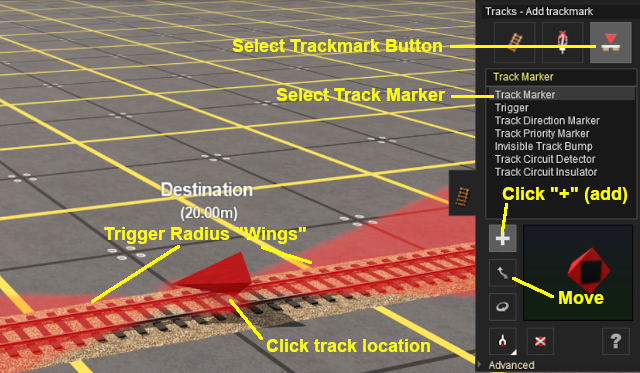 |
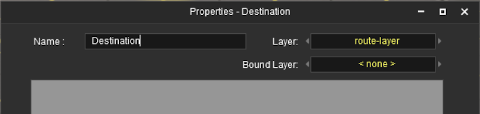
When placed, the properties window for the Track Marker will appear. |
||||||

 |
Enter a useful name for each Track Marker - the name will be needed for driver commands. Most creators base the name on the location (e.g. "Maintown Track 1 North") |
Setting the Trigger Radius
At the bottom of the Track Tools flyout menu is an Advanced button. Click this button to open the Track Marker advanced tool set.
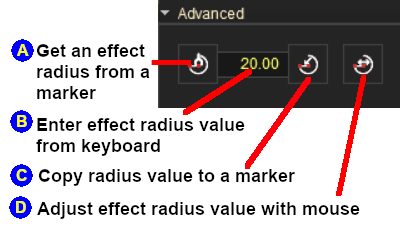 |
|
||||||


Track Marker Operation
The most common use for Track Markers is as destinations for driver commands or as "way points" to direct a train to a destination via one or more intermediate places. They can also be used as the targets for Navigation Points and coupling operations.
Driver Navigation Commands
Information on adding driver commands can be found in the Trainz Wiki at  How to Use the Driver Setup Rule
|
Drive To Trackmark and Drive Via Trackmark commands will NOT force the AI to find a clear path to the Track Marker if the shortest path is blocked |
|
Navigate To Trackmark and Navigate Via Trackmark commands will force the AI to find a clear path to the Track Marker if the shortest path is blocked. The path chosen may not be prototypical |
| Error creating thumbnail: /bin/bash: line 1: /usr/bin/convert: No such file or directory Error code: 127 | Drive To Trackmark Instructs the AI driver to Drive, via the shortest available path, to the designated Track Marker. The AI will noticeably slow the train as it approaches the Track Marker. Switches ahead of the train that are not locked against the AI will be set to allow the train to proceed and reset after the train has cleared the switch. The AI driver will NOT attempt to find a way around blockages when calculating the shortest path to the Track Marker. All signals and speed signs along the route are obeyed. |
| Error creating thumbnail: /bin/bash: line 1: /usr/bin/convert: No such file or directory Error code: 127 | Drive Via Trackmark Instructs the AI driver to Drive, via the shortest available path, to and through the designated Track Marker. If there are no further navigation commands (e.g. Drive To, etc) then the AI will halt the train after passing the Track Marker. If there are further navigation commands then the AI will proceed through the Track Marker to the next Track Marker or Industry at normal speed. Switches ahead of the train that are not locked against the AI will be set to allow the train to proceed and reset after the train has cleared the switch. The AI driver will NOT attempt to find a way around blockages when calculating the shortest path to the Track Marker. All signals and speed signs along the route are obeyed. |
| Error creating thumbnail: /bin/bash: line 1: /usr/bin/convert: No such file or directory Error code: 127 | Navigate To Trackmark Instructs the AI driver to Drive, via the shortest available path, to the designated Track Marker. The AI will noticeably slow the train as it approaches the Track Marker. Switches ahead of the train that are not locked against the AI will be set to allow the train to proceed and reset after the train has cleared the switch. The AI driver will attempt to find a way around blockages when calculating the shortest path to the Track Marker. All signals and speed signs along the route are obeyed. |
| Error creating thumbnail: /bin/bash: line 1: /usr/bin/convert: No such file or directory Error code: 127 | Navigate Via Trackmark Instructs the AI driver to Drive, via the shortest available path, to and through the designated Track Marker. If there are no further navigation commands (e.g. Navigate To, etc) then the AI will halt the train after passing the Track Marker. If there are further navigation commands then the AI will proceed through the Track Marker to the next Track Marker or Industry at normal speed. Switches ahead of the train that are not locked against the AI will be set to allow the train to proceed and reset after the train has cleared the switch. The AI driver will attempt to find a way around blockages when calculating the shortest path to the Track Marker. All signals and speed signs along the route are obeyed. |
Navigation Points
Coupling Operations
Related Links
 |
Trainz Wiki
 |
More Tutorials and Guides to Using Trainz |

