How to Use Session Editor: Difference between revisions
From TrainzOnline
Jump to navigationJump to search
Created page with "The information in this Wiki Page applies to both '''TANE''' and '''TRS19'''. __TOC__ ='''What is the Session Editor'''= <table cellpadding="4" bgcolor=#c1e7e7> <tr valign=..." |
No edit summary |
||
| Line 22: | Line 22: | ||
<br><br> | <br><br> | ||
In '''TANE''' and '''TRS19''' the Session Editor is found in the '''Surveyor Main Menu'''. In '''TRS19 SP1''' it has been moved to the '''Surveyor Edit Menu'''. In either case select '''Edit Session''' from the menu.<br> | In '''TANE''' and '''TRS19''' the Session Editor is found in the '''Surveyor Main Menu'''. In '''TRS19 SP1''' it has been moved to the '''Surveyor Edit Menu'''. In either case select '''Edit Session''' from the menu.<br> | ||
[[file:SessionEditMenuTANE.png|link=]] [[file:SessionEditMenuSP1.png|link=]]<br> | [[file:SessionEditMenuTANE.png|link=]] [[file:SessionEditMenuSP1.png|link=]]<br><br> | ||
When loaded, the '''Session Editor''' will show all the Rules that have been added to the Session. If you have just opened the Editor on a Route without a Session then it will show a very basic set of Rules. The Editor will allow you to add additional Rules, and delete or edit those shown.<br> | |||
[[file:SessionEditRulesSP1.png|link=]]<br><br> | |||
<table cellpadding="4" bgcolor=#c1e7e7> | |||
<tr valign="top"> | |||
<td>[[file:DotPoint.JPG|link=]]</td> | |||
<td>'''The order of the Rules in the Editor list is generally not important. All the rules shown will be executed ''simultaneously'' although some rules will take longer to complete than others</td> | |||
</tr> | |||
</table> | |||
<br> | |||
---- | ---- | ||
---- | ---- | ||
Revision as of 06:24, 27 October 2019
The information in this Wiki Page applies to both TANE and TRS19.
What is the Session Editor
 |
The Session Editor allows you to add and edit Rules in a Session that control the operation of the Session |
The Rules added and edited by the Session Editor control:-
- behaviour of drivers (and their trains)
- weather conditions
- time of day
- signals and switches
- display of information and instructions to the player
- train timetables
- decisions on what has to happen next
to name just a few.
In TANE and TRS19 the Session Editor is found in the Surveyor Main Menu. In TRS19 SP1 it has been moved to the Surveyor Edit Menu. In either case select Edit Session from the menu.
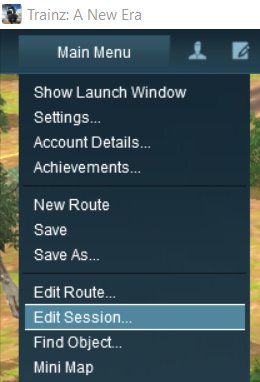
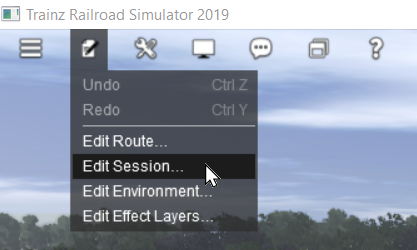
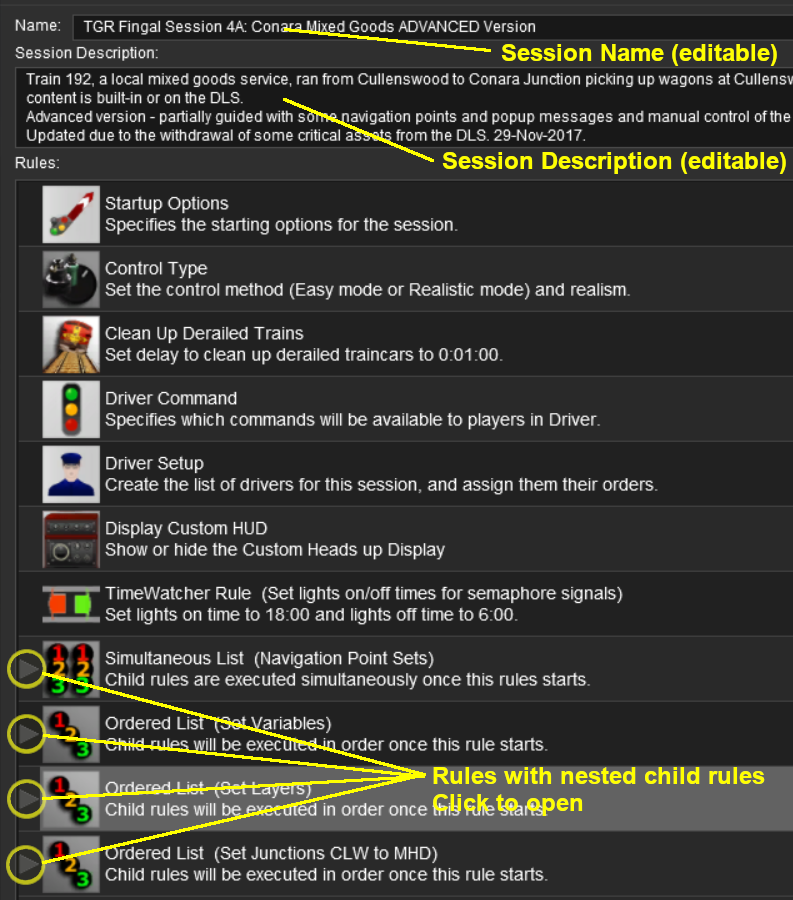
When loaded, the Session Editor will show all the Rules that have been added to the Session. If you have just opened the Editor on a Route without a Session then it will show a very basic set of Rules. The Editor will allow you to add additional Rules, and delete or edit those shown.
|
The order of the Rules in the Editor list is generally not important. All the rules shown will be executed simultaneously although some rules will take longer to complete than others |
Trainz Wiki
 |
More Tutorials and Guides to Using Trainz |
