How to Backup a Picklist: Difference between revisions
From TrainzOnline
Jump to navigationJump to search
m →How to Restore a Picklist: added instruction for picklist assets being missing from installation |
mNo edit summary |
||
| Line 21: | Line 21: | ||
</table> | </table> | ||
<br> | <br> | ||
<table | __TOC__ | ||
<table> <!-- BEGIN Nav Buttons Table --> | |||
<tr valign="top"> | <tr valign="top"> | ||
<td>[[file: | <td width=729><span id="stepCurrent"></span> </td> | ||
<td> | <td width=46>[[file:BackToTop.png|link=#top|alt=Top|Top]]</td> | ||
<td width=75> </td> | |||
<td width=75>[[file:NextDown.png|link=#stepTransfer|alt=Next Down|Next Down]]</td> | |||
</td> | <td width=75>[[file:BackToBottom.png|link=#bottom|alt=Bottom|Bottom]]</td> | ||
</tr> | </tr> | ||
</table> | </table> <!-- END Nav Buttons Table --> | ||
< | |||
<table cellpadding="4" bgcolor=#c1e7e7> | <table cellpadding="4" bgcolor=#c1e7e7> | ||
<tr valign="top"> | <tr valign="top"> | ||
| Line 153: | Line 150: | ||
</td> | </td> | ||
</tr> | </tr> | ||
< | <table> <!-- BEGIN Nav Buttons Table --> | ||
<tr valign="top"> | <tr valign="top"> | ||
<td | <td width=729><span id="stepTransfer"></span> </td> | ||
<td width=46>[[file:BackToTop.png|link=#top|alt=Top|Top]]</td> | |||
<td width=75>[[file:NextUp.png|link=#stepCurrent|alt=Next Up|Next Up]]</td> | |||
<td width=75>[[file:NextDown.png|link=#stepRestore|alt=Next Down|Next Down]]</td> | |||
<td width=75>[[file:BackToBottom.png|link=#bottom|alt=Bottom|Bottom]]</td> | |||
</tr> | </tr> | ||
</table> <!-- END Nav Buttons Table --> | |||
</table> <!-- END Back-To-Top Table --> | </table> <!-- END Back-To-Top Table --> | ||
| Line 201: | Line 202: | ||
</tr> | </tr> | ||
</table> <!-- END Steps Table --> | </table> <!-- END Steps Table --> | ||
<table | <table> <!-- BEGIN Nav Buttons Table --> | ||
<tr valign="top"> | <tr valign="top"> | ||
<td | <td width=729><span id="stepRestore"></span> </td> | ||
<td width=46>[[file:BackToTop.png|link=#top|alt=Top|Top]]</td> | |||
<td width=75>[[file:NextUp.png|link=#stepTransfer|alt=Next Up|Next Up]]</td> | |||
<td width=75> </td> | |||
<td width=75>[[file:BackToBottom.png|link=#bottom|alt=Bottom|Bottom]]</td> | |||
</tr> | </tr> | ||
</table> | </table> <!-- END Nav Buttons Table --> | ||
='''How to Restore a Picklist'''= | ='''How to Restore a Picklist'''= | ||
| Line 299: | Line 303: | ||
</tr> | </tr> | ||
</table> <!-- END Steps Table --> | </table> <!-- END Steps Table --> | ||
<table | <table> <!-- BEGIN Nav Buttons Table --> | ||
<tr valign="top"> | <tr valign="top"> | ||
<td | <td width=729><span id="bottom"></span> </td> | ||
<td width=46>[[file:BackToTop.png|link=#top|alt=Top|Top]]</td> | |||
<td width=75>[[file:NextUp.png|link=#stepRestore|alt=Next Up|Next Up]]</td> | |||
<td width=75> </td> | |||
<td width=75> </td> | |||
</tr> | </tr> | ||
</table> | </table> <!-- END Nav Buttons Table --> | ||
---- | ---- | ||
---- | ---- | ||
='''Trainz Wiki'''= | ='''Trainz Wiki'''= | ||
<table cellpadding="4" bgcolor=#ffffff> | <table cellpadding="4" bgcolor=#ffffff> | ||
Revision as of 11:54, 21 August 2021
The information in this Wiki Page applies to TANE, TRS19 and Trainz Plus. This guide will show you how to backup a Picklist.
 |
This page is also available in text only format suitable for copying and pasting at How to Backup a Picklist TEXT |
 |
|
 |
 |
 |
| Main Points: | |
 |
Picklists cannot be saved as .CDP files so they cannot be backed up using that method |
|
Picklists can be saved as text files |
|
Picklists can be imported from text files |
Access Your Current Picklists
 Steps |
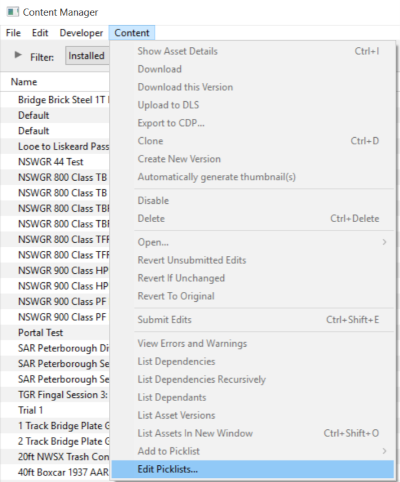
 Open CM and Your Picklists
|
|||
|
|
||||
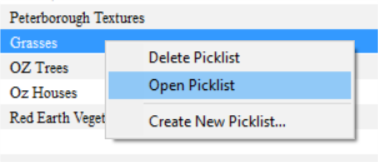
 Select the Picklist to be Backed Up:
|
||||
|
|
||||
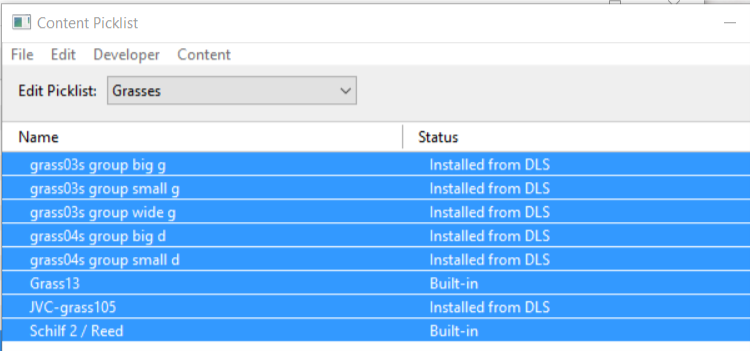
 Select Picklist Contents:
|
||||
|
|
||||
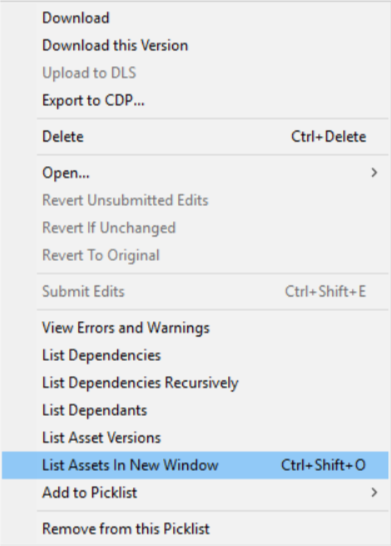
 Transfer List to a New Window:
|
||||
|
|
||||
 Copy Assets in Picklist:
|
||||

|
 |
|
|
Transfer the List to Notepad (or Any Text Editor)
Steps |
Open Notepad or Any Other Suitable Text Editor:
|
|||
Save the Picklist as a Text (.txt) File:
|
||||
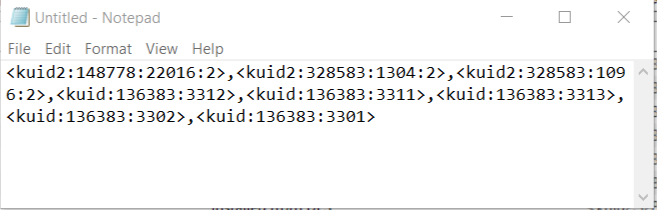
|
|
|
How to Restore a Picklist
|
Restoring a Picklist basically involves reversing the above steps |
|
|
||||
Steps |
Open Notepad or Other Text Editor:
|
|||
Open CM in the Destination Trainz and Create a New Filter:
|
||||
Create a New Picklist:
|
||||
Enter a Name for the Picklist:
|
||||

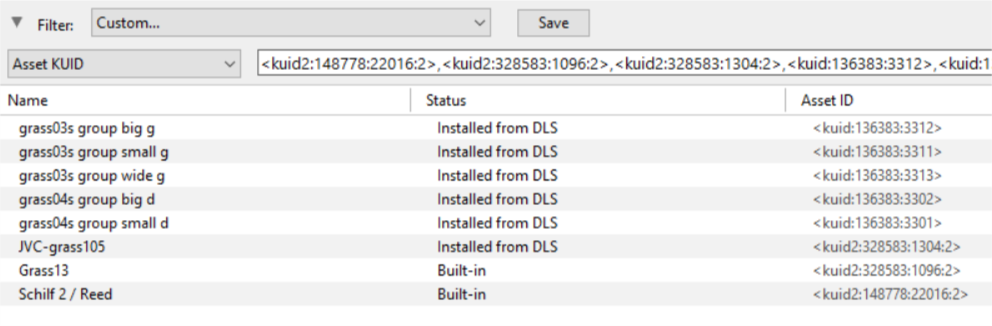
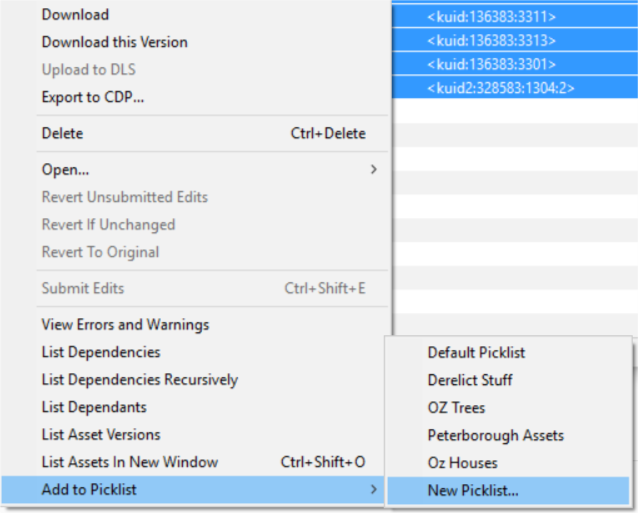
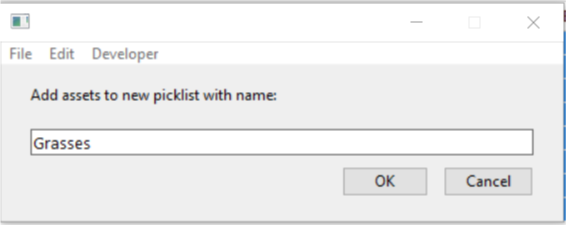
|
|
Trainz Wiki
 |
More Tutorials and Guides to Using Trainz |
This page was created by Trainz user pware in January 2019 and was last updated as shown below.
