SAR Yongala Industry: Difference between revisions

From TrainzOnline
Jump to navigationJump to search
Pware (talk | contribs)
added note about MIN bug
Pware (talk | contribs)
removed note about MIN as problem has now been solved
Line 54: Line 54:
<tr valign="middle">
<td colspan=2 align="center"><span style="font-weight: 700;">For all other Industries use the "Drive To <span style="color: blue;">name of industry</span>" and <span style="color: blue;">"Load/Unload"</span> commands</span></td>
</tr>
<tr valign="top">
<td colspan=2 align="center">[[Image:line740.png|link=]]</td>
</tr>
<tr valign="top">
<td colspan=2>
<table cellpadding="4" bgcolor=#ff0000>
<tr valign="top">
<td>
<table cellpadding="4" bgcolor=#ffffff>
<tr valign="top">
<td>[[file:Bug.png|link=]]</td>
<td><span style="font-size: 17px; font-weight: 700;">Known Issues</span><br>
Some industry assets, specifically '''Multiple Industry New''' and a few others, are known to have problems loading and unloading products from railcars. This is likely to affect the [[image:Goods_Label.png|link=]], [[image:Crane_Label.png|link=]], [[image:Gantry_Label.png|link=]] and [[image:Transfer_Label.png|link=]] industries in this session. For this reason the <span style="font-weight: 700; background-color: blue; color: white;">&nbsp;Instant Load Command&nbsp;</span> and <span style="font-weight: 700; background-color: blue; color: white;">&nbsp;InstantUnload&nbsp;</span> driver commands have been added to the Session Driver Command List to provide the option for manual loading and unloading of consists. This problem does not affect the loading and unloading of [[image:Stockyard_Label.png|link=]] ('''cattle''', '''sheep'''), [[image:Loco_Label.png|link=]] products ('''coal''', '''water''', '''bunker c oil''') and [[image:Station_Label.png|link=]] products ('''Passengers'''). The <span style="font-weight: 700; background-color: blue; color: white;">&nbsp;InstantLoadLoco&nbsp;</span> driver command has been added to provide instant "emergency loco top-ups", if needed.</td>
</tr>
</table></td>
</tr>
</table></td>
</tr>
</tr>
<tr valign="top">
<tr valign="top">
Line 88: Line 69:
<td width=70>&nbsp;</td>
<td>[[image:Crane_Label.png|link=]]&nbsp;<span style="font-weight: 700; color: blue;">Yongala Goods Crane</span>
* <span style="font-weight: 700;">Flat Stock - <span style="color: blue;">Unload</span></span>
* <span style="font-weight: 700;">Farm Equipment - <span style="color: blue;">Unload</span></span>
* <span style="font-weight: 700;">I-Beams - <span style="color: blue;">Unload</span></span>
* <span style="font-weight: 700;">John Deere Tractor Product - <span style="color: blue;">Unload</span></span>
* <span style="font-weight: 700;">Lumber - <span style="color: blue;">Unload</span></span>
* <span style="font-weight: 700;">Steel Pipe - <span style="color: blue;">Unload</span></span>
* <span style="font-weight: 700;">Tractor Farmall - <span style="color: blue;">Unload</span></span>
* <span style="font-weight: 700;">Tractor Massey Ferguson - <span style="color: blue;">Unload</span></span></td>
</tr>
</tr>
<tr valign="top">
<tr valign="top">

Revision as of 01:15, 9 February 2021

    
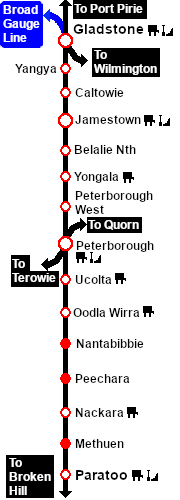
PortPirie-BrokenHill
Belalie North
Location Index
Peterborough
PortPirie-BrokenHill

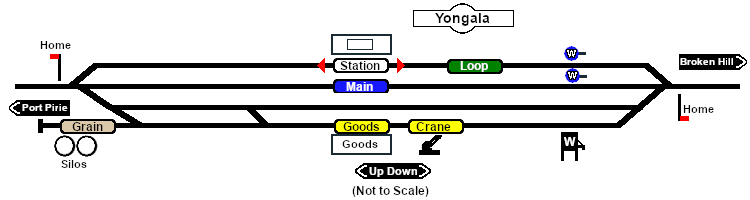
Yongala Industry map

 Industries 
For the Station use the "Drive To Trackmark name of Trackmark" command
   Error creating thumbnail: /bin/bash: line 1: /usr/bin/convert: No such file or directory Error code: 127 Yongala Station Up     Error creating thumbnail: /bin/bash: line 1: /usr/bin/convert: No such file or directory Error code: 127 Yongala Station Dn
For all other Industries use the "Drive To name of industry" and "Load/Unload" commands
 Yongala Goods Shed
  • General Goods - Unload
  • Fertiliser Bagged - Unload
  • Wool Bale - Load
   Yongala Goods Crane
  • Farm Equipment - Unload
  • I-Beams - Unload
  • John Deere Tractor Product - Unload
  • Lumber - Unload
 Yongala Grain
  • Grain - Load
  Yongala Water Column Loop
  • Water - Load
    Yongala Water Column Main
  • Water - Load

PortPirie-BrokenHill

Gladstone-Paratoo Strip Map