SAR Scenario Quorn-Peterborough Empty Fuel: Difference between revisions
From TrainzOnline
Jump to navigationJump to search
Created page with " <span id="QGO"></span><span style="font-size: 19px; font-weight: 700; background-color: black; color: white;"> Quorn to Peterborough Empty Fuel Freight </span><br> ..." |
mNo edit summary |
||
| Line 13: | Line 13: | ||
</tr> | </tr> | ||
</table> | </table> | ||
<table bgcolor="lightcyan"> | <table bgcolor="lightcyan"> | ||
<tr valign="top"> | <tr valign="top"> | ||
| Line 30: | Line 29: | ||
</tr> | </tr> | ||
<tr valign="top"> | <tr valign="top"> | ||
<td colspan=2>Click [[image:Line_Index_Label.png|link=SAR_Index]] or the graphic above to access the location data.</td> | <td colspan=2>Click [[image:Line_Index_Label.png|link=SAR_Index]] or the graphic above to access the location data (link will open in this window).</td> | ||
</tr> | |||
<tr valign="top"> | |||
<td colspan=2> | |||
'''Other Links:''' (these will open in this window)<br> | |||
'''[[image:Kurandamini.png|link=|alt=Rolling Stock|100px]] [[SAR Peterborough Base Session#Locos|Locomotives and Rolling Stock]]''' - commodities carried<br> | |||
'''[[image:SAR Industries.png|link=|alt=Industries|100px]] [[SAR Peterborough Base Session#Industries|Active Industries]]''' - commodities produced and consumed | |||
</td> | |||
</tr> | </tr> | ||
</table> | </table> | ||
| Line 64: | Line 70: | ||
<td> | <td> | ||
*The approaches to all locations are protected by invisible signals to prevent the '''AI Half Speed Slowdown Problem''' when approaching a signal at stop. | *The approaches to all locations are protected by invisible signals to prevent the '''AI Half Speed Slowdown Problem''' when approaching a signal at stop. | ||
*'''Enhanced Interlocking Towers''' with set paths are available for your optional use at '''Quorn''' (departure), '''Carrieton''' (arrival and departure), '''Orroroo''' (arrival and departure), '''Peterborough''' (arrival and departure), '''Jamestown''' (arrival and departure) and '''Gladstone''' (arrival). Details of all available '''EIT Paths''' are provided in the [[image:Tab_PH_Grey.png|link=|75px]] tab at each location with '''EITs'''. Click [[image:Line_Index_Label.png|link=SAR_Index]] | *'''Enhanced Interlocking Towers''' with set paths are available for your optional use at '''Quorn''' (departure), '''Carrieton''' (arrival and departure), '''Orroroo''' (arrival and departure), '''Peterborough''' (arrival and departure), '''Jamestown''' (arrival and departure) and '''Gladstone''' (arrival). Details of all available '''EIT Paths''' are provided in the [[image:Tab_PH_Grey.png|link=|75px]] tab at each location with '''EITs'''. Click [[image:Line_Index_Label.png|link=SAR_Index]] for details. | ||
*Trackmarks and industries have been provided for AI '''Drive To Trackmark''', '''Drive via Trackmark''' and '''Drive to <span style="background-color: yellow;"> Industry </span>''' commands. Details of all available '''Trackmarks''' and '''Industries''' are provided in the [[image:Tab_TM_Grey.png|link=|75px]] and [[image:Tab_IN_Grey.png|link=|75px]] tabs at each location. Click [[image:Line_Index_Label.png|link=SAR_Index]] | *Trackmarks and industries have been provided for AI '''Drive To Trackmark''', '''Drive via Trackmark''' and '''Drive to <span style="background-color: yellow;"> Industry </span>''' commands. Details of all available '''Trackmarks''' and '''Industries''' are provided in the [[image:Tab_TM_Grey.png|link=|75px]] and [[image:Tab_IN_Grey.png|link=|75px]] tabs at each location. Click [[image:Line_Index_Label.png|link=SAR_Index]] for details. | ||
*Manual (no AI) driving is possible. For those locations without home or approach semaphore signals, a '''Caution''' warning sign has been placed at the location of the '''Main Approach Dn''' and '''Main Approach Up''' trackmarks. Details on all switches and suggested switch paths are provided in the [[image:Tab_SW_Grey.png|link=|75px]] tab at each location. Click [[image:Line_Index_Label.png|link=SAR_Index]] | *Manual (no AI) driving is possible. For those locations without home or approach semaphore signals, a '''Caution''' warning sign has been placed at the location of the '''Main Approach Dn''' and '''Main Approach Up''' trackmarks. Details on all switches and suggested switch paths are provided in the [[image:Tab_SW_Grey.png|link=|75px]] tab at each location. Click [[image:Line_Index_Label.png|link=SAR_Index]] for details. | ||
</td> | </td> | ||
</tr> | </tr> | ||
Revision as of 05:09, 17 February 2021
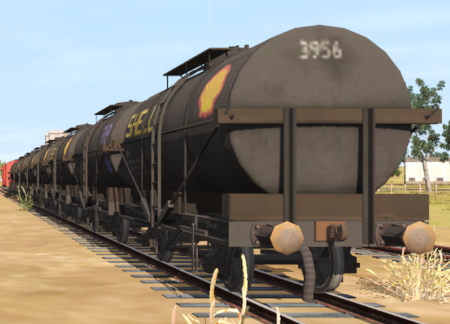
Quorn to Peterborough Empty Fuel Freight
Through freight from Quorn to Peterborough moving empty fuel cars from Quorn and Port Augusta to Peterborough where they will be attached to a freight for return to Port Pirie.
 |
|
|||||||||


| Duration: | x hours |
| Loco: | SAR T 51 at Quorn Depot Other Unrostered Locos:
|
| Consist: | 8 Tank wagons (from Port Augusta) located at Quorn Goods Sidings with 1 DB Guard Van attached, 4 Tank wagons located at Quorn Fuel Depot. |
| Task: |
|
| Driving Notes: |
|
 |
|


