SAR Scenario Peterborough Shunter: Difference between revisions
From TrainzOnline
Jump to navigationJump to search
mNo edit summary |
No edit summary |
||
| Line 50: | Line 50: | ||
<table cellpadding="2" bgcolor="black"> <!-- black border --> | <table cellpadding="2" bgcolor="black"> <!-- black border --> | ||
<tr valign="top"> | <tr valign="top"> | ||
<td> | <td><span style="font-size: 15px; font-weight: 700; color: white">Getting Started:</span><br> | ||
<table bgcolor="lightyellow"> | <table bgcolor="lightyellow"> | ||
<tr valign="top"> | <tr valign="top"> | ||
<td> | <td> | ||
# The first step is to pause the session by pressing the '''P''' key. | # The first step is to pause the session by pressing the '''P''' key. | ||
# Next locate your loco. '''Either''':- | # Next locate your loco. '''Either''':- | ||
| Line 70: | Line 69: | ||
</td> | </td> | ||
</tr> | </tr> | ||
</table> | |||
<table bgcolor="LightYellow"> | |||
<tr valign="top"> | <tr valign="top"> | ||
<td | <td width=920><span style="font-size: 15px; font-weight: 700;">Yard Map:</span></td> | ||
</tr> | </tr> | ||
<tr valign="top"> | <tr valign="top"> | ||
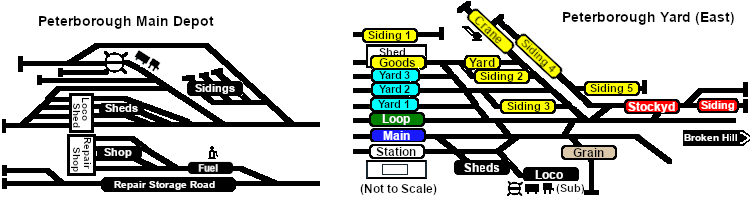
<td | <td>[[image:SAR_Peterborough_Yards.png|link=|alt=Yard map]]</td> | ||
</tr> | </tr> | ||
<tr valign="top"> | <tr valign="top"> | ||
<td | <td><span style="font-size: 15px; font-weight: 700;">Tasks:</span> | ||
# Move the loco out of the depot and navigate through to the other side of Peterborough Yard onto the '''Stockyard''' road. | # Move the loco out of the depot and navigate through to the other side of Peterborough Yard onto the '''Stockyard''' road. | ||
# Reverse onto '''Goods Siding 4''' and attach to the rake of empty '''MTW''' flat wagons stored there. | # Reverse onto '''Goods Siding 4''' and attach to the rake of empty '''MTW''' flat wagons stored there. | ||
| Line 88: | Line 89: | ||
# Move the loco to the back of the workshop area at the end of the '''Depot Repair Storage Road'''. | # Move the loco to the back of the workshop area at the end of the '''Depot Repair Storage Road'''. | ||
# Attach to loco '''SAR T 229''' (not in steam) and move it into the repair shop on '''Depot Repair Shop Road 2''' or '''Depot Repair Shop Road 3'''. Detatch. | # Attach to loco '''SAR T 229''' (not in steam) and move it into the repair shop on '''Depot Repair Shop Road 2''' or '''Depot Repair Shop Road 3'''. Detatch. | ||
# Return the loco to its starting position on '''Peterborough Depot Shed Road 1'''. | # Return the loco to its starting position on '''Peterborough Depot Shed Road 1'''.</td> | ||
</td> | <td width=180 rowspan=3>[[image:SAR Scenario Peterborough Strip Map.png|link=|alt=Strip Map]]</td> | ||
</tr> | </tr> | ||
<tr valign="top"> | <tr valign="top"> | ||
<td | <td><span style="font-size: 15px; font-weight: 700;">Driving Notes:</span> | ||
*You have permission to pass semaphore signals at stop provided you are satisfied that the road ahead is clear. | *You have permission to pass semaphore signals at stop provided you are satisfied that the road ahead is clear. | ||
</td> | </td> | ||
Revision as of 10:44, 25 February 2021
| Peterborough Shunter | |
| Shunting operations that cover the length of Peterborough Yard and Peterborough Depot. | 
|
 |
|
||||||


| Duration: | 1 hour | ||
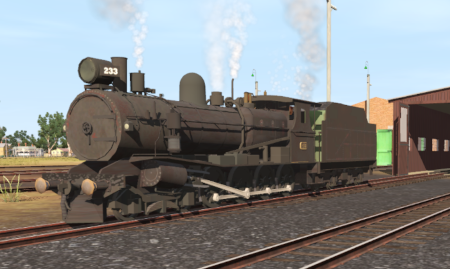
| Loco: | SAR T 233 on Peterborough Depot Shed Road 1 Other Unrostered Locos:
| ||
|
|||
| Yard Map: | |
 |
|
Tasks:
|
 |
Driving Notes:
|


This page was created by Trainz user pware in February 2021 and was last updated as shown below.


