SAR Paratoo Industry: Difference between revisions

From TrainzOnline
Jump to navigationJump to search
Pware (talk | contribs)
mNo edit summary
Pware (talk | contribs)
m removed all IT references as I simply cannot get the ITs to work consistently
Line 8: Line 8:
</tr>
</tr>
<tr valign="top">
<tr valign="top">
<td align="center">[[image:Tab_HM_Grey.png|link=SAR_Paratoo]]&nbsp;[[image:Tab_IN_White.png|link=]]&nbsp;[[image:Tab_TM_Grey.png|link=SAR_Paratoo_TrackMarks]]&nbsp;[[image:Tab_PH_Grey.png|link=SAR Paratoo Paths]]&nbsp;[[image:Tab_SW_Grey.png|link=SAR_Paratoo_Switches]]</td>
<td align="center">[[image:Tab_HM_Grey.png|link=SAR_Paratoo]]&nbsp;[[image:Tab_IN_White.png|link=]]&nbsp;[[image:Tab_TM_Grey.png|link=SAR_Paratoo_TrackMarks]]&nbsp;[[image:Tab_Blank_Grey.png|link=]]&nbsp;[[image:Tab_SW_Grey.png|link=SAR_Paratoo_Switches]]</td>
</tr>
</tr>
<tr valign="top">
<tr valign="top">

Revision as of 00:13, 5 April 2021

    
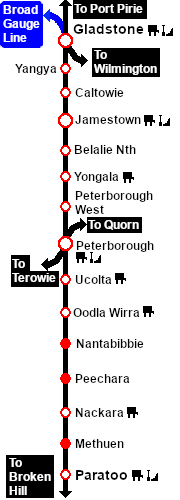
PortPirie-BrokenHill
Methuen
Location Index
Scenarios
  PortPirie-BrokenHill

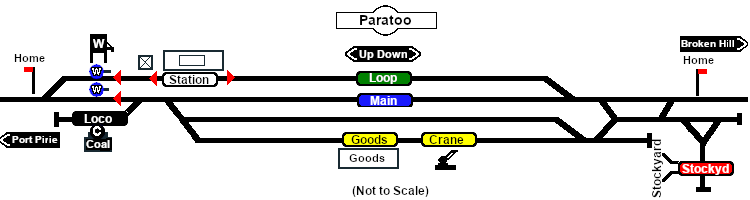
Paratoo Industry map

 Industries 
For the Station use the "Drive To Trackmark name of Trackmark" command
   Error creating thumbnail: /bin/bash: line 1: /usr/bin/convert: No such file or directory Error code: 127 Paratoo Station Up     Error creating thumbnail: /bin/bash: line 1: /usr/bin/convert: No such file or directory Error code: 127 Paratoo Station Dn
                  This station is NOT passenger enabled
For all other Industries use the "Drive To name of industry" and "Load/Unload" commands
 Paratoo Goods Shed
  • General Goods - Unload
  • Fertiliser Bagged - Unload
  • Wool Bale - Load
   Paratoo Goods Crane
  • Farm Equipment - Unload
  • I-Beams - Unload
  • John Deere Tractor Product - Unload
  • Lumber - Unload
 Paratoo Stockyard
  • Cattle - Load/Unload
  • Sheep - Load/Unload
  Paratoo Water Column Main Up
  • Water - Load
    Paratoo Water Column Loop Up
  • Water - Load
 Paratoo Coal Stage
  • Coal - Load/Unload

PortPirie-BrokenHill

Gladstone-Paratoo Strip Map