SAR Scenario Depot Fuel Run: Difference between revisions
From TrainzOnline
Jump to navigationJump to search
mNo edit summary |
mNo edit summary |
||
| Line 60: | Line 60: | ||
## Open the '''Finder Tool''' (press '''CTRL-F''') and type, in the '''name''' field, the name of the loco. For example '''SAR T 258''' (or just '''T 258''' should be enough). Click the '''tick''' icon, '''OR''' | ## Open the '''Finder Tool''' (press '''CTRL-F''') and type, in the '''name''' field, the name of the loco. For example '''SAR T 258''' (or just '''T 258''' should be enough). Click the '''tick''' icon, '''OR''' | ||
## Open the '''Driver List''' (bottom left of the screen) and select the loco from there - click the drivers '''Eye''' icon to jump to the loco. | ## Open the '''Driver List''' (bottom left of the screen) and select the loco from there - click the drivers '''Eye''' icon to jump to the loco. | ||
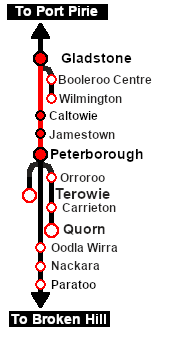
# Take a few moments to get your bearings. Use the [[image:Line_Index_Label.png|link=SAR_Index|Location Index]] (this link will open in this window) and click on ''' | # Take a few moments to get your bearings. Use the [[image:Line_Index_Label.png|link=SAR_Index|Location Index]] (this link will open in this window) and click on '''Gladstone''' to load its location details and track plans. In each location details page:- | ||
##the [[image:Tab_PH_Grey.png|link=|75px]] tab will identify the '''EIT Paths''' that are available if you wish to use them. | ##the [[image:Tab_PH_Grey.png|link=|75px]] tab will identify the '''EIT Paths''' that are available if you wish to use them. | ||
##the [[image:Tab_TM_Grey.png|link=|75px]] tab will reveal the invisible [[image:Trackmark_Right.png|link=|alt=TM|8px]] '''Track Marks''' for '''Drive To''' commands. | ##the [[image:Tab_TM_Grey.png|link=|75px]] tab will reveal the invisible [[image:Trackmark_Right.png|link=|alt=TM|8px]] '''Track Marks''' for '''Drive To''' commands. | ||
Revision as of 23:02, 27 February 2021
| Gladstone to Peterborough Depot Fuel Run | |
| A scenario in the SAR Peterborough Base Session | |
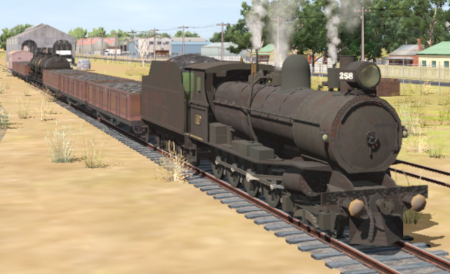
| Loco coal stages and fuel-oil points need to be refilled regularly. This service delivers coal to the loco coal stages at Jamestown and Peterborough, and bunker c oil (for the SAR 400 class Garrett locos) to the loco (main) depot at Peterborough. |  |
 |
|
||||||||||


Getting Started:
|
Tasks:
|
 |
|
|


This page was created by Trainz user pware in February 2021 and was last updated as shown below.


