SAR Scenario Paratoo Mixed Passenger Freight: Difference between revisions
From TrainzOnline
Jump to navigationJump to search
mNo edit summary |
mNo edit summary |
||
| Line 27: | Line 27: | ||
<tr valign="top"> | <tr valign="top"> | ||
<td><span style="font-size: 15px; font-weight: 700; color: white; background-color: black;"> Loco: </span></td> | <td><span style="font-size: 15px; font-weight: 700; color: white; background-color: black;"> Loco: </span></td> | ||
<td>'''SAR T 202''' on | <td>'''SAR T 202''' on <span style="font-weight: 700;">Peterborough Depot <span style="color: white; background-color: black;"> Car Siding </span></span> | ||
'''Other Unrostered Locos:''' | '''Other Unrostered Locos:''' | ||
*'''SAR T 233''' on <span style="font-weight: 700;">Peterborough Depot <span style="color: white; background-color: black;"> Loco Road 1 </span></span> | |||
*'''SAR T 233''' on | *'''SAR 407''' on <span style="font-weight: 700;">Peterborough Depot <span style="color: white; background-color: black;"> Repair Shop Road 4 </span></span></td> | ||
*'''SAR 407''' on | |||
</tr> | </tr> | ||
<tr valign="top"> | <tr valign="top"> | ||
| Line 100: | Line 99: | ||
<td> | <td> | ||
<span style="font-size: 15px; font-weight: 700; color: white; background-color: black;"> Tasks: </span><br> | <span style="font-size: 15px; font-weight: 700; color: white; background-color: black;"> Tasks: </span><br> | ||
# Reverse the train out of the siding and onto the station line. Pull the train forward into <span style="font-weight: 700;">Peterborough <span style="color: black; background-color: white;"> Station </span></span> stopping with the passenger car alongside the station building | # Reverse the train out of the siding and onto the station line. Pull the train forward into <span style="font-weight: 700;">Peterborough <span style="color: black; background-color: white;"> Station </span></span> stopping with the passenger car alongside the station building. | ||
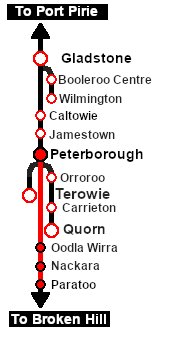
# Depart '''Peterborough''' at 08:06 and proceed to '''Paratoo''' stopping at '''Ucolta''', '''Oodla Wirra''' and '''Nackara'''. At each stop place the passenger car alongside the station building. | # Depart '''Peterborough''' at 08:06 and proceed to '''Paratoo''' stopping at '''Ucolta''', '''Oodla Wirra''' and '''Nackara'''. At each stop place the passenger car alongside the station building. | ||
# Detach and shunt wagons at each location as required. '''QLX''' wagons to the <span style="font-weight: 700;"><span style="color: black; background-color: yellow;"> Goods Sheds </span></span>, '''MTW''' flat wagons to the <span style="font-weight: 700;"><span style="color: black; background-color: yellow;"> Goods Cranes </span></span>. Leave each wagon at its unloading point. | # Detach and shunt wagons at each location as required. '''QLX''' wagons to the <span style="font-weight: 700;"><span style="color: black; background-color: yellow;"> Goods Sheds </span></span>, '''MTW''' flat wagons to the <span style="font-weight: 700;"><span style="color: black; background-color: yellow;"> Goods Cranes </span></span>. Leave each wagon at its unloading point. | ||
| Line 117: | Line 116: | ||
*The approaches to all locations are protected by invisible signals to prevent the '''AI Half Speed Slowdown Problem''' when approaching a signal at stop. | *The approaches to all locations are protected by invisible signals to prevent the '''AI Half Speed Slowdown Problem''' when approaching a signal at stop. | ||
*Trackmarks and industries have been provided for AI '''Drive To Trackmark''', '''Drive via Trackmark''' and '''Drive to <span style="background-color: yellow;"> Industry </span>''' commands. Click [[image:Line_Index_Label.png|link=SAR_Index|Location Index]] for details. | *Trackmarks and industries have been provided for AI '''Drive To Trackmark''', '''Drive via Trackmark''' and '''Drive to <span style="background-color: yellow;"> Industry </span>''' commands. Click [[image:Line_Index_Label.png|link=SAR_Index|Location Index]] for details. | ||
*An industry active station (where you can use the '''Drive To''' industry command) is at '''Peterborough'''. Industry active stations will have a longer than expected wait time. | |||
*Manual (no AI) driving is possible. As a visual driving aid, a '''Caution''' warning sign has been placed at the location of the '''Main Approach Dn''' and '''Main Approach Up''' trackmarks. Click [[image:Line_Index_Label.png|link=SAR_Index|Location Index]] for details. | *Manual (no AI) driving is possible. As a visual driving aid, a '''Caution''' warning sign has been placed at the location of the '''Main Approach Dn''' and '''Main Approach Up''' trackmarks. Click [[image:Line_Index_Label.png|link=SAR_Index|Location Index]] for details. | ||
</td> | </td> | ||
Revision as of 22:42, 16 April 2021
| Error creating thumbnail: /bin/bash: line 1: /usr/bin/convert: No such file or directory Error code: 127 | 9 Peterborough to Paratoo Mixed Passenger Freight | Error creating thumbnail: /bin/bash: line 1: /usr/bin/convert: No such file or directory Error code: 127 |
| A scenario in the SAR Peterborough Base Session | ||
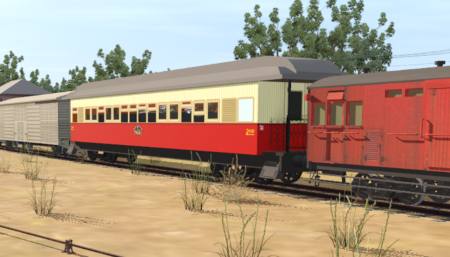
| Mixed passenger and freight run from Peterborough to Paratoo. |  |
 |
|
||||||||||


Getting Started:
|
Tutorial:
|

|
|



This page was created by Trainz user pware in February 2021 and was last updated as shown below.


