SAR Scenario Wilmington Freight: Difference between revisions
From TrainzOnline
Jump to navigationJump to search
mNo edit summary |
mNo edit summary |
||
| Line 69: | Line 69: | ||
<tr valign="top"> | <tr valign="top"> | ||
<td> | <td> | ||
# | # If you have already closed the opening message window then the first step is to pause the session by pressing the <span style="font-weight: 700; font-size: 15px; color: white; background-color: black;"> P </span> key. | ||
# Next locate your loco. '''Either''':- | # Next locate your loco. '''Either''':- | ||
## Open the '''Finder Tool''' (press <span style="font-weight: 700; font-size: 15px; color: white; background-color: black;"> Ctrl </span> <span style="font-weight: 700; font-size: 15px; color: white; background-color: black;"> F </span>) and type, in the '''Name''' field, the name of the loco. For example '''SAR T 257''' (or just '''T 257''' should be enough). Click the '''tick''' icon, '''OR''' | ## Open the '''Finder Tool''' (press <span style="font-weight: 700; font-size: 15px; color: white; background-color: black;"> Ctrl </span> <span style="font-weight: 700; font-size: 15px; color: white; background-color: black;"> F </span>) and type, in the '''Name''' field, the name of the loco. For example '''SAR T 257''' (or just '''T 257''' should be enough). Click the '''tick''' icon, '''OR''' | ||
| Line 80: | Line 80: | ||
# Each location details page has direct links to the adjacent locations so you can explore along the route. | # Each location details page has direct links to the adjacent locations so you can explore along the route. | ||
# When you are ready to start, reload the '''Peterborough Base Session''' page (click the '''Scenarios''' button on your current location page) and select this '''Scenario''' again or just use the '''Back''' button on your browser - whichever is quicker. | # When you are ready to start, reload the '''Peterborough Base Session''' page (click the '''Scenarios''' button on your current location page) and select this '''Scenario''' again or just use the '''Back''' button on your browser - whichever is quicker. | ||
# Switch back to '''TRS19 Driver''' and press the <span style="font-weight: 700; font-size: 15px; color: white; background-color: black;"> P </span> key to start the session. | # Switch back to '''TRS19 Driver''' and either close the opening message window or press the <span style="font-weight: 700; font-size: 15px; color: white; background-color: black;"> P </span> key to start the session. | ||
</td> | </td> | ||
</tr> | </tr> | ||
Revision as of 23:37, 6 May 2021
| Error creating thumbnail: /bin/bash: line 1: /usr/bin/convert: No such file or directory Error code: 127 | 3 Gladstone to Wilmington Local Freight | Error creating thumbnail: /bin/bash: line 1: /usr/bin/convert: No such file or directory Error code: 127 |
| A scenario in the SAR Peterborough Base Session | ||
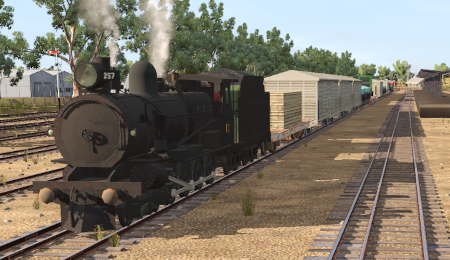
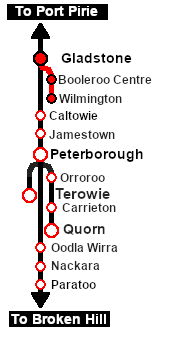
| A twice weekly (if required) freight service from Gladstone to Wilmington dropping wagons at locations as required. |  |
The Historical Bit
By the 1960s the Gladstone-Wilmington Line was in decline. Freight services largely ran on demand and passenger services usually consisted of a passenger car attached to a freight service. All its passenger services were permanently cancelled in 1969.
When the Port Pirie-Broken Hill Line was converted to standard gauge in 1969-70 the Wilmington Line became isolated from the rest of the narrow gauge network.
The line had no signals and none of its locations were manned. Normally only one train was given authority to use the line at any one time.
The line was eventually closed in 1990.
 |
|
||||||||||


Getting Started:
|
Tutorial:
|

|
|



This page was created by Trainz user pware in February 2021 and was last updated as shown below.


