SAR Scenario Hawker Freight: Difference between revisions
mNo edit summary |
mNo edit summary |
||
| Line 68: | Line 68: | ||
## Open the '''Finder Tool''' (press <span style="font-weight: 700; font-size: 15px; color: white; background-color: black;"> Ctrl </span> <span style="font-weight: 700; font-size: 15px; color: white; background-color: black;"> F </span>) and type, in the '''Name''' field, the name of the loco. For example '''SAR T 255''' (or just '''T 255''' should be enough). Click the '''tick''' icon, '''OR''' | ## Open the '''Finder Tool''' (press <span style="font-weight: 700; font-size: 15px; color: white; background-color: black;"> Ctrl </span> <span style="font-weight: 700; font-size: 15px; color: white; background-color: black;"> F </span>) and type, in the '''Name''' field, the name of the loco. For example '''SAR T 255''' (or just '''T 255''' should be enough). Click the '''tick''' icon, '''OR''' | ||
## Open the '''Driver List''' (bottom left of the screen) and select the loco from there - click the drivers '''Eye''' icon to jump to the loco. | ## Open the '''Driver List''' (bottom left of the screen) and select the loco from there - click the drivers '''Eye''' icon to jump to the loco. | ||
# Take a few moments to get your bearings. | # Take a few moments to get your bearings. Click [[image:Line_Index_Quorn.png|link=SAR_Quorn|Quorn Data]] (this link will open in this window) to show the location details and track plans for '''Quorn'''. In each location details page:- | ||
#*the [[image:Tab_HM_White.png|link=|75px]] tab gives an overall summary of each location with a "potted" history (where available). | #*the [[image:Tab_HM_White.png|link=|75px]] tab gives an overall summary of each location with a "potted" history (where available). | ||
#*the [[image:Tab_TM_Grey.png|link=|75px]] tab reveals the invisible [[image:Trackmark_Right.png|link=|alt=TM|8px]] '''Track Marks''' for '''Drive To''' commands. | #*the [[image:Tab_TM_Grey.png|link=|75px]] tab reveals the invisible [[image:Trackmark_Right.png|link=|alt=TM|8px]] '''Track Marks''' for '''Drive To''' commands. | ||
Revision as of 22:05, 8 November 2021
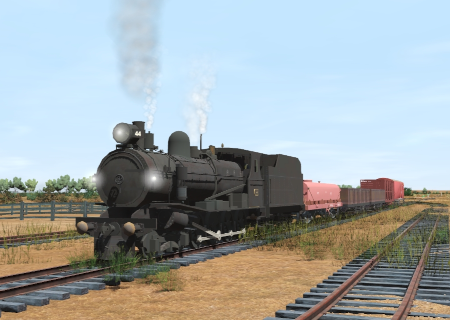
| The weekly Commonwealth Railways freight service from Quorn to Hawker. |  |
The Historical Bit
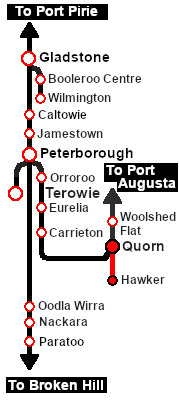
Up until 1956 the Central Australia Line from Port Augusta north to Maree and on to Alice Springs ran via Quorn and Hawker. In 1956 a new standard gauge (4ft 8.5inch, 1435mm) line to Maree was opened which followed a more direct route bypassing Quorn and Hawker. The narrow gauge line sections from Port Augusta to Quorn and from Hawker to Maree were closed leaving only the section between Quorn and Hawker open for traffic.
The Commonwealth Railways, the operator of the Central Australia Line, ran a weekly freight service on this section until 1972 when the service was cancelled and the line closed. It was the only scheduled service running on the line. They used SAR locos and a mixture of CR and SAR rolling stock.
 |
|
||||||||||


Getting Started:
|

Tutorial:
|

|
|



This page was created by Trainz user pware in October 2021 and was last updated as shown below.


