SAR Scenario Quorn-Peterborough Empty Fuel: Difference between revisions
From TrainzOnline
Jump to navigationJump to search
mNo edit summary |
mNo edit summary |
||
| Line 1: | Line 1: | ||
<table width=1000> <!-- BEGIN Title table --> | <table width=1000> <!-- BEGIN Title table --> | ||
<tr valign="top"> | <tr valign="top"> | ||
<td width=50 align="left">[[image:ArrowLeftBtn.png|link=SAR Scenario | <td width=50 align="left">[[image:ArrowLeftBtn.png|link=SAR Scenario Paratoo Empty Ore|30px]]</td> | ||
<td width=900 align="center"><span style="font-size: 21px; font-weight: 700;"> <span style="background-color: black; color: white;"> | <td width=900 align="center"><span style="font-size: 21px; font-weight: 700;"> <span style="background-color: black; color: white;"> 7 </span> <span style="background-color: black; color: white;"> Quorn to Peterborough Local Freight </span></span></td> | ||
<td width=50 align="right">[[image:ArrowRightBtn.png|link=SAR Scenario | <td width=50 align="right">[[image:ArrowRightBtn.png|link=SAR Scenario Quorn-Peterborough Empty Fuel|30px]]</td> | ||
</tr> | </tr> | ||
<tr valign="top"> | <tr valign="top"> | ||
| Line 11: | Line 11: | ||
<table width=1000> <!-- BEGIN Summary table --> | <table width=1000> <!-- BEGIN Summary table --> | ||
<tr valign="top"> | <tr valign="top"> | ||
<td align="left"> | <td align="left">A thrice weekly (if required) freight service from '''Quorn''' to '''Peterborough''' dropping wagons at locations as required.</td> | ||
<td align="right">[[file:BackToBottom.png|link=#bottom|alt=Bottom|Bottom]]</td> | <td align="right">[[file:BackToBottom.png|link=#bottom|alt=Bottom|Bottom]]</td> | ||
</tr> | </tr> | ||
</table> <!-- END | </table> <!-- END Title and summary tables --> | ||
----- | ----- | ||
<table width=1000> <!-- BEGIN Scenario image and loco/consist table --> | <table width=1000> <!-- BEGIN Scenario image and loco/consist table --> | ||
<tr valign="top"> | <tr valign="top"> | ||
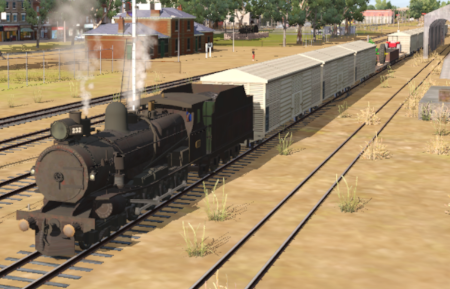
<td width=450>[[image:SAR Quorn | <td width=450>[[image:SAR T 232 Quorn Local.png|link=|alt=Quorn Local]]</td> | ||
<td> | <td> | ||
<table width=550> <!-- BEGIN Loco/consist sub table --> | <table width=550> <!-- BEGIN Loco/consist sub table --> | ||
<tr valign="top"> | <tr valign="top"> | ||
<td width=75><span style="font-size: 15px; font-weight: 700; color: white; background-color: black;"> Era: </span></td> | <td width=75><span style="font-size: 15px; font-weight: 700; color: white; background-color: black;"> Era: </span></td> | ||
<td>'''1920s to | <td>'''1920s to 1980s'''</td> | ||
</tr> | </tr> | ||
<tr valign="top"> | <tr valign="top"> | ||
<td><span style="font-size: 15px; font-weight: 700; color: white; background-color: black;"> Duration: </span></td> | <td><span style="font-size: 15px; font-weight: 700; color: white; background-color: black;"> Duration: </span></td> | ||
<td>3 hours</td> | <td>3 hours 30 minutes</td> | ||
</tr> | </tr> | ||
<tr valign="top"> | <tr valign="top"> | ||
<td><span style="font-size: 15px; font-weight: 700; color: white; background-color: black;"> Loco: </span></td> | <td><span style="font-size: 15px; font-weight: 700; color: white; background-color: black;"> Loco: </span></td> | ||
<td>'''[[SAR_Scenario_Rolling_Stock#SAR_T_Class|SAR T | <td>'''[[SAR_Scenario_Rolling_Stock#SAR_T_Class|SAR T 232]]''' on <span style="font-weight: 700;">Quorn <span style="background-color: yellow;"> Goods Loop </span></span><br> | ||
'''Other Unrostered Locos:''' [[image:Loco_Roster_Label.png|link=SAR Peterborough Division Loco Roster]] | '''Other Unrostered Locos:''' [[image:Loco_Roster_Label.png|link=SAR Peterborough Division Loco Roster]] | ||
*'''[[SAR_Scenario_Rolling_Stock#SAR_T_Class|SAR T 255]]''' at <span style="font-weight: 700;">Quorn <span style="color: white; background-color: black;"> Loco </span> Depot</span> | *'''[[SAR_Scenario_Rolling_Stock#SAR_T_Class|SAR T 255]]''' at <span style="font-weight: 700;">Quorn <span style="color: white; background-color: black;"> Loco </span> Depot</span> | ||
| Line 38: | Line 38: | ||
<tr valign="top"> | <tr valign="top"> | ||
<td><span style="font-size: 15px; font-weight: 700; color: white; background-color: black;"> Consist: </span></td> | <td><span style="font-size: 15px; font-weight: 700; color: white; background-color: black;"> Consist: </span></td> | ||
<td> | <td>Attached to '''[[SAR_Scenario_Rolling_Stock#SAR_T_Class|SAR T 232]]''': 3 '''[[SAR_Scenario_Rolling_Stock#QR_MTW|QR MTW Flat]]''' wagons, 9 '''[[SAR_Scenario_Rolling_Stock#QR_QLX|QR QLX Van]]''' wagons, 2 '''[[SAR_Scenario_Rolling_Stock#QR_WHE|QR WHE Gondola]]''' covered wagons, 2 '''[[SAR_Scenario_Rolling_Stock#TGR_CCC|TGR CCC Gondola]]''' wagons, 1 '''[[SAR_Scenario_Rolling_Stock#TGR_DB|Guard Van]]'''. Each wagon has its destination as part of its name e.g. '''QLX Orroroo 2''' indicating it is the 2nd QLX wagon for '''Orroroo'''. | ||
<!-- V2.0 | |||
In '''SAR Peterborough Base Session v2.0''' the '''TGR DB Guard Van''' has been replaced with a '''[[SAR_Scenario_Rolling_Stock#SAR_7550|SAR 7550 Brake Van]]''' --> | |||
</td> | </td> | ||
</tr> | </tr> | ||
<tr valign="top"> | <tr valign="top"> | ||
<td colspan=2> | <td colspan=2> | ||
<table bgcolor="lightcyan" | <table bgcolor="lightcyan"> <!-- BEGIN Location Data table --> | ||
<tr> | <tr> | ||
<td> | <td> | ||
| Line 67: | Line 69: | ||
# If you have already closed the opening message window then the first step is to pause the session by pressing the <span style="font-weight: 700; font-size: 15px; color: white; background-color: black;"> P </span> key. | # If you have already closed the opening message window then the first step is to pause the session by pressing the <span style="font-weight: 700; font-size: 15px; color: white; background-color: black;"> P </span> key. | ||
# Next locate your loco. '''Either''':- | # Next locate your loco. '''Either''':- | ||
## Open the '''Finder Tool''' (press <span style="font-weight: 700; font-size: 15px; color: white; background-color: black;"> Ctrl </span> <span style="font-weight: 700; font-size: 15px; color: white; background-color: black;"> F </span>) and type, in the '''Name''' field, the name of the loco. For example '''SAR T | ## Open the '''Finder Tool''' (press <span style="font-weight: 700; font-size: 15px; color: white; background-color: black;"> Ctrl </span> <span style="font-weight: 700; font-size: 15px; color: white; background-color: black;"> F </span>) and type, in the '''Name''' field, the name of the loco. For example '''SAR T 232''' (or just '''T 232''' should be enough). Click the '''tick''' icon, '''OR''' | ||
## Open the '''Driver List''' (bottom left of the screen) and select the loco from there - click the drivers '''Eye''' icon to jump to the loco. | ## Open the '''Driver List''' (bottom left of the screen) and select the loco from there - click the drivers '''Eye''' icon to jump to the loco. | ||
# Take a few moments to get your bearings. Click [[image:Line_Index_Quorn.png|link=SAR_Quorn|Quorn Data]] (this link will open in this window) to show the location details and track plans for '''Quorn'''. In each location details page:- | # Take a few moments to get your bearings. Click [[image:Line_Index_Quorn.png|link=SAR_Quorn|Quorn Data]] (this link will open in this window) to show the location details and track plans for '''Quorn'''. In each location details page:- | ||
| Line 106: | Line 108: | ||
<tr valign="top"> | <tr valign="top"> | ||
<td width=720><span style="font-size: 15px; font-weight: 700; color: white; background-color: black;"> Tasks: </span><br> | <td width=720><span style="font-size: 15px; font-weight: 700; color: white; background-color: black;"> Tasks: </span><br> | ||
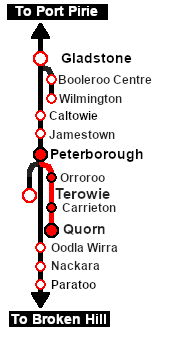
# | # Take the train onto the '''Peterborough-Quorn Line'''. | ||
# Deliver wagons according to their destination names. '''WHE''' covered wagons to <span style="font-weight: 700;"><span style="color: black; background-color: #dbc7aa;"> Grain Silos </span></span>. '''MTW''' flat wagons to <span style="font-weight: 700;"><span style="color: black; background-color: yellow;"> Goods Cranes </span></span>. '''QLX''' wagons to <span style="font-weight: 700;"><span style="color: black; background-color: yellow;"> Goods Sheds </span></span>. | |||
# Water and coal the loco as needed. | |||
# '''Option:''' Turn the loco on one of the <span style="font-weight: 700;">Peterborough <span style="color: white; background-color: black;"> Loco </span> Depot Turntables</span> or select a suitable replacement loco at <span style="font-weight: 700;">Peterborough Main <span style="color: white; background-color: black;"> Loco </span> Depot</span> and return to '''Quorn''' collecting the wagons along the way. | |||
</td> | </td> | ||
<td width=100>[[image:SAR Train Order Rotated.png|100px|link=|alt=Logo]]</td> | <td width=100>[[image:SAR Train Order Rotated.png|100px|link=|alt=Logo]]</td> | ||
| Line 151: | Line 152: | ||
</tr> | </tr> | ||
<tr valign="center"> | <tr valign="center"> | ||
<td width=63 align="left">[[image:ArrowLeftBtn.png|link=SAR Scenario | <td width=63 align="left">[[image:ArrowLeftBtn.png|link=SAR Scenario Paratoo Empty Ore|30px]]</td> | ||
<td width=125 align="center">[[image:Session Scenario Index.png|link=SAR Peterborough Base Session|alt=Scenarios|Scenario Index]]<br>'''[[SAR Peterborough Base Session|Session Scenarios]]'''</td> | <td width=125 align="center">[[image:Session Scenario Index.png|link=SAR Peterborough Base Session|alt=Scenarios|Scenario Index]]<br>'''[[SAR Peterborough Base Session|Session Scenarios]]'''</td> | ||
<td width=125 align="center">[[Image:Location Index.png|link=SAR Index|alt=Location Index|Location Index]]<br>'''[[SAR Index|Location List]]'''</td> | <td width=125 align="center">[[Image:Location Index.png|link=SAR Index|alt=Location Index|Location Index]]<br>'''[[SAR Index|Location List]]'''</td> | ||
| Line 159: | Line 160: | ||
<td width=125 align="center">[[image:Industry Index.png|link=SAR Scenario Industries|alt=Industries]]<br>'''[[SAR Scenario Industries|Active Industries]]'''</td> | <td width=125 align="center">[[image:Industry Index.png|link=SAR Scenario Industries|alt=Industries]]<br>'''[[SAR Scenario Industries|Active Industries]]'''</td> | ||
<td width=125 align="center">[[image:BackToTop.png|link=#top|alt=Top|Top]]</td> | <td width=125 align="center">[[image:BackToTop.png|link=#top|alt=Top|Top]]</td> | ||
<td width= | <td width=62 align="left">[[image:ArrowRightBtn.png|link=SAR Scenario Quorn-Peterborough Empty Fuel|30px]]</td> | ||
</tr> | </tr> | ||
</table> <!-- END End Links Table --> | </table> <!-- END End Links Table --> | ||
Revision as of 00:46, 29 March 2022
| A thrice weekly (if required) freight service from Quorn to Peterborough dropping wagons at locations as required. |  |
 |
|
||||||||||||


Getting Started:
|

Tutorial:
|

|
|




This page was created by Trainz user pware in February 2021 and was last updated as shown below.


