SAR Scenario Livestock Shuttle: Difference between revisions
From TrainzOnline
Jump to navigationJump to search
mNo edit summary |
No edit summary |
||
| Line 43: | Line 43: | ||
*'''[[SAR_Scenario_Rolling_Stock#SAR_T_Class|SAR T 233]] at <span style="color: white; background-color: black;"> Loco Sheds </span>''' | *'''[[SAR_Scenario_Rolling_Stock#SAR_T_Class|SAR T 233]] at <span style="color: white; background-color: black;"> Loco Sheds </span>''' | ||
*'''[[SAR_Scenario_Rolling_Stock#SAR_400_Class|SAR 407]] at <span style="color: white; background-color: black;"> Repair Shop Sheds </span>''' | *'''[[SAR_Scenario_Rolling_Stock#SAR_400_Class|SAR 407]] at <span style="color: white; background-color: black;"> Repair Shop Sheds </span>''' | ||
*'''[[SAR_Scenario_Rolling_Stock#SAR_830_Class|SAR | *'''[[SAR_Scenario_Rolling_Stock#SAR_830_Class|SAR 858]] at <span style="color: white; background-color: black;"> Loco Sheds </span>''' | ||
*'''[[SAR_Scenario_Rolling_Stock#SAR_830_Class|SAR | *'''[[SAR_Scenario_Rolling_Stock#SAR_830_Class|SAR 867]] at <span style="color: white; background-color: black;"> Loco Sheds </span>''' | ||
</td> | </td> | ||
</tr> | </tr> | ||
| Line 123: | Line 123: | ||
<tr valign="top"> | <tr valign="top"> | ||
<td width=716> | <td width=716> | ||
# Reverse the loco and tender out of the <span style="font-weight: 700; color: white; background-color: black;"> Loco Depot </span> yard and onto the <span style="font-weight: 700; color: white; background-color: red;"> Stockyard | # Reverse the loco and tender out of the <span style="font-weight: 700; color: white; background-color: black;"> Loco Depot </span> yard and onto the <span style="font-weight: 700; color: white; background-color: red;"> Stockyard Road </span> | ||
# Couple to the livestock consist stored in either:- | # Couple to the livestock consist stored in either:- | ||
#* <span style="font-weight: 700; color: white; background-color: red;"> Stockyard Siding 1 </span> (cattle), or | #* <span style="font-weight: 700; color: white; background-color: red;"> Stockyard Siding 1 </span> (cattle wagons), or | ||
#* <span style="font-weight: 700; color: white; background-color: red;"> Stockyard Siding 2 </span> (sheep) | #* <span style="font-weight: 700; color: white; background-color: red;"> Stockyard Siding 2 </span> (sheep wagons) | ||
# Proceed | # Proceed to the <span style="font-weight: 700;">Terowie <span style="color: white; background-color: red;"> Stockyard Transfer </span> platform</span> and load livestock | ||
# Shunt the | # Proceed to '''Peterborough''' Yards. Take coal and water when required | ||
# | # Shunt the train to either the <span style="font-weight: 700;">Peterborough <span style="color: white; background-color: red;"> Stockyard 1 </span> (Cattle)</span> or <span style="font-weight: 700;">Peterborough <span style="color: white; background-color: red;"> Stockyard 2 </span> (Sheep)</span> and unload | ||
# | # Pull the wagons back to '''Peterborough''' Yards and run the loco around the train | ||
# Return to ''' | # Proceed to '''Ucolta''', '''Oodla Wirra''', '''Nackara''' and '''Paratoo''' delivering wagos to the stockyards at each location. Take water when required | ||
# At '''Paratoo''' take coal and water. Turn the loco on the <span style="font-weight: 700; color: white; background-color: black;"> WYE </span> | |||
# Return to '''Peterborough''' yard collecting the loaded livestock wagons at each location | |||
# Unload the livestock at the <span style="font-weight: 700;">Peterborough <span style="color: white; background-color: red;"> Stockyard 1 </span> (Cattle)</span> or <span style="font-weight: 700;">Peterborough <span style="color: white; background-color: red;"> Stockyard 2 </span> (Sheep)</span> | |||
# Shunt the wagons to '''Peterborough''' Yards. Coal and water when required. You may perform an optional loco swap | |||
# Return empty to '''Terowie''' | |||
# Stable the wagons in a vacant <span style="font-weight: 700; color: white; background-color: red;"> Stockyard Sidings </span> | |||
# Coal, water and stable the loco | |||
</td> | </td> | ||
<td width=100>[[image:SAR Train Order Rotated.png|100px|link=|alt=Logo]]</td> | <td width=100>[[image:SAR Train Order Rotated.png|100px|link=|alt=Logo]]</td> | ||
| Line 146: | Line 153: | ||
<tr valign="top"> | <tr valign="top"> | ||
<td> | <td> | ||
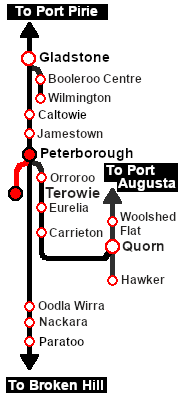
A summary of the facilities and product loads at all locations along the line is provided in the | A summary of the facilities and product loads at all locations along the line is provided in the links<br> | ||
[[Image:SAR_Peterborough-Terowie_Line.png|link=SAR Peterborough-Terowie|alt=Peterborough-Terowie Line|Show Peterborough-Terowie Line]] and [[Image:SAR_PortPirie-BrokenHill_Line.png|link=SAR Port Pirie-Broken Hill|alt=Port Pirie-Broken Hill Line|Show Port Pirie-Broken Hill Line]] | |||
*The approaches to all locations are protected by invisible signals to prevent the '''AI Half Speed Slowdown Problem''' when approaching a signal at stop. | *The approaches to all locations are protected by invisible signals to prevent the '''AI Half Speed Slowdown Problem''' when approaching a signal at stop. | ||
*Trackmarks and industries have been provided for AI '''Drive To Trackmark''', '''Drive via Trackmark''' and '''Drive to <span style="background-color: yellow;"> Industry </span>''' commands. Click [[image:Line_Index_Label.png|link=SAR_Index|Location Index]] for details. | *Trackmarks and industries have been provided for AI '''Drive To Trackmark''', '''Drive via Trackmark''' and '''Drive to <span style="background-color: yellow;"> Industry </span>''' commands. Click [[image:Line_Index_Label.png|link=SAR_Index|Location Index]] for details. | ||
Revision as of 10:21, 19 October 2022
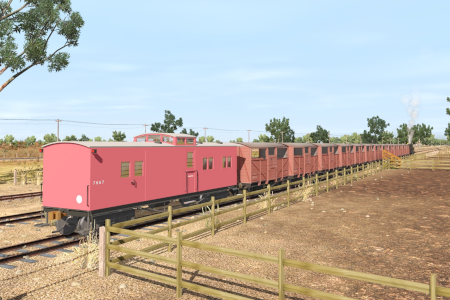
| Livestock transfer between the stockyards at Terowie and Peterborough. |  |
 |
|

|
|
Each location in the layout has a detailed set of track diagrams that provide a variety of useful information The Getting Started guide below gives a summary of what is available.  graphic, or go to the bottom of the page for all the session links (all links will open in this window). |

Getting Started:
|


Tutorial:
|

|
|






This page was created by Trainz user pware in June 2022 and was last updated as shown below.


