SAR Scenario Coffee Pot Special: Difference between revisions
mNo edit summary |
mNo edit summary |
||
| Line 1: | Line 1: | ||
<!-- V2.0 only (no V1.0 version) --> | <!-- V2.0 only (no V1.0 version) --> | ||
<!-- SAR Scenario 25 --> | |||
<table width=1000> <!-- BEGIN Title table --> | <table width=1000> <!-- BEGIN Title table --> | ||
<tr valign="top"> | <tr valign="top"> | ||
| Line 69: | Line 70: | ||
<td> | <td> | ||
# If you have already closed the opening message window then the first step is to pause the session by pressing the <span style="font-weight: 700; font-size: 15px; color: white; background-color: black;"> P </span> key. | # If you have already closed the opening message window then the first step is to pause the session by pressing the <span style="font-weight: 700; font-size: 15px; color: white; background-color: black;"> P </span> key. | ||
# If you decide to set the session clock to a different starting time then follow the instructions shown in the '''Orders''' section | |||
# Next locate your loco. '''Either''':- | # Next locate your loco. '''Either''':- | ||
#* Open the '''Finder Tool''' (press <span style="font-weight: 700; font-size: 15px; color: white; background-color: black;"> Ctrl </span> <span style="font-weight: 700; font-size: 15px; color: white; background-color: black;"> F </span>) and type, in the '''Name''' field, the name of the loco, in this case '''SAR SMC 1''', then click the '''tick''' icon, '''OR''' | #* Open the '''Finder Tool''' (press <span style="font-weight: 700; font-size: 15px; color: white; background-color: black;"> Ctrl </span> <span style="font-weight: 700; font-size: 15px; color: white; background-color: black;"> F </span>) and type, in the '''Name''' field, the name of the loco, in this case '''SAR SMC 1''', then click the '''tick''' icon, '''OR''' | ||
| Line 120: | Line 122: | ||
</td> | </td> | ||
<td width=100>[[image:SAR Train Order Rotated.png|100px|link=|alt=Logo]]</td> | <td width=100>[[image:SAR Train Order Rotated.png|100px|link=|alt=Logo]]</td> | ||
</tr> | |||
<tr valign="top"> | |||
<td colspan=2> | |||
<table width=812 bgcolor="white"> <!-- BEGIN Session Change Times Table --> | |||
<tr valign="top"> | |||
<td>The '''Base Session''' has the clock set to start at [[image:Clock_0800.png|link=]]</td> | |||
</tr> | |||
<tr valign="top"> | |||
<td>This can be changed to any required time. For the details see [[image:WikiLink.PNG|link=]]'''[[SAR Scenario Session Time Change]]'''</td> | |||
</tr> | |||
</table> <!-- END Session Change Times Table --> | |||
</td> | |||
</tr> | </tr> | ||
</table> <!-- END Orders and Logo Table --> | </table> <!-- END Orders and Logo Table --> | ||
Revision as of 00:07, 21 November 2022
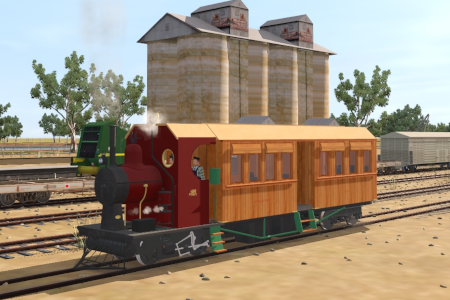
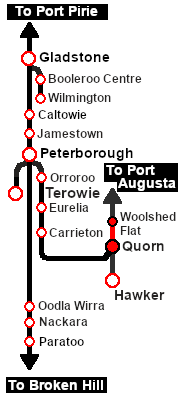
| A passenger excursion in the SAR SMC (Steam Motor Coach) on the Pichi Richi Railway from Quorn to Woolshed Flat, stopping at Summit. |  |
The Historical Bit
Affectionately known as the "Coffee Pot", SMC 1 consists of an engine unit and a passenger coach. The coach is attached to the loco by a pivot beneath the firebox and the loco cab floor is part of the coach frame. SMC 1 was one of only two units built. SMC 2 went to the SAR South Eastern Narrow Gauge Division.
SMC 1 spent its entire working life (1905 - 1932) based at Quorn where it ran a weekly mail and parcel service to Hawker. It was also used on weekend passenger charters as far as Port Augusta and Orroroo. In 1932 it was placed into storage and then static display in Alice Springs. In 1984 it was returned to Quorn and fully restored to operating condition. SMC 1 is the only known working example of its type in the world. It is currently used for passenger excursions on the Pichi Richi Railway between Quorn and Woolshed Flat.
 |
|
|
|
Each location in the layout has a detailed set of track diagrams that provide a variety of useful information The Getting Started guide below gives a summary of what is available.  graphic, or go to the bottom of the page for all the session links (all links will open in this window). |

Getting Started:
|


Tutorial:
|

|
|
|||||||||||







This page was created by Trainz user pware in February 2021 and was last updated as shown below.


