How to Use Variables in Sessions (Examples): Difference between revisions
From TrainzOnline
Jump to navigationJump to search
mNo edit summary |
No edit summary |
||
| Line 1: | Line 1: | ||
The information in this Wiki Page applies to '''TANE''', '''TRS19''', '''Trainz Plus''' and '''TRS22'''. It gives examples of using variables in Sessions. | The information in this Wiki Page applies to '''TANE''', '''TRS19''', '''Trainz Plus''' and '''TRS22'''. It gives examples of using variables in Sessions. | ||
<table width=1000> | |||
<tr valign="top"> | |||
<td width=350> | |||
__TOC__ | __TOC__ | ||
< | </td> | ||
<table cellpadding= | <td> | ||
<table bgcolor="lightcyan" cellpadding=2> | |||
<tr valign="top"> | |||
<td width=10>[[image:BlueDot10x10.png|link=]]</td> | |||
<td>Variables store '''integer values''' in Sessions that can be used to:- | |||
<table> | |||
<tr valign="top"> | <tr valign="top"> | ||
<td | <td width=10>[[image:BlueDot10x10.png|link=]]</td> | ||
<td>'''Test''' for certain events (e.g. if something has occurred a set number of times)</td> | |||
</tr> | </tr> | ||
<tr valign="top"> | <tr valign="top"> | ||
<td>[[ | <td>[[image:BlueDot10x10.png|link=]]</td> | ||
<td> | <td>Make decisions according to the value held by a variable</td> | ||
</tr> | </tr> | ||
<tr valign="top"> | <tr valign="top"> | ||
<td>[[ | <td>[[image:BlueDot10x10.png|link=]]</td> | ||
<td>''' | <td>Act as '''counters''' or '''score keepers'''</td> | ||
</tr> | |||
</table> | |||
</td> | |||
</tr> | </tr> | ||
<tr valign="top"> | <tr valign="top"> | ||
<td>[[ | <td>[[image:BlueDot10x10.png|link=]]</td> | ||
<td> | <td>Variables can be used for basic arithmetic by having set values added or subtracted</td> | ||
</tr> | |||
<tr valign="top"> | |||
<td>[[image:BlueDot10x10.png|link=]]</td> | |||
<td>Variables can have random values assigned to them</td> | |||
</tr> | |||
</table> | |||
</td> | |||
</tr> | </tr> | ||
</table> | </table> | ||
| Line 25: | Line 41: | ||
The scenarios shown below give examples of how variables can be used to control the operation of a session. | The scenarios shown below give examples of how variables can be used to control the operation of a session. | ||
<br> | <br> | ||
<table> <!-- BEGIN Nav Buttons Table --> | <table width=1000> <!-- BEGIN Nav Buttons Table NO SKIPS --> | ||
<tr valign="top"> | <tr valign="top"> | ||
<td width= | <td width=629><span id="stepEx1"></span> | ||
<td width=46>[[ | ='''Example 1: Random Passenger Stop'''= | ||
</td> | |||
<td width=50> </td> <!-- Skip Down --> | |||
<td width=50> </td> <!-- Skip Up --> | |||
<td width=46>[[image:BackToTop.png|link=#top|alt=Top|Top]]</td> | |||
<td width=75> </td> | <td width=75> </td> | ||
<td width=75>[[ | <td width=75>[[image:NextDown.png|link=#stepEx2|alt=Next Down|Next Down]]</td> | ||
<td width=75>[[ | <td width=75>[[image:BackToBottom.png|link=#bottom|alt=Bottom|Bottom]]</td> | ||
</tr> | </tr> | ||
</table> <!-- END Nav Buttons Table --> | </table> <!-- END Nav Buttons Table --> | ||
<table cellpadding= | <table width=1000 cellpadding=2 bgcolor=#ffffff> | ||
<tr valign="top"> | <tr valign="top"> | ||
<td>[[ | <td width=60 rowspan=4>[[image:magnifier.png|link=]]</td> | ||
<td | <td><span style="font-weight: 700; font-size: 17px;">The Scenario:</span></td> | ||
</tr> | </tr> | ||
<tr valign="top"> | <tr valign="top"> | ||
<!-- <td> </td> --> | |||
<td>In the example shown below a random variable is to be used to decide which one of 3 stations a user controlled train will be required to stop at. The user will be informed of the decision, to stop or not, by a message placed on the screen before they reach each station. | <td>In the example shown below a random variable is to be used to decide which one of 3 stations a user controlled train will be required to stop at. The user will be informed of the decision, to stop or not, by a message placed on the screen before they reach each station. | ||
When the train approaches the first possible stopping place, Sandplace, the session checks the value stored in "stopID" and if it is "1" then a stop will be requested.</td> | When the train approaches the first possible stopping place, Sandplace, the session checks the value stored in "stopID" and if it is "1" then a stop will be requested.</td> | ||
</tr> | |||
<tr valign="top"> | |||
<!-- <td> </td> --> | |||
<td>[[image:RandomLogic.jpg|link=]]</td> | |||
</tr> | |||
<tr valign="top"> | |||
<!-- <td> </td> --> | |||
<td> | |||
<table> | |||
<tr valign="top"> | |||
<td width=10>[[image:DotPoint.JPG|10px|link=]]</td> | |||
<td>If a stop is required then a predefined '''Navigation Point''' is shown to indicate the stopping place</td> | |||
</tr> | |||
<tr valign="top"> | |||
<td>[[image:DotPoint.JPG|10px|link=]]</td> | |||
<td>The same logic is repeated for the other two stations with '''stopID''' values of "2" and "3"</td> | |||
</tr> | </tr> | ||
</table> | </table> | ||
</td> | |||
</tr> | |||
</table> | |||
<br> | |||
<table width=1000 cellpadding=2 bgcolor=#ffffff> | |||
<tr valign="top"> | |||
<td width=60 rowspan=4>[[image:conditions.PNG|link=]]</td> | |||
<td colspan=2><span style="font-size: 17px;">'''Preconditions:'''</span></td> | |||
</tr> | |||
<tr valign="top"> | |||
<!-- <td> </td> --> | |||
<td> | |||
<table> | <table> | ||
<tr> | <tr valign="top"> | ||
<td>[[ | <td width=10>[[image:DotPoint.JPG|10px|link=]]</td> | ||
<td>The '''[[Session_Rule_List_with_Parameters#Randomize_Rule|Randomize Rule]]''' is used at the start of the session to create a different sequence of random values each time the session is run</td> | |||
</tr> | |||
<tr valign="top"> | |||
<td>[[image:DotPoint.JPG|10px|link=]]</td> | |||
<td>The '''[[Session_Rule_List_with_Parameters#Navigation_Display_Rule|Navigation Display Rule]]''' is used to create three Navigation Point Sets, one for each stopping place</td> | |||
</tr> | |||
<tr valign="top"> | |||
<td>[[image:DotPoint.JPG|10px|link=]]</td> | |||
<td>The '''[[Session_Rule_List_with_Parameters#Navigation_Set_Hide/Show_Rule|Navigation Set Hide/Show Rule]]''' is used to initially hide all three navigation sets</td> | |||
</tr> | </tr> | ||
<tr valign="top"> | <tr valign="top"> | ||
<td>[[ | <td>[[image:DotPoint.JPG|10px|link=]]</td> | ||
<td | <td>The '''[[Session_Rule_List_with_Parameters#Variable_Random_Rule|Variable Random Rule]]''' is used to create a variable, '''stopID''', with an integer random value from 1 to 3. Each number representing one of the stops</td> | ||
</tr> | </tr> | ||
</table> | </table> | ||
</td> | |||
</tr> | |||
<tr valign="top"> | |||
<!-- <td> </td> --> | |||
< | <td>[[image:VariableRandom.jpg|link=]]</td> | ||
< | |||
<td>[[ | |||
</tr> | </tr> | ||
<tr> | <tr valign="top"> | ||
<!-- <td> </td> --> | |||
<td>Setting the random variable '''stopID'''</td> | <td>Setting the random variable '''stopID'''</td> | ||
</tr> | </tr> | ||
</table> | </table> | ||
<br> | <br> | ||
<table cellpadding= | <table width=1000 cellpadding=2 bgcolor=#ffffff> | ||
<tr valign="top"> | |||
<td width=60 rowspan=2>[[image:RulesWiki.PNG|link=]]</td> | |||
<td><span style="font-size: 17px;">'''Rules Used:'''</span></td> | |||
</tr> | |||
<tr valign="top"> | |||
<!-- <td> </td> --> | |||
<td> | |||
<table> | |||
<tr valign="top"> | |||
<td colspan=2>In addition to those used in the '''Preconditions''' above:-</td> | |||
</tr> | |||
<tr valign="top"> | <tr valign="top"> | ||
<td width= | <td width=10>[[image:DotPoint.JPG|10px|link=]]</td> | ||
<td | <td>'''[[Session_Rule_List_with_Parameters#Trigger_Check_Rule|Trigger Check Rule]]''' to trigger the decision and message event</td> | ||
</tr> | </tr> | ||
< | <tr valign="top"> | ||
<td>[[image:DotPoint.JPG|10px|link=]]</td> | |||
<td>'''[[Session_Rule_List_with_Parameters#Variable_Check_Rule|Variable Check Rule]]''' to check the value held in a session variable | |||
<table> | <table> | ||
<tr> | <tr> | ||
<td>[[ | <td>[[image:VariableCheck.jpg|link=]]</td> | ||
</tr> | </tr> | ||
<tr> | <tr> | ||
| Line 100: | Line 152: | ||
</tr> | </tr> | ||
</table> | </table> | ||
</td> | |||
</tr> | |||
<tr valign="top"> | |||
<td>[[image:DotPoint.JPG|10px|link=]]</td> | |||
<td>'''[[Session_Rule_List_with_Parameters#Navigation_Set_Hide/Show_Rule|Navigation Set Hide/Show Rule]]''' to show the navigation set identified by the random variable</td> | |||
</tr> | |||
<tr valign="top"> | |||
<td>[[image:DotPoint.JPG|10px|link=]]</td> | |||
<td>'''[[Session_Rule_List_with_Parameters#Message_Popup_Rule|Message Popup Rule]]''' to open a message window on the screen</td> | |||
</tr> | |||
</table> | |||
</td> | |||
</tr> | |||
</table> | |||
<br> | <br> | ||
<table cellpadding= | <table width=1000 cellpadding=2 bgcolor=#ffffff> | ||
<tr valign="top"> | <tr valign="top"> | ||
<td>[[ | <td width=60 rowspan=2>[[image:screenshot.PNG|link=]]</td> | ||
<td | <td><span style="font-size: 17px;">'''Session Editor Screenshot:'''</span></td> | ||
</tr> | </tr> | ||
< | <tr valign="top"> | ||
< | <!-- <td> </td> --> | ||
< | <td>[[image:AppRandomStop1.jpg|link=]]</td> | ||
<td>[[ | |||
</tr> | </tr> | ||
</table> | </table> | ||
<br> | <br> | ||
<table cellpadding= | <table width=1000 cellpadding=2 bgcolor=#ffffff> | ||
<tr valign="top"> | <tr valign="top"> | ||
<td>[[ | <td width=60 rowspan=2>[[image:explanation.PNG|link=]]</td> | ||
<td | <td><span style="font-size: 17px;">'''Description:'''</span></td> | ||
----</td> | </tr> | ||
<tr valign="top"> | |||
<!-- <td> </td> --> | |||
<td>'''Line''' <span style="font-weight: 700; font-size: 15px; color: white; background-color: black;"> 1 </span>''': Trigger Check''' The event is triggered when the consist passes over a track trigger. This executes the following rules:- | |||
:'''Line''' <span style="font-weight: 700; font-size: 15px; color: white; background-color: black;"> 2 </span>''': Variable Check''' The value stored in the variable '''stopID''' is tested "=1". Lines 3 and 4 are executed only if '''stopID''' is '''equal to''' "1" | |||
::'''Line''' <span style="font-weight: 700; font-size: 15px; color: white; background-color: black;"> 3 </span>''': Navigation Set Hide/Show''' Displays a navigation point showing the stopping location | |||
::'''Line''' <span style="font-weight: 700; font-size: 15px; color: white; background-color: black;"> 4 </span>''': Message Popup''' Displays a message window showing that a stop has to be made at Sandplace | |||
:'''Line''' <span style="font-weight: 700; font-size: 15px; color: white; background-color: black;"> 5 </span>''': Variable Check''' The value stored in the variable '''stopID''' is tested "<>1". Line 6 is executed only if '''stopID''' is '''not equal''' to "1". | |||
::'''Line''' <span style="font-weight: 700; font-size: 15px; color: white; background-color: black;"> 6 </span>''': Message Popup''' Displays a message window showing that no stop has to be made at Sandplace</td> | |||
</tr> | </tr> | ||
</table> | </table> | ||
<br> | <br> | ||
<table> <!-- BEGIN Nav Buttons Table --> | <table width=1000> <!-- BEGIN Nav Buttons Table NO SKIPS --> | ||
<tr valign="top"> | <tr valign="top"> | ||
<td width= | <td width=629><span id="stepEx2"></span> | ||
<td width=46>[[ | ='''Example 2: Event Counter and Message Selection'''= | ||
<td width=75>[[ | </td> | ||
<td width=75>[[ | <td width=50> </td> <!-- Skip Down --> | ||
<td width=75>[[ | <td width=50> </td> <!-- Skip Up --> | ||
<td width=46>[[image:BackToTop.png|link=#top|alt=Top|Top]]</td> | |||
<td width=75>[[image:NextUp.png|link=#stepEx1|alt=Next Up|Top]]</td> | |||
<td width=75>[[image:NextDown.png|link=#stepEx3|alt=Next Down|Next Down]]</td> | |||
<td width=75>[[image:BackToBottom.png|link=#bottom|alt=Bottom|Bottom]]</td> | |||
</tr> | </tr> | ||
</table> <!-- END Nav Buttons Table --> | </table> <!-- END Nav Buttons Table --> | ||
<table cellpadding= | <table width=1000 cellpadding=2 bgcolor=#ffffff> | ||
<tr valign="top"> | <tr valign="top"> | ||
<td width= | <td width=60 rowspan=4>[[image:magnifier.png|link=]]</td> | ||
<td | <td><span style="font-weight: 700; font-size: 17px;">The Scenario:</span></td> | ||
</tr> | </tr> | ||
<tr valign="top"> | <tr valign="top"> | ||
<!-- <td> </td> --> | |||
<td>Each time a user causes a SPAD (Signal Passed At Danger) at specific locations, the event is counted and an appropriate message is displayed on the screen. The tone of the messages becomes more severe with each occurance.</td> | <td>Each time a user causes a SPAD (Signal Passed At Danger) at specific locations, the event is counted and an appropriate message is displayed on the screen. The tone of the messages becomes more severe with each occurance.</td> | ||
</tr> | </tr> | ||
</table> | </table> | ||
<br> | <br> | ||
<table cellpadding= | <table width=1000 cellpadding=2 bgcolor=#ffffff> | ||
<tr valign="top"> | |||
<td width=60 rowspan=4>[[image:conditions.PNG|link=]]</td> | |||
<td colspan=2><span style="font-size: 17px;">'''Preconditions:'''</span></td> | |||
</tr> | |||
<tr valign="top"> | |||
<!-- <td> </td> --> | |||
<td> | |||
<table> | |||
<tr valign="top"> | |||
<td width=10>[[image:DotPoint.JPG|10px|link=]]</td> | |||
<td>A variable, '''SetSPAD''' (value "0" or "1"), is used to indicate whether a SPAD event is to be counted and responded to or not. This is set to "0" or "1" by track triggers</td> | |||
</tr> | |||
<tr valign="top"> | <tr valign="top"> | ||
<td | <td>[[image:DotPoint.JPG|10px|link=]]</td> | ||
<td | <td>A variable, '''SPADCounter''', is used to count the SPAD events and is initially set at 0</td> | ||
</tr> | |||
</table> | |||
</td> | |||
</tr> | </tr> | ||
</table> | </table> | ||
<br> | <br> | ||
<table cellpadding= | <table width=1000 cellpadding=2 bgcolor=#ffffff> | ||
<tr valign="top"> | <tr valign="top"> | ||
<td width= | <td width=60 rowspan=2>[[image:RulesWiki.PNG|link=]]</td> | ||
<td | <td><span style="font-size: 17px;">'''Rules Used:'''</span></td> | ||
----</td> | </tr> | ||
<tr valign="top"> | |||
<!-- <td> </td> --> | |||
<td> | |||
<table> | |||
<tr valign="top"> | |||
<td width=10>[[image:DotPoint.JPG|10px|link=]]</td> | |||
<td>'''[[Session_Rule_List_with_Parameters#Signal_Passed_At_Danger_Check_Rule|Signal Passed At Danger Check Rule]]''' set to trigger on every SPAD event</td> | |||
</tr> | |||
<tr valign="top"> | |||
<td>[[image:DotPoint.JPG|10px|link=]]</td> | |||
<td>'''[[Session_Rule_List_with_Parameters#Variable_Check_Rule|Variable Check Rule]]''' to check the value held in a session variable</td> | |||
</tr> | |||
<tr valign="top"> | |||
<td>[[image:DotPoint.JPG|10px|link=]]</td> | |||
<td>'''[[Session_Rule_List_with_Parameters#Driver_Schedule_Rule|Driver Schedule Rule]]''' used to immediately stop the train</td> | |||
</tr> | </tr> | ||
</table> | </table> | ||
<table> | <table> | ||
<tr> | <tr> | ||
<td>[[ | <td>[[image:DriverSchedule.jpg|link=]]</td> | ||
</tr> | </tr> | ||
<tr> | <tr> | ||
| Line 183: | Line 271: | ||
</tr> | </tr> | ||
</table> | </table> | ||
<table> | |||
<tr valign="top"> | |||
<td>[[image:DotPoint.JPG|10px|link=]]</td> | |||
<td>'''[[Session_Rule_List_with_Parameters#Simultaneous_List_Rule|Simultaneous List Rule]]''' to force all rules to run simultaneously for speed</td> | |||
< | </tr> | ||
< | <tr valign="top"> | ||
<td>[[image:DotPoint.JPG|10px|link=]]</td> | |||
<td>'''[[Session_Rule_List_with_Parameters#Variable_Modify_Rule|Variable Modify Rule]]''' to alter the value held in a session variable</td> | |||
</tr> | |||
<tr valign="top"> | |||
<td>[[image:DotPoint.JPG|10px|link=]]</td> | |||
<td>'''[[Session_Rule_List_with_Parameters#Variable_Show_Rule|Variable Show Rule]]''' adds a session variable to the Heads Up Display</td> | |||
</tr> | |||
<tr valign="top"> | <tr valign="top"> | ||
<td | <td>[[image:DotPoint.JPG|10px|link=]]</td> | ||
<td | <td>'''[[Session_Rule_List_with_Parameters#Message_Popup_Rule|Message Popup Rule]]''' to open a message window on the screen</td> | ||
</tr> | </tr> | ||
</table> | </table> | ||
</td> | |||
</tr> | </tr> | ||
</table> | </table> | ||
<br> | <br> | ||
<table cellpadding= | <table width=1000 cellpadding=2 bgcolor=#ffffff> | ||
<tr valign="top"> | |||
<td width=60 rowspan=2>[[image:screenshot.PNG|link=]]</td> | |||
<td><span style="font-size: 17px;">'''Session Editor Screenshot:'''</span></td> | |||
</tr> | |||
<tr valign="top"> | <tr valign="top"> | ||
<td | <!-- <td> </td> --> | ||
<td>[[image:VariableSPADWarnings.jpg|link=]]</td> | |||
</tr> | </tr> | ||
</table> | </table> | ||
<table width=1000> | <br> | ||
<table width=1000 cellpadding=2 bgcolor=#ffffff> | |||
<tr valign="top"> | |||
<td width=60 rowspan=3>[[image:explanation.PNG|link=]]</td> | |||
<td><span style="font-size: 17px;">'''Description:'''</span></td> | |||
</tr> | |||
<tr valign="top"> | |||
<!-- <td> </td> --> | |||
<td>'''Line''' <span style="font-weight: 700; font-size: 15px; color: white; background-color: black;"> 1 </span>''': Signal Passed At Danger''' The event is triggered every time a consist passes a signal (or stop sign) set at STOP. This executes the following lines:- | |||
:'''Line''' <span style="font-weight: 700; font-size: 15px; color: white; background-color: black;"> 2 </span>''': Variable Check''' The value stored in the variable '''SetSPAD''' is tested "=1". If true then the following lines are executed. This executes the following lines:- | |||
::'''Line''' <span style="font-weight: 700; font-size: 15px; color: white; background-color: black;"> 3 </span>''': Driver Schedule''' The current schedule (if any) for the user controlled driver is replaced with a '''Halt Train''' command to bring the train to an immediate stop | |||
::'''Line''' <span style="font-weight: 700; font-size: 15px; color: white; background-color: black;"> 4 </span>''': Variable Modify''' The value stored in the variable '''SPADCounter''' is increased by 1 | |||
::'''Line''' <span style="font-weight: 700; font-size: 15px; color: white; background-color: black;"> 5 </span>''': Simultaneous List''' This forces all the '''Variable Check Rules''' to be run simultaneously. This is not strictly necessary but without it all the '''Variable Check Rules''' will be tested, one after the other, when only one (or none) of them will be executed. This will (marginally) speed up the processing. This will execute the following lines:- | |||
:::'''Line''' <span style="font-weight: 700; font-size: 15px; color: white; background-color: black;"> 6 </span>''': Variable Check''' The value stored in the variable '''SPADCounter''' is tested "=1". If true then the first SPAD event has occurred and the following lines are executed:- | |||
::::'''Line''' <span style="font-weight: 700; font-size: 15px; color: white; background-color: black;"> 7 </span>''': Variable Show''' The value stored in the variable '''SPADCounter''' is added to the '''Custom HUD'''. Each time the value changes it will be updated in the HUD | |||
::::'''Line''' <span style="font-weight: 700; font-size: 15px; color: white; background-color: black;"> 8 </span>''': Message Popup''' The first warning message is shown on the screen | |||
:::'''Line''' <span style="font-weight: 700; font-size: 15px; color: white; background-color: black;"> 9 </span>''': Variable Check''' The value stored in the variable '''SPADCounter''' is tested "=2". If true then the second SPAD event has occurred and the following line is executed:- | |||
::::'''Line''' <span style="font-weight: 700; font-size: 15px; color: white; background-color: black;"> 10 </span>''': Message Popup''' The second warning message is shown on the screen</td> | |||
</tr> | |||
<tr valign="top"> | <tr valign="top"> | ||
<td> | <!-- <td> </td> --> | ||
<td>Lines 9 and 10 are then repeated with variations as shown. If more than 5 SPADs occur, then no new messages will be shown (the driver is clearly taking no notice so what is the point?) but the '''SPADCounter''' will continue to be updated. | |||
Lines 9 and 10 are then repeated with variations as shown. If more than 5 SPADs occur, then no new messages will be shown (the driver is clearly taking no notice so what is the point?) but the '''SPADCounter''' will continue to be updated. | |||
</td> | </td> | ||
</tr> | </tr> | ||
</table> | </table> | ||
<br> | <br> | ||
<table> <!-- BEGIN Nav Buttons Table --> | <table width=1000> <!-- BEGIN Nav Buttons Table NO SKIPS --> | ||
<tr valign="top"> | <tr valign="top"> | ||
<td width= | <td width=629><span id="stepEx3"></span> | ||
<td width=46>[[ | ='''Example 3: Counting Consist Checks'''= | ||
<td width=75>[[ | </td> | ||
<td width=75>[[ | <td width=50> </td> <!-- Skip Down --> | ||
<td width=75>[[ | <td width=50> </td> <!-- Skip Up --> | ||
<td width=46>[[image:BackToTop.png|link=#top|alt=Top|Top]]</td> | |||
<td width=75>[[image:NextUp.png|link=#stepEx2|alt=Next Up|Top]]</td> | |||
<td width=75>[[image:NextDown.png|link=#stepEx4|alt=Next Down|Next Down]]</td> | |||
<td width=75>[[image:BackToBottom.png|link=#bottom|alt=Bottom|Bottom]]</td> | |||
</tr> | </tr> | ||
</table> <!-- END Nav Buttons Table --> | </table> <!-- END Nav Buttons Table --> | ||
<table cellpadding= | <table width=1000 cellpadding=2 bgcolor=#ffffff> | ||
<tr valign="top"> | <tr valign="top"> | ||
<td width= | <td width=60 rowspan=4>[[image:magnifier.png|link=]]</td> | ||
<td | <td><span style="font-weight: 700; font-size: 17px;">The Scenario:</span></td> | ||
</tr> | </tr> | ||
<tr valign="top"> | <tr valign="top"> | ||
<td>The '''Consist Check Rule''' cannot be set to trigger only once but sometimes you want it triggered only once on (for example) the | <!-- <td> </td> --> | ||
<td>The '''Consist Check Rule''' cannot be set to trigger only once but sometimes you want it triggered only once on (for example) the 2nd time that a particular consist is formed. This example uses a variable to count the number of times the rule has been triggered and acts only when a set count has been reached. It could easily be modified to trigger a set number of times.</td> | |||
</tr> | </tr> | ||
</table> | </table> | ||
<br> | <br> | ||
<table cellpadding= | <table width=1000 cellpadding=2 bgcolor=#ffffff> | ||
<tr valign="top"> | <tr valign="top"> | ||
<td width= | <td width=60 rowspan=4>[[image:conditions.PNG|link=]]</td> | ||
<td | <td colspan=2><span style="font-size: 17px;">'''Preconditions:'''</span></td> | ||
----</td> | </tr> | ||
<tr valign="top"> | |||
<!-- <td> </td> --> | |||
<td> | |||
<table> | |||
<tr valign="top"> | |||
<td width=10>[[image:DotPoint.JPG|10px|link=]]</td> | |||
<td>A variable, '''ConsistCount''', is initially set to "0"</td> | |||
</tr> | |||
</table> | |||
</td> | |||
</tr> | </tr> | ||
</table> | </table> | ||
<br> | <br> | ||
<table cellpadding= | <table width=1000 cellpadding=2 bgcolor=#ffffff> | ||
<tr valign="top"> | |||
<td width=60 rowspan=2>[[image:RulesWiki.PNG|link=]]</td> | |||
<td><span style="font-size: 17px;">'''Rules Used:'''</span></td> | |||
</tr> | |||
<tr valign="top"> | |||
<!-- <td> </td> --> | |||
<td> | |||
<table> | |||
<tr valign="top"> | |||
<td width=10>[[image:DotPoint.JPG|10px|link=]]</td> | |||
<td>'''[[Session_Rule_List_with_Parameters#Consist_Check_Rule|Consist Check Rule]]''' set to trigger when a specific consist has been formed</td> | |||
</tr> | |||
<tr valign="top"> | |||
<td>[[image:DotPoint.JPG|10px|link=]]</td> | |||
<td>'''[[Session_Rule_List_with_Parameters#Variable_Modify_Rule|Variable Modify Rule]]''' to set and increase the value held in a session variable</td> | |||
</tr> | |||
<tr valign="top"> | <tr valign="top"> | ||
<td | <td>[[image:DotPoint.JPG|10px|link=]]</td> | ||
<td | <td>'''[[Session_Rule_List_with_Parameters#Variable_Check_Rule|Variable Check Rule]]''' to check the value held in a session variable</td> | ||
</tr> | |||
<tr valign="top"> | |||
<td>[[image:DotPoint.JPG|10px|link=]]</td> | |||
<td>'''[[Session_Rule_List_with_Parameters#Message_Popup_Rule|Message Popup Rule]]''' to place a message on the screen</td> | |||
</tr> | |||
</table> | |||
</td> | |||
</tr> | </tr> | ||
</table> | </table> | ||
<br> | <br> | ||
<table cellpadding= | <table width=1000 cellpadding=2 bgcolor=#ffffff> | ||
<tr valign="top"> | <tr valign="top"> | ||
<td width= | <td width=60 rowspan=2>[[image:screenshot.PNG|link=]]</td> | ||
<td | <td><span style="font-size: 17px;">'''Session Editor Screenshot:'''</span></td> | ||
</tr> | </tr> | ||
< | <tr valign="top"> | ||
< | <!-- <td> </td> --> | ||
< | <td>[[image:VariableConsistCounter.JPG|link=]]</td> | ||
<td>[[ | |||
</tr> | </tr> | ||
</table> | </table> | ||
<br> | <br> | ||
<table cellpadding= | <table width=1000 cellpadding=2 bgcolor=#ffffff> | ||
<tr valign="top"> | <tr valign="top"> | ||
<td width= | <td width=60 rowspan=3>[[image:explanation.PNG|link=]]</td> | ||
<td | <td><span style="font-size: 17px;">'''Description:'''</span></td> | ||
--- | </tr> | ||
<tr valign="top"> | |||
<!-- <td> </td> --> | |||
<td>'''Line''' <span style="font-weight: 700; font-size: 15px; color: white; background-color: black;"> 1 </span>''': Consist Check Rule''' Triggered when the specified consist has been found. This executes the following lines:- | |||
:'''Line''' <span style="font-weight: 700; font-size: 15px; color: white; background-color: black;"> 2 </span>''': Variable Modify Rule''' Adds 1 to the variable '''ConsistCounter''' | |||
:'''Line''' <span style="font-weight: 700; font-size: 15px; color: white; background-color: black;"> 3 </span>''': Variable Check''' Compares the value stored in '''ConsistCounter''' to a set value (in this case 2). If it matches then the next line is executed:- | |||
::'''Line''' <span style="font-weight: 700; font-size: 15px; color: white; background-color: black;"> 4 </span>''': Places a message on the screen</td> | |||
</tr> | </tr> | ||
</table> | </table> | ||
<br> | <br> | ||
<table> <!-- BEGIN Nav Buttons Table --> | <table width=1000> <!-- BEGIN Nav Buttons Table NO SKIPS --> | ||
<tr valign="top"> | <tr valign="top"> | ||
<td width= | <td width=629><span id="stepEx4"></span> | ||
<td width=46>[[ | ='''Example 4: Train Status'''= | ||
<td width=75>[[ | </td> | ||
<td width=75>[[ | <td width=50> </td> <!-- Skip Down --> | ||
<td width=75>[[ | <td width=50> </td> <!-- Skip Up --> | ||
<td width=46>[[image:BackToTop.png|link=#top|alt=Top|Top]]</td> | |||
<td width=75>[[image:NextUp.png|link=#stepEx3|alt=Next Up|Top]]</td> | |||
<td width=75>[[image:NextDown.png|link=#stepRules|alt=Next Down|Next Down]]</td> | |||
<td width=75>[[image:BackToBottom.png|link=#bottom|alt=Bottom|Bottom]]</td> | |||
</tr> | </tr> | ||
</table> <!-- END Nav Buttons Table --> | </table> <!-- END Nav Buttons Table --> | ||
<table cellpadding= | <table width=1000 cellpadding=2 bgcolor=#ffffff> | ||
<tr valign="top"> | |||
<td width=60 rowspan=4>[[image:magnifier.png|link=]]</td> | |||
<td><span style="font-weight: 700; font-size: 17px;">The Scenario:</span></td> | |||
</tr> | |||
<tr valign="top"> | <tr valign="top"> | ||
<td | <!-- <td> </td> --> | ||
<td | <td>A consist identified by number 188 passes over the same trigger twice, once when empty and once when loaded. Each time the user needs to be given a different set of instructions</td> | ||
</tr> | </tr> | ||
</table> | </table> | ||
<br> | |||
<table width=1000 cellpadding=2 bgcolor=#ffffff> | |||
<table cellpadding= | <tr valign="top"> | ||
<td width=60 rowspan=4>[[image:conditions.PNG|link=]]</td> | |||
<td colspan=2><span style="font-size: 17px;">'''Preconditions:'''</span></td> | |||
</tr> | |||
<tr valign="top"> | <tr valign="top"> | ||
<td | <!-- <td> </td> --> | ||
<td | <td> | ||
<table> | |||
<tr valign="top"> | |||
<td width=10>[[image:DotPoint.JPG|10px|link=]]</td> | |||
<td>A variable, '''T188Status''' is initially set to "1" signifying that the train is empty. This will be modified to "2" after it has been loaded</td> | |||
</tr> | |||
</table> | |||
</td> | |||
</tr> | </tr> | ||
</table> | </table> | ||
<br> | <br> | ||
<table cellpadding= | <table width=1000 cellpadding=2 bgcolor=#ffffff> | ||
<tr valign="top"> | |||
<td width=60 rowspan=2>[[image:RulesWiki.PNG|link=]]</td> | |||
<td><span style="font-size: 17px;">'''Rules Used:'''</span></td> | |||
</tr> | |||
<tr valign="top"> | |||
<!-- <td> </td> --> | |||
<td> | |||
<table> | |||
<tr valign="top"> | |||
<td width=10>[[image:DotPoint.JPG|10px|link=]]</td> | |||
<td>'''[[Session_Rule_List_with_Parameters#Trigger_Check_Rule|Trigger Check Rule]]''' to trigger the event when the consist reaches the trigger</td> | |||
</tr> | |||
<tr valign="top"> | |||
<td>[[image:DotPoint.JPG|10px|link=]]</td> | |||
<td>'''[[Session_Rule_List_with_Parameters#Variable_Check_Rule|Variable Check Rule]]''' to check the value held in a session variable</td> | |||
</tr> | |||
<tr valign="top"> | <tr valign="top"> | ||
<td | <td>[[image:DotPoint.JPG|10px|link=]]</td> | ||
<td | <td>'''[[Session_Rule_List_with_Parameters#Message_Popup_Rule|Message Popup Rule]]''' to place a message on the screen</td> | ||
</tr> | |||
</table> | |||
</td> | |||
</tr> | </tr> | ||
</table> | </table> | ||
<br> | <br> | ||
<table cellpadding= | <table width=1000 cellpadding=2 bgcolor=#ffffff> | ||
<tr valign="top"> | <tr valign="top"> | ||
<td width= | <td width=60 rowspan=2>[[image:screenshot.PNG|link=]]</td> | ||
<td | <td><span style="font-size: 17px;">'''Session Editor Screenshot:'''</span></td> | ||
</tr> | </tr> | ||
< | <tr valign="top"> | ||
< | <!-- <td> </td> --> | ||
< | <td>[[image:VariableTrainTrigger.JPG|link=]]</td> | ||
<td>[[ | |||
</tr> | </tr> | ||
</table> | </table> | ||
<br> | <br> | ||
<table cellpadding= | <table width=1000 cellpadding=2 bgcolor=#ffffff> | ||
<tr valign="top"> | <tr valign="top"> | ||
<td width= | <td width=60 rowspan=3>[[image:explanation.PNG|link=]]</td> | ||
<td | <td><span style="font-size: 17px;">'''Description:'''</span></td> | ||
----</td> | </tr> | ||
<tr valign="top"> | |||
<!-- <td> </td> --> | |||
<td>'''Line''' <span style="font-weight: 700; font-size: 15px; color: white; background-color: black;"> 1 </span>''': Trigger Check Rule''' Triggered by the train. This is '''NOT''' set to trigger once only. When triggered it will execute the following lines:- | |||
:'''Line''' <span style="font-weight: 700; font-size: 15px; color: white; background-color: black;"> 2 </span>''': Variable Check''' Compares the value stored in '''T188Status''' to 1, indicating "empty". If it matches then the next line is executed:- | |||
::'''Line''' <span style="font-weight: 700; font-size: 15px; color: white; background-color: black;"> 3 </span>''': Message Popup''' Places a message on the screen | |||
::'''Line''' <span style="font-weight: 700; font-size: 15px; color: white; background-color: black;"> 4 </span>''': Variable Check''' Compares the value stored in '''T188Status''' to 2, indicating "loaded". If it matches then the next line is executed:- | |||
:::'''Line''' <span style="font-weight: 700; font-size: 15px; color: white; background-color: black;"> 5 </span>''': Message Popup''' Places a message on the screen</td> | |||
</tr> | </tr> | ||
</table> | </table> | ||
<br> | <br> | ||
<table> <!-- BEGIN Nav Buttons Table --> | <table width=1000> <!-- BEGIN Nav Buttons Table NO SKIPS --> | ||
<tr valign="top"> | <tr valign="top"> | ||
<td width= | <td width=629><span id="stepRules"></span> | ||
<td width=46>[[ | ='''Variable Rules and Commands'''= | ||
<td width=75>[[ | </td> | ||
<td width=50> </td> <!-- Skip Down --> | |||
<td width=50> </td> <!-- Skip Up --> | |||
<td width=46>[[image:BackToTop.png|link=#top|alt=Top|Top]]</td> | |||
<td width=75>[[image:NextUp.png|link=#stepEx4|alt=Next Up|Top]]</td> | |||
<td width=75> </td> | <td width=75> </td> | ||
<td width=75>[[ | <td width=75>[[image:BackToBottom.png|link=#bottom|alt=Bottom|Bottom]]</td> | ||
</tr> | </tr> | ||
</table> <!-- END Nav Buttons Table --> | </table> <!-- END Nav Buttons Table --> | ||
<table cellpadding= | <table width=1000 cellpadding=2 bgcolor=#ffffff> | ||
<tr valign="top"> | |||
<td width=50>[[image:RulesWiki.PNG|link=]]</td> | |||
<td>These are the '''Session Rules''' that can access, create and/or modify Session variables | |||
<table> | |||
<tr valign="top"> | |||
<td width=10>[[image:DotPoint.JPG|10px|link=]]</td> | |||
<td>'''[[Session_Rule_List_with_Parameters#Randomize_Rule|Randomize Rule]]''' - creates a different set of random numbers every time a session is run</td> | |||
</tr> | |||
<tr valign="top"> | |||
<td>[[image:DotPoint.JPG|10px|link=]]</td> | |||
<td>'''[[Session_Rule_List_with_Parameters#Variable Check Rule|Variable Check Rule]]''' - executes child rules according to the value of a specified variable</td> | |||
</tr> | |||
<tr valign="top"> | |||
<td>[[image:DotPoint.JPG|10px|link=]]</td> | |||
<td>'''[[Session_Rule_List_with_Parameters#Variable Modify Rule|Variable Modify Rule]]''' - changes the value of a specified variable and creates new variables by setting their initial values</td> | |||
</tr> | |||
<tr valign="top"> | <tr valign="top"> | ||
<td | <td>[[image:DotPoint.JPG|10px|link=]]</td> | ||
<td | <td>'''[[Session_Rule_List_with_Parameters#Variable Modify Continuous Rule|Variable Modify Continuous Rule]]''' - continuously changes the value of a specified variable</td> | ||
</tr> | |||
<tr valign="top"> | |||
<td>[[image:DotPoint.JPG|10px|link=]]</td> | |||
<td>'''[[Session_Rule_List_with_Parameters#Variable Random Rule|Variable Random Rule]]''' - assigns a random value to a variable</td> | |||
</tr> | |||
<tr valign="top"> | |||
<td>[[image:DotPoint.JPG|10px|link=]]</td> | |||
<td>'''[[Session_Rule_List_with_Parameters#Variable Show Rule|Variable Show Rule]]''' - adds or removes a specified variable and a descriptive label to the custom HUD</td> | |||
</tr> | |||
</table> | |||
</td> | |||
</tr> | </tr> | ||
</table> | </table> | ||
<br> | <br> | ||
<table cellpadding= | <table width=1000 cellpadding=2 bgcolor=#ffffff> | ||
<tr valign="top"> | <tr valign="top"> | ||
<td width= | <td width=50>[[image:CommandsWiki.png|link=]]</td> | ||
<td | <td>These are the '''Driver Commands''' that can access Session variables. The [[image:WikiLink.PNG|link=]] '''[[Session Rule List with Parameters#InputTable Rule|InputTable Rule]]''' must be added to the Session and configured with the names of the variables before these Driver Commands can be used. | ||
These are the '''Driver Commands''' that can access Session variables. The [[ | <table> | ||
<tr valign="top"> | |||
<td width=10>[[image:DotPoint.JPG|10px|link=]]</td> | |||
<td>'''[[Driver_Commands_List#Skip if Session-Variable|Skip if Session Variable]]''' - conditionally jumps to the named command label in the Driver Command Bar if a selected session variable meets a set condition</td> | |||
</tr> | |||
<tr valign="top"> | |||
<td>[[image:DotPoint.JPG|10px|link=]]</td> | |||
<td>'''[[Driver_Commands_List#Wait Until S-Variable V3|Wait Until S-Variable V3]]''' - AI driver waits for the specified variable condition to occur</td> | |||
</tr> | </tr> | ||
</table> | </table> | ||
</td> | |||
</tr> | |||
<table> <!-- BEGIN Nav Buttons Table -- | </table> | ||
<table width=1000> <!-- BEGIN Nav Buttons Table NO SKIPS --> | |||
<tr valign="top"> | <tr valign="top"> | ||
<td width= | <td width=629><span id="bottom"></span> </td> | ||
<td width=46>[[ | <td width=50> </td> <!-- Skip Down --> | ||
<td width=75>[[ | <td width=50> </td> <!-- Skip Up --> | ||
<td width=46>[[image:BackToTop.png|link=#top|alt=Top|Top]]</td> | |||
<td width=75>[[image:NextUp.png|link=#stepRules|alt=Next Up|Top]]</td> | |||
<td width=75> </td> | <td width=75> </td> | ||
<td width=75> </td> | <td width=75> </td> | ||
</tr> | </tr> | ||
</table> <!-- END Nav Buttons Table --> | </table> <!-- END Nav Buttons Table --> | ||
---- | ---- | ||
---- | ---- | ||
='''Trainz Wiki'''= | ='''Trainz Wiki'''= | ||
<table cellpadding= | <table cellpadding=2 bgcolor=#ffffff> | ||
<tr valign="top"> | <tr valign="top"> | ||
<td>[[ | <td>[[image:TrainzWiki.png|link=]]</td> | ||
<td> | <td> | ||
<span style="font-size: 17px;">'''More Tutorials and Guides to Using Trainz'''</span><br> | <span style="font-size: 17px;">'''More Tutorials and Guides to Using Trainz'''</span><br> | ||
Revision as of 00:22, 3 October 2023
The information in this Wiki Page applies to TANE, TRS19, Trainz Plus and TRS22. It gives examples of using variables in Sessions.
|

The scenarios shown below give examples of how variables can be used to control the operation of a session.
Example 1: Random Passenger Stop |
 |
 |
 |
 |
The Scenario: | |||
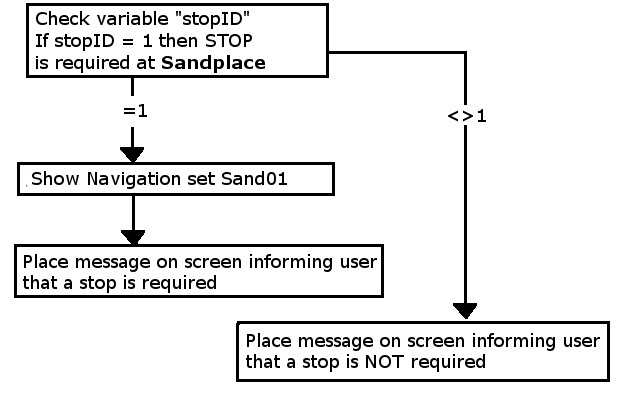
| In the example shown below a random variable is to be used to decide which one of 3 stations a user controlled train will be required to stop at. The user will be informed of the decision, to stop or not, by a message placed on the screen before they reach each station. When the train approaches the first possible stopping place, Sandplace, the session checks the value stored in "stopID" and if it is "1" then a stop will be requested. | ||||
 |
||||
|
 |
Preconditions: | |||||||
|
||||||||
 |
||||||||
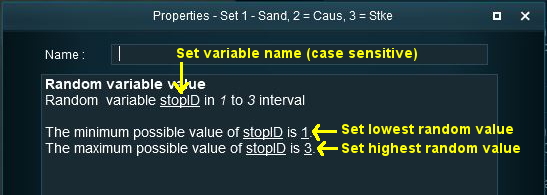
| Setting the random variable stopID | ||||||||
 |
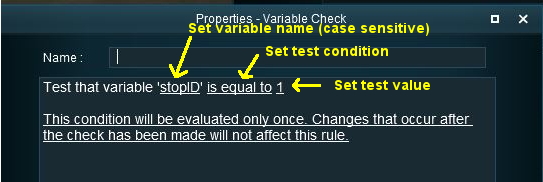
Rules Used: | |||||||||||
|
||||||||||||
 |
Session Editor Screenshot: |
 |
 |
Description: |
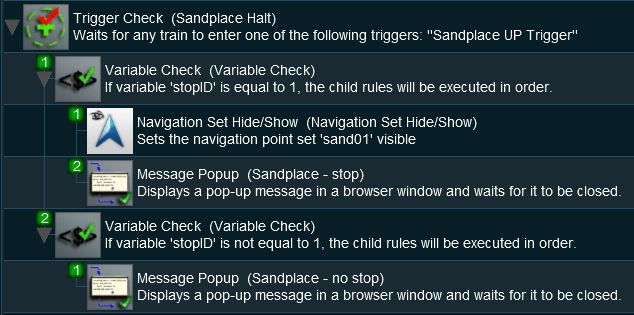
Line 1 : Trigger Check The event is triggered when the consist passes over a track trigger. This executes the following rules:-
|
Example 2: Event Counter and Message Selection |
|
 |
|
|
|
The Scenario: |
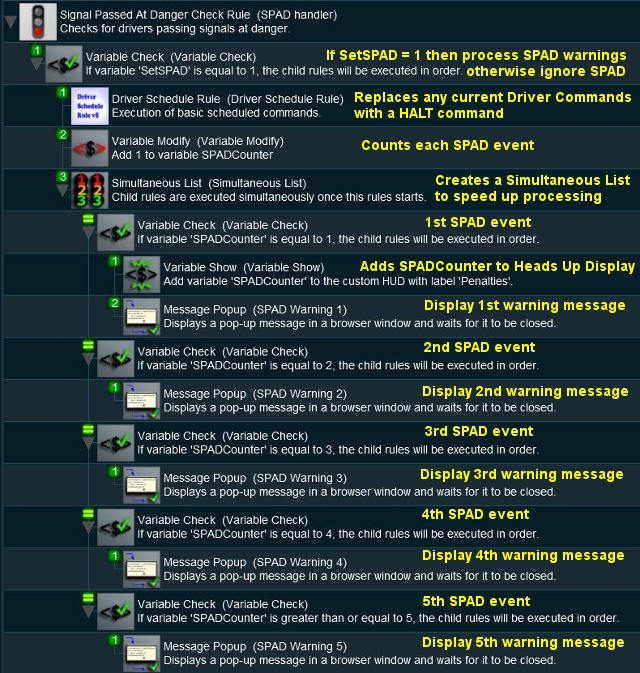
| Each time a user causes a SPAD (Signal Passed At Danger) at specific locations, the event is counted and an appropriate message is displayed on the screen. The tone of the messages becomes more severe with each occurance. |
|
Preconditions: | |||
|
||||
|
Session Editor Screenshot: |
 |
|
Description: |
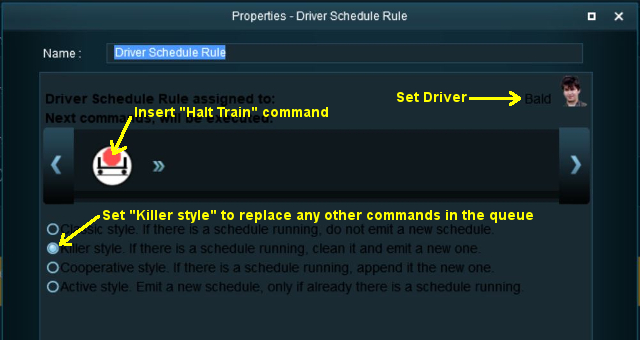
Line 1 : Signal Passed At Danger The event is triggered every time a consist passes a signal (or stop sign) set at STOP. This executes the following lines:-
|
|
| Lines 9 and 10 are then repeated with variations as shown. If more than 5 SPADs occur, then no new messages will be shown (the driver is clearly taking no notice so what is the point?) but the SPADCounter will continue to be updated. |
Example 3: Counting Consist Checks |
|
|
|
|
|
The Scenario: |
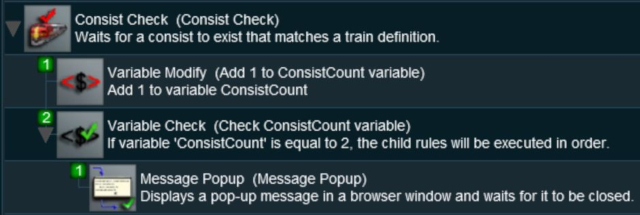
| The Consist Check Rule cannot be set to trigger only once but sometimes you want it triggered only once on (for example) the 2nd time that a particular consist is formed. This example uses a variable to count the number of times the rule has been triggered and acts only when a set count has been reached. It could easily be modified to trigger a set number of times. |
|
Preconditions: | |
|
||
|
Rules Used: | |||||||
|
|
Session Editor Screenshot: |
 |
|
Description: |
Line 1 : Consist Check Rule Triggered when the specified consist has been found. This executes the following lines:-
|
Example 4: Train Status |
|
|
|
|
|
The Scenario: |
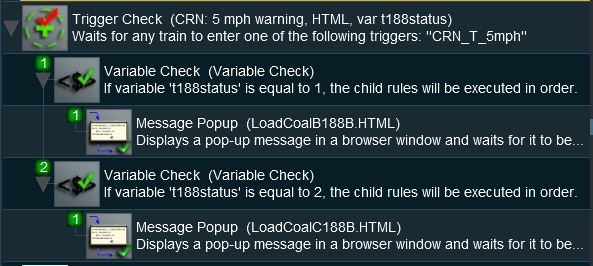
| A consist identified by number 188 passes over the same trigger twice, once when empty and once when loaded. Each time the user needs to be given a different set of instructions |
|
Preconditions: | |
|
||
|
Rules Used: | |||||
|
|
Session Editor Screenshot: |
 |
|
Description: |
Line 1 : Trigger Check Rule Triggered by the train. This is NOT set to trigger once only. When triggered it will execute the following lines:-
|
Variable Rules and Commands |
|
|
|
|
These are the Session Rules that can access, create and/or modify Session variables
|
 |
These are the Driver Commands that can access Session variables. The  InputTable Rule must be added to the Session and configured with the names of the variables before these Driver Commands can be used.
|
|
|
Trainz Wiki
 |
More Tutorials and Guides to Using Trainz |
This page was created by Trainz user pware in April 2018 and was last updated as shown below.

