How to Use Navigation Point Rules: Difference between revisions
From TrainzOnline
Jump to navigationJump to search
mNo edit summary |
|||
| Line 615: | Line 615: | ||
='''Trainz Wiki'''= | ='''Trainz Wiki'''= | ||
<table | <table width=1000> | ||
<tr valign="top"> | <tr valign="top"> | ||
<td>[[image:TrainzWiki.png|link=]]</td> | <td> | ||
<table width=500 cellpadding=2 bgcolor=#ffffff> | |||
<tr valign="top"> | |||
<td width=80>[[image:TrainzWiki.png|link=]]</td> | |||
<td> | <td> | ||
<span style="font-size: 17px;">'''More Tutorials and Guides to Using Trainz'''</span><br> | <span style="font-size: 17px;">'''More Tutorials and Guides to Using Trainz'''</span><br> | ||
| Line 624: | Line 627: | ||
*'''[[Session Rule List with Parameters|Session Rules List (Alphabetical) with Parameters]]''' | *'''[[Session Rule List with Parameters|Session Rules List (Alphabetical) with Parameters]]''' | ||
*'''[[Session Rules By Categories With Properties|Session Rules List (Categories) With Parameters]]''' | *'''[[Session Rules By Categories With Properties|Session Rules List (Categories) With Parameters]]''' | ||
</td> | |||
</tr> | |||
</table> | |||
</td> | |||
<td> | |||
<table width=500 cellpadding=4 bgcolor="aquamarine"> | |||
<tr valign="top"> | |||
<td width=50>[[image:LinkWiki.PNG|link=]]</td> | |||
<td> | |||
<span style="font-size: 17px;">'''Related Links'''</span><br> | |||
'''[[How to Use Session Editor|How to Use the Session Editor]]''' | |||
</td> | |||
</tr> | |||
</table> | |||
</td> | </td> | ||
</tr> | </tr> | ||
Revision as of 22:17, 22 November 2023
The information in this Wiki Page applies to TANE, TRS19, Trainz Plus and TRS22. It describes how to configure the various Navigation Point Rules.
|

 |
 |
 |
Navigation Display Rule
 |
The Navigation Set Hide/Show Rule is added to a Session and configured using the  Session Editor in Surveyor |
|
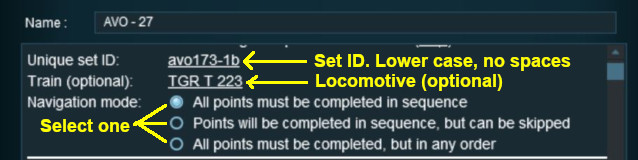
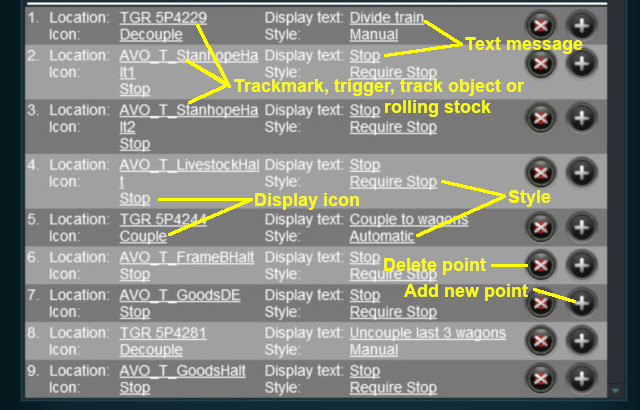
The Navigation Display Rule create a set of Navigation Points |
|

 |
|
|
|
||||||||||||
 |
Settings:
|
|||||||||||
|
|
||||||||||||


 |
|
|
||||||||||||||||||||||||||||
|
 |
|
|
Navigation Set Hide/Show Rule
|
The Navigation Set Hide/Show Rule is added to a Session and configured using the Session Editor in Surveyor |
|
The Navigation Set Hide/Show Rule hides and displays the navigation sets created by the Navigation Display Rule |
| Error creating thumbnail: /bin/bash: line 1: /usr/bin/convert: No such file or directory Error code: 127 |
|
|
|
|||||||||
|
Settings:
|
||||||||
|
|
|||||||||
|
|
|
|
Navigation Set Clear Rule
|
The Navigation Set Clear Rule is added to a Session and configured using the Session Editor in Surveyor |
|
The Navigation Set Clear Rule clears or completes any uncompleted Navigation Points in a set created by the Navigation Display Rule |
| Error creating thumbnail: /bin/bash: line 1: /usr/bin/convert: No such file or directory Error code: 127 |
|
|
|
|||
|
Settings:
|
||
|
|
|||
|
|
|
|
Navigation Point Complete Rule
|
The Navigation Point Complete Rule is added to a Session and configured using the Session Editor in Surveyor |
|
The Navigation Point Complete Rule clears or completes the selected Navigation Point in a set created by the  Navigation Display Rule. This rule is used to complete Navigation Points with their Style property set to manual |
| Error creating thumbnail: /bin/bash: line 1: /usr/bin/convert: No such file or directory Error code: 127 |
|
|
|
|||||
|
Settings:
|
||||
|
|
|||||
|
|
|
|
Navigation Set Check Rule
|
The Navigation Set Check Rule is added to a Session and configured using the Session Editor in Surveyor. It is a Parent Rule |
|
The Navigation Set Check Rule checks if the specified Navigation Set has been completed, or not completed, then executes any following child rules |
| Error creating thumbnail: /bin/bash: line 1: /usr/bin/convert: No such file or directory Error code: 127 |
|
|
|
|||||
|
Settings:
|
||||
|
|
|||||
|
|
|
Wait on Navigation Point Rule
|
The Wait on Navigation Point Rule is added to a Session and configured using the Session Editor in Surveyor. It is a Parent Rule |
|
The Wait on Navigation Point Rule waits until the specified Navigation Point in the specified set has been completed then executes any following child rules |
| Error creating thumbnail: /bin/bash: line 1: /usr/bin/convert: No such file or directory Error code: 127 |
|
|
|
|||||
|
Settings:
|
||||
|
|
|||||
|
|
Trainz Wiki
|
|

This page was created by Trainz user pware in May 2018 and was last updated as shown below.


