|
|
| Line 4: |
Line 4: |
| <td width=750> | | <td width=750> |
|
| |
|
| <table width=750> <!-- BEGIN TABBED link list with Switches page active--> | | <table width=750> <!-- BEGIN TABBED link list with Industry page active--> |
| <tr valign="top"> | | <tr valign="top"> |
| <td align="center">[[Image:line740.png|link=]]</td> | | <td align="center">[[Image:line740.png|link=]]</td> |
| </tr> | | </tr> |
| <tr valign="top"> | | <tr valign="top"> |
| <td align="center">[[image:Tab_HM_Grey.png|link=SAR_Terka]] [[image:Tab_IN_Grey.png|link=SAR_Terka_Industry]] [[image:Tab_TM_Grey.png|link=SAR_Terka_TrackMarks]] [[image:Tab_SW_White.png|link=]] [[image:Tab_Blank_Grey.png|link=]]</td> | | <td align="center">[[image:Tab_HM_Grey.png|link=SAR_Terka]] [[image:Tab_IN_White.png|link=]] [[image:Tab_TM_Grey.png|link=SAR_Terka_TrackMarks]] [[image:Tab_SW_Grey.png|link=SAR_Terka_Switches]] [[image:Tab_Blank_Grey.png|link=]]</td> |
| </tr> | | </tr> |
| <tr valign="top"> | | <tr valign="top"> |
| Line 28: |
Line 28: |
| </table> <!-- END Location link table with LINE and STATION NAMES --> | | </table> <!-- END Location link table with LINE and STATION NAMES --> |
|
| |
|
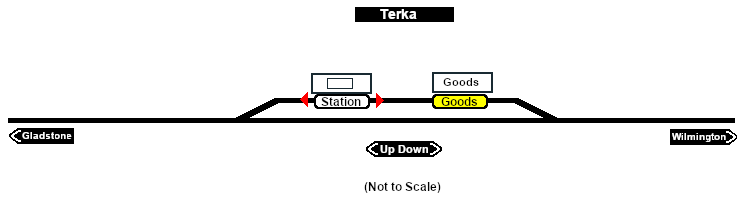
| [[image:SAR_Terka_Basic.png|link=|alt=Terka Switches map]] | | [[image:SAR_Terka_Industry.png|link=|alt=Terka Industry map]] |
|
| |
|
| <table bgcolor="LightYellow" width=750> <!-- BEGIN Switches table --> | | <table bgcolor="lightcyan" width=750> <!-- BEGIN Industries Table --> |
|
| |
|
| <tr valign="top"> | | <tr valign="top"> |
| <td colspan=6 align="center">[[Image:line740.png|link=]]</td> | | <td colspan=2 align="center">[[Image:line740.png|link=]]</td> |
| </tr> | | </tr> |
|
| |
|
| <tr valign="top"> | | <tr valign="middle"> |
| <td align="center" colspan=6><span style="font-size: 17px; font-weight: 700; color: white; background-color: black;">  Switches  </span></td> | | <td colspan=2 align="center"><span style="font-weight: 700;font-size: 17px; background-color: blue; color: white;"> Industries </span></td> |
| </tr> | | </tr> |
| | | <tr valign="middle"> |
| <tr valign="top"> | | <td colspan=2 align="center"><span style="font-weight: 700;">For the Station use the "Drive To Trackmark <span style="color: blue;">name of Trackmark</span>" command</span></td> |
| <td align="center" valign="top" width=50><span style="font-size: 17px; font-weight: 700;">No.</span></td> | |
| <td align="left" valign="top" width=80><span style="font-size: 17px; font-weight: 700;">Name</span></td>
| |
| <td align="left" valign="top" width=245><span style="font-size: 17px; font-weight: 700;">Facing and L/R Directions</span><br>'''(default direction first)'''</td>
| |
| <td align="center" valign="top" width=50><span style="font-size: 17px; font-weight: 700;">No.</span></td>
| |
| <td align="left" valign="top" width=80><span style="font-size: 17px; font-weight: 700;">Name</span></td>
| |
| <td align="left" valign="top" width=245><span style="font-size: 17px; font-weight: 700;">Facing and L/R Directions</span><br>'''(default direction first)'''</td>
| |
| </tr>
| |
| | |
| <tr valign="top">
| |
| <td colspan=6 align="center">[[Image:line740.png|link=]]</td>
| |
| </tr> | | </tr> |
|
| |
|
| <tr valign="top"> | | <tr valign="top"> |
| <td align="center">[[Image:No_1.png|20px|link=]]</td> | | <td colspan=2 align="center">[[Image:line740.png|link=]]</td> |
| <td>'''TK 1'''</td>
| |
| <td><span style="background-color: yellow; font-weight: 700;">Down</span> '''(R) Main, (L) Station/Goods Shed'''</td>
| |
| <td align="center">[[Image:Ared_sq.png|20px|link=]]</td>
| |
| <td><span style="color: white; font-weight: 700; background-color: red"> TKCP A </span></td>
| |
| <td><span style="background-color: cyan; font-weight: 700;">Up</span> '''<span style="background-color: red; color: white;"> (R) Catchpoint </span>, (L) Gladstone'''</td>
| |
| </tr> | | </tr> |
| <tr valign="top"> | | <tr valign="top"> |
| <td align="center">[[Image:Bred_sq.png|20px|link=]]</td> | | <td width=70>[[Image:Passenger_Icon_off.png|link=]] </td> |
| <td><span style="color: white; font-weight: 700; background-color: red"> TKCP B </span></td> | | <td>[[image:Station_Label.png|link=]] [[image:Trackmark_Left.png|link=|alt=TM|10px]] <span style="font-weight: 700; color: blue;">Terka Station Up</span>     [[image:Trackmark_Right.png|link=|alt=TM|10px]] <span style="font-weight: 700; color: blue;">Terka Station Dn</span><br> |
| <td><span style="background-color: yellow; font-weight: 700;">Down</span> '''<span style="background-color: red; color: white;"> (L) Catchpoint </span>, (R) Wilmington'''</td>
| | <span style="font-size=12px; font-weight: 700;">                  This station is NOT passenger enabled</span><br> |
| <td align="center">[[Image:No_2.png|20px|link=]]</td>
| | Station '''Trackmarks''' are positioned for the '''RM''' rail motor and trailer</td> |
| <td>'''TK 2'''</td> | |
| <td><span style="background-color: cyan; font-weight: 700;">Up</span> '''(L) Main, (R) Goods Shed/Station'''</td>
| |
| </tr> | | </tr> |
|
| |
| <tr valign="top"> | | <tr valign="top"> |
| <td colspan=6 align="center">[[Image:line740.png|link=]]</td> | | <td colspan=2 align="center">[[Image:line740.png|link=]]</td> |
| </tr> | | </tr> |
|
| |
| <tr valign="middle"> | | <tr valign="middle"> |
| <td colspan=6 align="center"><span style="font-weight: 700;font-size: 17px; background-color: black; color: white;"> Switch Sets </span></td> | | <td colspan=2 align="center"><span style="font-weight: 700;">For all other Industries use the "Drive To <span style="color: blue;">name of industry</span>" and <span style="color: blue;">"Load/Unload"</span> commands</span></td> |
| </tr> | | </tr> |
| <tr valign="top"> | | <tr valign="top"> |
| <td colspan=6> | | <td colspan=2 align="center">[[Image:line740.png|link=]]</td> |
| | |
| <table width=750> <!-- BEGIN Switch Sets Station/Goods table -->
| |
| <tr valign="top">
| |
| | |
| <td width=200><span style="font-weight: 700;"><span style="background-color: black; color: white;"> Gladstone - </span><span style="background-color: white; color: black;"> Station </span> <span style="background-color: yellow; color: black;"> Goods </span></span></td>
| |
| | |
| <td width=175><span style="font-weight: 700;"><span style="background-color: black; color: yellow;"> 1 </span>-L <span style="background-color: red; color: white;"> A </span>-L </span></td>
| |
| | |
| <td width=200><span style="font-weight: 700;"><span style="background-color: black; color: white;"> Wilmington - </span><span style="background-color: white; color: black;"> Station </span><span style="background-color: yellow; color: black;"> Goods </span></span></td>
| |
| | |
| <td width=175><span style="font-weight: 700;"><span style="background-color: black; color: yellow;"> 2 </span>-R <span style="background-color: red; color: white;"> B </span>-R </span></td>
| |
| | |
| </tr> | | </tr> |
| </table> <!-- END Switch Sets Station/Goods table -->
| |
|
| |
|
| <table width=750> <!-- BEGIN Switch Mainline table -->
| |
| <tr valign="top"> | | <tr valign="top"> |
| | | <td width=70>[[Image:Goods_Icon.png|link=]]</td> |
| <td width=200><span style="font-weight: 700;"><span style="background-color: black; color: white;"> Gladstone - </span><span style="background-color: #1919fe; color: white;"> Main </span></span></td> | | <td>[[image:Goods_Label.png|link=]] <span style="font-weight: 700; color: blue;">Terka Goods Shed</span> |
| | | * <span style="font-weight: 700;">General Goods - <span style="color: blue;">Unload</span></span> |
| <td width=175><span style="font-weight: 700;"><span style="background-color: black; color: yellow;"> 1 </span>-R </span></td>
| | * <span style="font-weight: 700;">Fertiliser Bagged - <span style="color: blue;">Unload</span></span> |
| | | * <span style="font-weight: 700;">Wool Bale - <span style="color: blue;">Load</span></span></td> |
| <td width=200><span style="font-weight: 700;"><span style="background-color: black; color: white;"> Wilmington - </span><span style="background-color: #1919fe; color: white;"> Main </span></span></td>
| |
| | |
| <td width=175><span style="font-weight: 700;"><span style="background-color: black; color: yellow;"> 2 </span>-L </span></td>
| |
| | |
| </tr> | | </tr> |
| </table> <!-- END Switch Mainline table -->
| |
| </td>
| |
| </tr>
| |
|
| |
| <tr valign="top"> | | <tr valign="top"> |
| <td colspan=6 align="center">[[Image:line740.png|link=]]</td> | | <td colspan=2 align="center">[[Image:line740.png|link=]]</td> |
| </tr> | | </tr> |
|
| |
|
| </table> <!-- END Switches table --> | | </table> <!-- END Industries Table --> |
|
| |
|
| </td> | | </td> |