SAR Scenario Quorn-Peterborough Empty Fuel V2: Difference between revisions
From TrainzOnline
Jump to navigationJump to search
mNo edit summary |
mNo edit summary |
||
| Line 159: | Line 159: | ||
<tr valign="top"> | <tr valign="top"> | ||
<td width=716> | <td width=716> | ||
# Move the loco from the <span style="font-weight: 700;"><span style="color: white; background-color: black;"> Loco </span> Depot</span> | #The first 6 steps are also performed in one of the options of the scenario <span style="font-weight: 700;"><span style="font-size: 15px; color: white; background-color: black;"> 16 </span> [[SAR Scenario Quorn Shunter|Quorn Shunter]]</span> | ||
# Collect the empty '''Tank''' wagons stored in the siding and move them | # Move the loco from the <span style="font-weight: 700;"><span style="color: white; background-color: black;"> Loco </span> Depot</span> to the <span style="font-weight: 700;"><span style="color: white; background-color: black;"> Fuel </span> Siding</span>. | ||
# | # Collect the 4 empty '''Tank''' wagons stored in the siding and move them onto the <span style="color: black; background-color: white; font-weight: 700;"> Station </span> road. | ||
# | # Run the loco around the train | ||
# Proceed to <span style="font-weight: 700;">Peterborough <span style="color: black; background-color: cyan;">& | # Shunt the wagons back into the <span style="font-weight: 700; color: white; background-color: grey;"> Car Siding </span> to couple with a '''Guard Van''' | ||
# Move the consist back onto the <span style="color: black; background-color: white; font-weight: 700;"> Station </span> road and run the loco around the train again | |||
# Shunt the wagons into <span style="font-weight: 700; color: black; background-color: yellow;"> Goods Siding 2 </span> to couple with the fuel tank wagons already stored there. | |||
# Pull the completed consist back onto the <span style="font-weight: 700; background-color: green; color: white;"> Loop </span> or <span style="font-weight: 700; background-color: blue; color: white;"> Main </span> road | |||
# Run the loco around the train | |||
# Proceed to <span style="font-weight: 700;">Peterborough <span style="color: black; background-color: cyan;"> Yard 1 </span></span>. Coal and water the loco at <span style="font-weight: 700;">Carrieton <span style="color: white; background-color: black;"> Loco Coal & Water </span> Stage</span> or other locations as required. | |||
</td> | </td> | ||
<td width=100>[[image:SAR Train Order Rotated.png|100px|link=|alt=Logo]]</td> | <td width=100>[[image:SAR Train Order Rotated.png|100px|link=|alt=Logo]]</td> | ||
Revision as of 07:55, 7 June 2024
| Error creating thumbnail: /bin/bash: line 1: /usr/bin/convert: No such file or directory Error code: 127 7 |
8 Quorn to Peterborough Empty Fuel A scenario in the SAR Peterborough Base Session v2.0 |
Error creating thumbnail: /bin/bash: line 1: /usr/bin/convert: No such file or directory Error code: 127 9 |
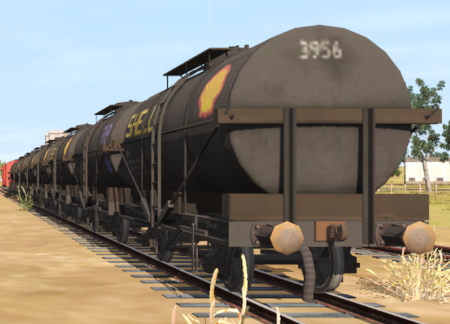
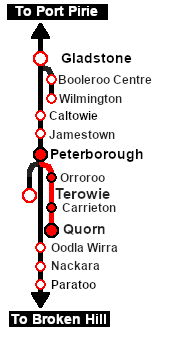
| Through bulk freight from Quorn to Peterborough moving empty fuel tank cars. The tank cars came from Port Augusta (1920-1932) and from the Central Australia Line (1920-1956). At Peterborough they were transferred to Port Pirie for reloading. |  |
When, Where and With What
 |
|

Similar/Related Scenarios
| 1 | Depot Fuel Run | 5 | Paratoo-Gladstone Bulk Ore | 6 | Gladstone-Paratoo Empty Ore |
| 10 | Transcontinental Express Freights | 15 | Quorn Shunter | ||
|
|
Each location in the layout has a detailed set of track diagrams that provide a variety of useful information The Getting Started guide below gives a summary of what is available.  graphic, or go to the bottom of the page for all the session links (all links will open in this window). |

Getting Started:
|


Tutorial:
|

|
|
||||||||||||||||||||||||||||||||||||||||||||||||||||||||||||||||||||||||||||||||||||||||||||||||||||||||||||||||||||||||||||||||||||||||||||||||||||||||




Driving Notes:
|



This page was created by Trainz user pware in February 2021 and was last updated as shown below.


