How to Log into Trainz: Difference between revisions
mNo edit summary |
|||
| Line 36: | Line 36: | ||
<tr valign="top"> | <tr valign="top"> | ||
<td width=10>[[image:BlueDot10x10.png|link=]]</td> | <td width=10>[[image:BlueDot10x10.png|link=]]</td> | ||
<td>a new install of '''Trainz''' requires that you must ''' | <td>a new install of '''Trainz''' requires that you must '''Login''' to the program. This is usually a '''one time only''' process</td> | ||
</tr> | </tr> | ||
<tr valign="top"> | <tr valign="top"> | ||
| Line 113: | Line 113: | ||
<td width=46>[[image:BackToTop.png|link=#top|alt=Top|Top]]</td> | <td width=46>[[image:BackToTop.png|link=#top|alt=Top|Top]]</td> | ||
<td width=75>[[image:NextUp.png|link=#stepLoadTrainz|alt=Next Up|Next Up]]</td> | <td width=75>[[image:NextUp.png|link=#stepLoadTrainz|alt=Next Up|Next Up]]</td> | ||
<td width=75>[[image:NextDown.png|link=# | <td width=75>[[image:NextDown.png|link=#stepTabMyTrainz|alt=Next Down|Next Down]]</td> | ||
<td width=75>[[image:BackToBottom.png|link=#bottom|alt=Bottom|Bottom]]</td> | <td width=75>[[image:BackToBottom.png|link=#bottom|alt=Bottom|Bottom]]</td> | ||
</tr> | </tr> | ||
| Line 152: | Line 152: | ||
</tr> | </tr> | ||
<tr valign="top"> | <tr valign="top"> | ||
<td> | <td><span style="font-weight: 700; font-size: 15px;">General</span></td> | ||
<td> | <td>your display characteristics such as the screen resolution, synchronisation, preferred language and font size.</td> | ||
</tr> | </tr> | ||
<tr valign="top"> | <tr valign="top"> | ||
<td> | <td><span style="font-weight: 700; font-size: 15px;">Installed</span></td> | ||
<td> | <td>the location of your '''User Data Folder''' where all your assets are kept and the type of program updates you want to receive.</td> | ||
</tr> | </tr> | ||
<tr valign="top"> | <tr valign="top"> | ||
<td> | <td><span style="font-weight: 700; font-size: 15px;">Performance</span></td> | ||
<td> | <td>the performance of the program to better match the hardware of your computer system and the demands of the routes you are running. Some experimentation will be required.</td> | ||
</tr> | </tr> | ||
<tr valign="top"> | <tr valign="top" bgcolor=#ffffe0> | ||
<td> | <td><span style="font-weight: 700; font-size: 15px;">MyTrainz</span></td> | ||
<td | <td>your user login details and online features. In some older versions this Tab is labelled '''Internet'''.</td> | ||
</tr> | </tr> | ||
<tr valign="top"> | <tr valign="top"> | ||
<td> | <td><span style="font-weight: 700; font-size: 15px;">Dev</span></td> | ||
<td>These | <td>the program for advanced testing of assets that are under development. These features are for asset developers '''ONLY'''. Unless you are an experienced asset developer you are strongly advised to '''NOT''' change these settings as some of them will adversely affect many older assets.</td> | ||
</tr> | </tr> | ||
</table> | </table> | ||
| Line 339: | Line 339: | ||
<tr valign="top"> | <tr valign="top"> | ||
<td width=629><span id="skipMyTrainzNewAccount"></span> | <td width=629><span id="skipMyTrainzNewAccount"></span> | ||
=='''Create an Account'''== | =='''Create an Account'''== | ||
</td> | </td> | ||
| Line 409: | Line 408: | ||
<td>[[image:DotPoint5.JPG|link=]]</td> | <td>[[image:DotPoint5.JPG|link=]]</td> | ||
<td>After entering your login details, close the '''Trainz Settings''' dialogue window and exit the '''Trainz Launcher'''. Then restart '''Trainz'''.<br> | <td>After entering your login details, close the '''Trainz Settings''' dialogue window and exit the '''Trainz Launcher'''. Then restart '''Trainz'''.<br> | ||
If required, you can then enter your login details into '''Trainz''' as described in the section [[image:PageLink.PNG|link=]] '''[[#skipMyTrainzEnterLogin|Enter Login Details]]''' above.<br> | |||
You will also be able to login to the '''Trainz Forum''' under your own name - open the [[image:WikiLink.PNG|link=]] '''<span class="plain;">[https://forums.auran.com/ Trainz Forum]</span>''' home page and click the <span style="font-weight: 700; color: blue;">Login</span> link. Then enter the same username and password that you entered in the '''New Account Dialogue Window'''. Each time you access the forum this username and password will be used automatically to identify you without having to login again.</td> | You will also be able to login to the '''Trainz Forum''' under your own name - open the [[image:WikiLink.PNG|link=]] '''<span class="plain;">[https://forums.auran.com/ Trainz Forum]</span>''' home page and click the <span style="font-weight: 700; color: blue;">Login</span> link. Then enter the same username and password that you entered in the '''New Account Dialogue Window'''. Each time you access the forum this username and password will be used automatically to identify you without having to login again.</td> | ||
<!-- <td></td> --> | <!-- <td></td> --> | ||
Revision as of 13:02, 26 July 2026
|
 |
 |
|
|||||||||
Load the Trainz Launcher |
 |
|
|
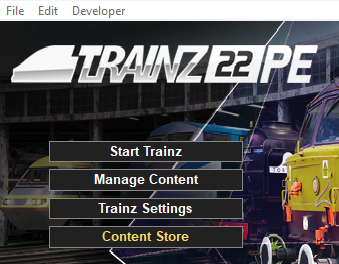
| Start your copy of Trainz which will load to show the Launcher Window (shown below). | ||||||||||
 |
|
|||||||||

Open the Trainz Settings Controls |
|
 |
|
|
 |
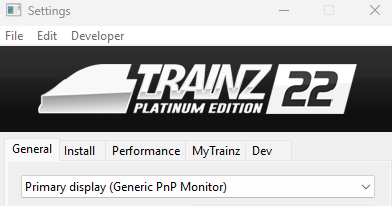
The Trainz Settings control how Trainz interacts with your Operating System and Graphics Display, where it stores your data, its overall performance, etc |
|
It also stores your login credentials which, amongst other things, gives you free access to the Download Station or DLS where assets such as routes, sessions, rolling stock and many different types of scenery can be downloaded and installed |
|
||||||||||||||||||

The MyTrainz Settings |
 |
|
|
|
|
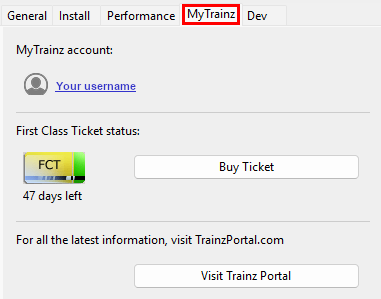
These settings identify your user login details. In some older versions this Tab is labelled Internet. |
|
You can also check your current FCT status and, if required, purchase more FCT access. |
| Left Click on the MyTrainz tab |
 |
|
|||||||
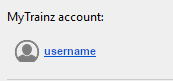
Enter Login Details |
|
 |
|
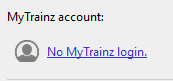
Your Login details are needed to access the Download Station and other online data. |
|
Your Trainz Login is the same as the Trainz Forum Login. If you do not have login then you can create a new account. |
|
||||||||||||||||||||||||||

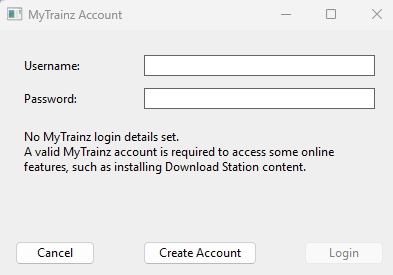

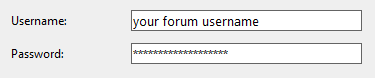



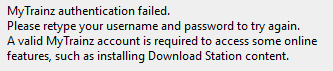


Create an Account |
|
|
|
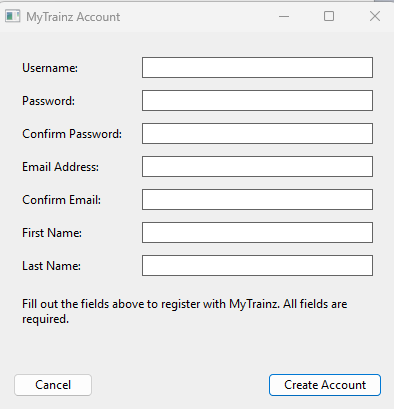
You will need a Trainz Account to be able to access the online features of Trainz including the Download Station where there is a vast library of free assets (routes and sessions, locomotives and rolling stock, signals and tracks, scenery of all types, ground textures, etc) available for you to download and install. |
|
A Trainz Account will also give you a Trainz Forum Login username and password to access the Trainz Forum. |
|

|
||||||||||||||
|
|
Trainz Wiki
 |
More Tutorials and Guides to Using Trainz |
This page was created by Trainz user pware in July 2026 and was last updated as shown below.


