How to Deal with Missing Assets: Difference between revisions
mNo edit summary |
No edit summary |
||
| Line 346: | Line 346: | ||
<table width=1000> | <table width=1000> | ||
<tr valign="top"> | <tr valign="top"> | ||
<td>Before deciding to delete any missing dependencies or missing assets from an installed route or session, it is recommended that you identify, as far as possible, what those assets are and how they are used in the route or session. This will also provide clues as to what currently installed asset could be a suitable replacement for the missing asset.</td> | <td>Before deciding to delete any missing dependencies or missing assets from an installed route or session, it is recommended that you identify, as far as possible, what those assets are and how they are used in the route or session. This will also provide clues as to what currently installed asset could be a suitable replacement for the missing asset.<br> | ||
<table bgcolor=#000000 cellpadding=2> | |||
<tr valign="top"> | |||
<td> | |||
<table bgcolor=#ffffb0 cellpadding=2> | |||
<tr valign="top"> | |||
<td width=25>[[image:NotePad.PNG|link=]]</td> | |||
<td width=975><span style="font-size: 17px; font-weight: 700;">Notes:'''</span><br> | |||
---- | |||
Replacing missing assets is not always simple. The '''Bulk Asset Update/Replace Tool''' in '''Surveyor Classic''' and the '''Bulk Replace Filtered Assets''' in '''Trainz Plus Surveyor 2.0''' will not allow missing assets to be selected and replaced. Instead you must find each missing asset in a layout or session for manual replacement.</td> | |||
</tr> | |||
</table> | |||
</td> | |||
</tr> | |||
</table> | |||
</td> | |||
</tr> | </tr> | ||
</table> | </table> | ||
| Line 369: | Line 384: | ||
<tr valign="top"> | <tr valign="top"> | ||
<td width=355>[[image:MissingTrack.png|link=]]</td> | <td width=355>[[image:MissingTrack.png|link=]]</td> | ||
<td><br> | <td bgcolor="lightcyan"> | ||
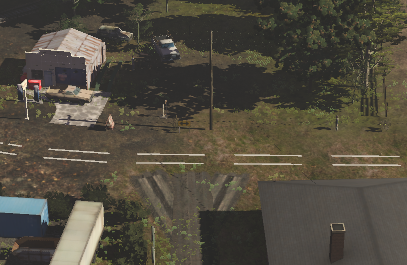
The missing spline asset is rail track - the presence of the track objects is a major clue. If deleted it '''WILL''' affect the operation of sessions that use this route.<br> | <br> | ||
The missing spline asset is rail track - the presence of the track objects is a major clue. If deleted the broken white lines will be removed leaving a "space" in the route. The track objects will also be deleted. Deleting it '''WILL''' affect the operation of sessions that use this route.<br> | |||
<br> | <br> | ||
It could be replaced by any suitable rail track spline.</td> | It could be replaced by any suitable rail track spline.</td> | ||
| Line 379: | Line 395: | ||
<tr valign="top"> | <tr valign="top"> | ||
<td width=325>[[image:MissingTrackTunnel.png|link=]]</td> | <td width=325>[[image:MissingTrackTunnel.png|link=]]</td> | ||
<td><br> | <td bgcolor="lightcyan"> | ||
<br> | |||
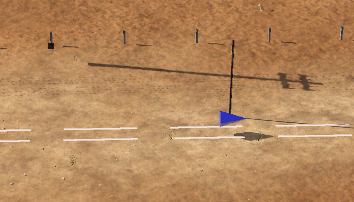
The missing spline asset is a tunnel with track. If deleted it will leave a gap in the route and it '''WILL''' affect the operation of sessions that use this route.<br> | The missing spline asset is a tunnel with track. If deleted it will leave a gap in the route and it '''WILL''' affect the operation of sessions that use this route.<br> | ||
<br> | <br> | ||
| Line 391: | Line 408: | ||
<tr valign="top"> | <tr valign="top"> | ||
<td width=435>[[image:MissingTexture.png|link=]]</td> | <td width=435>[[image:MissingTexture.png|link=]]</td> | ||
<td><br> | <td bgcolor="lightcyan"> | ||
<br> | |||
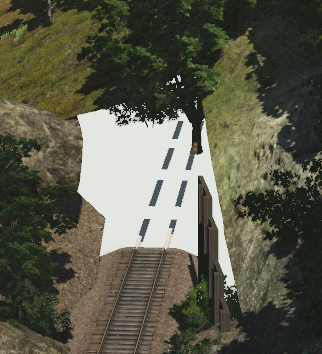
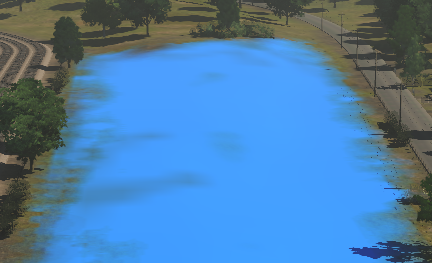
The false blue colour indicates that the missing asset is a ground texture. If deleted it will not affect the operation of the route, just its appearance.<br> | The false blue colour indicates that the missing asset is a ground texture. If deleted it will not affect the operation of the route, just its appearance.<br> | ||
<br> | <br> | ||
| Line 505: | Line 523: | ||
<tr valign="top"> | <tr valign="top"> | ||
<td width=280>[[image:MissingAssetOrangeBox.png|link=]]</td> | <td width=280>[[image:MissingAssetOrangeBox.png|link=]]</td> | ||
<td><br> | <td bgcolor="lightcyan"> | ||
<br> | |||
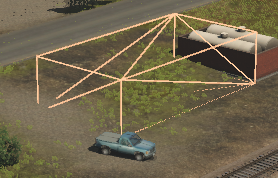
From its size and shape, the missing asset is most probably a building. If deleted it will leave a "space" in the route but it will not affect the operation of sessions that use this route, just their appearance.<br> | From its size and shape, the missing asset is most probably a building. If deleted it will leave a "space" in the route but it will not affect the operation of sessions that use this route, just their appearance.<br> | ||
<br> | <br> | ||
| Line 515: | Line 534: | ||
<tr valign="top"> | <tr valign="top"> | ||
<td width=540>[[image:MissingIndustryStation.png|link=]]</td> | <td width=540>[[image:MissingIndustryStation.png|link=]]</td> | ||
<td><br> | <td bgcolor="lightcyan"> | ||
<br> | |||
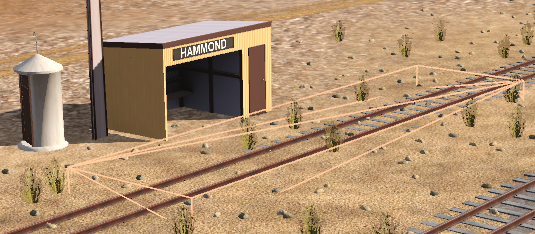
The missing asset is almost certainly an Industry Active Platform, possibly an invisible platform. The presence of a visible station building indicates that the missing asset is just the platform. If deleted it '''WILL''' affect the operation of sessions that use this route.<br> | The missing asset is almost certainly an Industry Active Platform, possibly an invisible platform. The presence of a visible station building indicates that the missing asset is just the platform. If deleted it '''WILL''' affect the operation of sessions that use this route.<br> | ||
<br> | <br> | ||
| Line 525: | Line 545: | ||
<tr valign="top"> | <tr valign="top"> | ||
<td width=350>[[image:MissingTree.png|link=]]</td> | <td width=350>[[image:MissingTree.png|link=]]</td> | ||
<td><br> | <td bgcolor="lightcyan"> | ||
<br> | |||
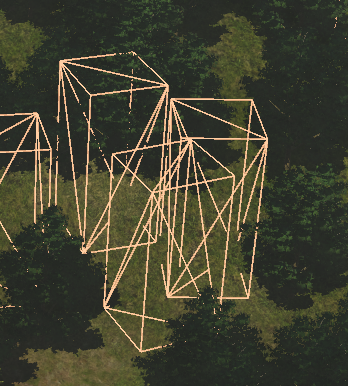
From its size, shape and location, the missing asset (or assets - there may be several different missing assets) is most likely a tree. If deleted it will leave gaps in the forest but it will not affect the operation of sessions that use this route, just their appearance.<br> | From its size, shape and location, the missing asset (or assets - there may be several different missing assets) is most likely a tree. If deleted it will leave gaps in the forest but it will not affect the operation of sessions that use this route, just their appearance.<br> | ||
<br> | <br> | ||
| Line 535: | Line 556: | ||
<tr valign="top"> | <tr valign="top"> | ||
<td width=505>[[image:MissingRollingStock.png|link=]]</td> | <td width=505>[[image:MissingRollingStock.png|link=]]</td> | ||
<td><br> | <td bgcolor="lightcyan"> | ||
<br> | |||
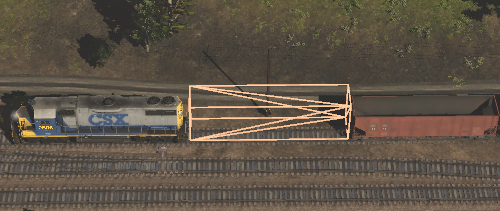
The missing asset is clearly rolling stock. If deleted it '''WILL''' affect the operation of the session.<br> | The missing asset is clearly rolling stock. If deleted it '''WILL''' affect the operation of the session.<br> | ||
<br> | <br> | ||
| Line 545: | Line 567: | ||
<tr valign="top"> | <tr valign="top"> | ||
<td width=550>[[image:MissingTrackObject.png|link=]]</td> | <td width=550>[[image:MissingTrackObject.png|link=]]</td> | ||
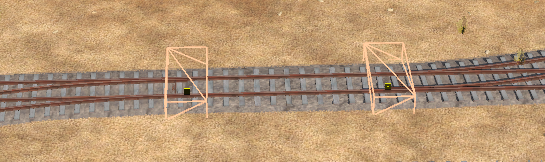
<td><br> | <td bgcolor="lightcyan"> | ||
<br> | |||
Because of its position on the track the missing asset is clearly a track object and almost certainly a track switch. If deleted it '''COULD''' affect the operation of the session depending on the type of track object (switch track objects '''WILL''' have an effect while caution and whistle signs will probably not).<br> | Because of its position on the track the missing asset is clearly a track object and almost certainly a track switch. If deleted it '''COULD''' affect the operation of the session depending on the type of track object (switch track objects '''WILL''' have an effect while caution and whistle signs will probably not).<br> | ||
<br> | <br> | ||
It could be replaced by an alternative track object asset but session rules | It could be replaced by an alternative track object asset but existing session rules and driver commands may have to be edited.</td> | ||
</tr> | </tr> | ||
</table> | </table> | ||
Revision as of 02:51, 18 October 2026
|
 |
 |
|
|||||||||
What Causes Missing Dependencies? |
 |
|
|
| Missing Dependencies can occur when an asset:- |
 |
has been installed from a .cdp file (e.g. from a 3rd party web site) or from a content folder (e.g. on your HD) without also installing other assets it requires. If an asset with Missing Dependencies has been installed using the Import Content Files... or Import Content Folder... options in the File menu of Content Manager, then the missing assets may be on the DLS. When these two import methods are used Content Manager does not check the DLS for any missing dependencies. |
|||||||||||
|
||||||||||||


 |
has been Disabled or Deleted in Content Manager. | |||||||||||||||||||||||
| If an asset has been Disabled then it is still installed but it is blocked from being used. Removing the block will make it available for use. | ||||||||||||||||||||||||
|
||||||||||||||||||||||||
| If an asset has been Deleted then it is no longer installed. It can be reinstalled if it is on the DLS. | ||||||||||||||||||||||||
|
||||||||||||||||||||||||



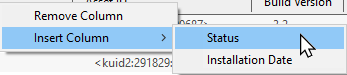
 |
has been downloaded from the DLS but contains dependency assets that are not on the DLS or built-in. Downloaded assets can sometimes contain dependencies that are not on the DLS or Built-in (ones that came installed with Trainz). This can lead to frustrations especially if the creator of the downloaded asset has not provided any information on where these missing assets can be found. Even when the location, such as a 3rd party web site, has been identified that site may no longer exist. |
||||||
| If the missing assets are not on the DLS then fixing this may not be easy. Possible solutions are:- | |||||||
|
|||||||

|
||||||||||||
Locating Missing Dependencies in a Layout |
|
 |
|
|
 |
Missing splines and tracks in a layout will be shown as white dotted lines |
|
Missing textures will be, conditionally, shown as a bright blue colour |
|
Missing scenery objects, including rolling stock track objects (e.g. signals, switches) will NOT be visible at all |
Before deciding to delete any missing dependencies or missing assets from an installed route or session, it is recommended that you identify, as far as possible, what those assets are and how they are used in the route or session. This will also provide clues as to what currently installed asset could be a suitable replacement for the missing asset.
|
Missing Splines (including Track)
| In the following examples... | |
 |
|
 |
|
 |
|
Missing Textures
 |
|
Missing Scenery Objects (incl Rolling Stock and Track Objects)
|
| Locating these objects in a layout can give you useful clues as to what the missing assets are (e.g. trees/bushes, cars, buildings, signals, wagons, etc). |
|
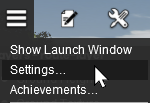
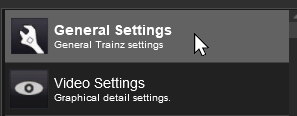
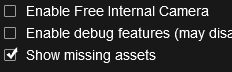


| With the Show missing assets check box set on, each scenery object that is missing from the route or session will be shown as an Orange Wire Frame Box in Surveyor. They will still be invisible in Driver. |
| In the following examples... | |
 |
|
 |
|
 |
|
 |
|
 |
|
Deleting Missing Dependencies |
|
|
|
Currently Under Construction
|
|
Trainz Wiki
|
|


This page was created by Trainz user pware in October 2026 and was last updated as shown below.


