SAR Wallaway: Difference between revisions
From TrainzOnline
Jump to navigationJump to search
mNo edit summary |
reorganised data display order |
||
| Line 3: | Line 3: | ||
<td width=750> | <td width=750> | ||
<table | <table bgcolor="lightgrey" bordercolor="lightgrey" width=750> <!-- BEGIN Location details table --> | ||
<tr valign="middle"> | <tr valign="middle"> | ||
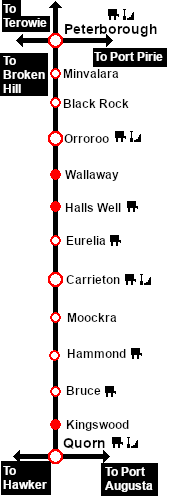
<td width=220 align="right">[[Image:SAR_Peterborough-Quorn_Line.png|link=SAR Peterborough-Quorn|alt=Peterborough-Quorn|Show Peterborough-Quorn]]</td> | <td width=220 align="right">[[Image:SAR_Peterborough-Quorn_Line.png|link=SAR Peterborough-Quorn|alt=Peterborough-Quorn|Show Peterborough-Quorn]]</td> | ||
| Line 29: | Line 13: | ||
</tr> | </tr> | ||
<tr valign="top"> | <tr valign="top"> | ||
<td colspan=5> | <td colspan=5><span style="font-weight: 700;"><span style="background-color: black; color: white;"> Commodities: </span> (load and/or unload)</span> | ||
<table> <!-- BEGIN Commodities Table --> | <table> <!-- BEGIN Commodities Table --> | ||
| Line 39: | Line 23: | ||
</td> | </td> | ||
</tr> | </tr> | ||
</table> <!-- END Location details table --> | </table> <!-- END Location details table --> | ||
<table> <!-- BEGIN Information Table --> | |||
<tr valign="top"> | |||
<td width=750> | |||
Goods loop. Unmanned location on the <span style="font-weight: 700; color: white; background-color: black;"> Peterborough-Quorn Line </span>. | |||
</td> | |||
</tr> | |||
<tr valign="top"> | |||
<td align="center">[[Image:line740.png|link=]]</td> | |||
</tr> | |||
</table> <!-- END Information Table --> | |||
<table width=750> <!-- BEGIN Track Diagram & Markers Title Link --> | |||
<tr valign="top"> | |||
<td width=450>{{Anchor|TrackData}}<span style="font-weight: 700; font-size: 18px; background-color: blue; color: white;"> Track Diagram & Track Markers </span></td> | |||
<td align="right" width=300>[[image:ToPathsDown.png|link=#PathData]] [[file:BackToTop.png|link=#top]] [[file:BackToBottom.png|link=#BaseData]]</td> | |||
</tr> | |||
</table> <!-- END Track Diagram & Markers Title Link --> | |||
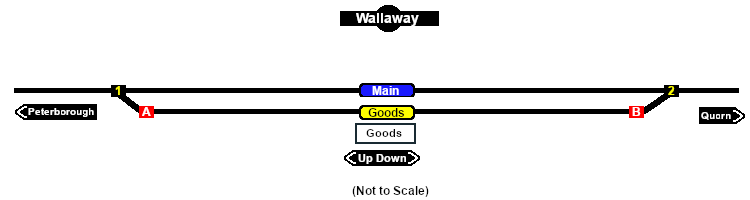
[[Image:SAR_Wallaway_Basic.png|link=|alt=Wallaway Track Diagram/Markers Map]]<br> <!-- TD/TM map --> | |||
<table bgcolor="LightYellow" width=750> <!-- BEGIN Track Markers table --> | <table bgcolor="LightYellow" width=750> <!-- BEGIN Track Markers table --> | ||
<tr valign="top"> | |||
<td colspan=3 align="center">[[Image:line740.png|link=]]</td> | |||
</tr> | |||
<tr valign="middle"> | <tr valign="middle"> | ||
<td colspan=3 align="center"><span style="font-weight: 700;font-size: 17px; background-color: red; color: white;"> Track Markers </span></td> | <td colspan=3 align="center"><span style="font-weight: 700;font-size: 17px; background-color: red; color: white;"> Track Markers </span></td> | ||
| Line 61: | Line 73: | ||
<td>[[image:Trackmark_Right.png|link=|alt=TM|10px]] <span style="font-weight: 700;">Wallaway Main Dn</span></td> | <td>[[image:Trackmark_Right.png|link=|alt=TM|10px]] <span style="font-weight: 700;">Wallaway Main Dn</span></td> | ||
</tr> | </tr> | ||
<tr valign="middle"> | |||
<td width=200>[[image:Goods_Label.png|link=|alt=Goods]] </td> | |||
<td>[[image:Trackmark_Left.png|link=|alt=TM|10px]] <span style="font-weight: 700;">Wallaway Goods Up</span></td> | |||
<td>[[image:Trackmark_Right.png|link=|alt=TM|10px]] <span style="font-weight: 700;">Wallaway Goods Dn</span></td> | |||
</tr> | |||
</table> <!-- END Track Markers table --> | </table> <!-- END Track Markers table --> | ||
<table bgcolor="LightYellow" width=750> <!-- BEGIN Switches table --> | <table bgcolor="LightYellow" width=750> <!-- BEGIN Switches table --> | ||
<tr valign="top"> | <tr valign="top"> | ||
<td colspan=6 align="center">[[Image:line740.png|link=]]</td> | <td colspan=6 align="center">[[Image:line740.png|link=]]</td> | ||
| Line 138: | Line 157: | ||
<td colspan=6 align="center">[[Image:line740.png|link=]]</td> | <td colspan=6 align="center">[[Image:line740.png|link=]]</td> | ||
</tr> | </tr> | ||
</table> <!-- END | |||
</table> <!-- END Switches table --> | |||
<table width=750> <!-- BEGIN Path Map Table --> | <table width=750> <!-- BEGIN Path Map Table --> | ||
| Line 144: | Line 164: | ||
<td width=750> | <td width=750> | ||
<table width= | <table width=750> <!-- BEGIN Path Title Link --> | ||
<tr valign="top"> | <tr valign="top"> | ||
<td width= | <td width=450>{{Anchor|PathData}}<span style="font-weight: 700; font-size: 18px; background-color: blue; color: white;"> Path Diagrams </span></td> | ||
<td align=right width= | <td align="right" width=300>[[image:ToTracksUp.png|link=#TrackData]] [[file:BackToTop.png|link=#top]] [[file:BackToBottom.png|link=#BaseData]]</td> | ||
</tr> | </tr> | ||
</table> <!-- END Path Title Link --> | </table> <!-- END Path Title Link --> | ||
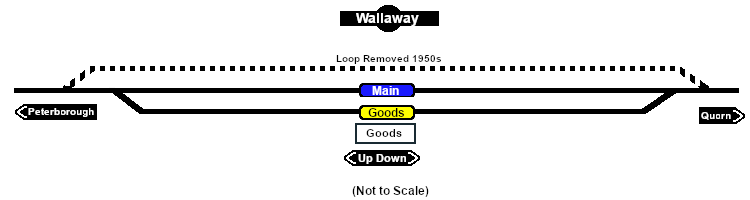
[[Image:SAR_Wallaway.png|link=|alt=Wallaway]]<br> | [[Image:SAR_Wallaway.png|link=|alt=Wallaway Path Map]]<br> <!-- Path map --> | ||
</td> | </td> | ||
| Line 158: | Line 178: | ||
<table bgcolor="LightYellow"> <!-- BEGIN Paths Table --> | <table bgcolor="LightYellow"> <!-- BEGIN Paths Table --> | ||
<tr valign="top"> | <tr valign="top"> | ||
<td colspan=4 align="center">[[Image:line740.png|link=]]</td> | <td colspan=4 align="center">[[Image:line740.png|link=]]</td> | ||
| Line 187: | Line 208: | ||
<td colspan=4 align="center">[[Image:line740.png|link=]]</td> | <td colspan=4 align="center">[[Image:line740.png|link=]]</td> | ||
</tr> | </tr> | ||
</table> <!-- END Paths Table --> | </table> <!-- END Paths Table --> | ||
<table width=750> <!-- BEGIN end Links --> | |||
<tr valign="top"> | |||
<td width=450> </td> | |||
<td align="right" width=300>[[image:ToTracksUp.png|link=#TrackData]] [[file:BackToTop.png|link=#top]]</td> | |||
</tr> | |||
</table> <!-- END end Links --> | |||
</td> | </td> | ||
| Line 194: | Line 223: | ||
</tr> | </tr> | ||
</table> <!-- END TOP TABLE --> | </table> <!-- END TOP TABLE --> | ||
{{Anchor|BaseData}} | |||
Revision as of 02:56, 13 November 2020
|
 |
|||||||||||||||||||||||||||||||||||||||||||||||||||||||||||||||||||||||||||||||||||||||||||||||||||||||||||||||||||||||||||||||||||||||||