SAR Scenario Gladstone Bulk Ore: Difference between revisions
From TrainzOnline
Jump to navigationJump to search
added "getting started" and reorganised |
mNo edit summary |
||
| Line 62: | Line 62: | ||
<tr valign="top"> | <tr valign="top"> | ||
<td colspan=2> | <td colspan=2> | ||
<table> | <table cellpadding="2" bgcolor="black"> <!-- black border --> | ||
<tr valign="top"> | |||
<td> | |||
<table bgcolor="lightyellow"> | |||
<tr valign="top"> | <tr valign="top"> | ||
<td> | <td> | ||
<span style="font-size: 15px; font-weight: 700;">Getting Started:</span><br> | <span style="font-size: 15px; font-weight: 700;">Getting Started:</span><br> | ||
# The first step is to pause the session by pressing the '''P''' key. | # The first step is to pause the session by pressing the '''P''' key. | ||
# Next locate your loco. Open the '''Finder''' (press '''CTRL-F''') and type, in the '''name''' field, the name of the loco. For example '''SAR 406'''. Click the '''tick''' icon. | # Next locate your loco. '''Either''':- | ||
## Open the '''Finder''' (press '''CTRL-F''') and type, in the '''name''' field, the name of the loco. For example '''SAR 406''' (or just '''406''' should be enough). Click the '''tick''' icon, '''OR''' | |||
## Open the '''Driver List''' (bottom left of the screen) and select the loco from there - click the drivers '''Eye''' icon to jump to the loco. | |||
# Take a few moments to get your bearings. Use the [[image:Line_Index_Label.png|link=SAR_Index]] (this link will open in this window) and click on '''Paratoo''' to load its location details and track plans. The [[image:Tab_PH_Grey.png|link=|75px]] tab will give you the '''EIT Paths''' that are available if you wish to use them. The [[image:Tab_TM_Grey.png|link=|75px]] tab will give you the location and names of the invisible '''Track Marks''' for '''Drive To''' commands. The [[image:Tab_IN_Grey.png|link=|75px]] tab will show the names and locations of all active industries and their commodities. The [[image:Tab_SW_Grey.png|link=|75px]] tab will give the names and locations of all junction switches as well as some switch sets you may want to use. | # Take a few moments to get your bearings. Use the [[image:Line_Index_Label.png|link=SAR_Index]] (this link will open in this window) and click on '''Paratoo''' to load its location details and track plans. The [[image:Tab_PH_Grey.png|link=|75px]] tab will give you the '''EIT Paths''' that are available if you wish to use them. The [[image:Tab_TM_Grey.png|link=|75px]] tab will give you the location and names of the invisible '''Track Marks''' for '''Drive To''' commands. The [[image:Tab_IN_Grey.png|link=|75px]] tab will show the names and locations of all active industries and their commodities. The [[image:Tab_SW_Grey.png|link=|75px]] tab will give the names and locations of all junction switches as well as some switch sets you may want to use. | ||
# Each location page has a direct link to the next location page, in all directions, so you can explore along the route. | # Each location page has a direct link to the next location page, in all directions, so you can explore along the route. | ||
# When you are ready to start, reload the '''Peterborough Base Session''' page (click the '''Scenarios''' button on your current location page) and select this '''Scenario''' again or just use the '''Back''' button on your browser - whichever is quicker. | # When you are ready to start, reload the '''Peterborough Base Session''' page (click the '''Scenarios''' button on your current location page) and select this '''Scenario''' again or just use the '''Back''' button on your browser - whichever is quicker. | ||
# Press the '''P''' key to start the session. | # Press the '''P''' key to start the session. | ||
</td> | |||
</tr> | |||
</table> | |||
</td> | </td> | ||
</tr> | </tr> | ||
Revision as of 01:01, 19 February 2021
Paratoo to Peterborough Bulk Ore Train
Paratoo to Gladstone Bulk Ore Train
Express bulk ore freight from Broken Hill to Port Pirie
 |
|
|||||||||


| Duration: | Paratoo to Peterborough 1 hour 25 minutes (includes refuelling time) Paratoo to Gladstone 2 hours 45 minutes |
||
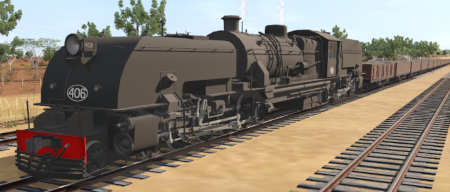
| Loco: | SAR 406 (Garrett) on the main line approaching Paratoo Other Unrostered Locos:
|
||
| Consist: | Attached to SAR 406. 23 CCC gondola wagons, 1 DB Guard Van. | ||
|
|||
Tasks:
|
|||
Driving Notes:
|
|||
 |
|||


