SAR Scenario Wilmington Freight: Difference between revisions

From TrainzOnline
Jump to navigationJump to search
Pware (talk | contribs)
mNo edit summary
Pware (talk | contribs)
added strip map
Line 75: Line 75:
</td>
</td>
</tr>
</tr>
</table>
<table bgcolor="LightYellow">
<tr valign="top">
<tr valign="top">
<td colspan=2><span style="font-size: 15px; font-weight: 700;">Tasks:</span>
<td width=820><span style="font-size: 15px; font-weight: 700;">Tasks:</span>
# Take the train onto the '''Wilmington Line'''.  
# Deliver wagons according to their destination names. '''WHE''' covered wagons are delivered to grain silos. '''MTW''' flat wagons are delivered to the yard cranes. '''QLX''' wagons are delivered to the goods sheds.  
# Water at '''Booleroo Center'''.  
# Turn the loco on the WYE at '''Wilmington''', coal and water.</td>
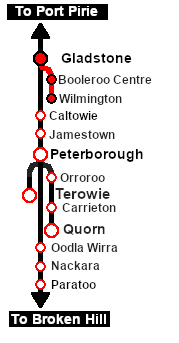
<td width=180 rowspan=2>[[image:SAR Scenario Wilmington Freight Strip Map.png|link=|alt=Strip Map]]</td>
</tr>
</tr>
<tr valign="top">
<tr valign="top">
<td colspan=2><span style="font-size: 15px; font-weight: 700;">Driving Notes:</span>
<td><span style="font-size: 15px; font-weight: 700;">Driving Notes:</span>
*The '''Gladstone-Wilmington Line''' is unsignalled with only one train normally allowed on the line at any one time.
*The approaches to all locations are protected by invisible signals to prevent the '''AI Half Speed Slowdown Problem''' when approaching a signal at stop.

Revision as of 00:52, 25 February 2021

 Gladstone to Wilmington Local Freight 
A twice weekly (if required) freight service from Gladstone to Wilmington dropping wagons at locations as required. Bottom

Wilmington Local Freight
Each location in the layout has a detailed set of track diagrams that provide the following information:-
  • the names of the tracks, sidings and loops
  • the location of various facilities - stations, turntables, water columns, coal stages, engine sheds, active industries
  • the names of active industries and their products and consumables
  • the names and locations of trackmarks for Drive To and Drive Via commands
  • the names, properties and locations of track switches and lists of switch sets for particular movements
  • Enhanced Interlocking Tower paths for those locations that have EITs
Location Index
To display the location data click any Location Index graphic, or go to the bottom of the page for all the session links (all links will open in this window).
Duration: 3 hours
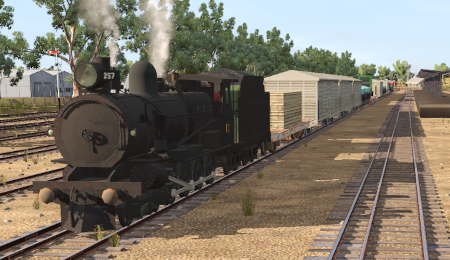
Loco: SAR T 257 on Gladstone Yard 2

Other Unrostered Locos:

  • SAR T 210 at Gladstone Depot
Consist: Attached to SAR T 257. 4 MTW wagons, 5 QLX wagons, 4 WHE covered wagons, 1 DB Guard Van. Each wagon has its destination as part of its name e.g. QLX Wirrabara 2 indicating it is the 2nd QLX wagon for Wirrabara.

Getting Started:

  1. The first step is to pause the session by pressing the P key.
  2. Next locate your loco. Either:-
    1. Open the Finder (press CTRL-F) and type, in the name field, the name of the loco. For example SAR T 257 (or just T 257 should be enough). Click the tick icon, OR
    2. Open the Driver List (bottom left of the screen) and select the loco from there - click the drivers Eye icon to jump to the loco.
  3. Take a few moments to get your bearings. Use the Location Index (this link will open in this window) and click on Gladstone to load its location details and track plans. The Error creating thumbnail: /bin/bash: line 1: /usr/bin/convert: No such file or directory Error code: 127 tab will give you the EIT Paths that are available if you wish to use them. The Error creating thumbnail: /bin/bash: line 1: /usr/bin/convert: No such file or directory Error code: 127 tab will give you the location and names of the invisible Track Marks for Drive To commands. The Error creating thumbnail: /bin/bash: line 1: /usr/bin/convert: No such file or directory Error code: 127 tab will show the names and locations of all active industries and their commodities. The Error creating thumbnail: /bin/bash: line 1: /usr/bin/convert: No such file or directory Error code: 127 tab will give the names and locations of all junction switches as well as some switch sets you may want to use.
  4. Each location page has a direct link to the next location page, in all directions, so you can explore along the route.
  5. When you are ready to start, reload the Peterborough Base Session page (click the Scenarios button on your current location page) and select this Scenario again or just use the Back button on your browser - whichever is quicker.
  6. Switch back to TRS19 Driver and press the P key to start the session.
Tasks:
  1. Take the train onto the Wilmington Line.
  2. Deliver wagons according to their destination names. WHE covered wagons are delivered to grain silos. MTW flat wagons are delivered to the yard cranes. QLX wagons are delivered to the goods sheds.
  3. Water at Booleroo Center.
  4. Turn the loco on the WYE at Wilmington, coal and water.
Strip Map
Driving Notes:

Links: All links will open in this window
Scenarios
Session Scenarios List
Location Index
Location List
Error creating thumbnail: /bin/bash: line 1: /usr/bin/convert: No such file or directory Error code: 127
Rolling Stock
Error creating thumbnail: /bin/bash: line 1: /usr/bin/convert: No such file or directory Error code: 127
Active Industries
Top


This page was created by Trainz user pware in February 2021 and was last updated as shown below.