SAR Scenario Gladstone Shunter: Difference between revisions
From TrainzOnline
Jump to navigationJump to search
mNo edit summary |
mNo edit summary |
||
| Line 81: | Line 81: | ||
# Attach to the empty wagons at the narrow gauge loading dock platform. | # Attach to the empty wagons at the narrow gauge loading dock platform. | ||
# Move the wagons onto the '''Wilmington Line''' resetting the mechanical indicator lever at the junction as you go. | # Move the wagons onto the '''Wilmington Line''' resetting the mechanical indicator lever at the junction as you go. | ||
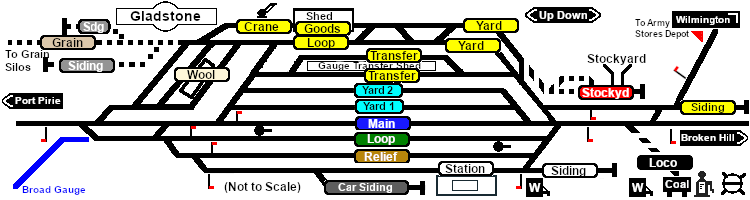
# Move the loco and wagons to the <span style="color: black; background-color: yellow | # Move the loco and wagons to the <span style="font-weight: 700; color: black; background-color: yellow;"> Goods Shed </span> to load the '''QLX''' wagons. | ||
# After loading uncouple the loco and '''MTW''' wagons from the '''CCC''' and '''QLX''' wagons and move the '''MTW''' wagons progressively through the <span style="color: black; background-color: yellow | # After loading uncouple the loco and '''MTW''' wagons from the '''CCC''' and '''QLX''' wagons and move the '''MTW''' wagons progressively through the <span style="font-weight: 700; color: black; background-color: yellow;"> Goods Crane </span> to load. | ||
# Shunt the '''MTW''' wagons back to couple with the '''CCC''' and '''QLX''' wagons. Detach the loco. | # Shunt the '''MTW''' wagons back to couple with the '''CCC''' and '''QLX''' wagons. Detach the loco. | ||
# Return the loco to the <span style="font-weight: 700;"><span style="color: white; background-color: black;"> Loco </span> Depot</span> and attach to the empty '''CCC''' and '''Tanker''' wagons stored at the end of the <span style="color: white; background-color: black | # Return the loco to the <span style="font-weight: 700;"><span style="color: white; background-color: black;"> Loco </span> Depot</span> and attach to the empty '''CCC''' and '''Tanker''' wagons stored at the end of the <span style="font-weight: 700; color: white; background-color: black;"> Fuel </span> road. | ||
# Move the wagons out of the <span style="font-weight: 700;"><span style="color: white; background-color: black;"> Loco </span> Depot</span> and couple them to the wagons waiting in the <span style="color: black; background-color: yellow | # Move the wagons out of the <span style="font-weight: 700;"><span style="color: white; background-color: black;"> Loco </span> Depot</span> and couple them to the wagons waiting in the <span style="font-weight: 700; color: black; background-color: yellow;"> Goods Shed </span>. | ||
# Return the loco to its starting position in the <span style="font-weight: 700;"><span style="color: white; background-color: black;"> Loco </span> Depot</span>.</td> | # Return the loco to its starting position in the <span style="font-weight: 700;"><span style="color: white; background-color: black;"> Loco </span> Depot</span>.</td> | ||
</tr> | </tr> | ||
Revision as of 06:40, 26 February 2021
| Gladstone Shunter | |
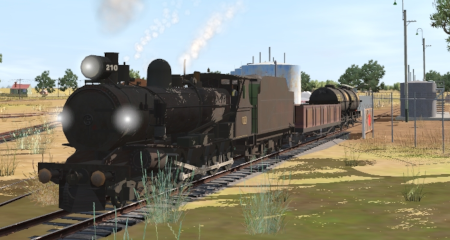
| Shunting operations in Gladstone Yard and nearby sidings. | 
|
 |
|
||||||


| Duration: | 40 minutes | ||
| Loco: | SAR T 210 at Gladstone Depot Other Unrostered Locos: none |
||
|
|||
| Yard Map: | 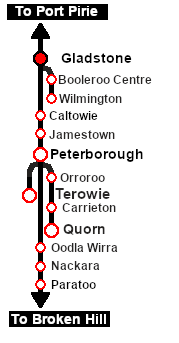 |
|
 |
||
Tasks:
|
||
|


This page was created by Trainz user pware in February 2021 and was last updated as shown below.


