SAR Scenarios Tutorial: Difference between revisions
m added links at base |
mNo edit summary |
||
| Line 139: | Line 139: | ||
<tr valign="top"> | <tr valign="top"> | ||
<td>[[file:DotPoint.JPG|link=]]</td> | <td>[[file:DotPoint.JPG|link=]]</td> | ||
<td><span style="font-weight: 700;">If you don't want to use EITs then go straight to Step <span style="color: white; background-color: blue; font-size: 16px;"> 2 </span></span></td> | <td><span style="font-weight: 700;">If you don't want to use EITs then go straight to Step <span style="color: white; background-color: blue; font-size: 16px;"> 2 </span></span> [[file:NextDown.png|link=#step2|alt=Next Down|Next Down]]</td> | ||
</tr> | </tr> | ||
</table> <!-- END Dot Point --> | </table> <!-- END Dot Point --> | ||
| Line 273: | Line 273: | ||
<tr valign="top"> | <tr valign="top"> | ||
<td>[[file:DotPoint.JPG|link=]]</td> | <td>[[file:DotPoint.JPG|link=]]</td> | ||
<td>Locations that do not have visible '''Home''' signals (and | <td>Locations that do not have visible '''Home''' signals (and many of the locations do not) then a visible '''Caution''' track sign has been placed alongside the track at the position of the '''Approach Track Mark''' as a stopping guide if you are driving manually</td> | ||
</tr> | </tr> | ||
</table> <!-- END Dot Point --> | </table> <!-- END Dot Point --> | ||
| Line 327: | Line 327: | ||
<tr valign="top"> | <tr valign="top"> | ||
<td>[[file:DotPoint.JPG|link=]]</td> | <td>[[file:DotPoint.JPG|link=]]</td> | ||
<td><span style="font-weight: 700;">If you don't want to use EITs then go straight to Step <span style="color: white; background-color: blue; font-size: 16px;"> 4 </span></span></td> | <td><span style="font-weight: 700;">If you don't want to use EITs then go straight to Step <span style="color: white; background-color: blue; font-size: 16px;"> 4 </span></span> [[file:NextDown.png|link=#step4|alt=Next Down|Next Down]]</td> | ||
</tr> | </tr> | ||
</table> <!-- END Dot Point --> | </table> <!-- END Dot Point --> | ||
| Line 449: | Line 449: | ||
<td>[[file:DotPoint.JPG|link=]]</td> | <td>[[file:DotPoint.JPG|link=]]</td> | ||
<td>Most stations on the route are '''NOT''' passenger enabled which reflects the level of passenger traffic that existed at those locations. The '''Drive To Trackmark''' command has to be used to bring a train alongside these stations when using the '''AI'''</td> | <td>Most stations on the route are '''NOT''' passenger enabled which reflects the level of passenger traffic that existed at those locations. The '''Drive To Trackmark''' command has to be used to bring a train alongside these stations when using the '''AI'''</td> | ||
</tr> | |||
<tr valign="top"> | |||
<td>[[file:DotPoint.JPG|link=]]</td> | |||
<td>The [[image:Tab_IN_Grey.png|link=|75px]] page at each location ([[image:Line_Index_Label.png|link=SAR_Index|Location Index]]) will show the status of each station</td> | |||
</tr> | </tr> | ||
</table> <!-- END Dot Point --> | </table> <!-- END Dot Point --> | ||
| Line 484: | Line 488: | ||
<tr valign="top"> | <tr valign="top"> | ||
<td>[[file:DotPoint.JPG|link=]]</td> | <td>[[file:DotPoint.JPG|link=]]</td> | ||
<td><span style="font-weight: 700;">If you don't want to use EITs then go straight to Step <span style="color: white; background-color: blue; font-size: 16px;"> 6 </span></span></td> | <td><span style="font-weight: 700;">If you don't want to use EITs then go straight to Step <span style="color: white; background-color: blue; font-size: 16px;"> 6 </span></span> [[file:NextDown.png|link=#step6|alt=Next Down|Next Down]]</td> | ||
</tr> | </tr> | ||
</table> <!-- END Dot Point --> | </table> <!-- END Dot Point --> | ||
Revision as of 22:39, 10 March 2021
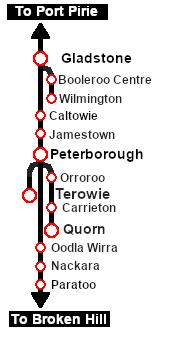
 SAR Peterborough Scenarios EIT, AI and Manual Driving Tutorial |
| A part of the SAR Peterborough Base Session |
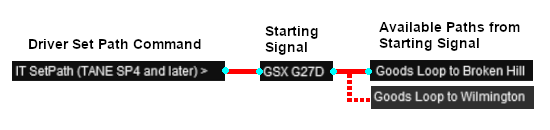
Driver Commands are available for use in the session.
The Tutorial Scenario The scenario used in this tutorial is
This page was created by Trainz user pware in March 2021 and was last updated as shown below. | ||||||||||||||||||||||||||||||||||||||||||||||||||||||||||||||||||||||||||||||||||||||||||||||||||||||||||||||||||||||||||||||||||||||||||||||||||||||||||||||||||||||||||||||||||||||||||||||||||||||||||||||