SAR Scenario Peterborough Shunter: Difference between revisions
From TrainzOnline
Jump to navigationJump to search
mNo edit summary |
m corrected scenario number error |
||
| Line 1: | Line 1: | ||
<table width=1000> <!-- BEGIN Title table --> | <table width=1000> <!-- BEGIN Title table --> | ||
<tr valign="top"> | <tr valign="top"> | ||
<td width=50 align="left">[[image:ArrowLeft.png|link=SAR Scenario | <td width=50 align="left">[[image:ArrowLeft.png|link=SAR Scenario Orroroo Grain|30px]]</td> | ||
<td width=900 align="center"><span style="font-size: 21px; font-weight: 700;"> <span style="background-color: black; color: white;"> | <td width=900 align="center"><span style="font-size: 21px; font-weight: 700;"> <span style="background-color: black; color: white;"> 12 </span> <span style="background-color: black; color: white;"> Peterborough Shunter </span></span></td> | ||
<td width=50 align="right">[[image:ArrowRight.png|link=SAR Scenario | <td width=50 align="right">[[image:ArrowRight.png|link=SAR Scenario Gladstone Shunter|30px]]</td> | ||
</tr> | </tr> | ||
<tr valign="top"> | <tr valign="top"> | ||
| Line 11: | Line 11: | ||
<table width=1000> <!-- BEGIN Summary table --> | <table width=1000> <!-- BEGIN Summary table --> | ||
<tr valign="top"> | <tr valign="top"> | ||
<td align="left"> | <td align="left">Shunting operations that cover the length of '''Peterborough Yard''' and '''Peterborough Depot'''.</td> | ||
<td align="right">[[file:BackToBottom.png|link=#bottom|alt=Bottom|Bottom]]</td> | <td align="right">[[file:BackToBottom.png|link=#bottom|alt=Bottom|Bottom]]</td> | ||
</tr> | </tr> | ||
</table> | </table> <!-- END Title and summary tables --> | ||
----- | ----- | ||
<table width=1000> <!-- BEGIN Scenario image and loco/consist table --> | <table width=1000> <!-- BEGIN Scenario image and loco/consist table --> | ||
<tr valign="top"> | <tr valign="top"> | ||
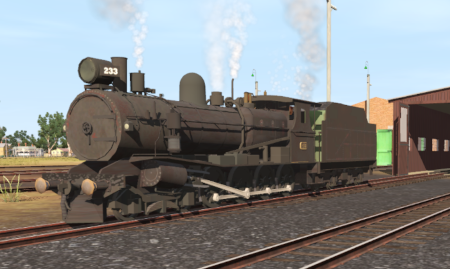
<td width=450>[[image:SAR | <td width=450>[[image:SAR Peterborough Shunter.png|link=|alt=Peterborough Shunter]]</td> | ||
<td> | <td> | ||
<table | <table> <!-- BEGIN Loco/consist sub table --> | ||
<tr valign="top"> | <tr valign="top"> | ||
<td width=75><span style="font-size: 15px; font-weight: 700; color: white; background-color: black;"> Duration: </span></td> | <td width=75><span style="font-size: 15px; font-weight: 700; color: white; background-color: black;"> Duration: </span></td> | ||
<td>1 hour | <td>1 hour</td> | ||
</tr> | </tr> | ||
<tr valign="top"> | <tr valign="top"> | ||
<td><span style="font-size: 15px; font-weight: 700; color: white; background-color: black;"> Loco: </span></td> | <td><span style="font-size: 15px; font-weight: 700; color: white; background-color: black;"> Loco: </span></td> | ||
<td>'''SAR T | <td>'''SAR T 233''' on <span style="font-weight: 700;">Peterborough Depot <span style="color: white; background-color: black;"> Loco Road 1 </span></span><br> | ||
'''Other Unrostered Locos:''' [[image:Loco_Roster_Label.png|link=SAR Peterborough Division Loco Roster]] | '''Other Unrostered Locos:''' [[image:Loco_Roster_Label.png|link=SAR Peterborough Division Loco Roster]] | ||
*'''SAR T | *'''SAR T 23''' on <span style="font-weight: 700;">Peterborough Depot <span style="color: white; background-color: black;"> Siding 1 </span></span> | ||
</td> | |||
</tr> | </tr> | ||
<tr valign="top"> | <tr valign="top"> | ||
<td colspan=2> | <td colspan=2> | ||
<table bgcolor="lightcyan" width=550> <!-- BEGIN Location Data table --> | <table bgcolor="lightcyan" width=550> <!-- BEGIN Location Data table --> | ||
<tr> | <tr valign="top"> | ||
<td> | <td> | ||
[[Image:Location Index.png|link=SAR Index|alt=Location Index|Location Index]]<br> | [[Image:Location Index.png|link=SAR Index|alt=Location Index|Location Index]]<br> | ||
| Line 62: | Line 58: | ||
# If you have already closed the opening message window then the first step is to pause the session by pressing the <span style="font-weight: 700; font-size: 15px; color: white; background-color: black;"> P </span> key. | # If you have already closed the opening message window then the first step is to pause the session by pressing the <span style="font-weight: 700; font-size: 15px; color: white; background-color: black;"> P </span> key. | ||
# Next locate your loco. '''Either''':- | # Next locate your loco. '''Either''':- | ||
## Open the '''Finder Tool''' (press <span style="font-weight: 700; font-size: 15px; color: white; background-color: black;"> Ctrl </span> <span style="font-weight: 700; font-size: 15px; color: white; background-color: black;"> F </span>) and type, in the '''Name''' field, the name of the loco. For example '''SAR T | ## Open the '''Finder Tool''' (press <span style="font-weight: 700; font-size: 15px; color: white; background-color: black;"> Ctrl </span> <span style="font-weight: 700; font-size: 15px; color: white; background-color: black;"> F </span>) and type, in the '''Name''' field, the name of the loco. For example '''SAR T 233''' (or just '''T 233''' should be enough). Click the '''tick''' icon, '''OR''' | ||
## Open the '''Driver List''' (bottom left of the screen) and select the loco from there - click the drivers '''Eye''' icon to jump to the loco. | ## Open the '''Driver List''' (bottom left of the screen) and select the loco from there - click the drivers '''Eye''' icon to jump to the loco. | ||
# Take a few moments to get your bearings. Use the [[image:Line_Index_Label.png|link=SAR_Index|Location Index]] (this link will open in this window) and click on '''Peterborough''' to load its location details and track plans. In each location details page:- | # Take a few moments to get your bearings. Use the [[image:Line_Index_Label.png|link=SAR_Index|Location Index]] (this link will open in this window) and click on '''Peterborough''' to load its location details and track plans. In each location details page:- | ||
| Line 95: | Line 91: | ||
<tr valign="top"> | <tr valign="top"> | ||
<td> | <td> | ||
<table bgcolor="LightYellow" width=820> <!-- BEGIN Yard Map Table --> | |||
<tr valign="top"> | |||
<td> | |||
<span style="font-size: 15px; font-weight: 700; color: white; background-color: black;"> Yard Map: </span></td> | |||
</tr> | |||
<tr valign="top"> | |||
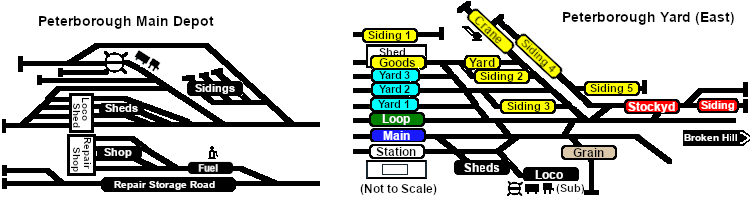
<td align="center">[[image:SAR_Peterborough_Yards.png|link=|alt=Yard map]]</td> | |||
</tr> | |||
</table> <!-- END Yard Map Table --> | |||
<table bgcolor="LightYellow" width=820> <!-- BEGIN Tasks Table --> | <table bgcolor="LightYellow" width=820> <!-- BEGIN Tasks Table --> | ||
<tr valign="top"> | <tr valign="top"> | ||
<td> | <td width=820><br> | ||
<span style="font-size: 15px; font-weight: 700; color: white; background-color: black;"> Tasks: </span><br> | <span style="font-size: 15px; font-weight: 700; color: white; background-color: black;"> Tasks: </span><br> | ||
# | # Move the loco out of the <span style="font-weight: 700;"><span style="color: white; background-color: black;"> Loco </span> Depot</span> and navigate through to the other side of '''Peterborough Yard''' onto the <span style="font-weight: 700; color: white; background-color: red;"> Stockyard </span> road. | ||
# Reverse onto <span style="font-weight: 700; color: black; background-color: yellow;"> Goods Siding 4 </span> and attach to the rake of empty '''MTW''' flat wagons stored there. | |||
# | # Move the empty wagons to the <span style="font-weight: 700; color: black; background-color: yellow;"> Goods Crane </span> and load. | ||
# Shunt the loaded wagons to <span style="font-weight: 700; color: black; background-color: yellow;"> Goods Siding 3 </span> and stable. | |||
# | # Move the loco to <span style="font-weight: 700; color: black; background-color: yellow;"> Goods Siding 5 </span> and attach to the rake of empty '''Livestock''' wagons stored there. | ||
# Shunt the empty wagons to the <span style="font-weight: 700; color: white; background-color: red;"> Stockyard Siding </span> at the far end of the <span style="font-weight: 700; color: white; background-color: red;"> Stockyard </span> road for pickup by a later service. | |||
# Move the loco back into the main depot to the <span style="font-weight: 700; color: white; background-color: black;"> Loco Depot Sidings </span> next to the tall water tower. There are empty coal ('''CCC''') and fuel ('''Tanker''') wagons stored on two of the siding roads. | |||
# Shunt the two wagon sets into a single consist and stable on one of the empty <span style="font-weight: 700; color: white; background-color: black;"> Loco Depot Sidings </span> roads for later pickup and return to '''Port Pirie'''. | |||
# Move the loco to the back of the workshop area at the end of the <span style="font-weight: 700;"> Depot <span style="color: white; background-color: black;"> Repair Storage Road </span></span>. | |||
# Attach to loco '''SAR T 229''' (not in steam) and move it into the repair shop on <span style="font-weight: 700;"> Depot <span style="color: white; background-color: black;"> Repair Shop Road </span> 2</span> or '''3'''. Detach the loco. | |||
# Return the loco to its starting position on <span style="font-weight: 700;"> Depot <span style="color: white; background-color: black;"> Shed Road </span> 1</span>. | |||
<br> | <br> | ||
</td> | </td> | ||
| Line 114: | Line 126: | ||
<tr valign="top"> | <tr valign="top"> | ||
<td> | <td> | ||
* | *You have permission to pass semaphore signals at stop provided you are satisfied that the road ahead is clear. | ||
</td> | </td> | ||
</tr> | </tr> | ||
| Line 129: | Line 138: | ||
<tr valign="top"> | <tr valign="top"> | ||
<td> | <td> | ||
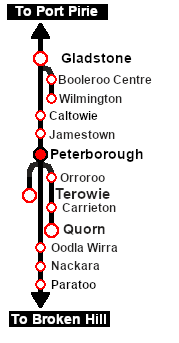
<td align="center">[[image:SAR Scenario Peterborough | <td align="center">[[image:SAR Scenario Peterborough Strip Map.png|link=|alt=Strip Map]]<br>[[image:SAR Scenario Route.png|link=|alt=Route Key]]</td> | ||
</tr> | </tr> | ||
</table> <!-- END Strip Map Table --> | </table> <!-- END Strip Map Table --> | ||
</td> | </td> | ||
</tr> | </tr> | ||
</table> <!-- END Yard, Tasks | </table> <!-- END Yard, Tasks and Driving Notes tables --> | ||
----- | ----- | ||
<table width=1000> <!-- BEGIN End Links Table --> | <table width=1000> <!-- BEGIN End Links Table --> | ||
| Line 141: | Line 150: | ||
</tr> | </tr> | ||
<tr valign="center"> | <tr valign="center"> | ||
<td width=63 align="left">[[image:ArrowLeft.png|link=SAR Scenario | <td width=63 align="left">[[image:ArrowLeft.png|link=SAR Scenario Orroroo Grain|30px]]</td> | ||
<td width=125 align="center">[[image:Session Scenario Index.png|link=SAR Peterborough Base Session|alt=Scenarios|Scenario Index]]<br>'''[[SAR Peterborough Base Session|Session Scenarios]]'''</td> | <td width=125 align="center">[[image:Session Scenario Index.png|link=SAR Peterborough Base Session|alt=Scenarios|Scenario Index]]<br>'''[[SAR Peterborough Base Session|Session Scenarios]]'''</td> | ||
<td width=125 align="center">[[Image:Location Index.png|link=SAR Index|alt=Location Index|Location Index]]<br>'''[[SAR Index|Location List]]'''</td> | <td width=125 align="center">[[Image:Location Index.png|link=SAR Index|alt=Location Index|Location Index]]<br>'''[[SAR Index|Location List]]'''</td> | ||
| Line 149: | Line 158: | ||
<td width=125 align="center">[[image:Industry Index.png|link=SAR Scenario Industries|alt=Industries]]<br>'''[[SAR Scenario Industries|Active Industries]]'''</td> | <td width=125 align="center">[[image:Industry Index.png|link=SAR Scenario Industries|alt=Industries]]<br>'''[[SAR Scenario Industries|Active Industries]]'''</td> | ||
<td width=125 align="center">[[image:BackToTop.png|link=#top|alt=Top|Top]]</td> | <td width=125 align="center">[[image:BackToTop.png|link=#top|alt=Top|Top]]</td> | ||
<td width=62 align="left">[[image:ArrowRight.png|link=SAR Scenario | <td width=62 align="left">[[image:ArrowRight.png|link=SAR Scenario Gladstone Shunter|30px]]</td> | ||
</tr> | </tr> | ||
</table> <!-- END End Links Table --> | </table> <!-- END End Links Table --> | ||
Revision as of 04:31, 1 June 2021
| Shunting operations that cover the length of Peterborough Yard and Peterborough Depot. |  |
 |
|
||||||||


Getting Started:
|
Tutorial:
|

|
|



This page was created by Trainz user pware in February 2021 and was last updated as shown below.


